MCP Observatory
  ███╗   ███╗ ██████╗██████╗
  ████╗ ████║██╔════╝██╔══██╗
  ██╔████╔██║██║     ██████╔╝
  ██║╚██╔╝██║██║     ██╔═══╝
  ██║ ╚═╝ ██║╚██████╗██║
  ╚═╝     ╚═╝ ╚═════╝╚═╝
     O B S E R V A T O R Y



Find problems in your MCP servers before your users do.
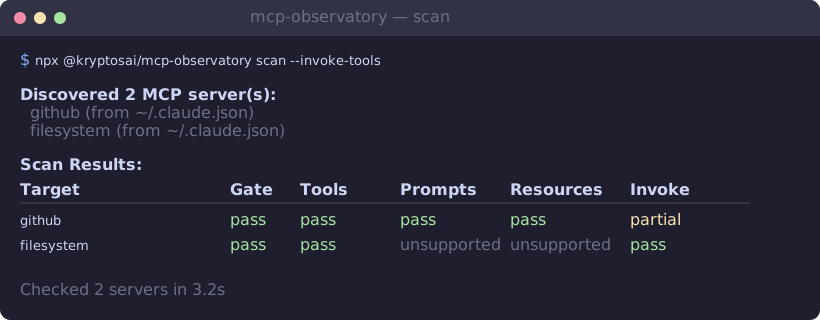
You update a server, a tool silently breaks, and your agent starts failing. MCP Observatory catches that. It connects to your servers, checks every capability, actually calls tools to make sure they work, and diffs runs to catch what changed.

Quick Start
Scan every MCP server in your Claude config:
npx @kryptosai/mcp-observatory
Go deeper — also invoke safe tools to verify they actually run:
npx @kryptosai/mcp-observatory scan deep
Test a specific server:
npx @kryptosai/mcp-observatory test npx -y @modelcontextprotocol/server-everything
Add it to Claude Code as an MCP server:
claude mcp add mcp-observatory -- npx -y @kryptosai/mcp-observatory serve
Or add it manually to your config:
{
  "mcpServers": {
    "mcp-observatory": {
      "command": "npx",
      "args": ["-y", "@kryptosai/mcp-observatory", "serve"]
    }
  }
}
Commands
| Command | What it does |
|---|---|
scan | Auto-discover servers from config files and check them all (default) |
scan deep | Scan and also invoke safe tools to verify they execute |
test <cmd> | Test a specific server by command |
record <cmd> | Record a server session to a cassette file for offline replay |
replay <cassette> | Replay a cassette offline — no live server needed |
verify <cassette> <cmd> | Verify a live server still matches a recorded cassette |
diff <base> <head> | Compare two run artifacts for regressions and schema drift |
watch <config> | Watch a server for changes, alert on regressions |
suggest | Detect your stack and recommend MCP servers from the registry |
serve | Start as an MCP server for AI agents |
Run with no arguments for an interactive menu:
What It Does
Check capabilities — connects to a server and verifies tools, prompts, and resources respond correctly.
Invoke tools — goes beyond listing. Actually calls safe tools (no required params / readOnlyHint) and reports which ones work and which ones crash.
npx @kryptosai/mcp-observatory scan deep
Detect schema drift — diffs two runs and surfaces added/removed fields, type changes, and breaking parameter changes.
npx @kryptosai/mcp-observatory diff run-a.json run-b.json
Recommend servers — scans your project for languages, frameworks, databases, and cloud providers, then cross-references the MCP registry to suggest servers you're missing.
npx @kryptosai/mcp-observatory suggest
Or ask your agent "what MCP servers should I add?" when running in MCP server mode.
Record / replay / verify — capture a live session, replay it offline in CI, and verify nothing changed. Like VCR for MCP.
# Record a session
npx @kryptosai/mcp-observatory record npx -y @modelcontextprotocol/server-everything

# Replay offline (no server needed)
npx @kryptosai/mcp-observatory replay .mcp-observatory/cassettes/latest.cassette.json

# Verify the live server still matches
npx @kryptosai/mcp-observatory verify cassette.json npx -y @modelcontextprotocol/server-everything
Watch for regressions — re-runs checks on an interval and alerts when something changes.
npx @kryptosai/mcp-observatory watch target.json
Scan locations
When you run scan, it looks for MCP configs in:
~/.claude.json(Claude Code)~/Library/Application Support/Claude/claude_desktop_config.json(Claude Desktop, macOS)%APPDATA%/Claude/claude_desktop_config.json(Claude Desktop, Windows).claude.jsonand.mcp.json(current directory)
MCP Server Mode
When running as an MCP server (serve), your AI agent gets the same capabilities as the CLI:
| Tool | What it does |
|---|---|
scan | Discover and check all configured servers |
check_server | Check a specific server by command |
record | Record a server session to a cassette file |
replay | Replay a cassette offline — no live server needed |
verify | Verify a live server still matches a cassette |
watch | Run checks and diff against the previous run |
diff_runs | Compare two saved run artifacts |
get_last_run | Return the most recent run for a target |
suggest_servers | Scan your environment and recommend servers you're missing |
An AI tool that checks other AI tools. It's a tool testing tools that serve tools.*
* I'm a dude playing a dude disguised as another dude.
Compatibility
Works with any MCP server that uses standard transports:
| Transport | Examples | Adapter |
|---|---|---|
| stdio (most servers) | filesystem, memory, context7, brave-search, sentry, notion, stripe | local-process |
| HTTP/SSE (remote) | Cloudflare, Exa, Tavily | http |
| Docker | All @modelcontextprotocol/server-* images | local-process via docker run -i |
Servers needing API keys work via env in the target config. Python servers work via uvx. See the full compatibility matrix for tested servers and known issues.
Target config files
For more control (env vars, metadata, custom timeout):
{
  "targetId": "filesystem-server",
  "adapter": "local-process",
  "command": "npx",
  "args": ["-y", "@modelcontextprotocol/server-filesystem", "."],
  "timeoutMs": 15000
}
npx @kryptosai/mcp-observatory run --target ./target.json
HTTP / SSE targets
{
  "targetId": "my-remote-server",
  "adapter": "http",
  "url": "http://localhost:3000/mcp",
  "authToken": "optional-bearer-token",
  "timeoutMs": 15000
}
How It Compares
| Feature | Observatory | mcp-recorder | MCPBench | mcp-jest |
|---|---|---|---|---|
| Auto-discover servers | ✅ | — | — | — |
| Check capabilities | ✅ | — | ✅ | ✅ |
| Invoke tools | ✅ | — | — | ✅ |
| Schema drift detection | ✅ | — | — | — |
| Record / replay | ✅ | ✅ | — | — |
| Verify against cassette | ✅ | — | — | — |
| Response snapshot diffs | ✅ | — | — | — |
| Benchmarking / latency | — | — | ✅ | — |
| Jest integration | — | — | — | ✅ |
| MCP proxy mode | — | ✅ | — | — |
| Works as MCP server | ✅ | — | — | — |
Each tool has strengths. Observatory focuses on regression detection and CI-friendly workflows. mcp-recorder is great as a transparent proxy. MCPBench is the go-to for performance benchmarking. mcp-jest is ideal if you're already in a Jest workflow.
Prior Art
The record/replay/verify pattern is inspired by:
- VCR (Ruby) — pioneered cassette-based HTTP record/replay
- Polly.js (Netflix) — HTTP interaction recording for JavaScript
- mcp-recorder — MCP-specific traffic recording proxy
- MCPBench — MCP server benchmarking
- mcp-jest — Jest-style testing for MCP servers
Limitations
- Servers requiring interactive OAuth (e.g., Google Drive) need pre-authentication before Observatory can connect
- Custom WebSocket transports (e.g., BrowserTools MCP) are not supported
- A few servers time out or close before init — see known issues and compatibility
Contributing
See CONTRIBUTING.md for guidelines. The fastest way to contribute is to add a real passing target with a distinct capability shape, a clearer report surface, or a cleaner startup diagnosis.