MCP Server Zotero Dev
Give your AI assistant superpowers for Zotero plugin development


Architecture · Getting Started · Available Tools
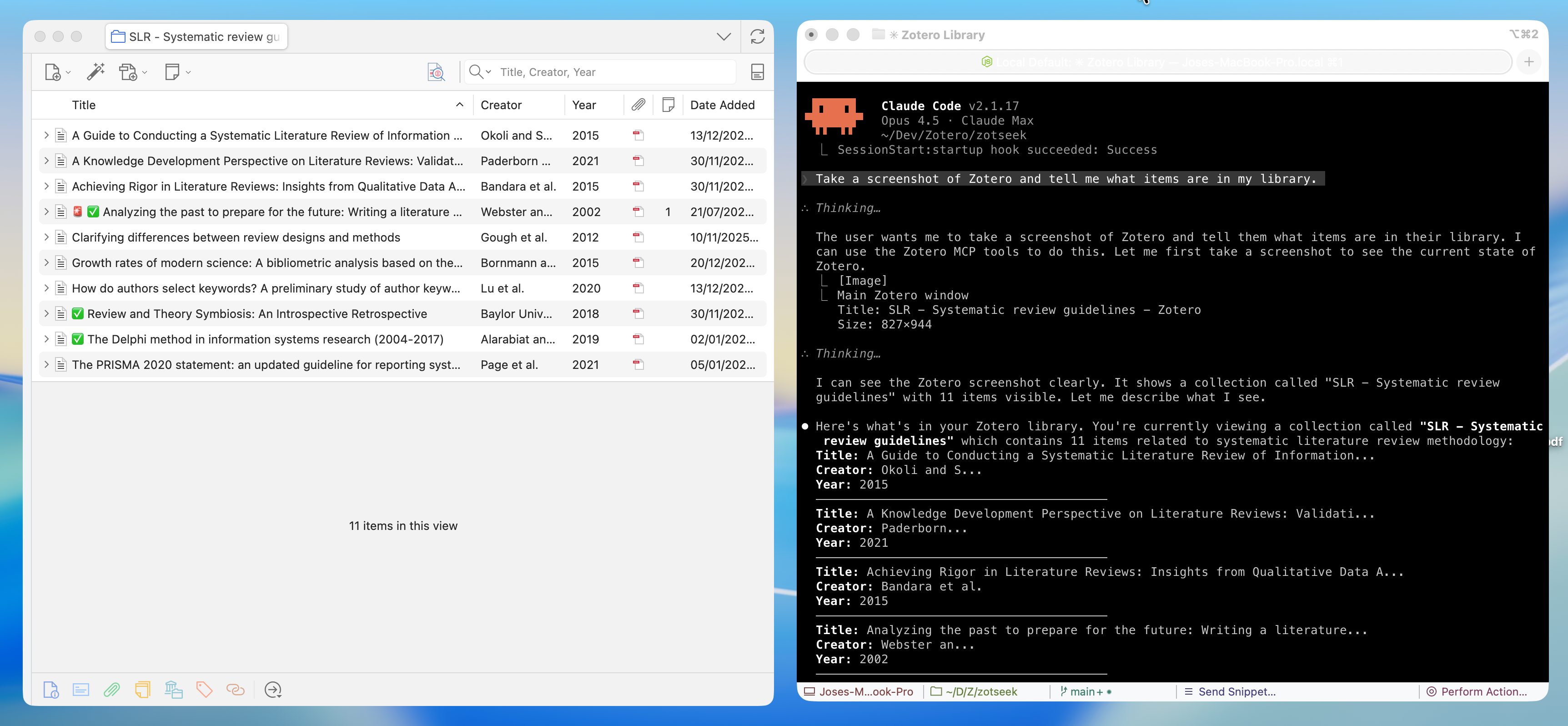
A Model Context Protocol (MCP) server that enables AI assistants like Claude, Cursor, and Windsurf to build, test, and debug Zotero 7/8 plugins. Screenshots, DOM state, debug logs, and JavaScript execution give the AI rich context to understand what's happening—and tools to help you fix it.
✨ Features
| Category | Capabilities |
|---|---|
| 🎯 UI Inspection | Screenshots, DOM tree, element finding, computed styles |
| 💻 JS Execution | Run code in Zotero context, inspect APIs, test snippets |
| 🔧 Build Tools | Scaffold integration for build, serve, hot reload |
| 📋 Logs & Errors | Stream debug output, error console, watch for issues |
| 🗃️ Database | Read-only access to zotero.sqlite for debugging |
| 🔌 Plugin Management | Install, reload, list plugins |
🚀 Quick Start
Prerequisites
- Node.js 20+ and npm
- Zotero 7+ — Works on all Zotero 7 and 8 builds (release, beta, dev)
- For plugin development: zotero-plugin-scaffold
1. Install MCP Server
Use install-mcp to add the server to your AI assistant:
npx -y install-mcp @introfini/mcp-server-zotero-dev --client claude-code
Supported clients: claude-code, cursor, windsurf, vscode, cline, roo-cline, claude, zed, goose, warp, codex
Claude Code
npx -y install-mcp @introfini/mcp-server-zotero-dev --client claude-code
Cursor
npx -y install-mcp @introfini/mcp-server-zotero-dev --client cursor
VS Code / Copilot
npx -y install-mcp @introfini/mcp-server-zotero-dev --client vscode
Windsurf
npx -y install-mcp @introfini/mcp-server-zotero-dev --client windsurf
Manual Configuration
Add to your MCP client config:
{
  "mcpServers": {
    "zotero-dev": {
      "command": "npx",
      "args": ["-y", "@introfini/mcp-server-zotero-dev"],
      "env": {
        "ZOTERO_RDP_PORT": "6100"
      }
    }
  }
}
Restart your AI assistant after adding the configuration.
2. Install MCP Bridge Plugin in Zotero
Download zotero-mcp-bridge.xpi and install:
- In Zotero: Tools → Plugins
- Click ⚙️ → Install Plugin From File
- Select the downloaded
.xpifile - Restart Zotero
This lightweight plugin enables the Remote Debugging Protocol when Zotero starts. It only needs to be installed once and works on all Zotero 7+ builds (release, beta, and dev).
3. Start Developing!
Just open Zotero normally and ask your AI assistant:
"Take a screenshot of Zotero and list installed plugins"
That's it! No special launch flags, no configuration. 🎉
🧰 Available Tools (25 total)
UI Inspection — Screenshots, DOM, styles
| Tool | Description |
|---|---|
zotero_screenshot | Capture window, element, or region screenshots |
zotero_inspect_element | Find elements by CSS selector |
zotero_get_dom_tree | Get DOM structure of a window/panel |
zotero_get_styles | Get computed CSS styles for element |
zotero_list_windows | List all open Zotero windows |
Screenshot Targets: Main window, preferences, PDF reader, dialogs, or any element by selector. Use
highlightSelectorto add a red border before capture.
JavaScript Execution — Run code in Zotero context
| Tool | Description |
|---|---|
zotero_execute_js | Execute JavaScript in Zotero's privileged context. Auto-wraps code with top-level return statements in IIFE. |
zotero_inspect_object | Explore Zotero APIs - list methods and properties of any object (e.g., Zotero.Items) |
zotero_search_prefs | Search/discover preferences by pattern (e.g., find all prefs containing "debug") |
zotero_get_pref | Get a preference value |
zotero_set_pref | Set a preference value |
Examples:
Zotero.Items.getAll(1),Zotero.Prefs.get('export.quickCopy.setting'),ZoteroPane.getSelectedItems()Tip: Use
zotero_inspect_objectto explore APIs before writing code. Usezotero_search_prefsto discover preference keys.
Build & Scaffold — Integration with zotero-plugin-scaffold
| Tool | Description |
|---|---|
zotero_scaffold_build | Build plugin (dev or production mode) |
zotero_scaffold_serve | Start dev server with hot reload |
zotero_scaffold_lint | Run ESLint on plugin source |
zotero_scaffold_typecheck | Run TypeScript type checking |
Logs & Debugging — Error console and debug output
| Tool | Description |
|---|---|
zotero_read_logs | Read debug output (Zotero.debug) |
zotero_read_errors | Read error console entries |
zotero_watch_logs | Stream logs in real-time |
zotero_clear_logs | Clear log buffer |
Plugin Management — Install, reload, inspect
| Tool | Description |
|---|---|
zotero_plugin_reload | Hot reload your dev plugin |
zotero_plugin_install | Install plugin from XPI path |
zotero_plugin_list | List installed plugins with version/status |
Database Access — Read-only SQLite access
| Tool | Description |
|---|---|
zotero_db_query | Execute SELECT query on zotero.sqlite |
zotero_db_schema | Get table schema information |
zotero_db_stats | Get database statistics (items, attachments, collections, size) |
Note: Database access is read-only and requires Zotero to be closed, or uses a copy of the database.
🏗️ Architecture
┌─────────────────────────────────────────────────────────────────┐
│                        AI Assistant                             │
│                  (Claude, Cursor, Windsurf)                     │
└─────────────────────────┬───────────────────────────────────────┘
                          │ MCP Protocol (stdio)
                          ▼
┌─────────────────────────────────────────────────────────────────┐
│                  MCP Server (Node.js/TypeScript)                │
│  ┌──────────────┐  ┌──────────────┐  ┌──────────────────────┐   │
│  │   Scaffold   │  │     RDP      │  │      Database        │   │
│  │  Integration │  │    Client    │  │      Reader          │   │
│  └──────────────┘  └──────┬───────┘  └──────────────────────┘   │
└─────────────────────────────┼───────────────────────────────────┘
                              │ Firefox RDP (port 6100)
                              ▼
┌─────────────────────────────────────────────────────────────────┐
│                      Zotero Application                         │
│  ┌──────────────────────────────────────────────────────────┐   │
│  │            MCP Bridge for Zotero                         │   │
│  │         Starts DevToolsServer on launch                  │   │
│  └──────────────────────────────────────────────────────────┘   │
│  ┌──────────────────────────────────────────────────────────┐   │
│  │              Firefox DevTools Server (built-in)          │   │
│  │           JS Execution • DOM • Console • Screenshots     │   │
│  └──────────────────────────────────────────────────────────┘   │
│  ┌──────────────────────────────────────────────────────────┐   │
│  │                   Your Plugin (dev)                      │   │
│  └──────────────────────────────────────────────────────────┘   │
└─────────────────────────────────────────────────────────────────┘
Why this approach?
- ✅ Lightweight plugin — Just enables RDP, Firefox DevTools does the rest
- ✅ Zero-config after install — Just open Zotero normally, no special flags
- ✅ Rich AI context — Screenshots, DOM, and logs help the AI understand your plugin's state
- ✅ Hot reload — Integrates with zotero-plugin-scaffold for instant feedback
- ✅ Full Zotero access — Execute any Zotero API in the privileged context
- ✅ Cross-platform — Works on Linux, Windows, macOS
🔧 Environment Variables
| Variable | Description | Default |
|---|---|---|
ZOTERO_RDP_PORT | Remote debugging port | 6100 |
ZOTERO_RDP_HOST | Debugging host | 127.0.0.1 |
ZOTERO_DATA_DIR | Path to Zotero data directory | Auto-detect |
ZOTERO_PROFILE_PATH | Path to Zotero profile | Auto-detect |
📸 Screenshot Examples
// Capture main Zotero window
await zotero_screenshot({ target: 'main-window' });

// Capture your plugin's panel with highlight
await zotero_screenshot({
  target: 'element',
  selector: '#my-plugin-panel',
  highlightSelector: '#my-plugin-button'
});

// Capture a specific window by ID (use zotero_list_windows to find IDs)
await zotero_screenshot({
  target: 'window',
  windowId: 12345
});

// Capture element after triggering UI action
await zotero_execute_js({ code: 'document.querySelector("#menu").click()' });
await zotero_screenshot({ target: 'element', selector: 'menupopup[state="open"]' });
🧑💻 Development
# Clone and install
git clone https://github.com/introfini/mcp-server-zotero-dev.git
cd mcp-server-zotero-dev
npm install

# Build everything
npm run build

# Build individual packages
npm run build -w mcp-server
npm run build -w zotero-plugin-mcp-rdp

# Run tests
npm test

# Development mode (watch)
npm run dev -w mcp-server
Project Structure
mcp-server-zotero-dev/
├── packages/
│   ├── mcp-server/               # MCP server (npm package)
│   │   ├── src/
│   │   │   ├── index.ts          # MCP server entry
│   │   │   ├── rdp/              # RDP client
│   │   │   ├── tools/            # Tool implementations
│   │   │   └── prompts/          # Slash commands
│   │   └── package.json
│   │
│   └── zotero-plugin-mcp-rdp/    # Tiny Zotero plugin (.xpi)
│       ├── src/
│       │   └── index.ts          # Starts RDP server
│       ├── addon/
│       │   └── manifest.json
│       └── package.json
│
├── docs/                         # Documentation
└── package.json                  # Monorepo root
📚 Resources
- Architecture & Technical Learnings — Deep dive into RDP protocol, actor hierarchy, and common pitfalls
- Zotero Plugin Development — Official docs
- Zotero 7 for Developers — Migration guide
- zotero-plugin-scaffold — Build tooling
- zotero-plugin-template — Starter template
- zotero-plugin-toolkit — API helpers
- Firefox RDP Protocol — Protocol docs
🤝 Contributing
Contributions are welcome! Please:
- Follow existing code patterns
- Add tests for new features
- Update documentation
- Ensure
npm testandnpm run lintpass
📄 License
MIT © introfini
Acknowledgments
- Built for the Zotero plugin developer community
- Integrates with zotero-plugin-scaffold by @windingwind
- Leverages Firefox DevTools RDP for reliable communication