MCP Telegram






Hosted version available! Don't want to self-host? Use mcp-telegram.com -- connect Telegram to Claude.ai in 30 seconds with QR code. No API keys needed.
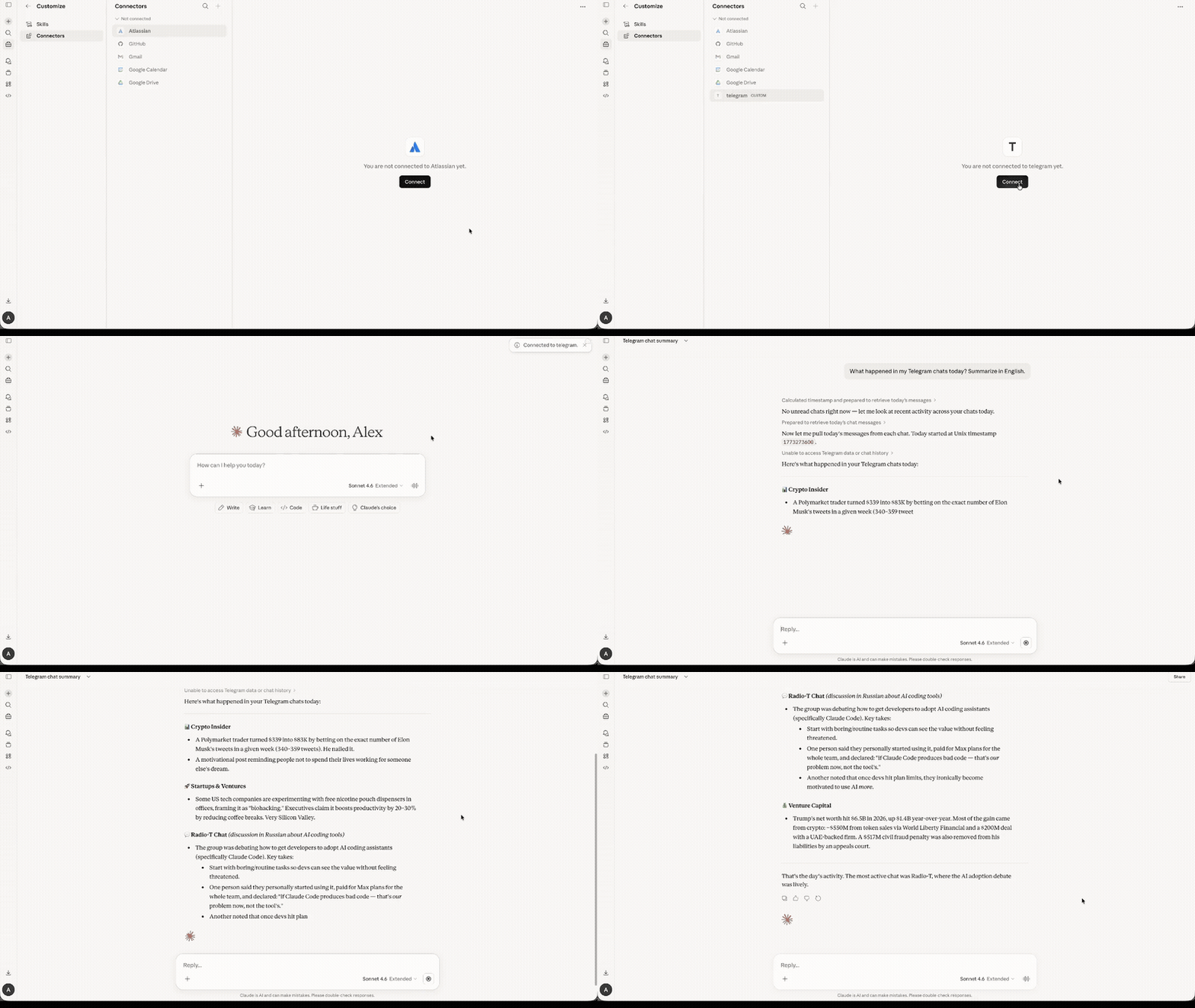
An MCP (Model Context Protocol) server that connects AI assistants like Claude to Telegram via the MTProto protocol. Unlike bots, this runs as a userbot -- it operates under your personal Telegram account using GramJS, giving full access to your chats, contacts, and message history.
Features
- MTProto protocol -- direct Telegram API access, not the limited Bot API
- Userbot -- operates as your personal account, not a bot
- 20 tools -- messaging, chat management, media, contacts, and more
- QR code login -- authenticate by scanning a QR code in the Telegram app
- Session persistence -- login once, stay connected across restarts
- Human-readable output -- sender names are resolved, not just numeric IDs
- Works with any MCP client -- Claude Code, Claude Desktop, Cursor, VS Code, Mastra, etc.
Prerequisites
- Node.js 18 or later
- Telegram API credentials --
API_ID and API_HASH from my.telegram.org
Quick Start
1. Get Telegram API credentials
- Go to my.telegram.org and log in with your phone number.
- Navigate to API development tools.
- Create a new application (any name and platform).
- Copy the App api_id and App api_hash.
2. Login
TELEGRAM_API_ID=YOUR_ID TELEGRAM_API_HASH=YOUR_HASH npx @overpod/mcp-telegram login
A QR code will appear in the terminal. Open Telegram on your phone, go to Settings > Devices > Link Desktop Device, and scan the code. The session is saved to ~/.telegram-session and reused automatically.
3. Add to Claude
claude mcp add telegram -s user \
  -e TELEGRAM_API_ID=YOUR_ID \
  -e TELEGRAM_API_HASH=YOUR_HASH \
  -- npx @overpod/mcp-telegram
That's it! Ask Claude to run telegram-status to verify.
Installation Options
npx (recommended, zero install)
No need to clone or install anything. Just use npx @overpod/mcp-telegram.
Global install
npm install -g @overpod/mcp-telegram
mcp-telegram          # run server
mcp-telegram login    # QR login
From source
git clone https://github.com/overpod/mcp-telegram.git
cd mcp-telegram
npm install && npm run build
Usage with MCP Clients
Claude Code (CLI)
claude mcp add telegram -s user \
  -e TELEGRAM_API_ID=YOUR_ID \
  -e TELEGRAM_API_HASH=YOUR_HASH \
  -- npx @overpod/mcp-telegram
Claude Desktop
-
Open your config file:
- macOS:
~/Library/Application Support/Claude/claude_desktop_config.json
- Windows:
%APPDATA%\Claude\claude_desktop_config.json
-
Add the Telegram server:
{
  "mcpServers": {
    "telegram": {
      "command": "npx",
      "args": ["@overpod/mcp-telegram"],
      "env": {
        "TELEGRAM_API_ID": "YOUR_ID",
        "TELEGRAM_API_HASH": "YOUR_HASH"
      }
    }
  }
}
-
Restart Claude Desktop.
-
Ask Claude: "Run telegram-login" -- a QR code will appear. If the image is not visible, Claude will provide a browser link to view the QR code. Scan it in Telegram (Settings > Devices > Link Desktop Device).
-
Ask Claude: "Run telegram-status" to verify the connection.
Note: No terminal required! Login works entirely through Claude Desktop.
Cursor / VS Code
Add the same JSON config above to your MCP settings (Cursor Settings > MCP, or VS Code MCP config).
Mastra
import { MCPClient } from "@mastra/mcp";

const telegramMcp = new MCPClient({
  id: "telegram-mcp",
  servers: {
    telegram: {
      command: "npx",
      args: ["@overpod/mcp-telegram"],
      env: {
        TELEGRAM_API_ID: process.env.TELEGRAM_API_ID!,
        TELEGRAM_API_HASH: process.env.TELEGRAM_API_HASH!,
      },
    },
  },
});
Available Tools
Connection
| Tool | Description |
|---|
telegram-status | Check connection status and current account info |
telegram-login | Authenticate via QR code |
Messaging
| Tool | Description |
|---|
telegram-send-message | Send a text message to a chat |
telegram-send-file | Send a file (photo, document, video, etc.) to a chat |
telegram-edit-message | Edit a previously sent message |
telegram-delete-message | Delete messages in a chat |
telegram-forward-message | Forward messages between chats |
Reading
| Tool | Description |
|---|
telegram-list-chats | List recent dialogs with unread counts |
telegram-read-messages | Read recent messages from a chat |
telegram-search-chats | Search for chats, users, or channels by name |
telegram-search-messages | Search messages in a chat by text |
telegram-get-unread | Get chats with unread messages |
Chat Management
| Tool | Description |
|---|
telegram-mark-as-read | Mark a chat as read |
telegram-get-chat-info | Get detailed info about a chat (name, type, members count, description) |
telegram-get-chat-members | List members of a group or channel |
telegram-pin-message | Pin a message in a chat |
telegram-unpin-message | Unpin a message in a chat |
User Info
| Tool | Description |
|---|
telegram-get-contacts | Get your contacts list with phone numbers |
telegram-get-profile | Get detailed profile info for a user (bio, photo, last seen) |
Media
| Tool | Description |
|---|
telegram-download-media | Download media from a message to a local file |
Tool Parameters
Common patterns
Most tools accept chatId as a string -- either a numeric ID (e.g., "-1001234567890") or a username (e.g., "@username").
telegram-send-message
| Parameter | Type | Required | Description |
|---|
chatId | string | yes | Chat ID or @username |
text | string | yes | Message text |
replyTo | number | no | Message ID to reply to |
parseMode | "md" / "html" | no | Message formatting mode |
telegram-list-chats
| Parameter | Type | Required | Description |
|---|
limit | number | no | Number of chats to return (default: 20) |
offsetDate | number | no | Unix timestamp for pagination |
filterType | "private" / "group" / "channel" | no | Filter by chat type |
telegram-read-messages
| Parameter | Type | Required | Description |
|---|
chatId | string | yes | Chat ID or @username |
limit | number | no | Number of messages (default: 10) |
offsetId | number | no | Message ID for pagination |
telegram-send-file
| Parameter | Type | Required | Description |
|---|
chatId | string | yes | Chat ID or @username |
filePath | string | yes | Absolute path to the file |
caption | string | no | File caption |
telegram-download-media
| Parameter | Type | Required | Description |
|---|
chatId | string | yes | Chat ID or @username |
messageId | number | yes | Message ID containing media |
downloadPath | string | yes | Absolute path to save the file |
telegram-forward-message
| Parameter | Type | Required | Description |
|---|
fromChatId | string | yes | Source chat ID or @username |
toChatId | string | yes | Destination chat ID or @username |
messageIds | number[] | yes | Array of message IDs to forward |
telegram-edit-message
| Parameter | Type | Required | Description |
|---|
chatId | string | yes | Chat ID or @username |
messageId | number | yes | ID of the message to edit |
text | string | yes | New message text |
telegram-delete-message
| Parameter | Type | Required | Description |
|---|
chatId | string | yes | Chat ID or @username |
messageIds | number[] | yes | Array of message IDs to delete |
telegram-pin-message
| Parameter | Type | Required | Description |
|---|
chatId | string | yes | Chat ID or @username |
messageId | number | yes | Message ID to pin |
silent | boolean | no | Pin without notification (default: false) |
telegram-search-messages
| Parameter | Type | Required | Description |
|---|
chatId | string | yes | Chat ID or @username |
query | string | yes | Search text |
limit | number | no | Max results (default: 20) |
telegram-search-chats
| Parameter | Type | Required | Description |
|---|
query | string | yes | Search query (name or username) |
limit | number | no | Max results (default: 10) |
telegram-get-chat-members
| Parameter | Type | Required | Description |
|---|
chatId | string | yes | Chat ID or @username |
limit | number | no | Number of members (default: 50) |
telegram-get-contacts
| Parameter | Type | Required | Description |
|---|
limit | number | no | Number of contacts (default: 50) |
telegram-get-profile
| Parameter | Type | Required | Description |
|---|
userId | string | yes | User ID or @username |
telegram-get-unread
| Parameter | Type | Required | Description |
|---|
limit | number | no | Number of unread chats (default: 20) |
Development
npm run dev        # Start with file watching (tsx)
npm start          # Start the MCP server
npm run login      # QR code login in terminal
npm run build      # Compile TypeScript
npm run lint       # Check code with Biome
npm run lint:fix   # Auto-fix lint issues
npm run format     # Format code with Biome
Project Structure
src/
  index.ts            -- MCP server entry point, 20 tool definitions
  telegram-client.ts  -- TelegramService class (GramJS wrapper)
  qr-login-cli.ts     -- CLI utility for QR code login
Tech Stack
- TypeScript -- ES2022, ESM modules
- GramJS (
telegram) -- Telegram MTProto client
- @modelcontextprotocol/sdk -- MCP server framework
- Zod -- Runtime schema validation for tool parameters
- Biome -- Linter and formatter
- tsx -- TypeScript execution without a build step
- dotenv -- Environment variable management
Security
- API credentials are stored in
.env (gitignored)
- Session is stored in
.telegram-session (gitignored)
- Phone number is not required -- QR-only authentication
- This is a userbot (personal account), not a bot -- respect the Telegram Terms of Service
License
MIT