🎨 Color Picker MCP App


A Model Context Protocol (MCP) App built with .NET that provides an interactive color picker with a simplified UI. This is a sample implementation demonstrating how to build MCP Apps using C# and the ModelContextProtocol.AspNetCore package.
Note: MCP Apps are a new extension to MCP that allows servers to provide interactive UI components. This sample demonstrates how to implement one in .NET/C#.
📸 Screenshots
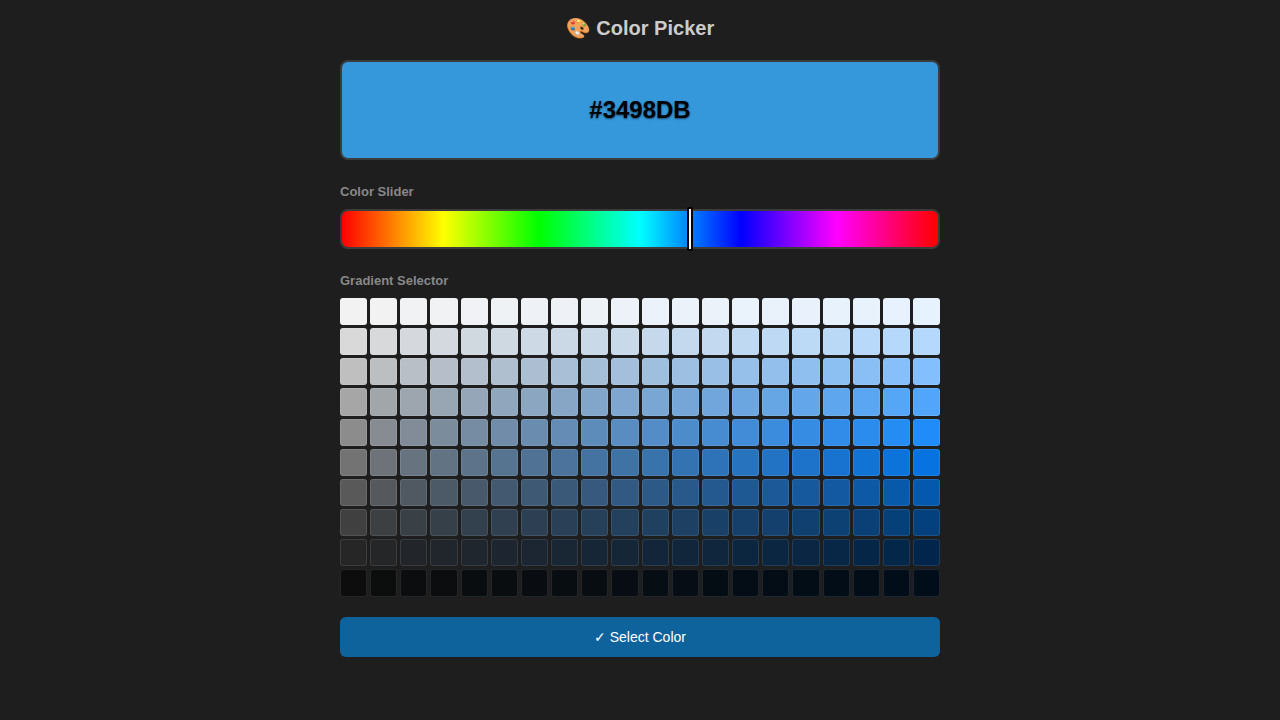
Initial View
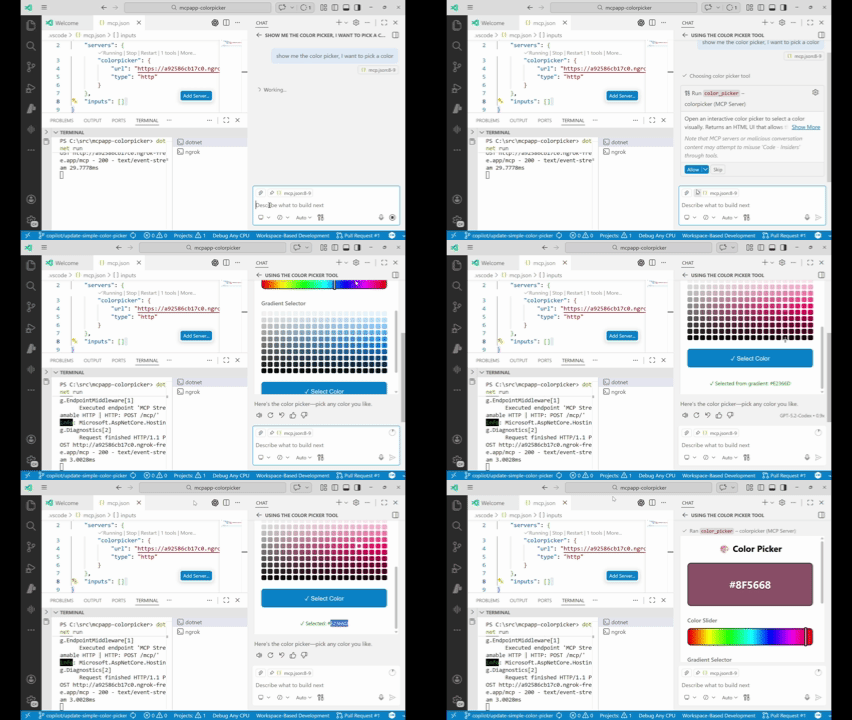
After Selecting a Color
The simplified interface allows you to:
- Use the Color Slider to select your base hue from the full color spectrum
- Pick from the Gradient Selector to choose the exact shade, tint, or tone
- See your selection instantly in the large preview box with the HEX code
✨ Features
- Simple & Intuitive Interface - Clean, focused design for easy color selection
- Color Slider - Visual hue selector with full spectrum of colors
- Gradient Selector - 200-color gradient grid showing different shades and tints
- Real-time Preview - See your selected color instantly with HEX code display
- VS Code Theme Integration - Automatically adapts to your VS Code theme
- HTTP Transport - Easy integration with MCP clients
🛠️ MCP Tool
ColorPicker
Opens an interactive color picker UI to visually select a color.
Parameters:
| Parameter | Type | Description |
|---|---|---|
initialColor | string (optional) | Initial color in hex format (e.g., #FF5733). Default: #3498DB |
Returns: A ColorPickerResult with the UI resource URI for rendering the interactive picker.
📋 Prerequisites
- .NET 10 SDK or later
- Visual Studio Code with MCP extension
🚀 Getting Started
1. Clone the repository
git clone https://github.com/elbruno/mcpapp-colorpicker.git
cd mcpapp-colorpicker
2. Build and run
dotnet restore
dotnet run
The server will start on http://localhost:3001/mcp.
3. Configure VS Code
Add the following to your VS Code MCP configuration (.vscode/mcp.json):
{
  "servers": {
    "color-picker": {
      "type": "http",
      "url": "http://localhost:3001/mcp"
    }
  }
}
4. Use it
In VS Code with the MCP extension, invoke the ColorPicker tool to open the interactive color picker UI.
5. (Optional) Expose with ngrok
To access the MCP app from a remote location or share it with others, you can use ngrok to expose your local server:
Download ngrok
- Visit ngrok.com
- Sign up for a free account
- Download the ngrok executable for your operating system
- Extract it to a folder and add it to your PATH, or use it directly
Run ngrok
In a new terminal, expose your local server:
ngrok http 3001
ngrok will display a public URL like https://abc123def456.ngrok.io that forwards to your local http://localhost:3001.
Update VS Code Configuration
Replace your local URL with the ngrok URL in .vscode/mcp.json:
{
  "servers": {
    "color-picker": {
      "type": "http",
      "url": "https://abc123def456.ngrok.io/mcp"
    }
  }
}
Now you can use the ColorPicker tool from any location!
🏗️ Project Structure
mcpapp-colorpicker/
├── ColorPickerMcp.csproj   # Project file with MCP SDK reference
├── Program.cs              # MCP server implementation with embedded UI
├── README.md               # This file
├── LICENSE                 # MIT License
└── .github/
    └── workflows/
        └── build.yml       # GitHub Actions CI
🔧 Technical Details
This MCP App uses:
- ModelContextProtocol.AspNetCore (
0.2.0-preview.1) - Official .NET SDK for MCP - HTTP Transport - Exposes MCP endpoint at
/mcp - Embedded HTML UI - Color picker interface served at
/ui/color-picker - Attribute-based Tool Definition - Uses
[McpServerToolType]and[McpServerTool]attributes
Endpoints
| Endpoint | Description |
|---|---|
/mcp | MCP protocol endpoint for client connections |
/ui/color-picker | Interactive color picker HTML UI |
/mcp/resources/ui/color-picker | UI as MCP resource |
📚 Resources
Learn more about MCP Apps:
- 📺 VS Code MCP Apps Video
- 📖 MCP Apps - Bringing UI
- 📝 MCP Apps Announcement Blog
- 🚀 MCP Apps QuickStart
- 💻 Official Samples Repository
📄 License
This project is licensed under the MIT License - see the LICENSE file for details.
🤝 Contributing
Contributions are welcome! Feel free to open issues or submit pull requests.
👤 Author
El Bruno - @elbruno