
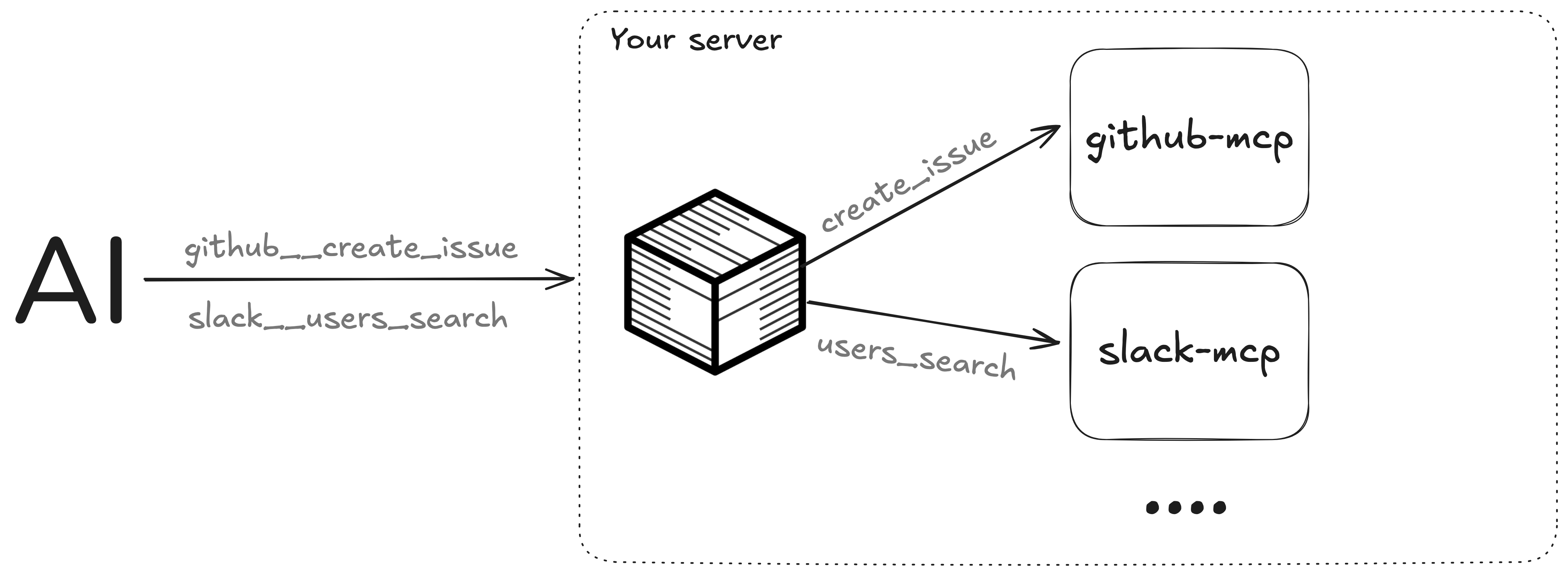
MCPBox is a lightweight gateway that exposes local stdio-based MCP (Model Context Protocol) servers via Streamable HTTP, enabling Claude and other AI agents to connect from anywhere.
- Aggregate multiple local stdio servers behind a single HTTP endpoint
- Exposes Tools, Resources & Prompts
- Namespaces with
servername__prefix to avoid collisions (e.g.,github__create_issue) - OAuth or API key authentication
Quick Start
Create mcpbox.json:
{
  "mcpServers": {
    "memory": {
      "command": "npx",
      "args": ["-y", "@modelcontextprotocol/server-memory"]
    }
  }
}
Run with:
npx
npx mcpbox
MCP server commands (e.g., uvx, docker) must be available where the box runs.
Docker
docker run -v ./mcpbox.json:/config/config.json -p 8080:8080 ghcr.io/kandobyte/mcpbox
The Docker image includes Node.js and Python, supporting MCP servers launched via npx and uvx.
The box starts on http://localhost:8080. Connect an agent by adding this to your MCP client config:
{
  "mcpServers": {
    "mcpbox": {
      "type": "http",
      "url": "http://localhost:8080"
    }
  }
}
For remote access with authentication, see Deployment and Connect Your AI.
Configuration
See mcpbox.example.jsonc for all options.
Authentication — choose one:
- None — default
- API Key —
auth.type: "apikey"withauth.apiKey - OAuth —
auth.type: "oauth"with users, clients, and optional dynamic registration
Storage (for OAuth):
- Memory — default, tokens lost on restart
- SQLite —
storage.type: "sqlite"for persistence
Deployment
To expose MCPBox remotely, put it behind a TLS-terminating reverse proxy.
Before deploying:
- Use
storage.type: "sqlite"for persistence across restarts - Set
auth.issuerto your public URL when using OAuth - Use bcrypt hashes for passwords
[!NOTE] MCPBox is single-instance only — don't run multiple instances behind a load balancer.
Quick remote access
Use cloudflared to expose a local instance (no account required):
cloudflared tunnel --url http://localhost:8080
Then update your config with the generated public URL:
{
  "auth": {
    "type": "oauth",
    "issuer": "https://<tunnel-id>.trycloudflare.com",
    "users": [{ "username": "admin", "password": "${MCPBOX_PASSWORD}" }],
    "dynamic_registration": true
  },
  "storage": {
    "type": "sqlite",
    "path": "/data/mcpbox.db"
  },
  "mcpServers": { ... }
}
Run with a persistent data volume:
docker run -v ./mcpbox.json:/config/config.json -v ./data:/data -p 8080:8080 ghcr.io/kandobyte/mcpbox
Connect Your AI
Claude Web & Mobile
Settings → Connectors → Add Custom Connector → enter your URL → Connect
Requires dynamic_registration: true in your config.
Claude Code
claude mcp add --transport http mcpbox https://your-mcpbox-url.com
Requires dynamic_registration: true in your config.
MCP clients with JSON config
{
  "mcpServers": {
    "mcpbox": {
      "url": "https://your-mcpbox-url.com",
      "headers": {
        "Authorization": "Bearer YOUR_API_KEY"
      }
    }
  }
}