MCP Hub
The Largest Open MCP Server Directory
8,000+ community-driven MCP servers. Open-source, fully searchable, zero vendor lock-in.



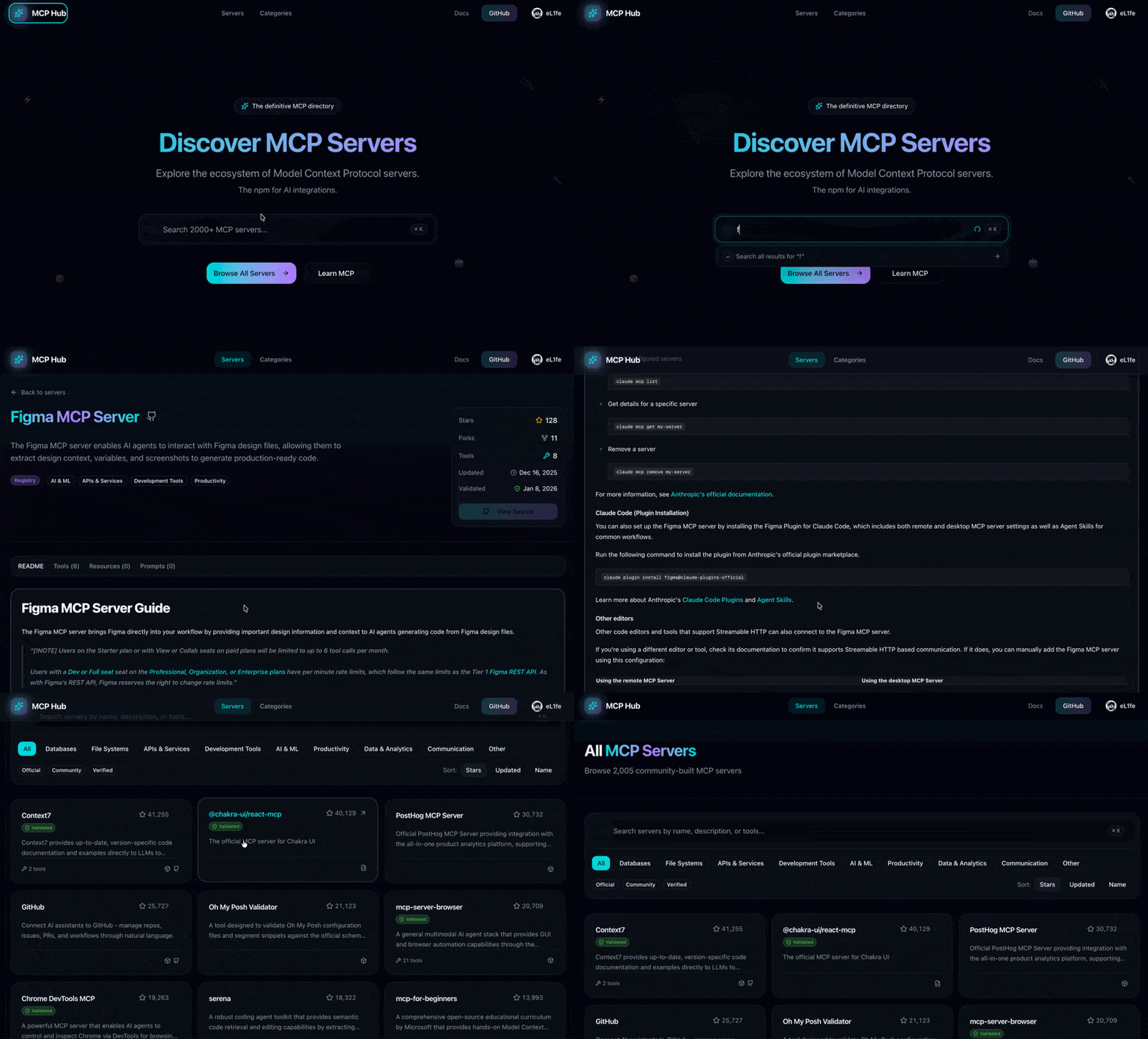
What is MCP Hub?
MCP Hub is the largest open-source directory of Model Context Protocol (MCP) servers — the open standard that enables AI assistants like Claude, GPT, and others to interact with external tools, databases, and services.
Unlike closed registries, MCP Hub aggregates servers from 5+ sources and makes them freely searchable. No walled gardens, no gatekeeping — just a community-driven index of every MCP server we can find.
8,000+ servers · 15+ categories · 5 data sources · 100% open-source
Features
Discovery & Search
- Full-text search with PostgreSQL FTS + trigram matching
- Category browsing (Databases, APIs, Dev Tools, AI/ML, etc.)
- Filter by validation status and source
- Sort by stars, updated, or relevance
Multi-Source Indexing
We aggregate MCP servers from multiple sources to provide the most comprehensive directory:
| Source | Description | Link |
|---|---|---|
| MCP Registry | Official Model Context Protocol registry | registry.modelcontextprotocol.io |
| npm | Node.js packages with mcp keyword | npmjs.com |
| GitHub | Repositories with mcp-server topic | github.com/topics/mcp-server |
| Glama | Curated MCP servers from Glama.ai | glama.ai/mcp/servers |
| PulseMCP | Community MCP server directory | pulsemcp.com |
| PyPI | Python packages (coming soon) | — |
Server Validation
- Docker-based validation for secure sandbox testing
- MCP handshake verification with protocol compliance
- Capability discovery — tools, resources, prompts
- Community-assisted validation for servers requiring config
GitHub Integration
- Real-time stars & forks tracking
- Last commit timestamps
- Direct links to source repositories
- README rendering with syntax highlighting
Developer Experience
- One-click install commands (
npx,uvx) - Tools/Resources/Prompts documentation
- Responsive glassmorphism UI
- Command palette search (
Cmd+K)
Tech Stack
| Category | Technology |
|---|---|
| Framework | Next.js 16 (App Router) |
| UI | React 19 + Tailwind CSS 4 |
| Components | Radix UI + Lucide Icons |
| Database | PostgreSQL via Neon (serverless) |
| ORM | Drizzle ORM |
| Auth | NextAuth.js v5 (GitHub OAuth) |
| AI Parsing | Anthropic Claude |
| Validation | Docker containers (Node.js/Python) |
Quick Start
Prerequisites
- Node.js 20+
- pnpm 9+
- PostgreSQL database (or Neon account)
- GitHub OAuth App (for authentication)
1. Clone & Install
git clone https://github.com/eL1fe/mcpdir.git
cd mcpdir
pnpm install
2. Environment Setup
cp .env.example .env.local
Configure your .env.local:
# Database (Neon recommended)
DATABASE_URL=postgresql://user:password@host/database?sslmode=require

# GitHub (for sync + OAuth)
GITHUB_TOKEN=ghp_xxxxxxxxxxxx
GITHUB_CLIENT_ID=your-oauth-app-client-id
GITHUB_CLIENT_SECRET=your-oauth-app-client-secret

# NextAuth
AUTH_SECRET=generate-with-openssl-rand-base64-32

# AI Parsing (optional - enhances metadata extraction)
ANTHROPIC_API_KEY=sk-ant-...
# or
OPENROUTER_API_KEY=sk-or-...
3. Database Setup
# Generate migrations
pnpm db:generate

# Apply migrations
pnpm db:push

# Seed categories
pnpm seed:categories
4. Sync Servers
# Sync from MCP Registry
pnpm sync

# Sync from all sources
pnpm sync:all

# With validation (requires Docker)
pnpm validate:popular
5. Run Development Server
pnpm dev
Project Structure
mcpdir/
├── src/
│   ├── app/                    # Next.js App Router pages
│   │   ├── page.tsx            # Homepage
│   │   ├── servers/            # Server listing & detail pages
│   │   ├── categories/         # Category pages
│   │   ├── auth/               # Authentication pages
│   │   ├── og/                 # Dynamic OG image generation
│   │   └── api/                # API routes
│   ├── components/             # React components
│   │   ├── ui/                 # Shadcn/ui components
│   │   ├── server-card.tsx     # Server display card
│   │   ├── filter-bar.tsx      # Search filters
│   │   └── search-command.tsx  # Command palette
│   ├── lib/
│   │   ├── db/                 # Database schema & queries
│   │   ├── seo/                # SEO utilities
│   │   ├── auth/               # NextAuth configuration
│   │   └── validation/         # MCP validation logic
│   └── types/                  # TypeScript definitions
├── scripts/
│   ├── sync-servers.ts         # Multi-source sync orchestrator
│   ├── validate-servers.ts     # Batch validation runner
│   └── lib/
│       ├── sources/            # Source adapters (npm, GitHub, registry)
│       ├── ai-parser.ts        # AI-powered metadata extraction
│       └── docker-validator.ts # Sandboxed MCP validation
├── drizzle/                    # Database migrations
└── public/                     # Static assets
Scripts Reference
| Command | Description |
|---|---|
pnpm dev | Start development server |
pnpm build | Build for production |
pnpm sync | Sync servers from MCP Registry |
pnpm sync:all | Sync from all sources |
pnpm sync:force | Force refresh all servers |
pnpm validate | Run validation on pending servers |
pnpm validate:popular | Validate top servers by stars |
pnpm db:studio | Open Drizzle Studio |
pnpm db:push | Push schema changes |
Contributing
We welcome contributions! Here's how to get started:
Ways to Contribute
- Add MCP servers — Submit servers to the registry
- Improve documentation — Fix typos, add examples
- Report bugs — Open issues with reproduction steps
- Feature requests — Suggest new functionality
- Code contributions — Pick up open issues
Development Workflow
- Fork the repository
- Create a feature branch:
git checkout -b feature/amazing-feature - Make your changes
- Run linting:
pnpm lint - Commit with conventional commits:
git commit -m "feat: add amazing feature" - Push to your fork:
git push origin feature/amazing-feature - Open a Pull Request
Roadmap
Completed
- Multi-source indexing (MCP Registry, npm, GitHub, Glama, PulseMCP)
- Server submission form with validation
- Admin dashboard with validation queue
- Auto-revalidation on version updates
- 8,000+ servers indexed
In Progress
- PyPI source integration
Planned
- Server comparison tool
- Installation analytics
- API access for programmatic queries
- Server health monitoring
- User collections/favorites
Future Ideas
- VS Code extension
- CLI tool for server discovery
- Self-hosted registry support
Related Projects
- Model Context Protocol — The MCP specification
- MCP Registry — Official server list
- Claude Desktop — MCP-enabled AI assistant
License
This project is licensed under the MIT License — see the LICENSE file for details.