MCP House Rules Server
Stop re-explaining yourself to AI assistants. This MCP (Model Context Protocol) server exposes reusable "house rules" as prompts and provides automatic git context, so you can focus on what you actually want to do instead of repeating the same setup instructions.
What Problem Does This Solve?
If you use AI assistants daily, you've probably experienced this loop:
- You open Cursor or VS Code and ask it to review a PR
- It asks where the repo is, what branch, what you want checked
- You paste the same context you pasted yesterday
- You switch to another client and do it again
This project solves two problems:
- Prompt reuse: Your "house rules" for how you want the assistant to behave are published once and discoverable by any MCP client
- Context reuse: Basic git information (branch, recent commits, diffstat) is fetched automatically so the assistant stops asking basic questions
What This Project Provides
1. House Rules Prompt
A reusable prompt template named house_rules that defines your preferred assistant behavior:
- Prefer safe and reversible actions (start read-only)
- Summarize before acting
- Keep scope small
- Be explicit with checklists
- Ask one clarifying question only when truly blocked
The prompt accepts an optional mode parameter (e.g., "review", "triage", "release-notes") to adapt the behavior for different workflows.
2. Git Context Tool
A tool named git_context that automatically fetches:
- Current branch name
- Recent commit history (configurable, default 15 commits)
- Latest commit diffstat
This eliminates the back-and-forth of "which repo?", "which branch?", "what changed?"
Project Structure
mcp-house-rules/
├── src/
│   └── index.ts                  # Main MCP server implementation
├── dist/                         # Compiled JavaScript (generated)
├── package.json                  # Dependencies and scripts
├── tsconfig.json                 # TypeScript configuration
├── mcp_Prompts_Screenshot.png    # MCP Inspector prompts demo
├── mcp_Tools_Screenshot.png      # MCP Inspector tools demo
└── README.md                     # This file
Components Explained
MCP Server (src/index.ts)
The server implements three main handlers:
- ListPromptsHandler: Exposes the
house_rulesprompt so clients can discover it - GetPromptHandler: Returns the actual prompt content with optional mode customization
- ListToolsHandler: Exposes the
git_contexttool - CallToolHandler: Executes
git_contextby running git commands and returning formatted results
Key Features
- Stdio Transport: Uses standard input/output for communication (required for MCP)
- Error Handling: Validates git repository before attempting operations
- Logging: All logs go to stderr (stdout is reserved for protocol messages)
- Type Safety: Uses Zod for runtime validation of tool arguments
Installation
- Clone or download this repository
- Install dependencies:
npm install
- Build the TypeScript code:
npm run build
- Test the server:
npm start
You should see a log message on stderr indicating the server is running.
Testing with MCP Inspector
Before wiring this into your AI client, test it with the MCP Inspector. This helps you debug and verify the server works correctly.
Step 1: Start MCP Inspector
npx @modelcontextprotocol/inspector
This opens a web UI in your browser (usually at http://localhost:5173).
Step 2: Configure the Connection
In the left sidebar of MCP Inspector:
- Transport Type: Select
STDIO - Command: Enter
node - Arguments: Enter the absolute path to your compiled server:
/Users/sanjay/personalProjects/mcpHouseRules/dist/index.js
Step 3: Connect
Click the "▷ Connect" button. You should see:
- Status changes to "Connected"
- Server name:
mcp-house-rules - Version:
0.1.0
Step 4: Test the Prompts
Go to the Prompts tab and select house_rules:
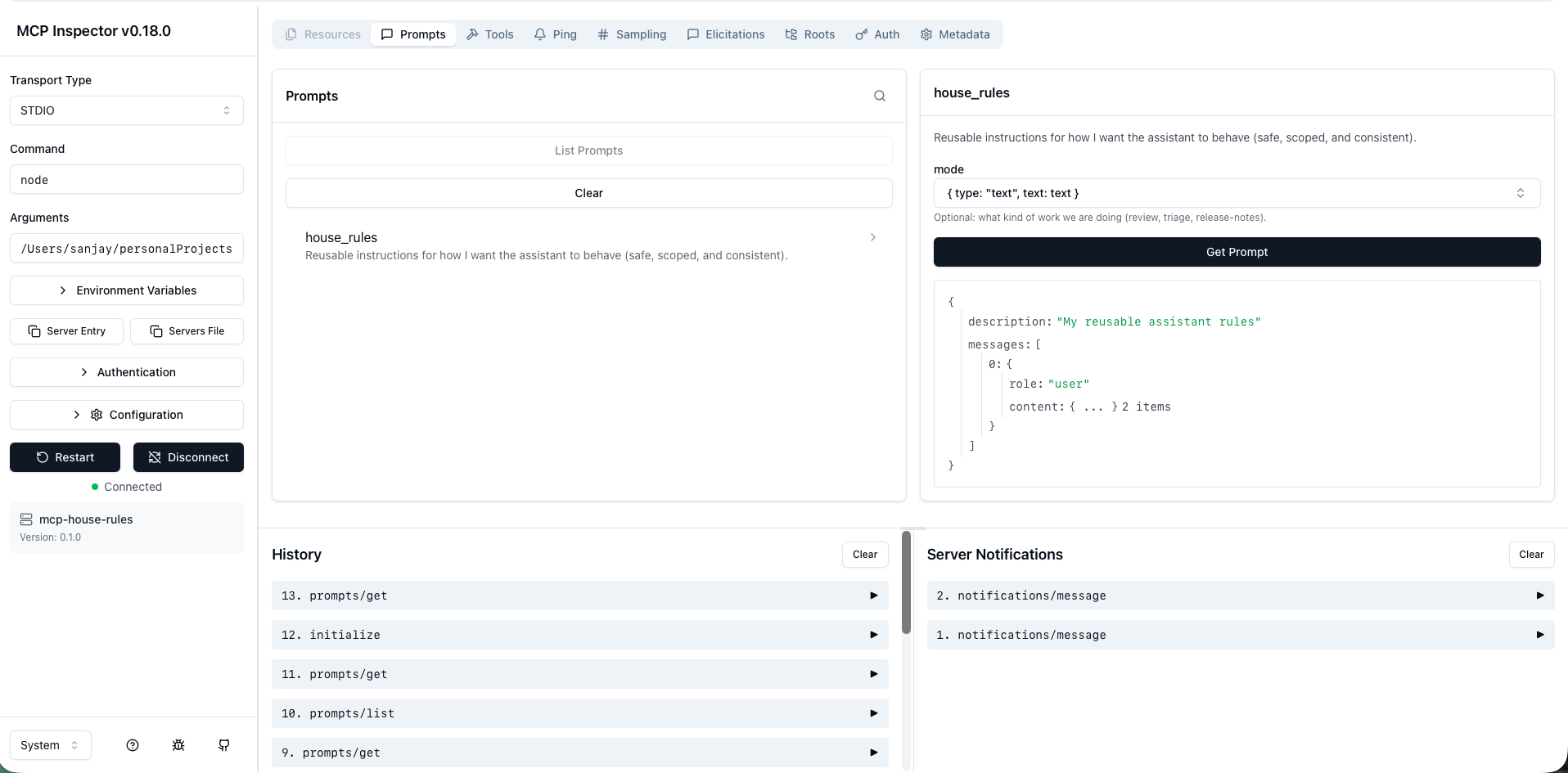
- Click on
house_rulesin the left panel - In the mode field, type a mode like
review,triage, orrelease-notes(plain text, not JSON) - Click "Get Prompt"
- You should see your operating rules returned with the mode applied
Note: The mode field is a free-form text input. Just type the mode name directly (e.g., review), not JSON syntax.
Step 5: Test the Tools
Go to the Tools tab and select git_context:
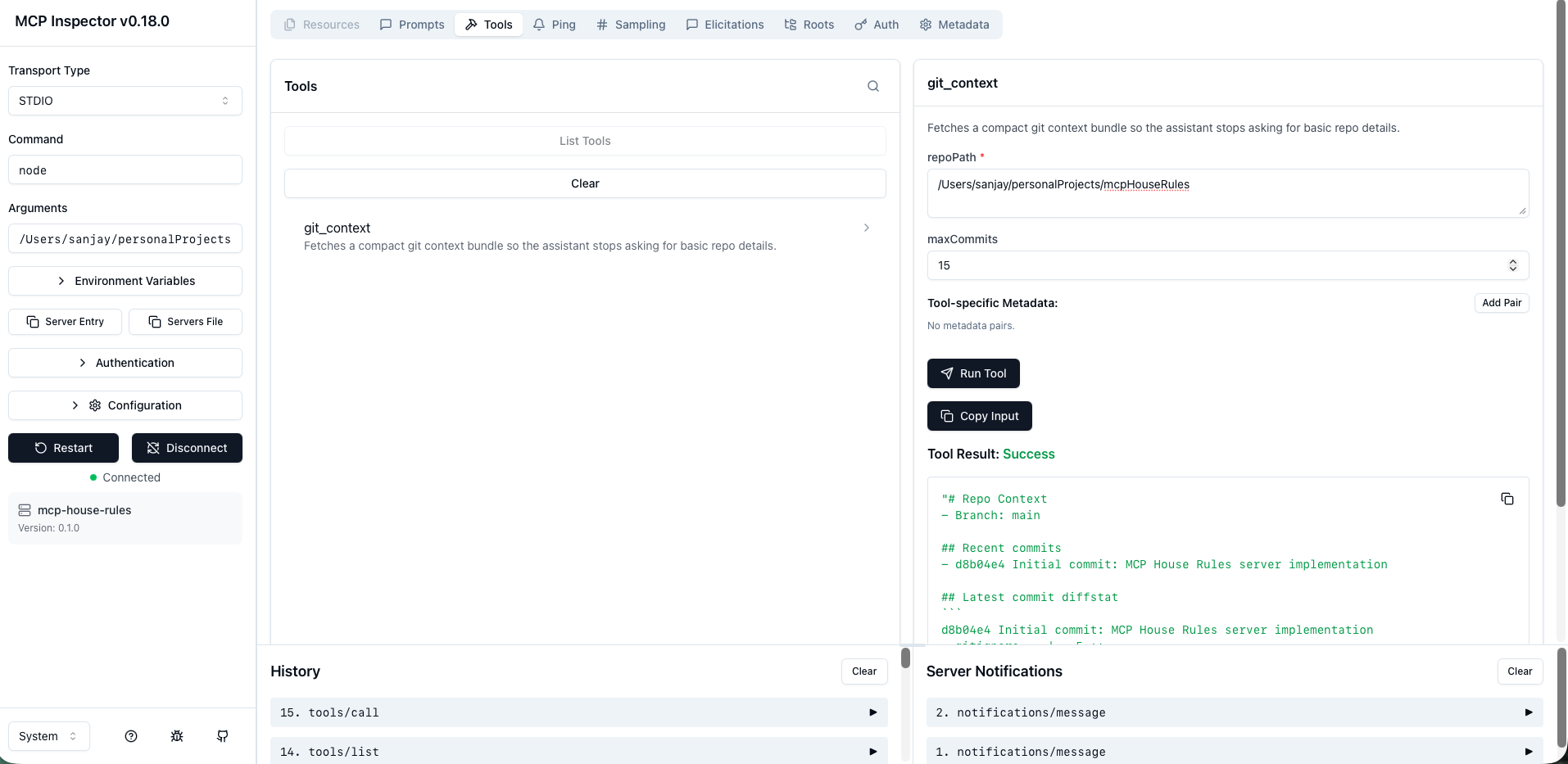
- Click on
git_contextin the left panel - Enter the repoPath:
/Users/sanjay/personalProjects/mcpHouseRules(use an absolute path to any git repository) - Set maxCommits to
15(or any number 1-50) - Click "Run Tool"
- You should see the repo context: branch name, recent commits, and diffstat
Verification Checklist
- ✅ Prompts list includes
house_rules - ✅ Tools list includes
git_context - ✅ Calling
house_rulesreturns your operating rules with the mode applied - ✅ Calling
git_contextreturns a compact repo context bundle
Troubleshooting
Server doesn't connect:
- Verify the path to
dist/index.jsis correct (use absolute path) - Make sure you've built the project:
npm run build - Check that no other process is using the server
Prompt returns an error:
- Make sure the mode field contains plain text (e.g.,
review), not JSON - The mode is optional; leaving it empty defaults to
general
Tool returns "Not a git repository":
- Verify the
repoPathis an absolute path to a valid git repository - The directory must contain a
.gitfolder
Integration with MCP Clients
Different MCP clients have different configuration formats, but the setup is similar:
- Register the server as a local process
- Set the command to:
node+ absolute path todist/index.js - The client will discover prompts and tools automatically
Example Configuration (Cursor)
In your Cursor MCP settings, add:
{
  "mcpServers": {
    "house-rules": {
      "command": "node",
      "args": ["/absolute/path/to/mcpHouseRules/dist/index.js"]
    }
  }
}
Daily Usage Example
Once integrated, your workflow becomes:
-
Apply the house_rules prompt (with optional mode):
Apply house_rules in review mode -
Call git_context for your repository:
Call git_context on /absolute/path/to/repo with 15 commits -
Ask for what you actually want:
Summarize what changed recently, flag risky areas, and give me a short checklist for what to verify before merging.
What changed compared to normal prompting:
- ✅ You're not retyping rules every time
- ✅ You're not answering "what branch is this"
- ✅ The assistant starts from a compact, consistent context bundle
Understanding Prompts vs Tools
This MCP server exposes both prompts and tools, which work differently in the MCP protocol:
Prompts (house_rules)
What they are:
- Reusable conversation templates that set context and behavior
- Discovered by the client and applied automatically
- Not directly callable as functions
How they work:
- The client (Cursor, VS Code, etc.) discovers available prompts
- When you reference a prompt, the client retrieves it and applies it to the conversation
- The prompt content becomes part of the conversation context
How to verify it's working:
-
In MCP Inspector:
- Go to the "Prompts" tab
- You should see
house_ruleslisted - Click "Get Prompt" to see the prompt content
- ✅ If you see the prompt content, it's discoverable and working
-
In Cursor:
- After adding to
mcp.jsonand restarting, go to Settings → Tools & MCP - Check that "house-rules" shows "1 prompt" available
- ✅ If the prompt count is correct, it's discoverable
- The prompt will be applied automatically when the client uses it
- After adding to
Note: Prompts are not callable as tools. They're templates that the client uses to set conversation context.
Tools (git_context)
What they are:
- Executable functions that perform actions
- Directly callable by the AI assistant
- Return data or perform operations
How they work:
- The assistant can call tools directly using their names
- Tools execute and return results
- Results are used in the conversation
How to verify it's working:
-
In MCP Inspector:
- Go to the "Tools" tab
- You should see
git_contextlisted - Enter a repo path and click "Run Tool"
- ✅ If you get repo context back, the tool is functional
-
In Cursor:
- After adding to
mcp.jsonand restarting, go to Settings → Tools & MCP - Check that "house-rules" shows "1 tool" available
- ✅ If the tool count is correct, it's discoverable
- Try: "Use git_context to get context for /path/to/repo"
- ✅ If the assistant successfully calls it and returns data, it's working
- After adding to
Verification Checklist
Server Connection:
- ✅ Server appears in Cursor's Tools & MCP settings
- ✅ Shows correct version (0.1.0)
- ✅ Status is "Connected"
Prompt Verification:
- ✅
house_rulesappears in MCP Inspector's Prompts tab - ✅ Can retrieve prompt content in MCP Inspector
- ✅ Cursor shows "1 prompt" for house-rules server
Tool Verification:
- ✅
git_contextappears in MCP Inspector's Tools tab - ✅ Can successfully run
git_contextin MCP Inspector - ✅ Cursor shows "1 tool" for house-rules server
- ✅ Assistant can call
git_contextand get results
Common Confusion
"Why can't I call house_rules as a tool?"
- Prompts are not tools. They're templates that the client applies to conversations.
- The client discovers prompts and uses them to set context, not as executable functions.
"How do I use the house_rules prompt then?"
- In Cursor, the client will discover and apply it automatically when relevant
- You can reference it in conversation: "Apply house_rules in review mode"
- The client retrieves the prompt and applies it to the conversation context
"How do I know if prompts are working?"
- Check that they're discoverable (appear in MCP Inspector and Cursor settings)
- The client applies them automatically - you'll notice the assistant following the rules
- Tools are easier to verify because you can call them directly and see results
Common Pitfalls
1. Logging to stdout breaks everything
Don't use console.log in a stdio MCP server. stdout is reserved for protocol messages. Always log to stderr using the provided log() function.
2. Use absolute paths
If you pass a relative path for repoPath, different clients may run your server with different working directories. Always use absolute paths to avoid weird failures.
3. Resist the urge to overbuild
It's tempting to add features like:
- "Summarize PR"
- "Open files"
- "Edit code"
- "Commit changes"
Resist it. This server is valuable because it stays focused:
- Publish reusable behavior (prompt)
- Publish reusable context (tool)
Everything else can remain in the AI client.
Customization
Modifying House Rules
Edit the prompt text in src/index.ts within the GetPromptRequestSchema handler. The rules are defined in the text array.
Adding New Modes
The mode parameter is already supported. You can extend the prompt logic to provide different instructions based on the mode:
const modeInstructions = {
  review: "Focus on code quality, potential bugs, and maintainability.",
  triage: "Prioritize issues by severity and impact.",
  "release-notes": "Generate concise, user-facing release notes.",
};

const text = [
  // ... existing rules ...
  modeInstructions[mode] || "",
].join("\n");
Extending Git Context
You can add more git information to the git_context tool by adding additional execFileAsync calls:
// Example: Get file changes
const fileChanges = await execFileAsync("git", [
  "-C",
  args.repoPath,
  "diff",
  "--name-status",
  "HEAD~1",
]).then((r) => r.stdout.trim());
Development
Build
npm run build
Run
npm start
TypeScript Configuration
The project uses strict TypeScript settings. See tsconfig.json for details.
License
MIT
Credits
This project is based on the article: "Stop Re-Explaining Yourself to AI with MCP" - a beginner-friendly guide to building reusable MCP servers.
Contributing
This is a minimal, focused server. If you want to extend it, consider:
- Keeping it simple and focused
- Adding only reusable prompts and context tools
- Avoiding complex agent logic (that belongs in the client)
Remember: Tools are reusable actions. Prompts are reusable behavior. Together, they turn "I keep re-explaining myself" into "my client can discover how I work."