MCP Media Forge


MCP server that generates diagrams, charts, and visual documentation from text DSLs -- designed for AI coding agents to embed into Markdown.
LLM agents call tools like render_mermaid or render_d2 with text input, and get back file paths to SVG/PNG assets ready to embed in docs.
Output Gallery
Mermaid Flowchart

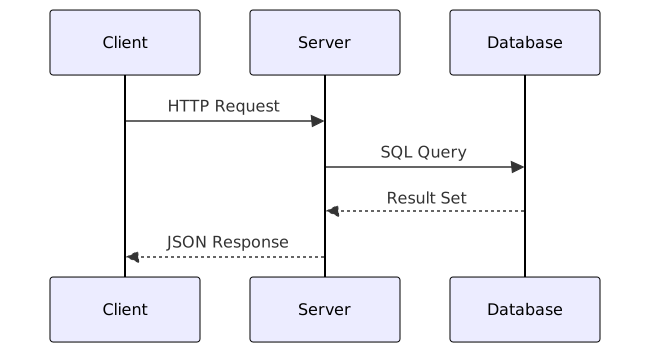
Mermaid Sequence Diagram
D2 Architecture Diagram
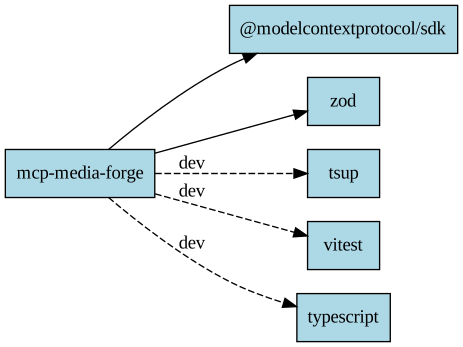
Graphviz Dependency Graph
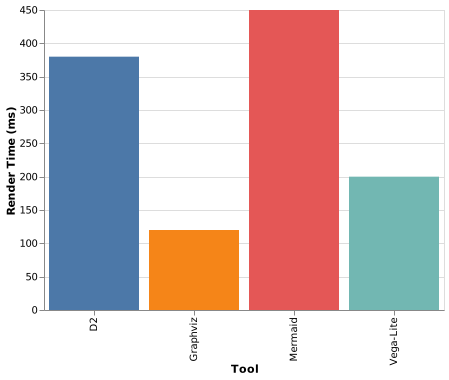
Vega-Lite Bar Chart
Tools
| Tool | Input | Formats | Use Case |
|---|---|---|---|
render_mermaid | Mermaid code | SVG, PNG | Flowcharts, sequence, ER, state, Gantt, git graphs |
render_d2 | D2 code | SVG, PNG | Architecture diagrams with containers and icons |
render_graphviz | DOT code | SVG, PNG | Dependency graphs, network diagrams |
render_chart | Vega-Lite JSON | SVG, PNG | Bar, line, scatter, area, heatmap charts |
list_assets | -- | JSON | List all generated files |
Quick Start
1. Start the rendering container
cd docker
docker compose up -d
2. Install the MCP server
Option A — npx (no install)
npx mcp-media-forge
Option B — Clone and build
git clone https://github.com/PavelGuzenfeld/mcp-media-forge.git
cd mcp-media-forge
npm install
npm run build
3. Register with your MCP client
Any MCP-compatible client (Claude Code, Cursor, VS Code + Copilot, Cline, etc.) can use this server. The standard config:
{
  "mcpServers": {
    "media-forge": {
      "command": "node",
      "args": ["/path/to/mcp-media-forge/dist/index.js"],
      "env": {
        "PROJECT_ROOT": "/path/to/your/project"
      }
    }
  }
}
Where to add this depends on your client:
- Claude Code:
~/.claude/settings.json - Cursor: MCP settings panel
- VS Code (Copilot):
.vscode/mcp.json - Cline: MCP server configuration
4. Use it
Ask your AI assistant to generate a diagram:
"Create a sequence diagram showing the OAuth2 flow and embed it in the README"
The agent will call render_mermaid with the diagram code, get back a file path, and embed it in your markdown.
How It Works
AI Agent (any MCP client)
    |
    | MCP Protocol (JSON-RPC over stdio)
    v
MCP Media Forge (Node.js on host)
    |
    | docker exec (sandboxed, no network)
    v
Rendering Container
  ├── mmdc       (Mermaid CLI + Chromium)
  ├── d2         (D2 diagrams)
  ├── dot/neato  (Graphviz)
  └── vl2svg     (Vega-Lite via vl-convert)
    |
    v
docs/generated/
  mermaid-a1b2c3.svg
  d2-7f8e9a.svg
  vegalite-d4e5f6.svg
Key design decisions:
- Text in, file path out -- returns relative paths, never base64 blobs
- Content-hash naming -- same input = same file = free caching + git-friendly
- SVG preferred -- vector format, small files, diffs cleanly in git
- Docker-contained -- all rendering tools run in a sandboxed container with
network_mode: none - Structured errors -- error responses include
error_type,error_message, andsuggestionto enable LLM self-correction
Tool Reference
render_mermaid
{
  "code": "graph TD\n    A[Start] --> B{Decision}\n    B -->|Yes| C[Done]",
  "format": "svg",
  "theme": "default"
}
| Parameter | Type | Default | Description |
|---|---|---|---|
code | string | required | Mermaid diagram code |
format | svg | png | svg | Output format |
theme | default | dark | forest | neutral | default | Mermaid theme |
render_d2
{
  "code": "client -> server -> database",
  "format": "svg",
  "layout": "dagre"
}
| Parameter | Type | Default | Description |
|---|---|---|---|
code | string | required | D2 diagram code |
format | svg | png | svg | Output format |
theme | number | -- | Theme ID (0=default, 1=neutral-grey, 3=terminal) |
layout | dagre | elk | tala | dagre | Layout engine |
render_graphviz
{
  "dot_source": "digraph G { A -> B -> C }",
  "engine": "dot",
  "format": "svg"
}
| Parameter | Type | Default | Description |
|---|---|---|---|
dot_source | string | required | Graphviz DOT source code |
engine | dot | neato | fdp | sfdp | twopi | circo | dot | Layout engine |
format | svg | png | svg | Output format |
render_chart
{
  "spec_json": "{\"$schema\":\"https://vega.github.io/schema/vega-lite/v5.json\",\"data\":{\"values\":[{\"x\":1,\"y\":10}]},\"mark\":\"bar\",\"encoding\":{\"x\":{\"field\":\"x\"},\"y\":{\"field\":\"y\"}}}",
  "format": "svg"
}
| Parameter | Type | Default | Description |
|---|---|---|---|
spec_json | string | required | Vega-Lite JSON specification |
format | svg | png | svg | Output format |
scale | number | 1 | Scale factor for PNG output |
list_assets
{
  "directory": ""
}
Returns a JSON array of all generated files with name, path, size, and modification time.
Error Handling
All tools return structured errors that help LLMs self-correct:
{
  "status": "error",
  "error_type": "syntax_error",
  "error_message": "Parse error on line 2: ...",
  "line": 2,
  "suggestion": "Check Mermaid syntax at https://mermaid.js.org/syntax/"
}
Error types: syntax_error, rendering_error, dependency_missing.
Environment Variables
| Variable | Default | Description |
|---|---|---|
PROJECT_ROOT | cwd() | Project root for output path resolution |
OUTPUT_DIR | docs/generated | Output directory relative to PROJECT_ROOT |
MEDIA_FORGE_CONTAINER | media-forge-renderer | Docker container name |
Development
npm install
npm run build          # Build with tsup
npm run dev            # Watch mode
npm test               # Run all tests (37 total)
npm run test:unit      # Unit tests only (no Docker needed)
npm run test:component # Integration tests (requires Docker container)
npm run lint           # Type-check with tsc
Running integration tests
cd docker && docker compose up -d   # Start renderer
cd .. && npm run test:component     # 26 tests across all 4 tools
Examples
See examples/ for sample input files:
| File | Tool | Description |
|---|---|---|
mermaid/flowchart.mmd | render_mermaid | Decision flowchart |
mermaid/sequence.mmd | render_mermaid | Client-server sequence |
d2/architecture.d2 | render_d2 | Backend architecture with containers |
graphviz/dependencies.dot | render_graphviz | npm dependency graph |
vegalite/bar-chart.json | render_chart | Tool performance comparison |
See examples/README.md for MCP tool call examples and expected responses.