memoir
AI tools forget you. memoir doesn't.




Sync memory across 11 AI tools. Search it all from your editor via MCP. One CLI, every device.
The Problem
You spend weeks teaching Claude how you code. Your projects are dialed in. Your AI knows your stack, your decisions, your preferences.
Then you switch machines. Everything is gone. Your AI has amnesia. Your projects aren't there. You start from zero.
The Fix
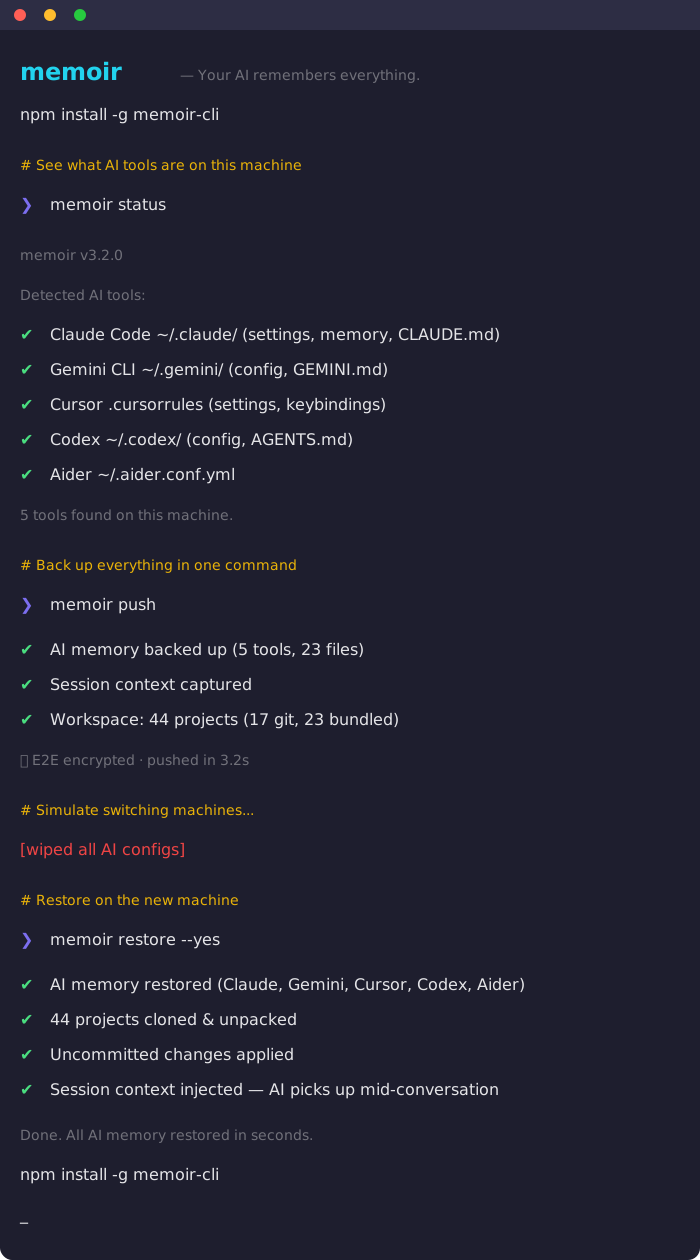
# On your main machine
memoir push

# On any other machine
npm install -g memoir-cli
memoir restore -y

# Done. Everything's back:
# ✔ AI memory restored (Claude, Gemini, Cursor, 11 tools)
# ✔ 44 projects cloned & unpacked
# ✔ Uncommitted changes applied
# ✔ Session context injected — AI picks up mid-conversation
One command to save. One command to restore. That's it.
What Gets Synced
memoir syncs three layers that no other tool connects:
Layer 1: AI Memory
Your AI tool configs, preferences, and project knowledge across 11 tools.
| Tool | What gets synced |
|---|---|
| Claude Code | ~/.claude/ settings, memory, CLAUDE.md files |
| Gemini CLI | ~/.gemini/ config, GEMINI.md files |
| ChatGPT | CHATGPT.md custom instructions |
| OpenAI Codex | ~/.codex/ config, AGENTS.md |
| Cursor | Settings, keybindings, .cursorrules |
| GitHub Copilot | Config, copilot-instructions.md |
| Windsurf | Settings, keybindings, .windsurfrules |
| Zed | Settings, keymap, tasks |
| Cline | Settings, .clinerules |
| Continue.dev | Config, .continuerules |
| Aider | .aider.conf.yml, system prompt |
Layer 2: Session State
What you were doing — not just what your AI knows, but the active context.
- Last coding session captured automatically
- What files you changed, what errors you hit, what decisions you made
- Injected into your AI on restore so it picks up mid-conversation
- Secrets auto-redacted (API keys, tokens, passwords stripped before sync)
Layer 3: Workspace (NEW in v3.1)
Your actual projects — code, files, everything.
- Git projects: Remote URLs saved, auto-cloned on restore
- Non-git projects: Bundled as compressed archives, unpacked on restore
- Uncommitted work: Saved as patches, applied after clone
- Zero git commands needed — memoir handles it all
memoir push on Mac:
  ✔ AI memory backed up
  ✔ Session context captured
  ✔ Workspace: 44 projects (17 git, 23 bundled)
  🔒 E2E encrypted

memoir restore on Windows:
  ✔ AI memory restored
  ✔ stock-market-book → C:\Users\You\stock-market-book (cloned)
  ✔ socialslink → C:\Users\You\socialslink (cloned)
  ✔ btc-trader → C:\Users\You\btc-trader (unpacked)
  ✔ 41 more projects restored
  📋 Session context injected — Claude picks up where you left off
Quick Start
# Install
npm install -g memoir-cli

# First-time setup
memoir init

# Back up everything
memoir push

# Restore on any machine
memoir restore
MCP Server (NEW in v3.2)
memoir ships an MCP server so your AI tools can search, read, and save memories without leaving the conversation.
# Start the server
memoir mcp
Claude Code — add to ~/.mcp.json:
{
  "mcpServers": {
    "memoir": { "command": "memoir-mcp" }
  }
}
Cursor — add to .cursor/mcp.json:
{
  "mcpServers": {
    "memoir": { "command": "memoir-mcp" }
  }
}
Your editor gets 6 tools: memoir_recall (search all memories), memoir_remember (save context), memoir_list, memoir_read, memoir_status, and memoir_profiles. Zero cost — runs locally.
Key Features
Workspace sync
memoir push     # scans all projects, saves git URLs + bundles non-git projects
memoir restore  # auto-clones repos, unpacks bundles, applies uncommitted patches
No manual git commands. memoir detects your projects, tracks their remotes, and restores them anywhere.
Translate between AI tools
memoir migrate --from chatgpt --to claude
# AI-powered — rewrites conventions, not copy-paste

memoir migrate --from chatgpt --to all
# Translate to every tool at once
Session handoff
# Capture your session (automatic on push, or manual)
memoir snapshot

# Pick up on another machine
memoir resume --inject --to claude
E2E Encryption
memoir encrypt    # toggle encryption on/off
memoir push       # prompted for passphrase, AES-256-GCM encrypted
Your backup is encrypted before it leaves your machine. Even if your storage is compromised, your data is safe. Secret scanning auto-redacts API keys, tokens, and passwords.
Profiles (personal / work)
memoir profile create work
memoir push --profile work
memoir profile switch personal
Each profile has its own repo and tool filters. Work configs never mix with personal.
Cloud sync (Pro)
memoir login
memoir cloud push      # encrypted cloud backup
memoir cloud restore   # restore from any version
memoir history         # view all backup versions
Cross-platform (Mac / Windows / Linux)
# Push from Mac
memoir push

# Restore on Windows — paths remap automatically
memoir restore
Claude's memory paths are automatically remapped between platforms. Projects are cloned to the right locations. It just works.
All Commands
| Command | What it does |
|---|---|
memoir init | Setup wizard — GitHub or local storage |
memoir push | Back up AI memory + workspace + session |
memoir restore | Restore everything on a new machine |
memoir status | Show detected AI tools |
memoir doctor | Diagnose issues, scan for secrets |
memoir view | Preview what's in your backup |
memoir diff | Show changes since last backup |
memoir migrate | Translate memory between tools via AI |
memoir snapshot | Capture current coding session |
memoir resume | Pick up where you left off |
memoir encrypt | Toggle E2E encryption |
memoir profile | Manage profiles (personal/work) |
memoir cloud push | Back up to memoir cloud |
memoir cloud restore | Restore from memoir cloud |
memoir history | View cloud backup versions |
memoir login | Sign in to memoir cloud |
memoir mcp | Start MCP server for editor integration |
memoir update | Self-update to latest version |
How memoir compares
| Feature | memoir | dotfiles managers | ai-rulez | memories.sh |
|---|---|---|---|---|
| AI memory sync | 11 tools | No | 18 tools | 3 tools |
| Workspace sync | Yes | No | No | No |
| Session handoff | Yes | No | No | No |
| AI-powered translation | Yes | No | No | No |
| E2E encryption | Yes | No | No | No |
| Secret scanning | Yes | Some | No | No |
| Cross-platform remap | Yes | Some | No | No |
| Uncommitted work patches | Yes | No | No | No |
| Cloud backup | Yes | No | No | Yes ($15/mo) |
| Profiles | Yes | No | No | No |
| MCP server | Yes | No | No | No |
| Free & open source | Yes | Yes | Yes | No |
Common Workflows
New machine setup
# Old machine
memoir push

# New machine — one command, everything's back
npm install -g memoir-cli && memoir init && memoir restore -y
Daily sync between machines
memoir push      # end of day on laptop
memoir restore   # next morning on desktop — AI knows what you were doing
Switching AI tools
memoir migrate --from chatgpt --to claude
# Your custom instructions become a proper CLAUDE.md
Team onboarding
# Senior dev pushes team config
memoir push --profile team

# New hire runs one command
memoir restore --profile team
# Every project cloned. Every AI tool configured. Day one productive.
Security
- E2E encryption — AES-256-GCM with scrypt key derivation
- Secret scanning — 20+ patterns detect API keys, tokens, passwords, connection strings
- Auto-redaction — secrets stripped from session handoffs before sync
- No credentials synced — .env files, auth tokens, and API keys are never included
- Passphrase verified — wrong passphrase caught before decrypt attempt
Requirements
- Node.js >= 18
- Git (for workspace sync)
- Works on macOS, Windows, Linux
Contributing
Contributions welcome — especially new tool adapters and migration improvements.
- Fork the repo
- Create your branch (
git checkout -b feature/my-feature) - Commit and push
- Open a PR
Links
- Website: memoir.sh
- npm: memoir-cli
- Blog: memoir.sh/blog
- Issues: GitHub Issues
License
MIT