Mockups MPC
A self-hosted MCP server and gallery for AI-generated mockups. AI tools send mockups via MCP tool calls, the server stores and catalogs them, and you browse everything in a clean web gallery.
Token-efficient by design. MCP tool parameters flow through the model context, so sending a large HTML file via a tool call wastes tokens. Mockups MPC provides an HTTP upload endpoint (POST /api/upload) — the AI writes the file locally and curls it to the server, keeping file content entirely out of the model context. MCP tools handle lightweight operations only: listing, metadata, tagging, and deletion.
Prerequisites
- Docker (for deployment) or Python 3.12+ (for local development)
- An MCP-compatible AI client (Claude Code, Claude Desktop, etc.)
- Optional: Traefik reverse proxy (for production with TLS)
Why
Every time an AI tool generates a mockup, there's no consistent place for it to go. Files get scattered, sessions lose context, and there's no history. Mockups MPC solves this: the AI sends the mockup to the server, you view it in the gallery, and the local file gets cleaned up. One place for everything.
Architecture
┌─────────────────┐     MCP (HTTP/SSE)     ┌──────────────────────┐
│  Claude Code /  │ ◄───────────────────── │                      │
│  Claude Desktop │  send/list/get/update  │    Mockups MPC       │
│  Any MCP Client │  delete/tag            │    (FastAPI)         │
└─────────────────┘                        │                      │
                                           │  ┌────────────────┐  │
       Browser                             │  │  MCP Server    │  │
    ┌──────────┐      GET /                │  │  (fastmcp)     │  │
    │ Gallery  │ ◄──────────────────────── │  └────────────────┘  │
    │ Viewer   │                           │  ┌────────────────┐  │
    └──────────┘                           │  │  JSON API      │  │
                                           │  │  /api/*        │  │
                                           │  └────────────────┘  │
                                           │  ┌────────────────┐  │
                                           │  │  SQLite (WAL)  │  │
                                           │  │  + Filesystem   │  │
                                           │  └────────────────┘  │
                                           └──────────────────────┘
Single Docker container running a FastAPI app that serves two roles:
- MCP Server — mounted at
/mcp/(HTTP transport) and/mcp/sse(SSE transport). AI tools connect here to send and manage mockups. - Web Gallery — served at
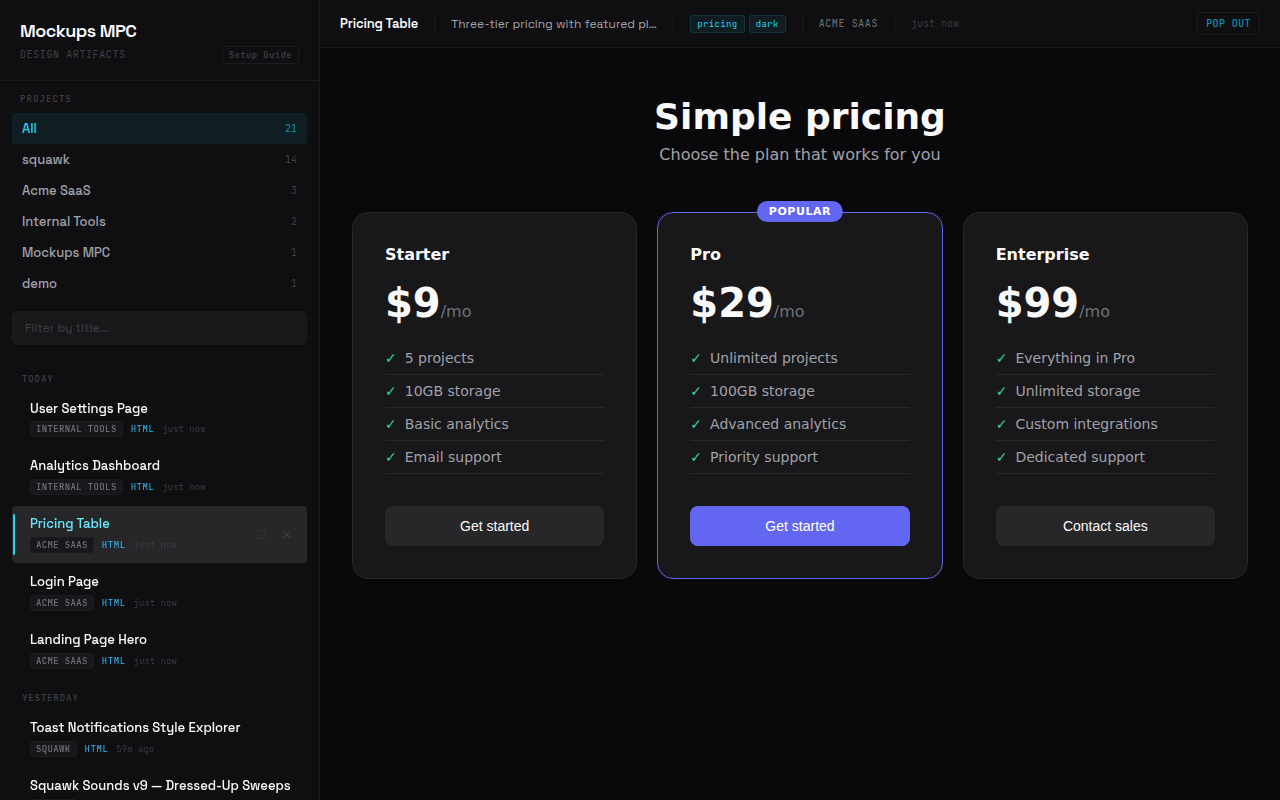
/. Sidebar with project list and chronological feed, main viewer with iframe/image display.
Data Layer
- SQLite in WAL mode — metadata catalog (project, title, description, tags, content type, timestamps)
- Filesystem — mockup files stored in
data/{project_slug}/{uuid}.{ext} - Storage is a bind-mounted
data/directory next to the compose file
Tech Stack
- Python 3.12
- FastAPI + uvicorn
- fastmcp v3.x (standalone)
- SQLite via aiosqlite
- Jinja2 templates + vanilla JS
- Docker + Traefik
Security
There is no built-in authentication. All API endpoints and MCP tools are open to anyone who can reach the server. This is designed for trusted networks (LAN, VPN, Tailscale) or behind a reverse proxy that handles auth. If you deploy this on a public network, add authentication at the proxy layer.
MCP Tools
| Tool | Description |
|---|---|
send_mockup | Send HTML/SVG (raw string) or PNG/JPG (base64) to the gallery. Returns a gallery URL. |
list_mockups | List mockups reverse-chronologically, optionally filtered by project. |
get_mockup | Get a specific mockup by UUID with view and gallery URLs. Curl the view_url to read the file content. |
update_mockup | Update metadata (title, description, tags) or replace content. |
delete_mockup | Delete a mockup — removes both the DB record and file on disk. |
tag_mockup | Add or remove tags on an existing mockup. |
The server stores all content permanently. AI clients can clean up local files when they're no longer needed, or retrieve content later via get_mockup.
API Routes
| Route | Purpose |
|---|---|
GET / | Gallery UI |
GET /view/{id} | Raw mockup (HTML rendered, images served with correct MIME type) |
GET /api/mockups | JSON listing with limit, offset, project filter |
GET /api/mockups/{id} | Single mockup metadata |
GET /api/projects | Project list with counts |
POST /api/upload | Upload a mockup file (multipart form: file, project, title, description?, tags?) |
GET /health | Health check |
Setup
1. Clone and configure
git clone https://github.com/kgNatx/mockups-mpc.git
cd mockups-mpc
2. Deploy
Quick start (pre-built image):
docker compose -f docker-compose.local.yml up -d
# Gallery available at http://localhost:8000
Build from source:
docker compose -f docker-compose.local.yml up -d --build
Production (with Traefik):
cp .env.example .env
# Edit .env with your domain and Traefik network name
docker compose up -d --build
3. Verify
curl http://localhost:8000/health
# {"status":"ok"}
4. Connect Claude Code
claude mcp add-json mockups-gallery '{"type":"http","url":"https://your-domain.com/mcp"}'
Or add to .mcp.json (project-level) or ~/.claude/.mcp.json (global):
{
  "mcpServers": {
    "mockups-gallery": {
      "type": "http",
      "url": "https://your-domain.com/mcp"
    }
  }
}
5. Connect Claude Desktop
Add to your Claude Desktop config file:
- macOS:
~/Library/Application Support/Claude/claude_desktop_config.json - Windows:
%APPDATA%\Claude\claude_desktop_config.json - Linux:
~/.config/Claude/claude_desktop_config.json
{
  "mcpServers": {
    "mockups-gallery": {
      "type": "sse",
      "url": "https://your-domain.com/mcp/sse"
    }
  }
}
6. Tell your AI to use it
Add instructions to your CLAUDE.md (or equivalent) so your AI uploads mockups via curl instead of passing file content through the model context:
# Mockups

When generating UI mockups, design concepts, or visual prototypes,
write the file locally then upload it to the Mockups MPC gallery via curl:

    curl -s -X POST https://your-domain.com/api/upload \
      -F file=@/path/to/file.html -F project=name -F title=name \
      [-F description=text] [-F "tags=a,b,c"]

To read a mockup's content later, use `get_mockup` to get its
`view_url`, then curl it.
Add to ~/.claude/CLAUDE.md for all projects, or a project's CLAUDE.md for specific ones.
Gallery UI
The gallery auto-seeds a Setup Guide as the first entry on fresh installs. The guide covers all configuration methods with copy-able code blocks.
Layout: Sidebar (project list + chronological feed with title filter + infinite scroll) + main viewer (iframe for HTML, img for images/SVG) + metadata bar + pop-out link.
Theme: Techno Chic Minimalist — Space Grotesk, cyan accents, zinc/neutral dark backgrounds.
Project Structure
app/
├── main.py          # FastAPI app, lifespan, MCP mount, router includes
├── config.py        # Settings (DATA_DIR, DB_PATH, BASE_URL from env)
├── db.py            # SQLite init + CRUD (WAL mode, aiosqlite)
├── models.py        # Pydantic models
├── storage.py       # Slug generation, file write/read/delete, 25MB limit
├── mcp_server.py    # FastMCP instance, tool logic, tool wrappers
├── seed.py          # Auto-seed setup guide on empty DB
├── routes/
│   ├── api.py       # JSON API endpoints
│   └── gallery.py   # Gallery page + raw mockup serving
├── templates/
│   └── gallery.html # Jinja2 gallery template
└── static/
    ├── style.css         # Gallery theme
    └── setup-guide.html  # Self-contained setup guide page
Development
python -m venv .venv
source .venv/bin/activate
pip install -r requirements.txt
pytest tests/ -v
uvicorn app.main:app --reload
47 tests covering storage, database, MCP tools, API routes, upload, and gallery.
License
MIT — see LICENSE.