⚡ momentum-mcp
Give your AI agent a Bloomberg terminal.
A Model Context Protocol server for quantitative trading analysis.
Tools • Quickstart • Connect Your Client • Tech Stack • License
What Is This?
momentum-mcp turns any MCP-compatible AI assistant into a quantitative trading analyst. Instead of copy-pasting tickers into Yahoo Finance and screenshotting charts, your AI agent can:
- 🔍 Screen the entire market in seconds — find overbought stocks, unusual volume spikes, new 52-week highs
- 📊 Pull clean OHLCV data for any ticker, any timeframe — ready for analysis, no CSV wrangling
- 📈 Compute technical indicators — RSI, MACD with plain-English interpretation, not just raw numbers
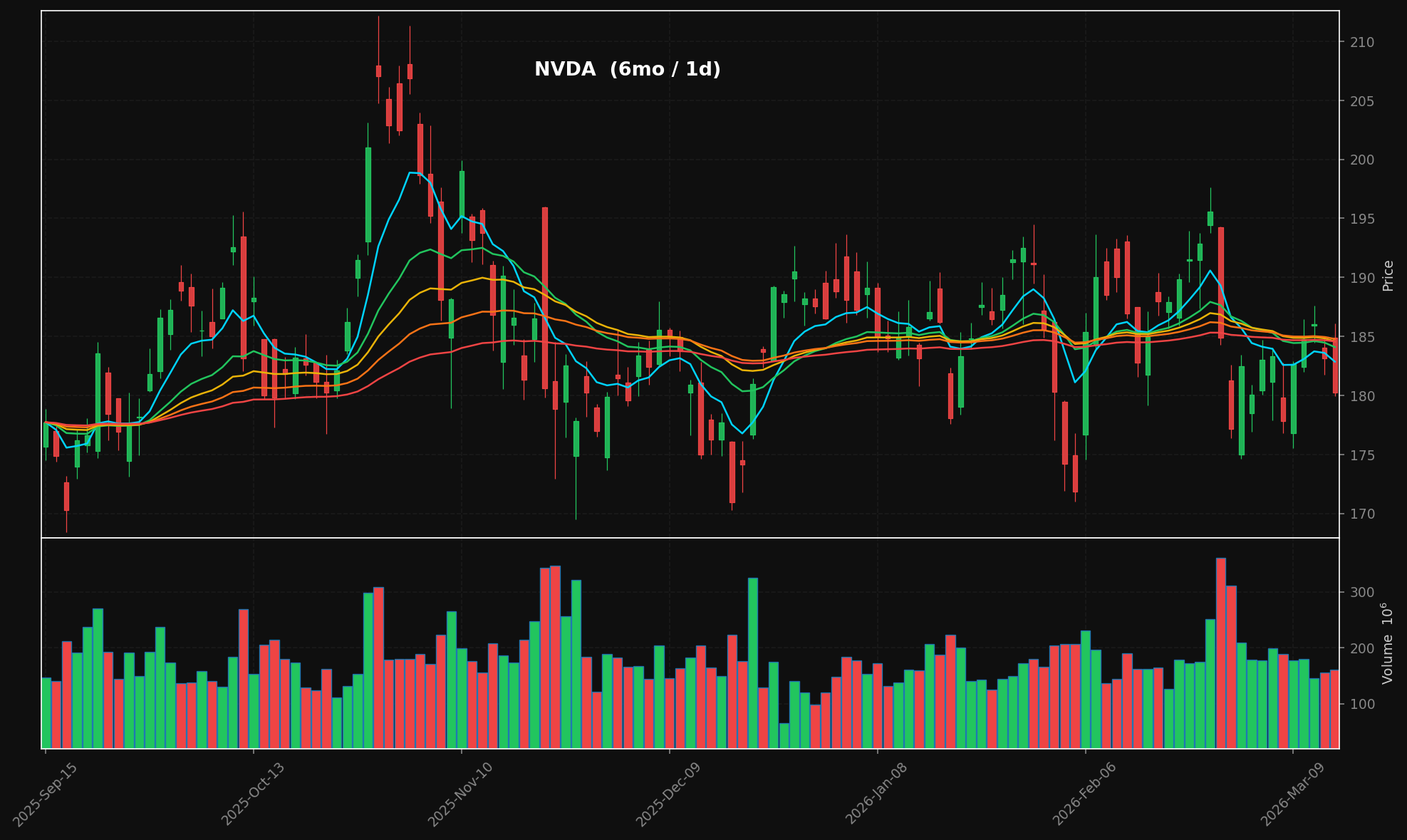
- 🕯️ Generate professional candlestick charts — dark-themed with stacked EMA overlays (8/21/34/55/89), volume panels, publication-ready PNGs
- 📰 Aggregate financial news from multiple RSS sources in real-time
- 📄 Extract full article text from any URL — your agent reads the actual article, not just the headline
All of this happens through the Model Context Protocol, so your AI assistant calls these tools natively — no API keys, no REST endpoints, no configuration hell.
Example Chart Output
generate_chart("NVDA", period="6mo") → candlestick + volume + stacked EMAs:
Tools
| Tool | What It Does |
|---|---|
run_stock_screen | Scan for stocks by preset: most active, new highs/lows, overbought, oversold, high relative volume |
get_historical_data | Fetch OHLCV candlestick data — any ticker, any period, any interval |
analyze_technicals | Compute RSI(14) + MACD(12,26,9) and get a plain-English analysis summary |
generate_chart | Render a candlestick chart with stacked EMA overlays (8/21/34/55/89) + volume → PNG + base64 |
fetch_ticker_news | Pull recent headlines from Yahoo Finance & Google News RSS feeds |
extract_article_text | Extract the full article body from any URL (strips ads, nav, paywalls) |
Quickstart
git clone https://github.com/mphinance/momentum-mcp.git
cd momentum-mcp
python3 -m venv .venv
source .venv/bin/activate
pip install -r requirements.txt
Test that everything works:
python -c "from mcp_server.server import mcp; print('✓ Ready')"
Run the server:
python -m mcp_server.server
Connect Your Client
Claude Desktop
The most popular MCP client. Add to your claude_desktop_config.json (located at ~/Library/Application Support/Claude/ on macOS or %APPDATA%\Claude\ on Windows):
{
  "mcpServers": {
    "momentum": {
      "command": "python",
      "args": ["-m", "mcp_server.server"],
      "cwd": "/absolute/path/to/momentum-mcp",
      "env": {
        "VIRTUAL_ENV": "/absolute/path/to/momentum-mcp/.venv",
        "PATH": "/absolute/path/to/momentum-mcp/.venv/bin:$PATH"
      }
    }
  }
}
Restart Claude Desktop. You'll see the 🔨 tools icon — click it to verify all 6 tools are loaded.
Cursor
Add to .cursor/mcp.json in your project root (or global config at ~/.cursor/mcp.json):
{
  "mcpServers": {
    "momentum": {
      "command": "/absolute/path/to/momentum-mcp/.venv/bin/python",
      "args": ["-m", "mcp_server.server"],
      "cwd": "/absolute/path/to/momentum-mcp"
    }
  }
}
The tools will be available in Cursor's Agent mode. Ask it to "screen for overbought stocks" or "chart NVDA over the last 6 months."
VS Code + GitHub Copilot
MCP is generally available in GitHub Copilot (VS Code 1.86+). Add to your .vscode/mcp.json:
{
  "servers": {
    "momentum": {
      "command": "/absolute/path/to/momentum-mcp/.venv/bin/python",
      "args": ["-m", "mcp_server.server"],
      "cwd": "/absolute/path/to/momentum-mcp"
    }
  }
}
Enable Agent mode in the Copilot Chat panel — momentum tools will appear in the tool picker.
Windsurf
Add to your Windsurf MCP config at ~/.codeium/windsurf/mcp_config.json:
{
  "mcpServers": {
    "momentum": {
      "command": "/absolute/path/to/momentum-mcp/.venv/bin/python",
      "args": ["-m", "mcp_server.server"],
      "cwd": "/absolute/path/to/momentum-mcp"
    }
  }
}
Cascade will automatically discover the tools. Use them in any Windsurf chat.
Cline (VS Code Extension)
Open Cline's MCP settings (gear icon → MCP Servers → "Edit MCP Settings") and add:
{
  "mcpServers": {
    "momentum": {
      "command": "/absolute/path/to/momentum-mcp/.venv/bin/python",
      "args": ["-m", "mcp_server.server"],
      "cwd": "/absolute/path/to/momentum-mcp"
    }
  }
}
Cline will list the tools in its server panel. Enable them and they're ready to use.
Claude Code (CLI)
Add the server directly from the terminal:
claude mcp add momentum \
  /absolute/path/to/momentum-mcp/.venv/bin/python \
  -m mcp_server.server \
  --cwd /absolute/path/to/momentum-mcp
Verify it's connected:
claude mcp list
Any Other MCP Client
momentum-mcp uses the stdio transport (the MCP default). Any client that supports stdio can connect by running:
/path/to/.venv/bin/python -m mcp_server.server
That's it. No HTTP server, no ports, no auth — just stdin/stdout.
Project Structure
momentum-mcp/
├── requirements.txt         # Pinned dependencies
├── README.md
└── mcp_server/
    ├── __init__.py
    ├── server.py            # FastMCP entry point — registers all tools
    ├── screener.py          # TradingView stock scanner (6 presets)
    ├── data.py              # yfinance OHLCV with async wrapper
    ├── technicals.py        # pandas-ta RSI(14) & MACD(12,26,9)
    ├── charts.py            # mplfinance candlestick + volume charts
    └── news.py              # feedparser RSS + trafilatura extraction
Tech Stack
| Library | Role |
|---|---|
| FastMCP | MCP server framework (v3.x) |
| tradingview-screener | Stock screening via TradingView's API |
| yfinance | Yahoo Finance OHLCV data |
| pandas-ta | 130+ technical indicators |
| mplfinance | Financial chart rendering |
| feedparser | RSS/Atom feed parsing |
| trafilatura | Web article text extraction |
Example Prompts
Once connected, try asking your AI assistant:
"Screen the market for stocks with high relative volume today"
"Get me 6 months of daily data for NVDA and analyze the technicals"
"Generate a candlestick chart for AAPL over the past year"
"What's the latest news on TSLA? Pull the full text of the most interesting article."
"Find oversold stocks, then analyze the technicals on the top 3 results"
License
MIT — do whatever you want with it.