MuseScore MCP Server
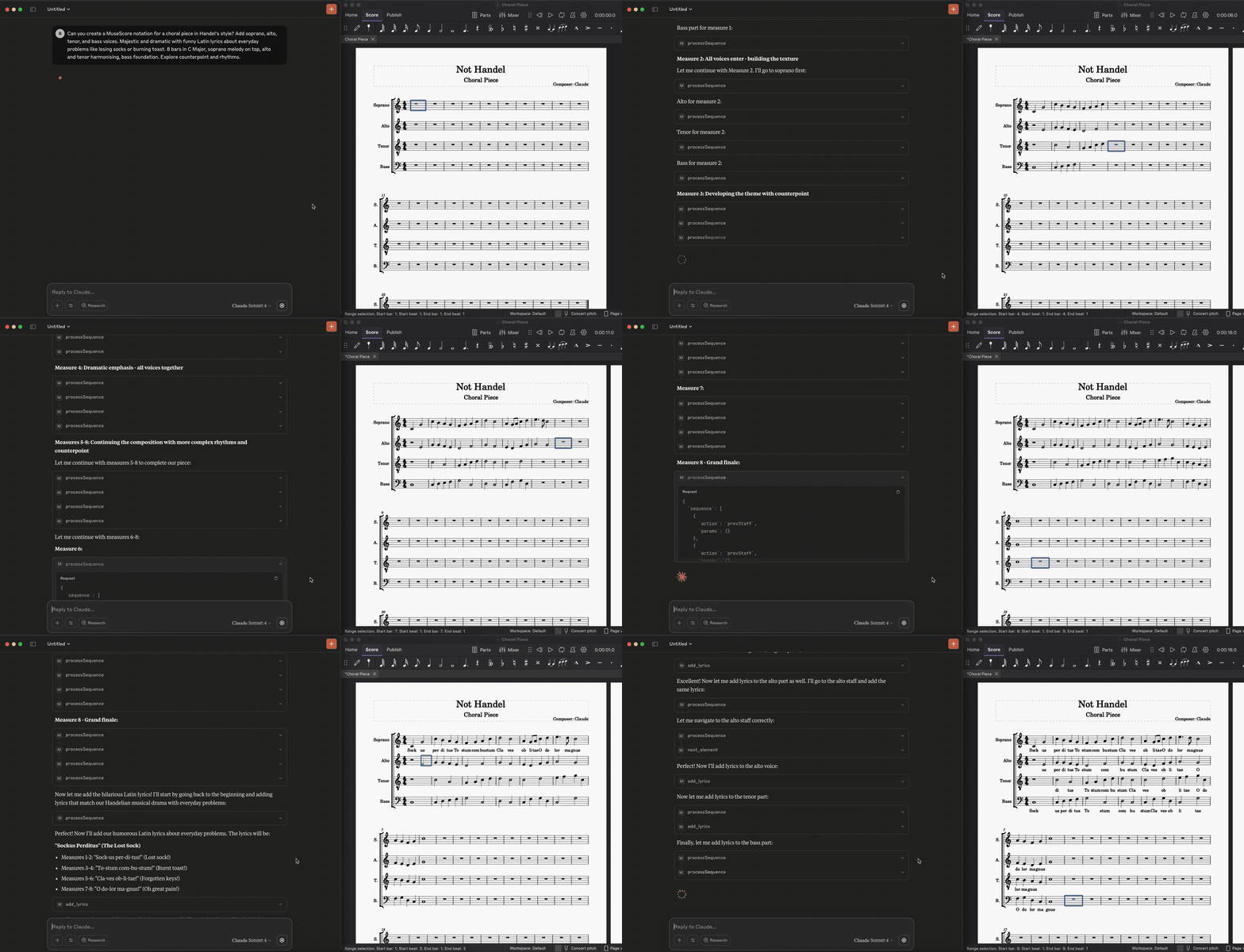
A Model Context Protocol (MCP) server that provides programmatic control over MuseScore through a WebSocket-based plugin system. This allows AI assistants like Claude to compose music, add lyrics, navigate scores, and control MuseScore directly.
Prerequisites
- MuseScore 3.x or 4.x
- Python 3.8+
- Claude Desktop or compatible MCP client
Setup
1. Install the MuseScore Plugin
First, save the QML plugin code to your MuseScore plugins directory:
macOS: ~/Documents/MuseScore4/Plugins/musescore-mcp-websocket.qml
Windows: %USERPROFILE%\Documents\MuseScore4\Plugins\musescore-mcp-websocket.qml
Linux: ~/Documents/MuseScore4/Plugins/musescore-mcp-websocket.qml
2. Enable the Plugin in MuseScore
- Open MuseScore
- Go to Plugins → Plugin Manager
- Find "MuseScore API Server" and check the box to enable it
- Click OK
3. Setup Python Environment
git clone <your-repo>
cd mcp-agents-demo
python -m venv .venv
source .venv/bin/activate  # On Windows: .venv\Scripts\activate
pip install fastmcp websockets
4. Configure Claude Desktop
Add to your Claude Desktop configuration file:
macOS: ~/Library/Application Support/Claude/claude_desktop_config.json
Windows: %APPDATA%\Claude\claude_desktop_config.json
{
  "mcpServers": {
    "musescore": {
      "command": "/path/to/your/project/.venv/bin/python",
      "args": [
        "/path/to/your/project/server.py"
      ]
    }
  }
}
Note: Update the paths to match your actual project location.
Running the System
Order of Operations (Important!)
- Start MuseScore first with a score open
- Run the MuseScore plugin: Go to Plugins → MuseScore API Server
- You should see console output:
"Starting MuseScore API Server on port 8765"
- You should see console output:
- Then start the Python MCP server or restart Claude Desktop
[insert screenshot of different functionality, harmonisation, melodywriting, as zoomed in GIFs]
Development and Testing
For development, use the MCP development tools:
# Install MCP dev tools
pip install mcp

# Test your server
mcp dev server.py

# Check connection status
mcp dev server.py --inspect
Viewing Console Output
To see MuseScore plugin console output, run MuseScore from terminal:
macOS:
/Applications/MuseScore\ 4.app/Contents/MacOS/mscore
Windows:
cd "C:\Program Files\MuseScore 4\bin"
MuseScore.exe
Linux:
musescore4
Features
This MCP server provides comprehensive MuseScore control:
Navigation & Cursor Control
get_cursor_info()- Get current cursor position and selection infogo_to_measure(measure)- Navigate to specific measurego_to_beginning_of_score()/go_to_final_measure()- Navigate to start/endnext_element()/prev_element()- Move cursor element by elementnext_staff()/prev_staff()- Move between stavesselect_current_measure()- Select entire current measure
Note & Rest Creation
add_note(pitch, duration, advance_cursor_after_action)- Add notes with MIDI pitchadd_rest(duration, advance_cursor_after_action)- Add restsadd_tuplet(duration, ratio, advance_cursor_after_action)- Add tuplets (triplets, etc.)
Measure Management
insert_measure()- Insert measure at current positionappend_measure(count)- Add measures to end of scoredelete_selection(measure)- Delete current selection or specific measure
Lyrics & Text
add_lyrics_to_current_note(text)- Add lyrics to current noteadd_lyrics(lyrics_list)- Batch add lyrics to multiple notesset_title(title)- Set score title
Score Information
get_score()- Get complete score analysis and structureping_musescore()- Test connection to MuseScoreconnect_to_musescore()- Establish WebSocket connection
Utilities
undo()- Undo last actionset_time_signature(numerator, denominator)- Change time signatureprocessSequence(sequence)- Execute multiple commands in batch
Sample Music
Check out the /examples folder for sample MuseScore files demonstrating various musical styles:
- Asian Instrumental - Traditional Asian-inspired instrumental piece
- String Quartet - Classical string quartet arrangement
Each example includes:
.mscz- MuseScore file (editable).pdf- Sheet music.mp3- Audio preview
Usage Examples
Creating a Simple Melody
# Set up the score
await set_title("My First Song")
await go_to_beginning_of_score()

# Add notes (MIDI pitch: 60=C, 62=D, 64=E, etc.)
await add_note(60, {"numerator": 1, "denominator": 4}, True)  # Quarter note C
await add_note(64, {"numerator": 1, "denominator": 4}, True)  # Quarter note E
await add_note(67, {"numerator": 1, "denominator": 4}, True)  # Quarter note G
await add_note(72, {"numerator": 1, "denominator": 2}, True)  # Half note C

# Add lyrics
await go_to_beginning_of_score()
await add_lyrics_to_current_note("Do")
await next_element()
await add_lyrics_to_current_note("Mi")
await next_element()
await add_lyrics_to_current_note("Sol")
await next_element()
await add_lyrics_to_current_note("Do")
Batch Operations
# Add multiple lyrics at once
await add_lyrics(["Twin-", "kle", "twin-", "kle", "lit-", "tle", "star"])

# Use sequence processing for complex operations
sequence = [
    {"action": "goToBeginningOfScore", "params": {}},
    {"action": "addNote", "params": {"pitch": 60, "duration": {"numerator": 1, "denominator": 4}, "advanceCursorAfterAction": True}},
    {"action": "addNote", "params": {"pitch": 64, "duration": {"numerator": 1, "denominator": 4}, "advanceCursorAfterAction": True}},
    {"action": "addRest", "params": {"duration": {"numerator": 1, "denominator": 4}, "advanceCursorAfterAction": True}}
]
await processSequence(sequence)
Troubleshooting
Connection Issues
- "Not connected to MuseScore":
- Ensure MuseScore is running with a score open
- Run the MuseScore plugin (Plugins → MuseScore API Server)
- Check that port 8765 isn't blocked by firewall
Plugin Issues
- Plugin not appearing: Check the
.qmlfile is in the correct plugins directory - Plugin won't enable: Restart MuseScore after placing the plugin file
- No console output: Run MuseScore from terminal to see debug messages
Python Server Issues
- "No server object found": The server object must be named
mcp,server, orappat module level - WebSocket errors: Make sure MuseScore plugin is running before starting Python server
- Connection timeout: The MuseScore plugin must be actively running, not just enabled
API Limitations
- Lyrics: Only first verse supported in MuseScore 3.x plugin API
- Title setting: Uses multiple fallback methods due to frame access limitations
- Selection persistence: Some operations may affect current selection
File Structure
mcp-agents-demo/
├── .venv/
├── server.py                           # Python MCP server entry point
├── musescore-mcp-websocket.qml         # MuseScore plugin
├── requirements.txt
├── README.md
└── src/                                # Source code modules
    ├── __init__.py
    ├── client/                         # WebSocket client functionality
    │   ├── __init__.py
    │   └── websocket_client.py
    ├── tools/                          # MCP tool implementations
    │   ├── __init__.py
    │   ├── connection.py               # Connection management tools
    │   ├── navigation.py               # Score navigation tools
    │   ├── notes_measures.py           # Note and measure manipulation
    │   ├── sequences.py                # Batch operation tools
    │   ├── staff_instruments.py        # Staff and instrument tools
    │   └── time_tempo.py               # Timing and tempo tools
    └── types/                          # Type definitions
        ├── __init__.py
        └── action_types.py             # WebSocket action type definitions
Requirements
Create a requirements.txt file with:
fastmcp
websockets
MIDI Pitch Reference
Common MIDI pitch values for reference:
- Middle C: 60
- C Major Scale: 60, 62, 64, 65, 67, 69, 71, 72
- Chromatic: C=60, C#=61, D=62, D#=63, E=64, F=65, F#=66, G=67, G#=68, A=69, A#=70, B=71
Duration Reference
Duration format: {"numerator": int, "denominator": int}
- Whole note:
{"numerator": 1, "denominator": 1} - Half note:
{"numerator": 1, "denominator": 2} - Quarter note:
{"numerator": 1, "denominator": 4} - Eighth note:
{"numerator": 1, "denominator": 8} - Dotted quarter:
{"numerator": 3, "denominator": 8}