neleus-mcp
MCP server exposing Neleus Hyperliquid tools to Claude
Run market analysis, inspect order books, search docs, and place trades from Claude with Neleus-backed MCP tools.
Mock Questions
- What’s the current RSI and trend for SOL?
- Analyze ETH on the 1h timeframe.
- Show support and resistance for BTC.
- Scan perps for the strongest bullish setups.
- Which markets have rising momentum right now?
- What does the order book look like for HYPE?
- Show bid/ask imbalance for SOL.
- List the Neleus docs pages.
- Search the docs for limit orders.
- Read the docs page for market orders.
- Place a limit buy for ETH at 3200.
- Show my open orders.
- Cancel my latest order.
- Show my recent fills.
Preview
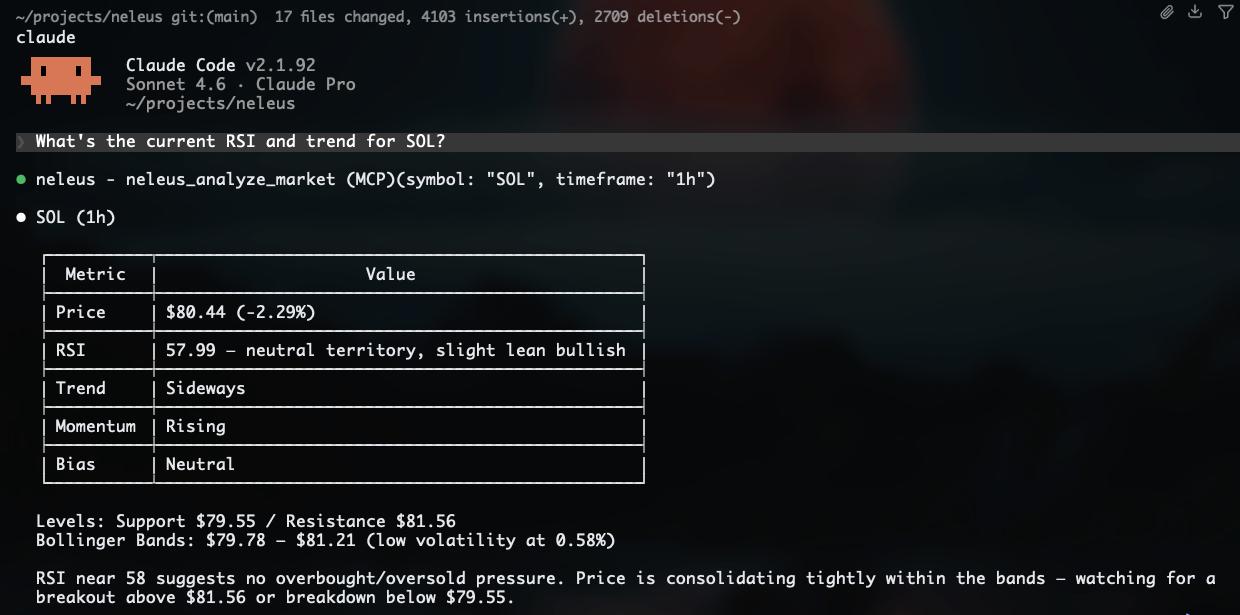
Market (no credentials)
| Tool | Description |
|---|---|
neleus_list_markets | List markets by scope: perps, all-perps, hip3, spot, hip4 |
neleus_analyze_market | TA analysis — RSI, trend, Bollinger bands, support/resistance |
neleus_scan_markets | Rank markets by composite TA score |
neleus_get_order_book | L2 order book snapshot with spread and imbalance |
Docs (no credentials)
| Tool | Description |
|---|---|
neleus_list_docs | List Neleus documentation pages |
neleus_search_docs | Search the Neleus docs |
neleus_read_doc | Read a documentation page by route |
Trading (requires HYPERLIQUID_SIGNER_PRIVATE_KEY)
| Tool | Description |
|---|---|
neleus_place_limit_order | Place a limit order |
neleus_place_market_order | Place a market order |
neleus_cancel_order | Cancel an open order by ID |
neleus_get_open_orders | List open orders |
neleus_get_fills | Recent fill history |
Installation
1. Install uv (once)
uvx is required to run MCP servers without managing Python environments manually.
# macOS / Linux
curl -LsSf https://astral.sh/uv/install.sh | sh

# or via Homebrew
brew install uv
2. Add to Claude Code
claude mcp add neleus -- uvx neleus-mcp
With trading credentials:
claude mcp add neleus \
  -e HYPERLIQUID_SIGNER_PRIVATE_KEY=0x... \
  -e HYPERLIQUID_TESTNET=false \
  -- uvx neleus-mcp
2. Add to Claude Desktop
Edit ~/Library/Application Support/Claude/claude_desktop_config.json:
{
  "mcpServers": {
    "neleus": {
      "command": "uvx",
      "args": ["neleus-mcp"]
    }
  }
}
With trading credentials:
{
  "mcpServers": {
    "neleus": {
      "command": "uvx",
      "args": ["neleus-mcp"],
      "env": {
        "HYPERLIQUID_SIGNER_PRIVATE_KEY": "0x...",
        "HYPERLIQUID_TESTNET": "false"
      }
    }
  }
}
Environment variables
| Variable | Required | Description |
|---|---|---|
HYPERLIQUID_SIGNER_PRIVATE_KEY | Trading only | Wallet private key (0x...) |
HYPERLIQUID_TESTNET | No | true to use testnet for all tools |
NELEUS_DOCS_URL | No | Override the docs manifest URL |
NELEUS_DOCS_MANIFEST_PATH | No | Use a local manifest file (offline/dev) |
Notes
- HIP-4 outcome markets require
testnet=true. - Trading tools raise
PermissionErrorifHYPERLIQUID_SIGNER_PRIVATE_KEYis not set. - Docs are fetched from the live Neleus docs site and cached for 1 hour.