NeuronDB — PostgreSQL AI ecosystem
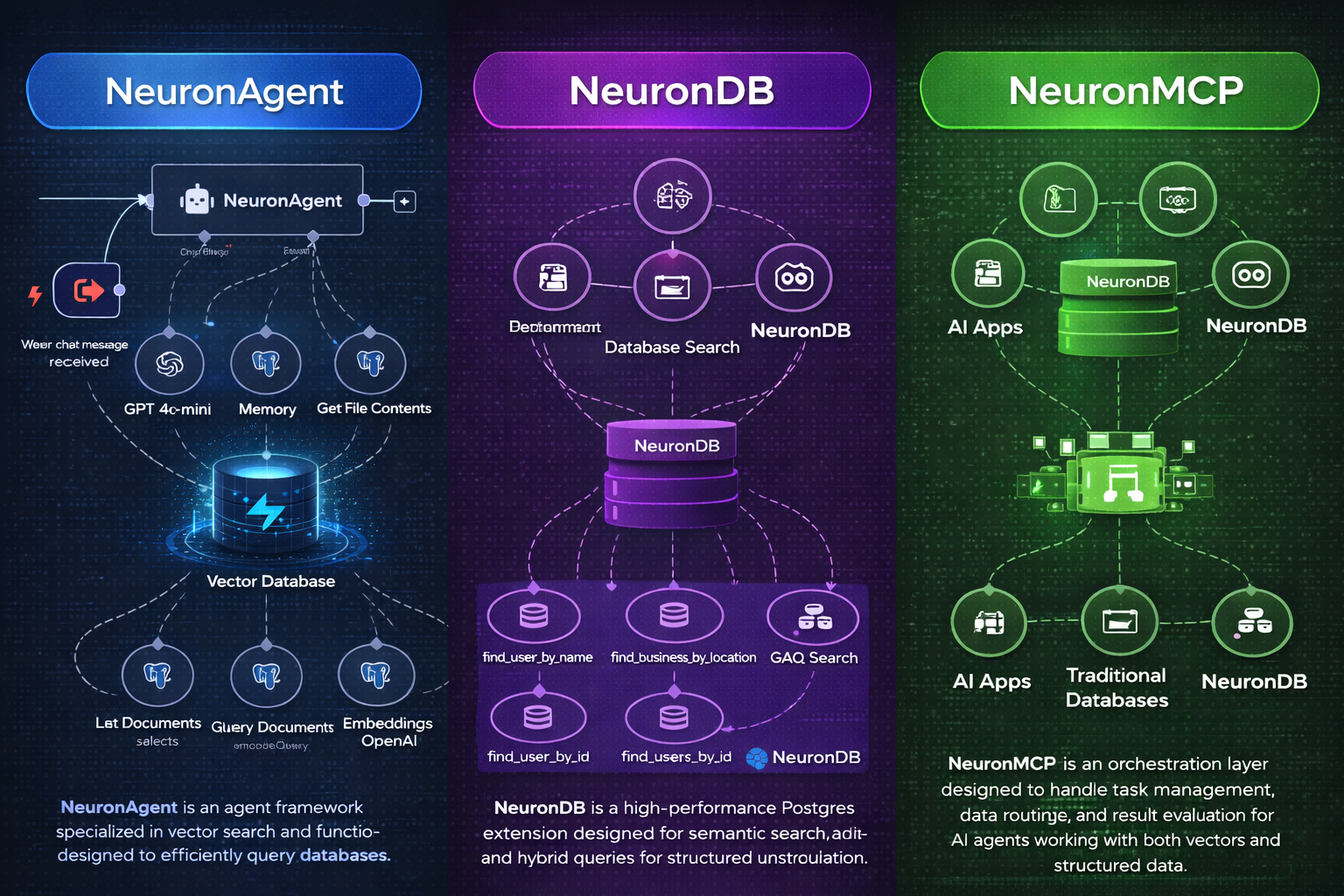






Vector search, embeddings, and ML primitives in PostgreSQL, with optional services for agents, MCP, and a desktop UI.
[!TIP] New here? Start with
Docs/getting-started/simple-start.mdor jump toQUICKSTART.md.
Hello NeuronDB (60 seconds)
Get vector search working in under a minute:
# 1. Start PostgreSQL with NeuronDB (CPU profile, default)
docker compose up -d neurondb

# Wait for service to be healthy (about 30-60 seconds)
docker compose ps

# 2. Connect and create extension
psql "postgresql://neurondb:neurondb@localhost:5433/neurondb" -c "CREATE EXTENSION IF NOT EXISTS neurondb;"

# 3. Create table, insert vectors, create index, and search
psql "postgresql://neurondb:neurondb@localhost:5433/neurondb" <<EOF
CREATE TABLE documents (
  id SERIAL PRIMARY KEY,
  content TEXT,
  embedding vector(384)
);

INSERT INTO documents (content, embedding) VALUES
  ('Machine learning algorithms', '[0.1,0.2,0.3]'::vector),
  ('Neural networks and deep learning', '[0.2,0.3,0.4]'::vector),
  ('Natural language processing', '[0.3,0.4,0.5]'::vector);

CREATE INDEX ON documents USING hnsw (embedding vector_cosine_ops);

SELECT id, content, embedding <=> '[0.15,0.25,0.35]'::vector AS distance
FROM documents
ORDER BY embedding <=> '[0.15,0.25,0.35]'::vector
LIMIT 3;
EOF
Expected output:
 id |              content               |     distance
----+------------------------------------+-------------------
  1 | Machine learning algorithms        | 0.141421356237309
  2 | Neural networks and deep learning  | 0.173205080756888
  3 | Natural language processing       | 0.244948974278318
(3 rows)
[!SECURITY] The default password (
neurondb) is for development only. Always change it in production by settingPOSTGRES_PASSWORDin your.envfile. See Service URLs & ports for connection details.
Table of contents
- What you can build
- Architecture
- Installation
- Service URLs & ports
- Documentation
- Repo layout
- Benchmarks
- GPU profiles (CUDA / ROCm / Metal)
- Contributing / security / license
- Project statistics
What you can build
- Semantic & hybrid search: vector similarity + SQL filters + full-text search
- RAG pipelines: store, retrieve, and serve context with Postgres-native primitives
- Agent backends: durable memory and tool execution backed by PostgreSQL
- MCP integrations: MCP clients connecting to NeuronDB via tools/resources
What's different
| Feature | NeuronDB | Alternatives |
|---|---|---|
| Index types | HNSW, IVF, PQ, hybrid, multi-vector | Limited (e.g., pgvector: HNSW/IVFFlat only) |
| GPU acceleration | CUDA, ROCm, Metal (3 backends) | Single backend or CPU-only |
| Benchmark coverage | RAGAS, MTEB, BEIR integrated | Manual setup required |
| Agent runtime | NeuronAgent included (REST API, workflows) | External services needed |
| MCP server | NeuronMCP included (100+ tools) | Separate integration required |
| Desktop UI | NeuronDesktop included | Build your own |
| ML algorithms | 52+ algorithms (classification, regression, clustering) | Extension only (limited) |
| SQL functions | 473+ functions | Typically <100 |
Architecture
flowchart LR
  subgraph DB["NeuronDB PostgreSQL"]
    EXT["NeuronDB extension"]
  end
  AG["NeuronAgent"] -->|SQL| DB
  MCP["NeuronMCP"] -->|tools/resources| DB
  UI["NeuronDesktop UI"] --> API["NeuronDesktop API"]
  API -->|SQL| DB
[!NOTE] The root
docker-compose.ymlstarts the ecosystem services together. You can also run each component independently (see component READMEs).
Installation
Pick one component
Choose what you need:
| Component Setup | Command | What you get |
|---|---|---|
| NeuronDB only (extension) | docker compose up -d neurondb | Vector search, ML algorithms, embeddings in PostgreSQL |
| NeuronDB + NeuronMCP | docker compose up -d neurondb neuronmcp | Above + MCP server for Claude Desktop, etc. |
| NeuronDB + NeuronAgent | docker compose up -d neurondb neuronagent | Above + Agent runtime with REST API |
| Full stack | docker compose up -d | All components including NeuronDesktop UI |
[!NOTE] All components run independently. The root
docker-compose.ymlstarts everything together for convenience, but you can run individual services as needed.
Quick start (Docker)
Option 1: Use published images (recommended)
Pull pre-built images from GitHub Container Registry:
# Pull latest images
docker compose pull

# Start services
docker compose up -d

# Wait for services to be healthy (30-60 seconds)
docker compose ps

# Verify all services are running
./scripts/health-check.sh
What you'll see:
- 5 services starting:
neurondb-cpu,neuronagent,neurondb-mcp,neurondesk-api,neurondesk-frontend - All services should show "healthy" status after initialization
[!TIP] For specific versions, see Container Images documentation. Published images are available starting with v1.0.0.
Option 2: Build from source
# Build and start all services
docker compose up -d --build

# Monitor build progress (first time takes 5-10 minutes)
docker compose logs -f

# Once built, wait for services to be healthy
docker compose ps

# Verify all services are running
./scripts/health-check.sh
Build time: First build takes 5-10 minutes depending on your system. Subsequent starts are 30-60 seconds.
Prerequisites checklist
- Docker 20.10+ installed
- Docker Compose 2.0+ installed
- 4 GB+ RAM available
- Ports 5433, 8080, 8081, 3000 available
[!IMPORTANT] Prefer a step-by-step guide? See
QUICKSTART.md.
[!SECURITY] Default credentials are for development only. In production, set strong passwords via environment variables or
.envfile.
Native install
Install the NeuronDB extension directly into your existing PostgreSQL installation.
Build and install steps
Prerequisites:
- PostgreSQL 16, 17, or 18 development headers
- C compiler (gcc or clang)
- Make
Build:
cd NeuronDB
make
sudo make install
Enable extension:
CREATE EXTENSION neurondb;
Configure (if needed):
Some features require preloading. Add to postgresql.conf:
shared_preload_libraries = 'neurondb'
Then restart PostgreSQL:
sudo systemctl restart postgresql
Configuration parameters (GUCs):
# Vector index settings
neurondb.hnsw_ef_search = 40          # HNSW search quality
neurondb.enable_seqscan = on          # Allow sequential scans

# Memory settings
neurondb.maintenance_work_mem = 256MB # Index build memory
Upgrade path:
-- Check current version
SELECT extversion FROM pg_extension WHERE extname = 'neurondb';

-- Expected output: 2.0

-- Upgrade to latest (if newer version available)
ALTER EXTENSION neurondb UPDATE;

-- Verify upgrade
SELECT neurondb.version();
For detailed installation instructions, see NeuronDB/INSTALL.md.
Minimal mode (extension only)
Use NeuronDB as a PostgreSQL extension only, without the Agent, MCP, or Desktop services.
Benefits:
- ✅ No extra services or ports
- ✅ Minimal resource footprint
- ✅ Full vector search, ML algorithms, and embeddings
- ✅ Works with any PostgreSQL client
Installation:
Follow the Native install steps above. That's it! You now have vector search and ML capabilities in PostgreSQL.
Usage:
-- Create a table with vectors
CREATE TABLE documents (
  id SERIAL PRIMARY KEY,
  content TEXT,
  embedding VECTOR(1536)
);

-- Create HNSW index
CREATE INDEX ON documents USING hnsw (embedding vector_cosine_ops);

-- Vector similarity search
SELECT id, content
FROM documents
ORDER BY embedding <=> '[0.1, 0.2, ...]'::vector
LIMIT 10;
No additional services, ports, or configuration required!
Service URLs & ports
| Service | How to reach it | Default credentials | Notes |
|---|---|---|---|
| NeuronDB (PostgreSQL) | postgresql://neurondb:neurondb@localhost:5433/neurondb | User: neurondb, Password: neurondb ⚠️ Dev only | Container: neurondb-cpu, Service: neurondb |
| NeuronAgent | http://localhost:8080/health | Health: no auth. API: API key required | Container: neuronagent, Service: neuronagent |
| NeuronDesktop UI | http://localhost:3000 | No auth (development mode) | Container: neurondesk-frontend, Service: neurondesk-frontend |
| NeuronDesktop API | http://localhost:8081/health | Health: no auth. API: varies by config | Container: neurondesk-api, Service: neurondesk-api |
| NeuronMCP | stdio (JSON-RPC 2.0) | N/A (MCP protocol) | Container: neurondb-mcp, Service: neuronmcp. No HTTP port. |
[!WARNING] Production Security: The default credentials shown above are for development only. Always use strong, unique passwords in production. Set
POSTGRES_PASSWORDand other secrets via environment variables or a.envfile (seeenv.example).
Documentation
- Start here:
DOCUMENTATION.md(documentation index) - Beginner walkthrough:
Docs/getting-started/simple-start.md- Step-by-step guide for beginners - Technical quick start:
QUICKSTART.md- Fast setup for experienced users - Complete guide:
Docs/getting-started/installation.md- Detailed installation options - Official docs:
neurondb.ai/docs- Online documentation
Module-wise Documentation
NeuronDB documentation
- Getting Started:
installation.md•quickstart.md - Vector Search:
indexing.md•distance-metrics.md•quantization.md - Hybrid Search:
overview.md•multi-vector.md•faceted-search.md - RAG Pipeline:
overview.md•document-processing.md•llm-integration.md - ML Algorithms:
clustering.md•classification.md•regression.md - ML Embeddings:
embedding-generation.md•model-management.md - GPU Support:
cuda-support.md•rocm-support.md•metal-support.md - Operations:
troubleshooting.md•configuration.md•playbook.md
NeuronAgent documentation
- Architecture:
ARCHITECTURE.md - API Reference:
API.md - CLI Guide:
CLI_GUIDE.md - Connectors:
CONNECTORS.md - Deployment:
DEPLOYMENT.md - Troubleshooting:
TROUBLESHOOTING.md
NeuronMCP documentation
- Setup Guide:
NEURONDB_MCP_SETUP.md - Tool & Resource Catalog:
tool-resource-catalog.md - Examples:
README.md•example-transcript.md
NeuronDesktop documentation
- API Reference:
API.md - Deployment:
DEPLOYMENT.md - Integration:
INTEGRATION.md - NeuronAgent Usage:
NEURONAGENT_USAGE.md - NeuronMCP Setup:
NEURONMCP_SETUP.md
Repo layout
| Component | Path | What it is |
|---|---|---|
| NeuronDB | NeuronDB/ | PostgreSQL extension with vector search, ML algorithms, GPU acceleration (CUDA/ROCm/Metal), embeddings, RAG pipeline, hybrid search, and background workers |
| NeuronAgent | NeuronAgent/ | Agent runtime + REST/WebSocket API (Go) with multi-agent collaboration, workflow engine, HITL, tools, memory, budget management, and evaluation framework |
| NeuronMCP | NeuronMCP/ | MCP server for MCP-compatible clients (Go) with tools and resources |
| NeuronDesktop | NeuronDesktop/ | Web UI + API for the ecosystem providing a unified interface |
Component READMEs
Examples
- Examples index
- Semantic search docs example
- RAG chatbot (PDFs) example
- Agent tools example
- MCP integration example
Benchmarks
NeuronDB includes a benchmark suite to evaluate vector search, hybrid search, and RAG performance.
Quick start
Run all benchmarks:
cd NeuronDB/benchmark
./run_bm.sh
This validates connectivity and runs the vector/hybrid/RAG benchmark groups.
Benchmark suite
| Benchmark | Purpose | Datasets | Metrics |
|---|---|---|---|
| Vector | Vector similarity search performance | SIFT-128, GIST-960, GloVe-100 | QPS, Recall, Latency (avg, p50, p95, p99) |
| Hybrid | Combined vector + full-text search | BEIR (nfcorpus, msmarco, etc.) | NDCG, MAP, Recall, Precision |
| RAG | End-to-end RAG pipeline quality | MTEB, BEIR, RAGAS | Faithfulness, Relevancy, Context Precision |
Reproducible benchmarks
To reproduce benchmark results:
# Use exact Docker image tags (see releases)
docker pull ghcr.io/neurondb/neurondb-postgres:v1.0.0-pg17-cpu

# Run with documented hardware profile
cd NeuronDB/benchmark
./run_bm.sh --hardware-profile "cpu-8core-16gb"

# Individual benchmark with exact parameters
cd NeuronDB/benchmark/vector
./run_bm.py --prepare --load --run \
  --datasets sift-128-euclidean \
  --max-queries 1000 \
  --index hnsw \
  --ef-search 40
Benchmark Results & Hardware Specs
Test Environment:
- CPU: 13th Gen Intel(R) Core(TM) i5-13400F (16 cores)
- RAM: 31.1 GB
- GPU: NVIDIA GeForce RTX 5060, 8151 MiB
- PostgreSQL: 18.1
Vector Search Benchmarks:
| Metric | Value |
|---|---|
| Dataset | sift-128-euclidean |
| Dimensions | 128 |
| Training Vectors | 1,000,000 |
| Test Queries | 10,000 |
| Index Type | HNSW |
| Recall@10 | 1.000 |
| QPS | 1.90 |
| Avg Latency | 525.62 ms |
| p50 Latency | 524.68 ms |
| p95 Latency | 546.62 ms |
| p99 Latency | 555.52 ms |
Hybrid Search Benchmarks:
Status: Not run (see NeuronDB/benchmark/README.md for details)
RAG Pipeline Benchmarks:
Status: Completed (verification passed)
[!NOTE] For detailed benchmark results, reproducible configurations, and additional datasets, see
NeuronDB/benchmark/README.md.
Run individual benchmarks
# Vector benchmark
cd NeuronDB/benchmark/vector
./run_bm.py --prepare --load --run --datasets sift-128-euclidean --max-queries 100

# Hybrid benchmark
cd NeuronDB/benchmark/hybrid
./run_bm.py --prepare --load --run --datasets nfcorpus --model all-MiniLM-L6-v2

# RAG benchmark
cd NeuronDB/benchmark/rag
./run_bm.py --prepare --verify --run --benchmarks mteb
GPU profiles (CUDA / ROCm / Metal)
The root docker-compose.yml supports multiple GPU backends via Docker Compose profiles:
Available profiles:
- CPU (default):
docker compose up -dordocker compose --profile cpu up -d - CUDA (NVIDIA):
docker compose --profile cuda up -d - ROCm (AMD):
docker compose --profile rocm up -d - Metal (Apple Silicon):
docker compose --profile metal up -d
Ports differ per profile (see env.example):
- CPU:
POSTGRES_PORT=5433(default) - CUDA:
POSTGRES_CUDA_PORT=5434 - ROCm:
POSTGRES_ROCM_PORT=5435 - Metal:
POSTGRES_METAL_PORT=5436
Example: Start with CUDA support
# Stop CPU services first
docker compose down

# Start CUDA profile
docker compose --profile cuda up -d

# Verify CUDA services are running
docker compose ps

# Connect to CUDA-enabled PostgreSQL
psql "postgresql://neurondb:neurondb@localhost:5434/neurondb" -c "SELECT neurondb.version();"
GPU Requirements:
- CUDA: NVIDIA GPU with CUDA 12.2+ and nvidia-container-toolkit
- ROCm: AMD GPU with ROCm 5.7+ and proper device access
- Metal: Apple Silicon (M1/M2/M3) Mac with macOS 13+
Common Docker commands
# Stop everything (keep data volumes)
docker compose down

# Stop everything (delete data volumes - WARNING: deletes all data!)
docker compose down -v

# See status of all services
docker compose ps

# Tail logs for all services
docker compose logs -f

# Tail logs for specific services
docker compose logs -f neurondb neuronagent neuronmcp neurondesk-api neurondesk-frontend

# View last 100 lines of logs
docker compose logs --tail=100

# View logs for specific service
docker compose logs neurondb
Operations
Key operational considerations for production:
- Vacuum and bloat: Vector indexes require periodic maintenance. See
NeuronDB/docs/operations/playbook.md - Index rebuild guidance: When and how to rebuild HNSW/IVF indexes. See
NeuronDB/docs/troubleshooting.md - Memory configuration: Tune
neurondb.maintenance_work_memand index-specific parameters. SeeNeuronDB/docs/configuration.md
Contributing / security / license
- Contributing:
CONTRIBUTING.md - Security:
SECURITY.md- Report security issues to security@neurondb.ai - License:
LICENSE(proprietary) - Changelog:
CHANGELOG.md- See what's new - Roadmap:
ROADMAP.md- Planned features - Releases:
RELEASE.md- Release process
Project statistics
Stats snapshot (may change)
- 473 SQL functions in NeuronDB extension
- 52+ ML algorithms supported
- 100+ MCP tools available
- 4 integrated components working together
- 3 PostgreSQL versions supported (16, 17, 18)
- 4 GPU platforms supported (CPU, CUDA, ROCm, Metal)
Platform & version coverage
| Category | Supported Versions |
|---|---|
| PostgreSQL | 16, 17, 18 |
| Go | 1.21, 1.22, 1.23, 1.24 |
| Node.js | 18 LTS, 20 LTS, 22 LTS |
| Operating Systems | Ubuntu 20.04, Ubuntu 22.04, macOS 13 (Ventura), macOS 14 (Sonoma) |
| Architectures | linux/amd64, linux/arm64 |