OpenTabs
This is not another Playwright wrapper.
Every web app has internal APIs — the same endpoints its own frontend calls. Chrome's WebMCP wants websites to expose these to AI agents, but that requires every service to opt in, and it will take years. OpenTabs doesn't wait. We reverse-engineered those APIs and exposed them as MCP tools today. Your AI calls the same backend the web app's own frontend calls — through your browser, using your existing session. No screenshots. No DOM scraping. No pixel-guessing.
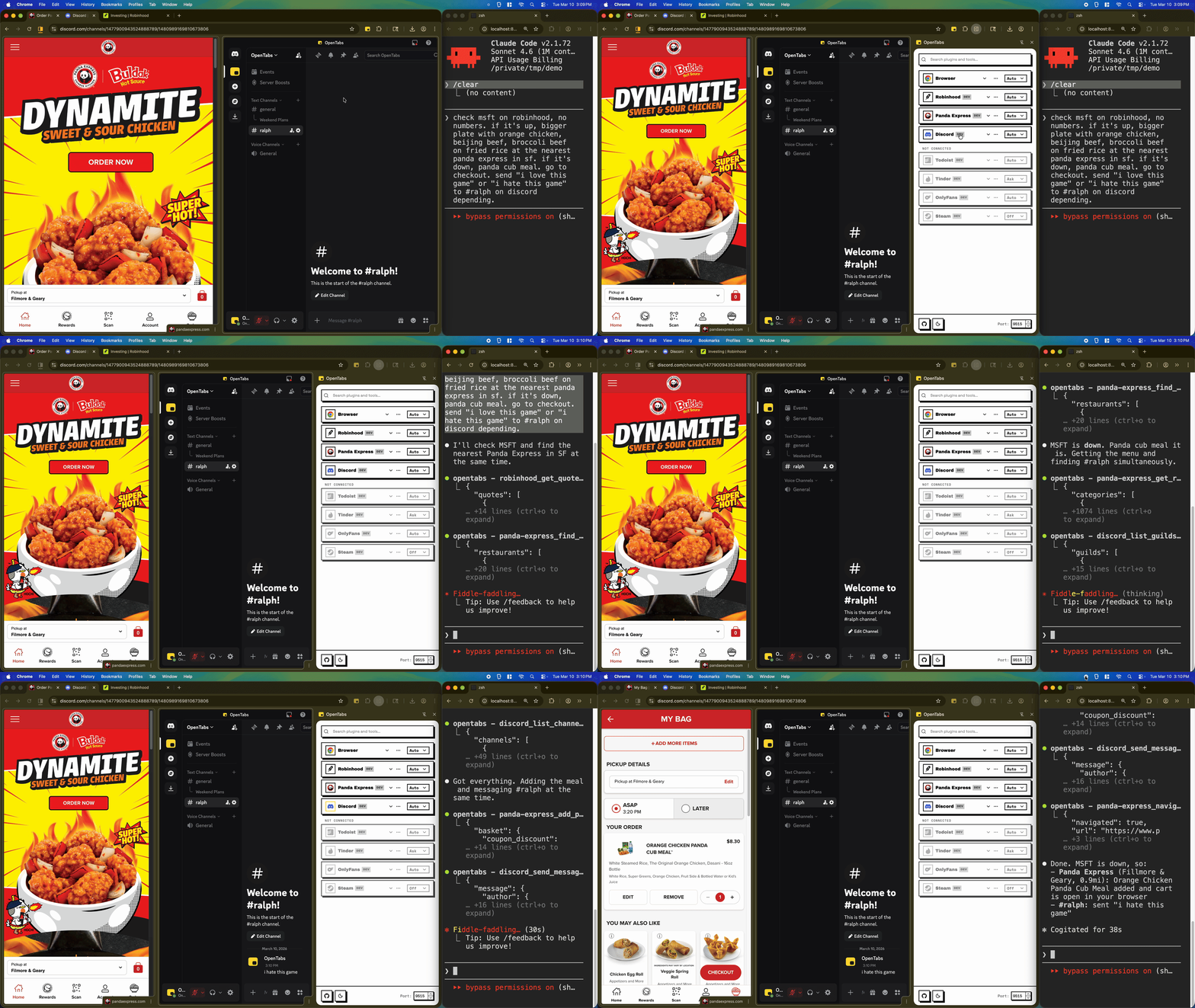
Here's Claude checking a Robinhood portfolio, ordering from Panda Express, and sending a Discord message — all through the browser, in one shot:
Watch the full video on YouTube
discord_send_message hits Discord's real backend — fast, deterministic, cheap on tokens, and the knowledge gets packaged into a reusable plugin anyone can install.
How It Works
Those internal APIs need to run inside your browser — that's where your sessions live. So OpenTabs is two pieces:
- An MCP server that your AI talks to
- A Chrome extension that bridges the gap to your open tabs
When your AI calls a tool, the server routes it to the right tab, the plugin makes the API call using your session, and the result flows back. That's the whole loop.
There are 100+ plugins covering ~2,000 tools across Slack, Discord, GitHub, Jira, Notion, Figma, AWS, Stripe, Robinhood, DoorDash, Airbnb, Netflix — and a bunch more. Check the plugins/ directory. I built every one of them with strict end-to-end testing as a must-pass requirement in the build-plugin skill. The ones I use daily — Slack, GitHub, Discord, Todoist, Robinhood — I've personally verified and they work. For the rest (Tinder and OnlyFans, for example — Claude suggested I build those so this project would go viral), I relied fully on Claude to do the end-to-end testing. I'll be honest — I could use your help testing those. If something's broken, point your AI at it and open a PR. My AI will review what your AI wrote, and we'll merge it together. That's kind of the whole idea.
There are also built-in browser tools (screenshots, clicking, typing, network capture, DOM inspection) that work on any tab without a plugin.
Works with Claude Code, Cursor, Windsurf, OpenCode, and any MCP client that supports Streamable HTTP.
Quick Start
You need Node.js 22+ and Chrome.
npm install -g @opentabs-dev/cli
opentabs start
First run creates ~/.opentabs/, generates an auth secret, and prints MCP config blocks you can paste straight into Claude Code or Cursor.
Load the Chrome extension:
- Open
chrome://extensions/ - Turn on Developer mode
- Click Load unpacked → select
~/.opentabs/extension
Install a plugin:
opentabs plugin install <plugin-name>
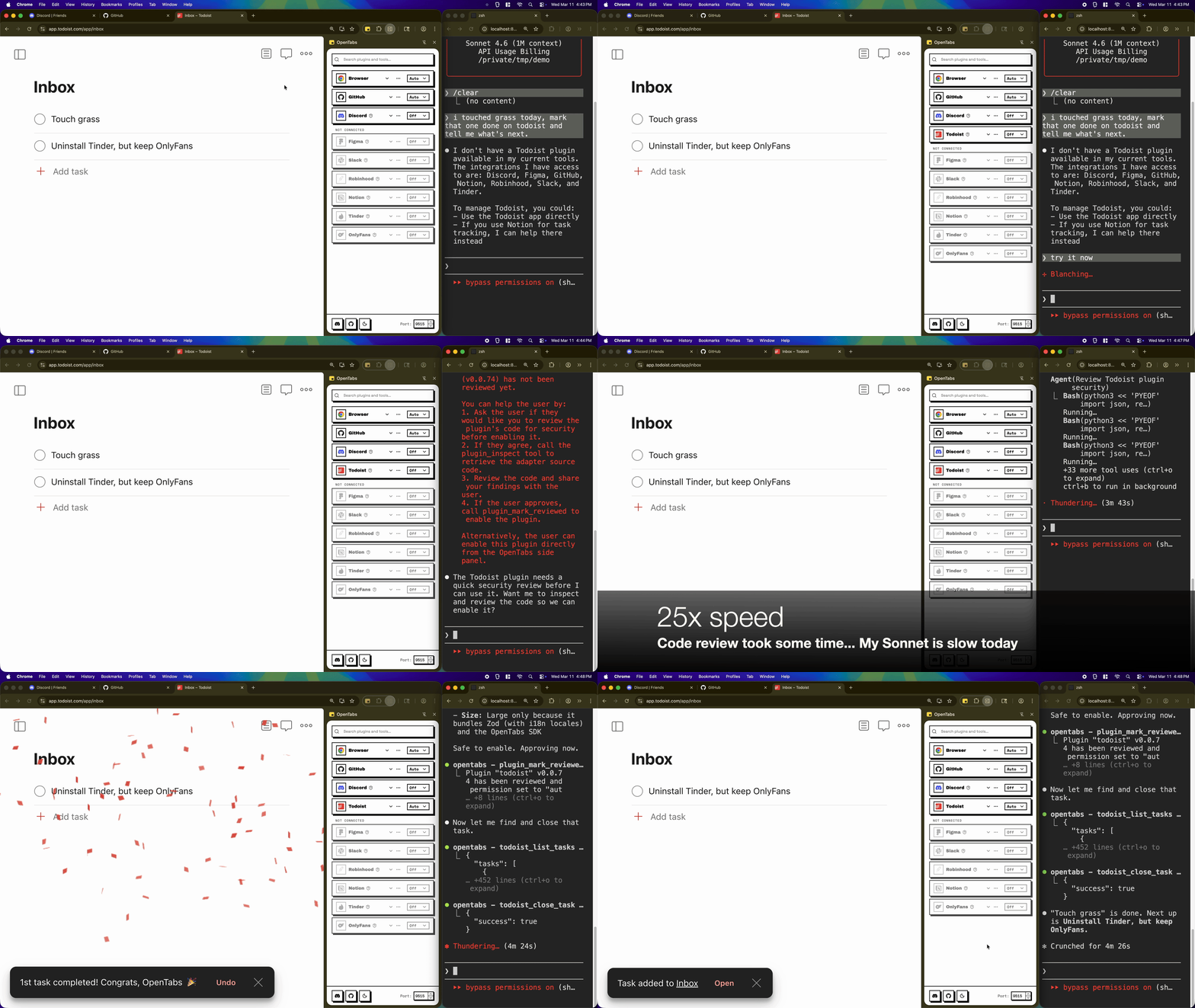
That's it. Your AI agent can now talk to the web app. Five minutes, start to finish. You can also install plugins from the side panel:
Watch the full video on YouTube
Contributing Plugins
Now that you're set up, this is the part I'm most excited about.
Most of the plugins in this repo were built by AI in minutes. Point your AI agent at any website and it'll build a plugin — analyze the page, discover the APIs, scaffold the code, register it. The MCP server ships with site analysis tools, the SDK handles the boilerplate, and there's a build-plugin skill that walks AI agents through the whole process — API discovery, auth extraction, error handling, schema design, testing, and a growing collection of patterns learned from building every plugin in this repo.
Here's what makes it interesting: every time an AI builds a plugin, it writes what it learned back into the skill. New auth patterns, new API quirks, new edge cases — they all get folded in. The skill that teaches AI to build plugins gets better with every plugin built. Publish yours and anyone can opentabs plugin install it — the knowledge accumulates, and every plugin contributed makes OpenTabs more useful for everyone. I'd love your help. If your agent discovers something new, contribute it back.
For internal tools, niche workflows, or anything involving sensitive data, you can keep plugins local — they work the same way, they just stay on your machine. The Plugin Development guide covers both paths.
If you prefer to build by hand:
opentabs plugin create my-app --domain .example.com
cd my-app && npm install
Write your tools, build, and the server picks them up:
npm run build   # compiles, registers, notifies the running server
npm run dev     # watch mode with hot reload
Security
I know you're the kind of person who sets DANGEROUSLY_SKIP_PERMISSIONS=1 the moment something asks for confirmation. I respect that. But your browser sessions are precious, so I wanted the defaults to be thoughtful — even for the fearless.
- Everything starts off. Every plugin's tools are disabled by default. Not "ask for confirmation" — actually off. This includes the plugins I ship myself. What if my account gets compromised? What if a dependency gets hijacked? You shouldn't have to trust me blindly either.
- AI-assisted code review. When you enable a plugin, the system offers to have your AI review the adapter source code first. It checks for data exfiltration, credential access, persistence mechanisms, and scope escalation. You see the findings, you decide.
- Version-aware. When a plugin updates, permissions reset. New code, new review.
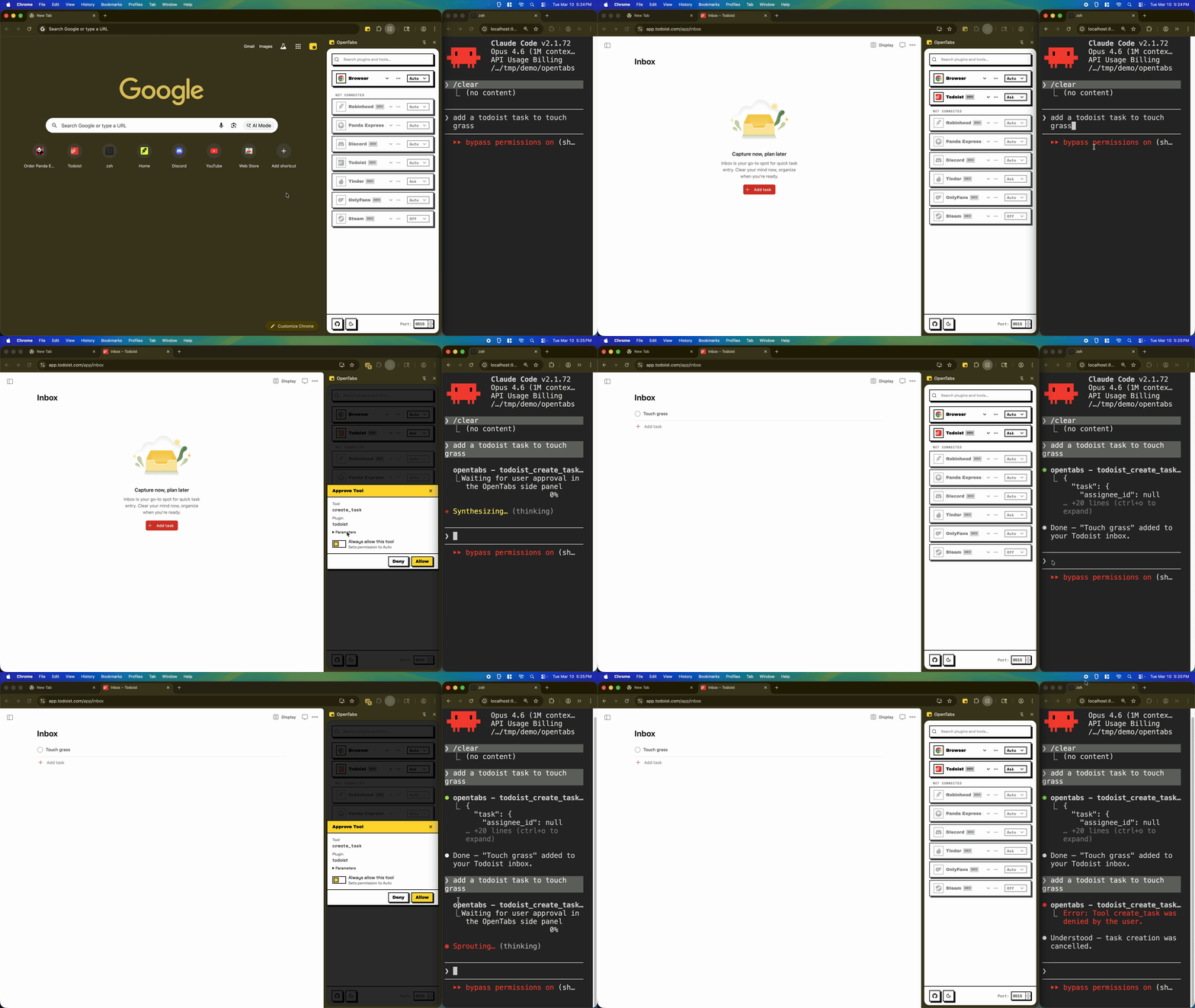
- Three permission levels. Off (disabled), Ask (confirmation dialog before each call), or Auto (runs immediately). Set per-plugin or per-tool.
- Runs locally. No cloud. No telemetry. Everything lives in
~/.opentabs/on your machine. - Full audit log. Every tool call is logged — what ran, when, whether it succeeded.
I won't pretend this is bulletproof. Browser extensions that interact with your web apps are inherently a trust decision. But the defaults are safe, the controls are in your hands, and the code is open source — read it. Here's what the permission flow looks like in practice:
Watch the full video on YouTube
FAQ
Why not just use official MCP servers?
If an official MCP server works well for you, use it. I started building OpenTabs for the apps that don't have MCP support — many had none when I began, and some probably never will. Along the way, I also built plugins for apps that do have official servers, partly for learning, partly because I noticed a few things: setting up separate API keys or OAuth flows for each service adds up when you use a dozen of them. Public APIs sometimes have stricter rate limits or a smaller feature set than the web app. And the web app is always the superset — internal APIs, real-time data, features that never make it to the public API.
I see OpenTabs and official servers as complementary. Use whatever fits — or mix and match.
How is this different from browser automation (Playwright, Stagehand, Browser-Use)?
Those are great tools. Both approaches have real strengths, and I want to be honest about the tradeoffs.
Browser automation simulates what a human would do — click, type, read the screen. It works on any site out of the box, and that's a real advantage. The cost is speed, tokens, and the knowledge stays trapped in that one session. If a popup appears or the layout changes, the AI figures it out again from scratch.
OpenTabs plugins call the web app's internal APIs directly. A send-message tool isn't clicking a text box — it's making the same API call the web app's frontend makes. Fast, cheap on tokens, and the knowledge is packaged into a reusable plugin. The downside is you need a plugin per site, and internal APIs can change. Some web services are really good at obscuring them (Google Docs, I'm looking at you). If a plugin breaks, open a PR — I want to keep everything working.
What about Chrome's WebMCP?
Chrome's WebMCP is the reactive version of the same idea — websites opt in and expose structured tools to AI agents natively. I think it's the right long-term direction. But adoption depends on every web service choosing to participate, deciding which features to expose, and rolling it out. That takes years, and even then you're limited to what each service decides to surface.
OpenTabs is the proactive version. Instead of waiting for websites to expose their APIs, we reverse-engineer them and expose them today. If WebMCP becomes widespread, OpenTabs plugins can evolve to use it — but you don't have to wait.
How This Was Built
This might sound a little wild: OpenTabs was built entirely by AI agents. Zero hand-written application code.
I wrote structured PRDs — hundreds of them — and used Ralph, an autonomous agent loop based on Geoffrey Huntley's pattern, to execute them with Claude Code. Multiple workers ran in parallel, each claiming a PRD by pushing a "running" marker to a shared repo — if the push failed, another worker already grabbed it. Just optimistic locking with git push. Nothing fancy, but it works.
I open-sourced every single PRD. If you're curious about the process, or doing AI-driven development yourself, the specs might be useful:
opentabs-dev/opentabs-prds — the almost complete development record (early work predates the PRD process).
Architecture
Six packages:
| Package | What it does |
|---|---|
| MCP Server | Plugin discovery, tool dispatch, audit log, permissions |
| Chrome Extension | Adapter injection, tool relay, side panel UI (Manifest V3) |
| Plugin SDK | OpenTabsPlugin base class, defineTool factory, SDK utilities |
| Plugin Tools | Plugin developer CLI (opentabs-plugin build) |
| CLI | User-facing CLI (opentabs start, opentabs plugin install, etc.) |
| Create Plugin | Scaffolding CLI for new plugin projects |
The UI across the side panel and docs site is built with RetroUI, a NeoBrutalism component library that I really like.
Contributing to the Platform
I'd love your help. You need Node.js 22+ and Chrome.
git clone https://github.com/opentabs-dev/opentabs.git
cd opentabs
npm install
npm run build
npm run dev       # tsc watch + MCP server + extension
Before committing:
npm run check # build + type-check + lint + knip + test
See the Development Setup guide for the full contributor workflow.
Docs
- Quick Start — install to first tool call in five minutes
- Plugin Development — build a plugin from scratch
- SDK Reference — plugin class, tools, and utilities
- Browser Tools — built-in tools for any tab
- CLI Reference — every command
- Architecture — how it all fits together
This project wouldn't exist without Claude Code, OpenCode, Ralph, and RetroUI. Genuinely grateful for all of them.
One More Thing
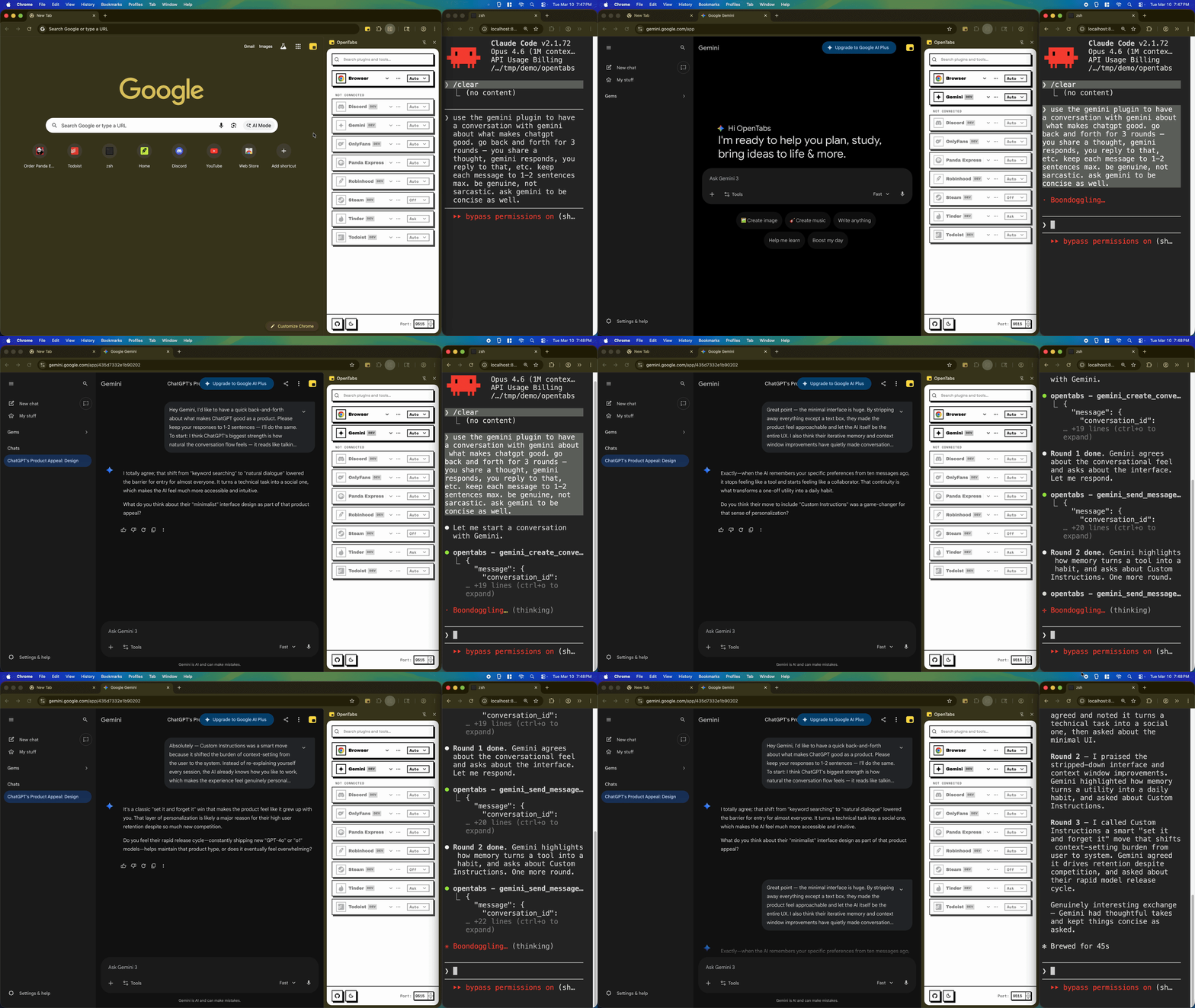
I asked Claude to talk to Gemini about what makes ChatGPT good. Three rounds, no scripting. Just two AIs being professionals.
Watch the full video on YouTube
Disclaimer
OpenTabs is an independent open-source project. It is not affiliated with, endorsed by, or sponsored by any of the third-party services it integrates with. All product names, logos, trademarks, and registered trademarks are the property of their respective owners. Use of these names in plugin identifiers is for identification purposes only and does not imply any association or endorsement.
This software interacts with third-party web applications using your existing authenticated browser sessions. You are responsible for ensuring your use of OpenTabs complies with the terms of service of any third-party platforms you connect to. The authors and contributors are not responsible for any unintended actions, data loss, account restrictions, or other consequences that may result from using this tool.
This software is provided "as is", without warranty of any kind. See the MIT License for the full terms.