Optical Context MCP
Compress OCR-heavy PDFs into dense packed images so agents can work with long visual documents.


Optical Context MCP is built for one specific job: turning large, visually structured PDFs into a smaller set of retrievable packed images for agent workflows.
It reads a local PDF, runs OCR with Mistral, recomposes the extracted text and figures into dense PNGs, and exposes those artifacts over MCP for batch retrieval.
What It Does
- reads a local PDF from the MCP host machine
- extracts page markdown and embedded images with Mistral OCR
- packs that content into dense PNGs that preserve visual grouping
- stores a manifest and temp job artifacts for follow-up retrieval
- lets an agent pull only the packed images it needs
Where It Fits
Use it for:
- operating manuals
- scanned handbooks
- product catalogs
- PDF slide decks
- visually structured OCR-heavy documents
Skip it for:
- tiny PDFs
- clean text-native PDFs where normal extraction is enough
- workflows that require exact page-faithful rendering
- cases where OCR cost is not justified
Example Result
The image below shows a real local validation run on a public research paper with dense text, figures, charts, and page-level visual structure. The packed image on the right consolidates the seven source pages shown on the left.
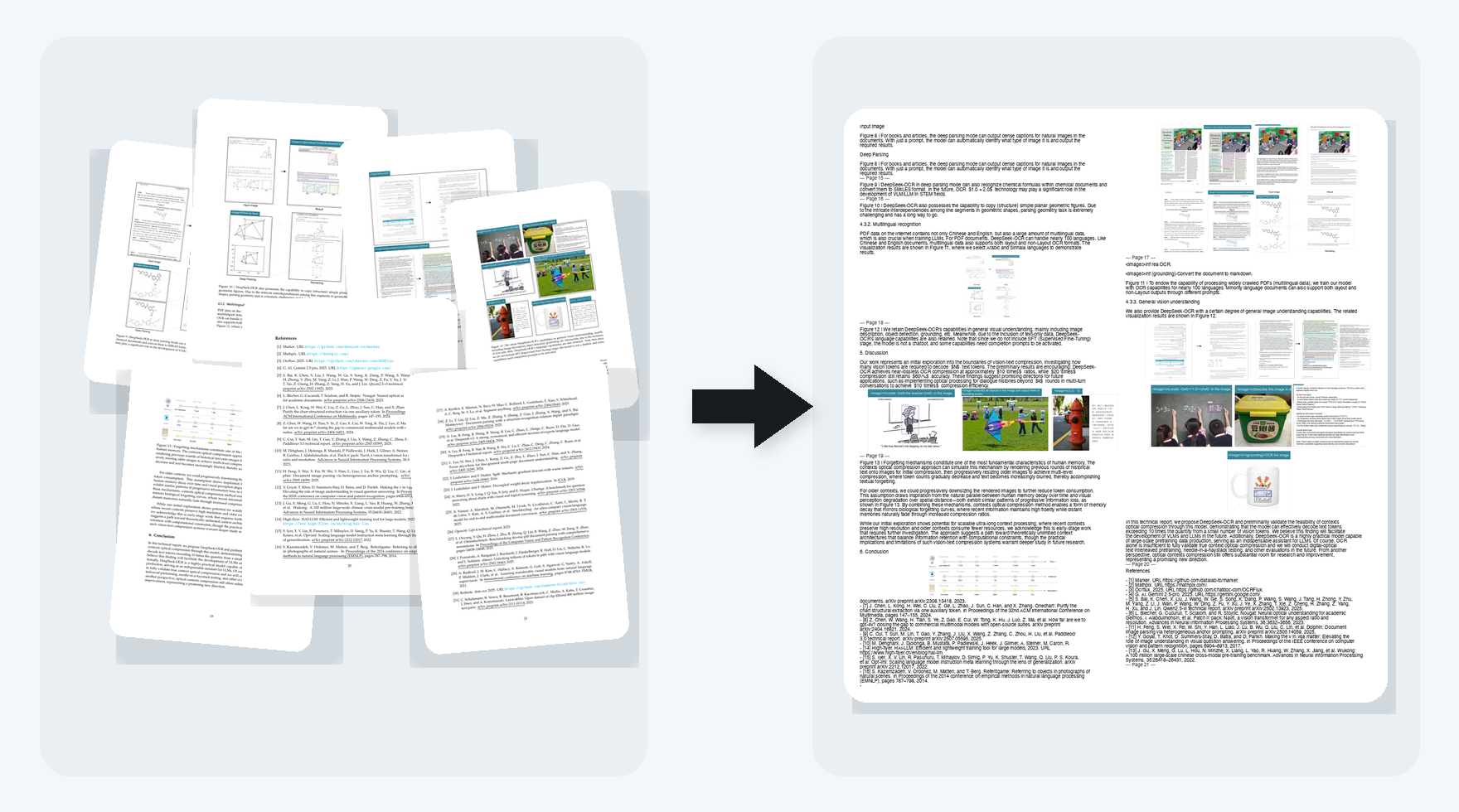
Example local run facts from the generated manifest:
- source paper pages: 22
- previewed source page range: 15 to 21
- extracted images: 30
- packed output images: 6
- example packed image size:
986x1084 - example packed image file size:
536,697 bytes
This example shows the intended workflow: take a long, visually structured PDF and compress it into a smaller set of retrievable packed images that still preserve the visual structure of the source.
Install
python -m pip install optical-context-mcp
Run without installing:
uvx optical-context-mcp
MISTRAL_API_KEYis required forcompress_pdf- packed images are always stored locally under the system temp directory
compress_pdfreturns up to30packed images inline by default
For pinned shared setups:
uvx --from optical-context-mcp==0.1.4 optical-context-mcp
Run
Default transport is stdio:
optical-context-mcp
Claude Code
Register the server in a project:
claude mcp add -s project optical-context -- uvx optical-context-mcp
Typical use:
- call
compress_pdf - inspect the returned manifest
- fetch packed images with
get_packed_images
MCP Tools
compress_pdf: run OCR plus recomposition and create a stored jobget_job_manifest: load metadata for an existing jobget_packed_images: fetch one or more packed PNGs from an existing job
How It Works
flowchart LR
    A["Local PDF"] --> B["Mistral OCR"]
    B --> C["Page markdown + embedded images"]
    C --> D["Recomposition engine"]
    D --> E["Dense packed PNG images"]
    E --> F["Stored job artifacts"]
    F --> G["Agent fetches manifest or image batches over MCP"]
Why Packed Images Instead Of Just OCR Text
- section grouping
- table-like layout
- captions near figures
- visual adjacency between text and embedded graphics
For many vision-capable agents, that is a better intermediate format than a plain OCR dump.
Current Scope
- depends on Mistral OCR
- currently handles local file paths, not remote uploads
- stores artifacts in the local system temp directory by default
- optimized for compression and retrieval, not final polished markdown generation
- quality depends on OCR quality and the visual density of the source document
Roadmap
- make the OCR layer provider-agnostic so different OCR backends can be swapped behind the same MCP workflow
Development
uv venv --python /opt/homebrew/bin/python3.11 .venv
uv pip install --python .venv/bin/python -e ".[dev]"
.venv/bin/python -m pytest