
OrionBelt Semantic Layer
Compile YAML semantic models into analytical SQL across multiple database dialects











OrionBelt Semantic Layer is an API-first engine that transforms declarative YAML model definitions into optimized SQL for Postgres, Snowflake, ClickHouse, Dremio, and Databricks. It provides a unified abstraction over your data warehouse, so analysts and applications can query using business concepts (dimensions, measures, metrics) instead of raw SQL. Every capability — model loading, validation, query compilation, and diagram generation — is exposed through a REST API and an MCP server, making OrionBelt easy to integrate into any application, workflow, or AI assistant.
Features
- 5 SQL Dialects — Postgres, Snowflake, ClickHouse, Dremio, Databricks SQL with dialect-specific optimizations
- AST-Based SQL Generation — Custom SQL AST ensures correct, injection-safe SQL (no string concatenation)
- OrionBelt ML (OBML) — YAML-based semantic models with data objects, dimensions, measures, metrics, and joins
- Star Schema & CFL Planning — Automatic join path resolution with Composite Fact Layer support for multi-fact queries
- Vendor-Specific SQL Validation — Post-generation syntax validation via sqlglot for each target dialect (non-blocking)
- Validation with Source Positions — Precise error reporting with line/column numbers from YAML source, including join graph analysis (cycle and multipath detection, secondary join constraints)
- Session Management — TTL-scoped sessions with per-client model stores for both REST API and MCP
- ER Diagram Generation — Mermaid ER diagrams via API and Gradio UI with theme support, zoom, and secondary join visualization
- REST API — FastAPI-powered session endpoints for model loading, validation, compilation, diagram generation, and management
- MCP Server — 9 tools + 3 prompts for AI-assisted model development via Claude Desktop and other MCP clients
- Gradio UI — Interactive web interface for model editing, query testing, and SQL compilation with live validation feedback
- Plugin Architecture — Extensible dialect system with capability flags and registry
Quick Start
Prerequisites
- Python 3.12+
- uv package manager
Installation
git clone https://github.com/ralfbecher/orionbelt-semantic-layer.git
cd orionbelt-semantic-layer
uv sync
Run Tests
uv run pytest
Start the REST API Server
uv run orionbelt-api
# or with reload:
uv run uvicorn orionbelt.api.app:create_app --factory --reload
The API is available at http://127.0.0.1:8000. Interactive docs at /docs (Swagger UI) and /redoc.
Start the MCP Server
# stdio (default, for Claude Desktop / Cursor)
uv run orionbelt-mcp

# HTTP transport (for multi-client use)
MCP_TRANSPORT=http uv run orionbelt-mcp
Example
Define a Semantic Model
# yaml-language-server: $schema=schema/obml-schema.json
version: 1.0

dataObjects:
  Customers:
    code: CUSTOMERS
    database: WAREHOUSE
    schema: PUBLIC
    columns:
      Customer ID:
        code: CUSTOMER_ID
        abstractType: string
      Country:
        code: COUNTRY
        abstractType: string

  Orders:
    code: ORDERS
    database: WAREHOUSE
    schema: PUBLIC
    columns:
      Order ID:
        code: ORDER_ID
        abstractType: string
      Order Customer ID:
        code: CUSTOMER_ID
        abstractType: string
      Price:
        code: PRICE
        abstractType: float
      Quantity:
        code: QUANTITY
        abstractType: int
    joins:
      - joinType: many-to-one
        joinTo: Customers
        columnsFrom:
          - Order Customer ID
        columnsTo:
          - Customer ID

dimensions:
  Country:
    dataObject: Customers
    column: Country
    resultType: string

measures:
  Revenue:
    resultType: float
    aggregation: sum
    expression: "{[Price]} * {[Quantity]}"
The yaml-language-server comment enables schema validation in editors that support it (VS Code with YAML extension, IntelliJ, etc.). The JSON Schema is at schema/obml-schema.json.
Define a Query
Queries select dimensions and measures by their business names:
select:
  dimensions:
    - Country
  measures:
    - Revenue
limit: 100
Compile to SQL (Python)
from orionbelt.compiler.pipeline import CompilationPipeline
from orionbelt.models.query import QueryObject, QuerySelect
from orionbelt.parser.loader import TrackedLoader
from orionbelt.parser.resolver import ReferenceResolver

# Load and parse the model
loader = TrackedLoader()
raw, source_map = loader.load("model.yaml")
model, result = ReferenceResolver().resolve(raw, source_map)

# Define a query
query = QueryObject(
    select=QuerySelect(
        dimensions=["Country"],
        measures=["Revenue"],
    ),
    limit=100,
)

# Compile to SQL
pipeline = CompilationPipeline()
result = pipeline.compile(query, model, "postgres")
print(result.sql)
Generated SQL (Postgres):
SELECT
  "Customers"."COUNTRY" AS "Country",
  SUM("Orders"."PRICE" * "Orders"."QUANTITY") AS "Revenue"
FROM WAREHOUSE.PUBLIC.ORDERS AS "Orders"
LEFT JOIN WAREHOUSE.PUBLIC.CUSTOMERS AS "Customers"
  ON "Orders"."CUSTOMER_ID" = "Customers"."CUSTOMER_ID"
GROUP BY "Customers"."COUNTRY"
LIMIT 100
Change the dialect to "snowflake", "clickhouse", "dremio", or "databricks" to get dialect-specific SQL.
Use the REST API with Sessions
# Start the server
uv run orionbelt-api

# Create a session
curl -s -X POST http://127.0.0.1:8000/sessions | jq
# → {"session_id": "a1b2c3d4e5f6", "model_count": 0, ...}

# Load a model into the session
curl -s -X POST http://127.0.0.1:8000/sessions/a1b2c3d4e5f6/models \
  -H "Content-Type: application/json" \
  -d '{"model_yaml": "version: 1.0\ndataObjects:\n  ..."}' | jq
# → {"model_id": "abcd1234", "data_objects": 2, ...}

# Compile a query
curl -s -X POST http://127.0.0.1:8000/sessions/a1b2c3d4e5f6/query/sql \
  -H "Content-Type: application/json" \
  -d '{
    "model_id": "abcd1234",
    "query": {"select": {"dimensions": ["Country"], "measures": ["Revenue"]}},
    "dialect": "postgres"
  }' | jq .sql
Use with Claude Desktop (MCP)
Add to your Claude Desktop config (claude_desktop_config.json):
{
  "mcpServers": {
    "orionbelt-semantic-layer": {
      "command": "uv",
      "args": [
        "run",
        "--directory",
        "/path/to/orionbelt-semantic-layer",
        "orionbelt-mcp"
      ]
    }
  }
}
Then ask Claude to load a model, validate it, and compile queries interactively.
Architecture
YAML Model          Query Object
    |                    |
    v                    v
 ┌───────────┐    ┌──────────────┐
 │  Parser   │    │  Resolution  │  ← Phase 1: resolve refs, select fact table,
 │  (ruamel) │    │              │    find join paths, classify filters
 └────┬──────┘    └──────┬───────┘
      │                  │
      v                  v
 SemanticModel    ResolvedQuery
      │                  │
      │    ┌─────────────┘
      │    │
      v    v
 ┌───────────────┐
 │   Planner     │  ← Phase 2: Star Schema or CFL (multi-fact)
 │  (star / cfl) │    builds SQL AST with joins, grouping, CTEs
 └───────┬───────┘
         │
         v
    SQL AST (Select, Join, Expr...)
         │
         v
 ┌───────────────┐
 │   Codegen     │  ← Phase 3: dialect renders AST to SQL string
 │  (dialect)    │    handles quoting, time grains, functions
 └───────┬───────┘
         │
         v
    SQL String (dialect-specific)
MCP Server
The MCP server exposes OrionBelt as tools for AI assistants (Claude Desktop, Cursor, etc.):
Session tools (3): create_session, close_session, list_sessions
Model tools (5): load_model, validate_model, describe_model, compile_query, list_models
Stateless (1): list_dialects
Prompts (3): write_obml_model, write_query, debug_validation
In stdio mode (default), a shared default session is used automatically. In HTTP/SSE mode, clients must create sessions explicitly.
Gradio UI
OrionBelt includes an interactive web UI built with Gradio for exploring and testing the compilation pipeline visually.
# Install UI dependencies
uv sync --extra ui

# Start the REST API (required backend)
uv run orionbelt-api &

# Launch the Gradio UI
uv run orionbelt-ui
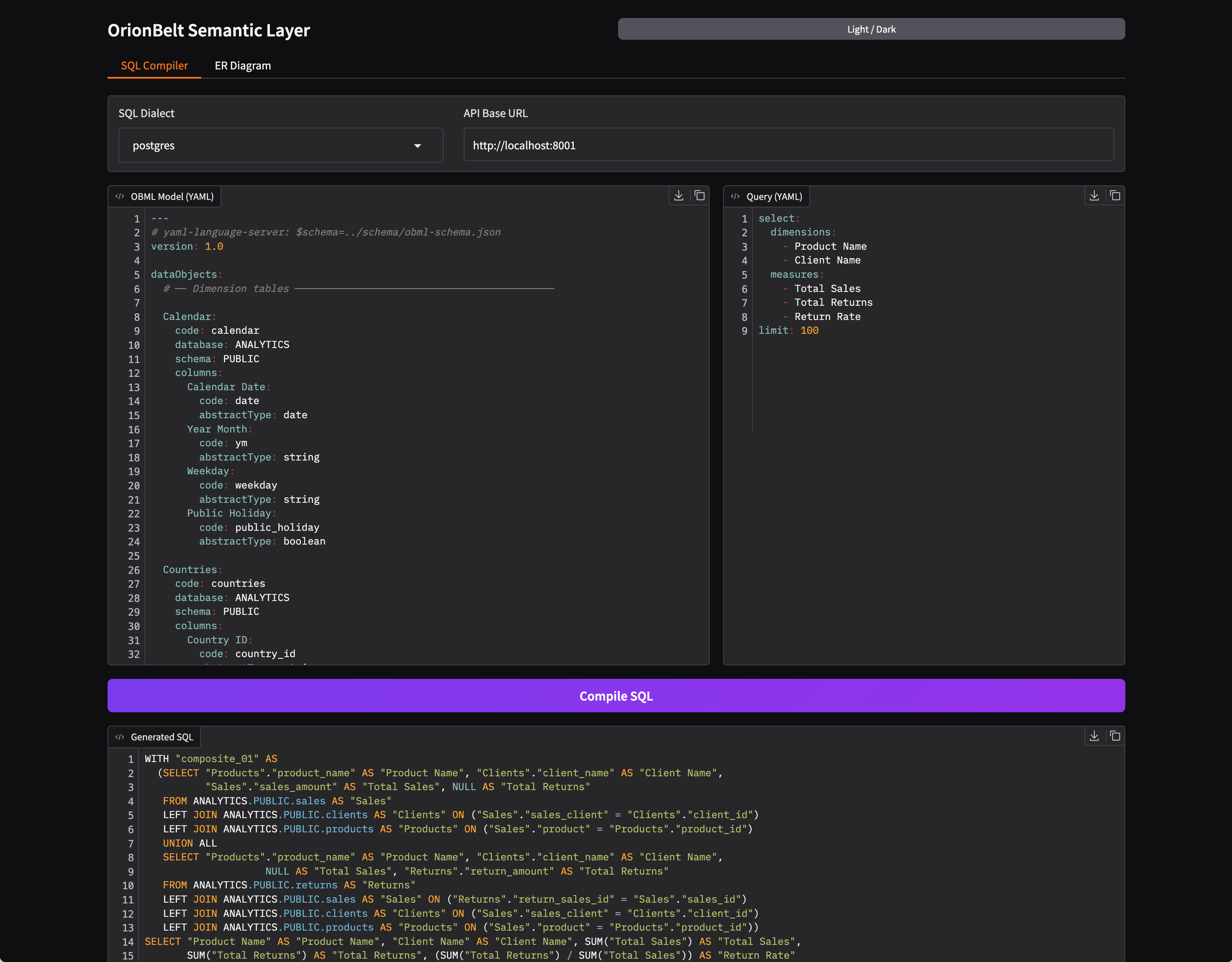
The UI provides:
- Side-by-side editors — OBML model (YAML) and query (YAML) with syntax highlighting
- Dialect selector — Switch between Postgres, Snowflake, ClickHouse, Dremio, and Databricks
- One-click compilation — Compile button generates formatted SQL output
- SQL validation feedback — Warnings and validation errors from sqlglot are displayed as comments above the generated SQL
- ER Diagram tab — Visualize the semantic model as a Mermaid ER diagram with left-to-right layout, FK annotations, dotted lines for secondary joins, and an adjustable zoom slider
- Dark / light mode — Toggle via the header button; all inputs and UI state are persisted across mode switches
The bundled example model (examples/sem-layer.obml.yml) is loaded automatically on startup.
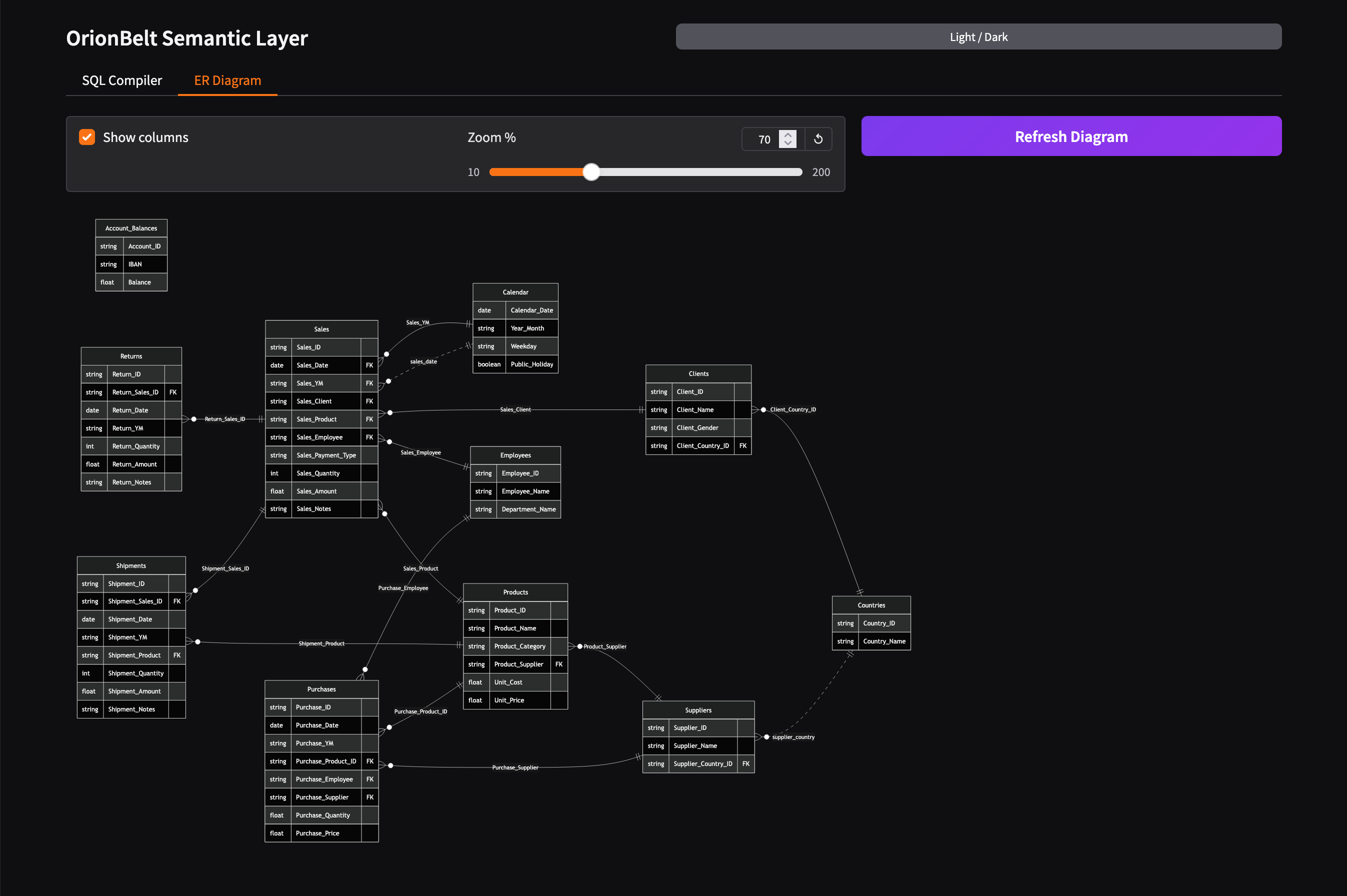
The ER diagram is also available via the REST API:
# Generate Mermaid ER diagram for a loaded model
curl -s "http://127.0.0.1:8000/sessions/{session_id}/models/{model_id}/diagram/er?theme=default" | jq .mermaid
Configuration
Configuration is via environment variables or a .env file. See .env.example for all options:
| Variable | Default | Description |
|---|---|---|
LOG_LEVEL | INFO | Logging level |
API_SERVER_HOST | localhost | REST API bind host |
API_SERVER_PORT | 8000 | REST API bind port |
MCP_TRANSPORT | stdio | MCP transport (stdio, http, sse) |
MCP_SERVER_HOST | localhost | MCP server host (http/sse only) |
MCP_SERVER_PORT | 9000 | MCP server port (http/sse only) |
SESSION_TTL_SECONDS | 1800 | Session inactivity timeout (30 min) |
SESSION_CLEANUP_INTERVAL | 60 | Cleanup sweep interval (seconds) |
Development
# Install all dependencies (including dev tools)
uv sync

# Run the test suite
uv run pytest

# Lint
uv run ruff check src/

# Type check
uv run mypy src/

# Format code
uv run ruff format src/ tests/

# Build documentation
uv sync --extra docs
uv run mkdocs serve
Documentation
Full documentation is available at the docs site or can be built locally:
uv sync --extra docs
uv run mkdocs serve   # http://127.0.0.1:8080
Companion Project
OrionBelt Analytics
OrionBelt Analytics is an ontology-based MCP server that analyzes relational database schemas and generates RDF/OWL ontologies with embedded SQL mappings. It connects to PostgreSQL, Snowflake, and Dremio, providing AI assistants with deep structural and semantic understanding of your data.
Together, the two MCP servers form a powerful combination for AI-guided analytical workflows:
- OrionBelt Analytics gives the AI contextual knowledge of your database schema, relationships, and business semantics
- OrionBelt Semantic Layer ensures correct, optimized SQL generation from business concepts (dimensions, measures, metrics)
By combining both, an AI assistant can navigate your data landscape through ontologies and compile safe, dialect-aware analytical SQL — enabling a seamless end-to-end analytical journey.
License
Copyright 2025 RALFORION d.o.o.
Licensed under the Apache License, Version 2.0. See LICENSE for details.
