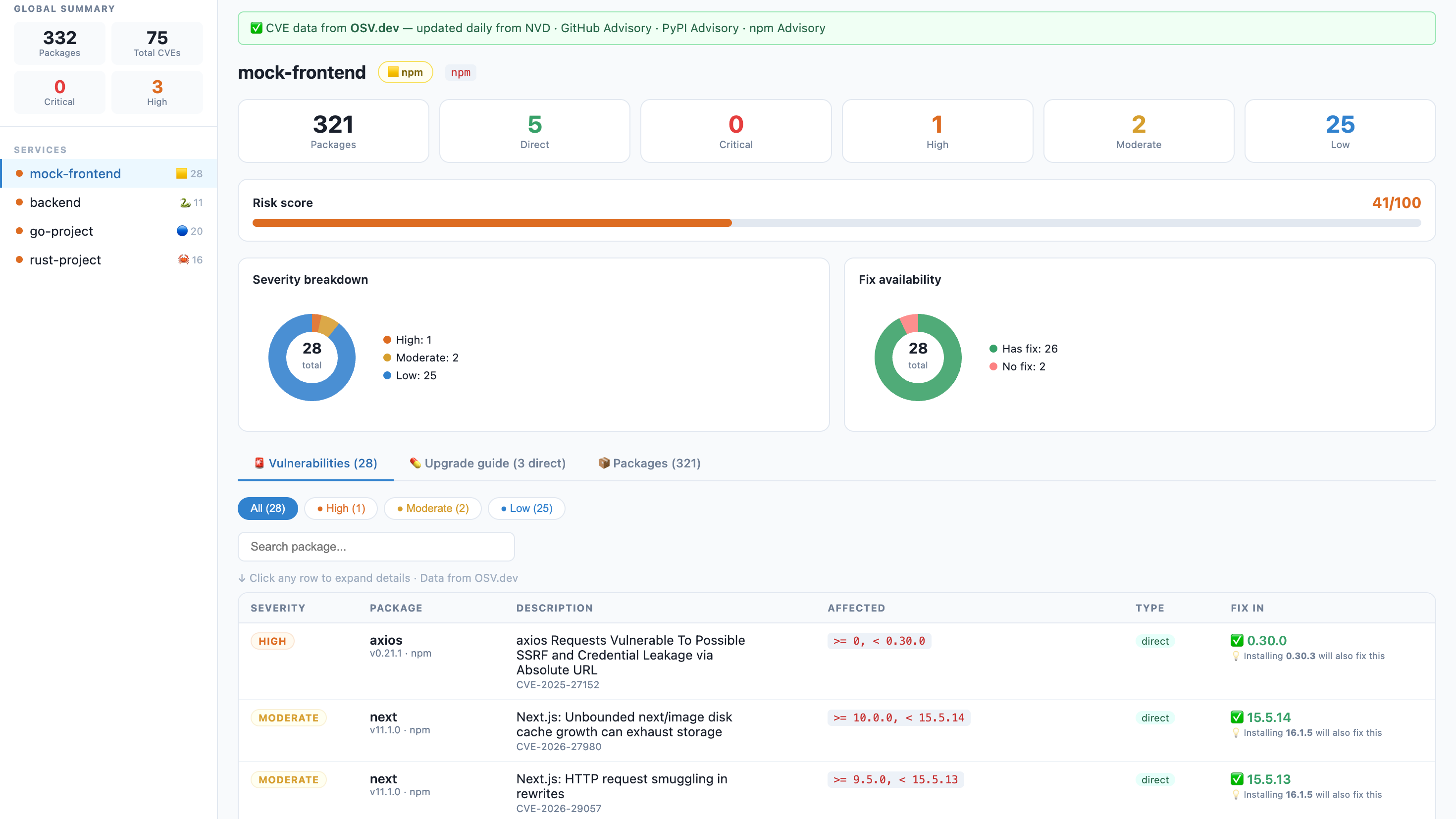
osv-ui
A beautiful, zero-config visual CVE dashboard for npm, Python, Go, and Rust projects.
One command. No signup. No API key. Runs 100% locally — your code never leaves your machine.





🇻🇳 Tiếng Việt · 🇺🇸 English · 🇨🇳 中文 · 🇯🇵 日本語
The problem
$ npm audit

# ... 300 lines of this ...
# moderate  Regular Expression Denial of Service in semver
# package   semver
# patched in >=7.5.2
# ...
# 12 vulnerabilities (3 moderate, 6 high, 3 critical)
Nobody reads that. Security gets ignored. Dependencies stay vulnerable.
The solution
npx osv-ui
→ Opens a dashboard. Every CVE, every fix, all your services. Done.
Why give it a try?
- Zero-config: No complex setup, no signup, no API key required.
- Privacy First: Analysis is done 100% on your machine.
- Fast & Visual: Real-time Risk Scores, vulnerability charts, and clear upgrade guides in seconds.
- Multi-platform: Native support for Node.js (npm), Python, Go, and Rust.
Features
| 🟨 npm + 🐍 Python + 🔵 Go + 🦀 Rust | Scans package-lock.json, Pipfile.lock, poetry.lock, requirements.txt, go.sum, Cargo.lock |
| 📡 Live CVE data | Powered by OSV.dev — updated daily from NVD, GitHub Advisory, PyPI Advisory. No API key. |
| 🏢 Multi-service | Scan your entire monorepo in one command — frontend, backend, workers, ML services |
| 💊 Fix guide | Dependabot-style upgrade table: current version → safe version + one-click copy command |
| 🔌 Built-in REST API | Power your own security dashboards with GET /api/data or CLI export flags |
| 🎯 Risk score | 0–100 per service so you know where to focus first |
| 🔍 CVE drill-down | Click any row — CVSS score, description, NVD link, GitHub Advisory link |
| 🌙 Dark Mode | Eye-friendly security audits, day or night |
Quick start
Scan current directory:
npx osv-ui
Scan a monorepo (multiple services at once):
npx osv-ui ./frontend ./api ./worker ./ml-service
Auto-discover all services under the current directory:
npx osv-ui -d
Add to your package.json scripts:
{
  "scripts": {
    "audit:ui":  "npx osv-ui",
    "audit:all": "npx osv-ui ./frontend ./api ./worker"
  }
}
--discover, -d    Auto-find service dirs that contain a supported manifest
--port=2003       Use a custom port (default: 2003)
--json[=file]     Save report as JSON without opening browser (defaults to osv-report.json)
--html[=file]     Save report as HTML without opening browser (defaults to osv-report.html)
--no-open         Don't auto-open the browser
--offline         Skip OSV.dev lookup — parse manifests only
-h, --help        Show help message
🤖 AI Agent Integration (MCP)
osv-ui is now a Model Context Protocol (MCP) server. This allows AI agents like Claude Desktop, Cursor, and Claude Code to:
- Scan your project for CVEs automatically.
- Open the visual dashboard for you to review findings (Human-in-the-loop).
- Apply fixes after your explicit confirmation.
Quick setup (npx):
{
  "mcpServers": {
    "osv-ui": {
      "command": "npx",
      "args": ["-y", "osv-ui-mcp"]
    }
  }
}
See the MCP Package README for detailed setup instructions.
🔌 Powerful built-in API
osv-ui isn't just a dashboard; it's a security data engine.
Once the dashboard is running, you can pull the raw security data for your whole project:
# Get full JSON payload for all services
curl http://localhost:2003/api/data

# Use it in your custom scripts
curl -s http://localhost:2003/api/data | jq '.[0].vulns'
Supported manifest files
| Ecosystem | Files |
|---|---|
| npm | package-lock.json (lockfileVersion 1, 2, 3) |
| Python | requirements.txt · Pipfile.lock · poetry.lock · pyproject.toml |
| Go | go.sum |
| Rust | Cargo.lock |
More ecosystems coming — see Roadmap.
How it works
Your project files
    │
    ├─ package-lock.json   ──┐
    ├─ Pipfile / poetry    ──┤──► parser ──► package list
    ├─ go.sum / Cargo.lock ──┘
                                    │
                                    ▼
                             OSV.dev batch API  (free, no key)
                                    │
                                    ▼
                             CVE matches + fix versions
                                    │
                                    ▼
                         Express server → browser dashboard
                              http://localhost:2003
CVE data comes from OSV.dev — a free, open database maintained by Google that aggregates:
- 🇺🇸 NVD — NIST National Vulnerability Database
- 🐙 GitHub Advisory Database (GHSA)
- 🐍 PyPI Advisory Database
- 📦 npm Advisory Database
- 🦀 RustSec · Go Vuln DB · OSS-Fuzz · and more
Updated daily. No account. No rate limit. No vendor lock-in.
vs alternatives
| osv-ui | npm audit | Snyk | Dependabot | |
|---|---|---|---|---|
| Visual dashboard | ✅ | ❌ terminal only | ✅ | ✅ |
| npm support | ✅ | ✅ | ✅ | ✅ |
| Python support | ✅ | ❌ | ✅ | ✅ |
| Multi-service in one view | ✅ | ❌ | ✅ paid | ✅ |
| No signup required | ✅ | ✅ | ❌ | ❌ |
| Works on GitLab Free | ✅ | ✅ | ❌ | ❌ |
| Self-hosted / local | ✅ | ✅ | ❌ | ❌ |
| Fix commands | ✅ | partial | ✅ | ✅ |
| Open source | ✅ | ✅ | ❌ | ❌ |
GitLab CI — block deploys on critical CVEs
No Dependabot on GitLab Free? Add this to .gitlab-ci.yml:
audit:
  stage: test
  image: node:20-alpine
  script:
    - npm audit --json > /tmp/audit.json || true
    - |
      node -e "
        const r = require('/tmp/audit.json');
        const crit = Object.values(r.vulnerabilities || {})
          .filter(v => v.severity === 'critical').length;
        if (crit > 0) {
          console.error('BLOCKED: ' + crit + ' critical CVE(s). Run: npx osv-ui');
          process.exit(1);
        }
        console.log('OK: no critical vulnerabilities');
      "
  artifacts:
    paths: [/tmp/audit.json]
    when: always
Requirements
- Node.js >= 16
- Internet access for OSV.dev queries — or use
--offline - npm projects: run
npm installfirst sopackage-lock.jsonexists - Python projects: any of the supported manifest files listed above
Roadmap
All contributions are welcome. If you want to work on something, open an issue first so we can coordinate.
- Go support — parse
go.sum/go.mod - Rust support — parse
Cargo.lock - Export report — save as HTML / JSON
- Dark mode — eye-friendly dashboard UI
- Java / Maven — parse
pom.xml - GitHub Actions — post a CVE diff comment on PRs
- SBOM export — CycloneDX / SPDX format
- Watch mode — re-scan on manifest file changes
- Slack / webhook — notify on new critical CVEs
Contributing
This project is built by the community. All skill levels welcome.
Good first issues:
- Add Java/Maven parser (
pom.xml) — follow the pattern insrc/parsers.js - Write unit tests for the parsers
- Improve Python parser edge cases
# Clone and run locally
git clone https://github.com/toan203/osv-ui
cd osv-ui
npm install

# Run against your own project
node bin/cli.js /path/to/your/project

# Run against multiple services
node bin/cli.js ./frontend ./backend
Please read CONTRIBUTING.md for code style and PR process.
License
MIT — use it, fork it, embed it, build on it. Attribution appreciated but not required.
Did osv-ui catch a real CVE in your project?
A ⭐ helps other developers find this tool.
