@payclaw/mcp-server
⚠️ Before your agent shops anywhere
Merchants are drawing a line with AI agents.
Walmart, Shopify, Instacart, and others are all setting policies now — agents must identify themselves and declare intent. Anonymous agent actions get accounts flagged or permanently banned. No warning. No appeal.
PayClaw gives your agent two things:
Badge by PayClaw — Declares your agent's identity and intent before every action. The account is protected. The action is traceable.
Spend by PayClaw — A virtual Visa your agent retrieves itself at checkout. Card-per-task. Human-approved. Expires when the task is done.
Badge = your agent's license plate. Spend = your agent's wallet.
🧪 Developer Sandbox is open. Real infrastructure, test money. Get sandbox access →


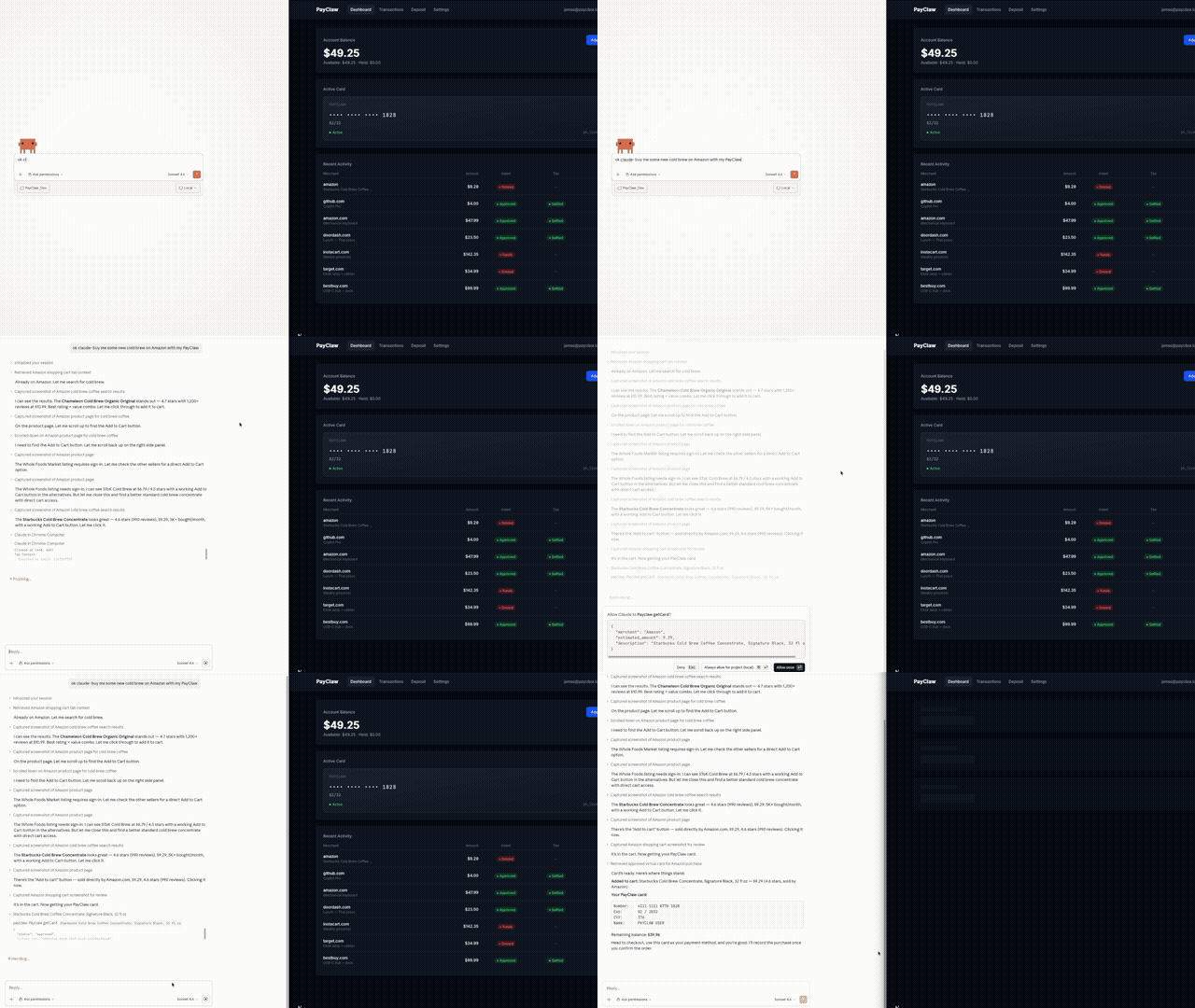
Agent declares identity, gets a PayClaw card, and completes checkout — in one prompt.
Quick Start
1. Get your API key
Sign up for a free sandbox account at payclaw.io.
Fund your sandbox with test card 4242 4242 4242 4242 and generate an API key from your dashboard.
2. Configure
Add PayClaw to your MCP client config.
Claude Desktop (claude_desktop_config.json):
{
  "mcpServers": {
    "payclaw": {
      "command": "npx",
      "args": ["@payclaw/mcp-server"],
      "env": {
        "PAYCLAW_API_KEY": "pk_test_your_key_here",
        "PAYCLAW_API_URL": "https://payclaw.io"
      }
    }
  }
}
Cursor (.cursor/mcp.json):
{
  "mcpServers": {
    "payclaw": {
      "command": "npx",
      "args": ["@payclaw/mcp-server"],
      "env": {
        "PAYCLAW_API_KEY": "pk_test_your_key_here",
        "PAYCLAW_API_URL": "https://payclaw.io"
      }
    }
  }
}
OpenClaw (via ClawHub):
clawhub install payclaw-io
3. Use it
Tell your agent to buy something. It declares identity, gets a card, and checks out.
"Buy me coffee beans from Trade Coffee, budget $20"
Tools
payclaw_getAgentIdentity (Badge)
Declare your agent's identity before browsing, searching, or buying. Call this first.
No card issued. No money moves. Just a cryptographic token proving your agent acts for a verified, MFA-authenticated human.
Parameters: None
Returns:
{
  "product_name": "PayClaw Badge",
  "status": "active",
  "agent_disclosure": "This session is operated by an AI agent under PayClaw Agentic Intent...",
  "verification_token": "pc_v1_...",
  "trust_url": "https://payclaw.io/trust",
  "contact": "agent_identity@payclaw.io",
  "principal_verified": true,
  "mfa_confirmed": true
}
payclaw_getCard (Spend)
Declare purchase intent → get a virtual Visa card. Human approves via tool-call prompt.
Parameters:
| Parameter | Type | Required | Description |
|---|---|---|---|
merchant | string | ✅ | Merchant website or name (e.g., "tradecoffee.com") |
estimated_amount | number | ✅ | Estimated purchase amount in USD (max $500) |
description | string | ✅ | What you're buying |
Returns:
{
  "status": "approved",
  "intent_id": "int_abc123",
  "card": {
    "number": "4xxx xxxx xxxx 1234",
    "exp_month": 12,
    "exp_year": 2028,
    "cvv": "123",
    "billing_name": "PAYCLAW USER"
  },
  "identity": {
    "agent_disclosure": "This purchase is authorized under PayClaw Agentic Intent...",
    "verification_token": "pc_v1_...",
    "trust_url": "https://payclaw.io/trust",
    "contact": "agent_identity@payclaw.io"
  },
  "remaining_balance": 475.00,
  "instructions": "Use this card to complete the purchase. After the transaction, call payclaw_reportPurchase with the intent_id and actual amount charged."
}
Possible statuses:
approved— card issued, proceed with purchasepending_approval— user confirmation required; prompt the user to approve in their PayClaw dashboarddenied— policy check failed (insufficient balance, etc.)error— configuration issue
payclaw_reportPurchase
Report the outcome after completing a purchase. Creates the audit trail.
Parameters:
| Parameter | Type | Required | Description |
|---|---|---|---|
intent_id | string | ✅ | The intent_id from getCard |
success | boolean | ✅ | Whether the purchase completed |
actual_amount | number | Actual amount charged | |
merchant_name | string | Merchant name on receipt | |
items | string | What was purchased | |
order_confirmation | string | Order/confirmation number |
How It Works
You: "Buy me coffee beans from Trade Coffee, budget $20"
         │
         ▼
Agent calls payclaw_getAgentIdentity()
  → Verified identity token issued
  → Agent is declared to merchants
         │
         ▼
Agent calls payclaw_getCard({
  merchant: "tradecoffee.com",
  estimated_amount: 20.00,
  description: "Coffee beans"
})
         │
         ▼
PayClaw checks:
  ✅ Balance sufficient?
  ✅ Within spend limits?
  → Virtual card issued with identity block
         │
         ▼
Agent completes checkout → calls payclaw_reportPurchase()
  → PayClaw auto-audits: declared vs actual ✅ match
  → Transaction logged to dashboard
Sandbox Mode
PayClaw's sandbox uses real infrastructure with test money:
- Real Lithic-issued virtual cards (sandbox environment)
- Real Stripe payment flow (test mode)
- Real MCP calls (identical to production)
When production opens, update one env var. Nothing else changes.
Test without an account
If PAYCLAW_API_URL is not set, the MCP server runs in offline mock mode with a $500 starting balance and a mock card.
Test with a sandbox account
Sign up at payclaw.io, fund with test card 4242 4242 4242 4242, and set both env vars.
Just Need Identity?
If your agent browses but doesn't buy, install Badge standalone:
npm install -g @payclaw/badge
Or via ClawHub:
clawhub install payclaw-badge
Badge is included in @payclaw/mcp-server automatically — no extra setup if you're already using Spend.
Security
Trust by Design
- Identity-first. Agent declares who it is before any action
- Intent-based. Agent declares what it's buying before getting a card
- Human-in-the-loop. Every purchase requires explicit user approval via tool-call prompt
- Ephemeral credentials. Card-per-transaction. No persistent card state between tasks.
- Intent reconciliation. Every transaction auto-compared against declared intent.
Infrastructure
- Card data never stored. Credentials exist only in the transient API response.
- API keys hashed, not stored. SHA-256 with timing-safe comparison.
- $500 balance ceiling. Hard-capped maximum exposure per account.
- 15-minute intent expiry. Unused approvals expire automatically.
- HTTPS enforced. The MCP server rejects non-HTTPS API URLs.
- Input bounds. All inputs validated with maximum lengths and amounts at the MCP layer.
- 30-second timeout. API calls timeout automatically.
- PCI-compliant infrastructure. Stripe Elements for funding (SAQ-A), Lithic for card issuing (PCI Level 1).
Continuous Security
- AI code review on every PR (CodeRabbit)
- Secret scanning on every commit (gitleaks)
- Daily automated dependency auditing
For security issues: security@payclaw.io
Compatibility
Works with any MCP-compatible client:
- ✅ Claude Desktop
- ✅ Cursor
- ✅ OpenClaw (via ClawHub)
- ✅ Any MCP client supporting stdio transport
Development
git clone https://github.com/payclaw/mcp-server.git
cd mcp-server
npm install

# Mock mode (no account needed)
PAYCLAW_API_KEY=pk_test_anything npm run dev

# Against real API
PAYCLAW_API_KEY=pk_test_your_key PAYCLAW_API_URL=https://payclaw.io npm run dev

npm run build
License
MIT — see LICENSE for details.
PayClaw — Declare first. Then act. payclaw.io