



PDF Export for AI Agents
Well-designed PDFs from a single prompt. Describe what you need, get a professional document.
Powered by PDFCrowd. Learn more →
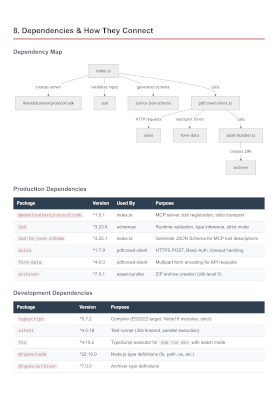
Example
Analyze this project and create a comprehensive architecture overview PDF.
Include component diagrams and data flow. Save to architecture-overview.pdf
Configuration
Prerequisites: Node.js 18 or later.
Claude Code
Add to ~/.claude.json (user scope) or .mcp.json in your project root (project scope):
{
  "mcpServers": {
    "pdfcrowd-export-pdf": {
      "command": "npx",
      "args": ["-y", "pdfcrowd-mcp-pdf-export"],
      "env": {
        "PDFCROWD_USERNAME": "demo",
        "PDFCROWD_API_KEY": "demo"
      }
    }
  }
}
Gemini CLI
Add to ~/.gemini/settings.json:
{
  "mcpServers": {
    "pdfcrowd-export-pdf": {
      "command": "npx",
      "args": ["-y", "pdfcrowd-mcp-pdf-export"],
      "env": {
        "PDFCROWD_USERNAME": "demo",
        "PDFCROWD_API_KEY": "demo"
      },
      "timeout": 65000
    }
  }
}
Codex CLI
Add to ~/.codex/config.toml:
[mcp_servers.pdfcrowd-export-pdf]
command = "npx"
args = ["-y", "pdfcrowd-mcp-pdf-export"]
tool_timeout_sec = 65

[mcp_servers.pdfcrowd-export-pdf.env]
PDFCROWD_USERNAME = "demo"
PDFCROWD_API_KEY = "demo"
Notes
- Restart your CLI after configuration to load the server
Credentials
The demo credentials work immediately, no signup needed. Output includes a watermark. For watermark-free PDFs, sign up for personal credentials.
Privacy
Your source code never leaves your machine — only the rendered document is sent to PDFCrowd for PDF conversion.