Peta Core – The Control Plane Runtime for MCP
Secure vault • Managed MCP runtime • Tool-call audit trail • Policy-based approvals
One layer between your AI agents and your tools & APIs — policies enforced, credentials injected server-side, every call logged.




Peta Core is the control-plane runtime for MCP: a zero-trust gateway + vault-backed credential injection layer that also manages downstream MCP server lifecycle (warm pools, health checks, autoscaling).
Often described as “1Password for AI agents” because secrets never reach clients — but the bigger value is centralized policy, approvals, and audit across every tool call.
Use Peta Core to connect ChatGPT, Claude, Cursor, n8n, or any MCP-compatible client to your internal tools, APIs, and data sources—without embedding raw secrets into prompts or client configs.
Key guarantees
- Managed MCP runtime: orchestrate downstream MCP servers with lifecycle management (warm pools, scaling, health checks).
- Secure vault: secrets stay encrypted server-side and are injected only at execution time (never in prompts or client configs).
- Policy-based approvals: enforce RBAC/ABAC and optional human approval for high-risk tools.
- Tool-call audit trail: every tool call is logged with identity, policy decision, and outcome (without leaking raw secrets).
⚡ Quick Start (no-code / easiest install) → https://peta.io/quick-start
Follow the official guide to install Peta Core + Console (and optionally Peta Desk) without building from source.
🚀 Official Website → https://peta.io
📘 Full Documentation → https://docs.peta.io
About the Project
What is Peta Core?
Peta Core sits between MCP clients (e.g Claude, ChatGPT, Cursor, or custom AI agents) and the MCP servers that expose internal tools and data.
From the MCP client’s perspective, it connects to a single MCP server. Behind that stable endpoint, Peta Core:
- Connects to multiple downstream MCP servers.
- Applies authentication and permission checks before any tool call runs.
- Translates and routes requests to the appropriate downstream server.
- Streams responses back to the client using the standard MCP protocol.
Peta Core uses the same MCP protocol in both directions, so you can plug it into existing MCP clients and servers without custom extensions.
Why Peta Core?
Without a control plane, MCP turns into an ops + governance problem: server sprawl, secret exposure, missing approvals, and no audit trail.
Running agents directly against individual MCP servers causes a few problems:
- MCP Servers Are a Full-Time Job. Each server must implement its own authentication, rate limiting, logging, and monitoring.
- Tool and resource permissions are often coarse (server-wide) instead of per user or per client.
- Secrets such as API keys tend to be shared across environments and copied into client configuration.
- There is no consistent way to introduce human approval for sensitive operations.
- Many teams require self-hosted / on-prem operation, with encrypted secret storage and audit trails under their control.
Peta Core centralizes these concerns into a single gateway:
- Centralized policy for authentication, authorization, quotas, and observability across MCP servers.
- A server-side vault keeps secrets encrypted at rest and injects them only at execution time.
- Fine-grained capability filtering per identity and context.
- Optional human-in-the-loop approvals for high-risk operations.
- Built for deployments inside your own infrastructure (self-hosted / on-prem) to meet security and compliance requirements.
See Security & Permissions for details on encryption at rest and key management.
System Components
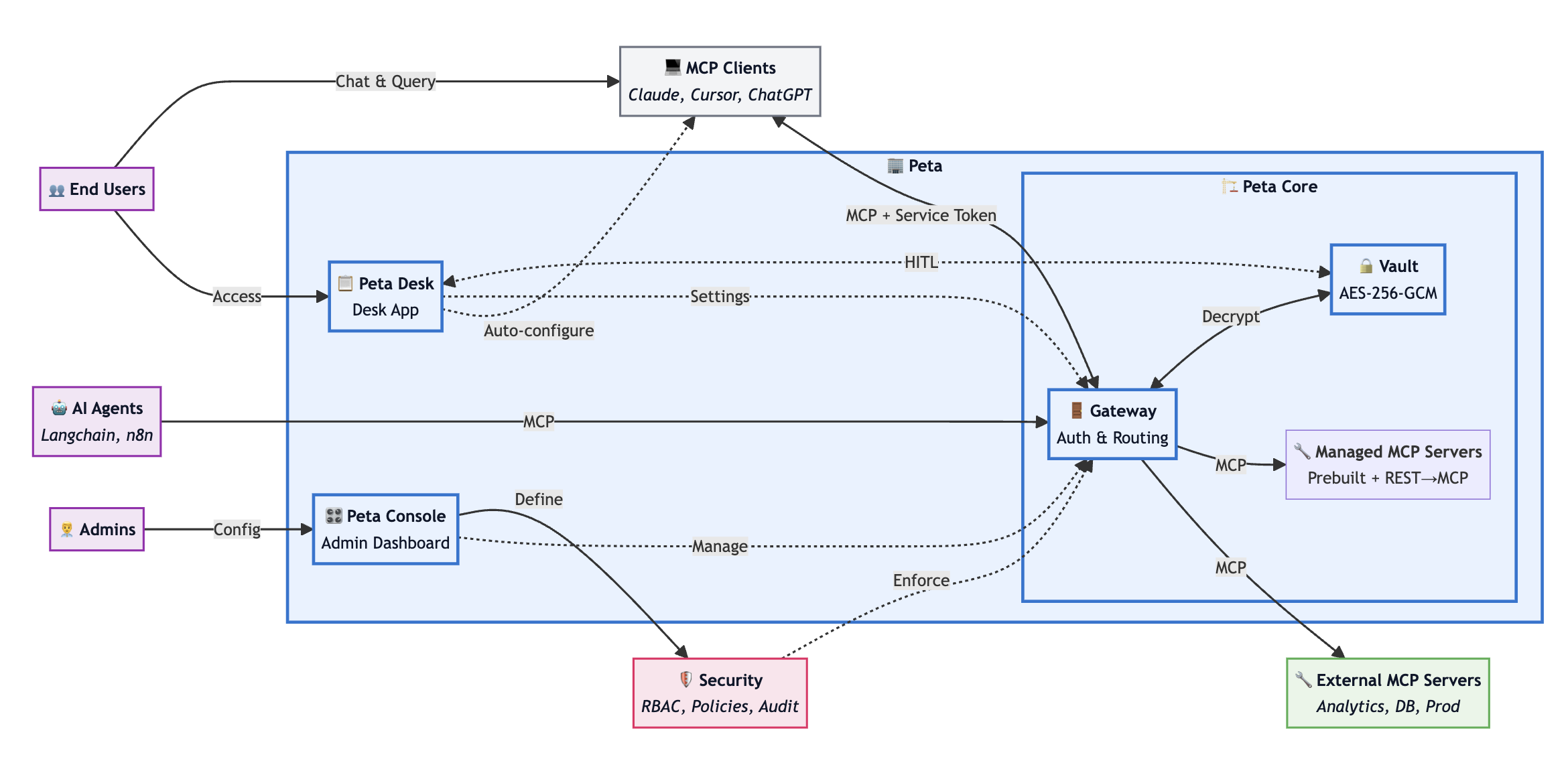
Peta Core is the core backend service of the Peta MCP stack. In typical deployments it runs together with two companion applications:
- Peta Core – this repository; the MCP vault, gateway and runtime.
- Peta Console – a web control plane used by administrators to configure policies, manage MCP servers, and inspect audit logs.
- Peta Desk – a desktop client that combines an MCP client with a real-time control surface, so end users can approve operations and manage their own configuration.
This repository contains only Peta Core. For Console/Desk details, see Companion Applications below.
At a high level, Peta Core is responsible for:
- Terminating and proxying MCP connections from agents and MCP-compatible clients (acting as an MCP server upstream and an MCP client downstream).
- Issuing and validating short-lived service tokens for users and agents.
- Routing requests to downstream MCP servers and managing downstream server lifecycle as needed.
- Injecting external credentials from an encrypted MCP vault at execution time (secrets never ship to clients).
- Enforcing per-user, per-agent, and per-tool policy decisions (RBAC/ABAC and capability filtering).
- Supporting human-in-the-loop approvals for high-risk operations.
- Enforcing rate limits and optional network controls (for example IP allow-lists).
- Persisting events for reconnection and maintaining audit trails.
- Providing observability hooks for logs and metrics.
Core Features
Peta Core provides the runtime layer of the MCP Control Plane: secure credential handling, policy enforcement, approvals, and audit — for every tool call.
1) Managed MCP Gateway & Runtime
- Transparent MCP proxying. Acts as an MCP server upstream and an MCP client downstream — no custom extensions required.
- Multi-server routing. Mount multiple downstream MCP servers behind one stable endpoint (e.g.
serverId::toolName). - Lazy loading (optional). Load server configurations into memory without startup; servers launch on-demand and auto-shutdown when idle to optimize resource usage.
- Downstream lifecycle (optional). Run/monitor downstream servers with health checks and lifecycle hooks when needed.
2) Secure Vault & Server-side Credential Injection
- Secrets never reach MCP clients. Credentials stay encrypted server-side and are injected just-in-time at execution.
- Vault-backed connectors. Downstream MCP servers receive the credentials they need only for the duration of a call.
- Encrypted config storage. Server configs and per-user configuration blobs can be stored encrypted at rest.
- See: Security & Permissions for encryption and key management details.
3) Policy Enforcement & Approvals
- Fine-grained policy checks. Enforce RBAC/ABAC + capability filtering per user/agent/client/tool.
- Human-in-the-loop approvals. Pause execution for sensitive tools and resume only after an approval decision (Desk or external UI).
- Quota & network controls. Rate limiting and optional IP allow-lists can be applied per workspace/user.
4) Tool-call Audit Trail & Observability
- Audit trail by default. Record who called what, the policy decision, and the outcome (without logging raw secrets).
- Structured logs & metrics hooks. Designed to integrate with your logging/monitoring stack.
Reliability
- Stream resumption. Persist events so clients can resume streams via
Last-Event-IDafter interruptions. - Real-time notifications channel. Supports approval/notification workflows (e.g. Desk integrations).
Companion Applications
Peta Console and Peta Desk are companion apps that work with Peta Core.
Peta Console (Admin Interface)
Peta Console is a web-based administration UI for operators and security teams. It communicates with Peta Core through the Admin API (for example, POST /admin).
Key Features
-
User management
- Create, query, update, and delete users.
- Enable or disable accounts.
- Assign roles and permissions.
- Configure per-user rate limits.
-
Credential security
- Store per-user tokens and credentials encrypted locally with a master password chosen by the user.
- Optionally unlock the local vault with platform biometrics (Touch ID / Windows Hello) instead of retyping the password.
- The master key never leaves the device and is never sent to Peta Core; only encrypted blobs are stored on disk.
-
MCP server management
- Register and configure downstream MCP servers.
- Control which tools, resources, and prompts are exposed from each server.
- Enable or disable servers per workspace or environment.
-
Permission and policy management
- Define per-user and per-workspace permissions for tools, resources, and prompts.
- Mark high-risk tools as approval-required.
- Inspect effective permissions for a given user or client.
-
Monitoring and audit
- Browse recent tool calls and their outcomes.
- Inspect audit logs for compliance and debugging.
- View basic health indicators for downstream servers.
Interaction Model
Peta Console talks to Peta Core using the Admin API:
- A single
/adminendpoint with action codes for operations (user, server, and policy management). - Authenticated with admin-level JWT or OAuth 2.0 credentials.
- Designed to be scriptable; you can call the same API from your own automation.
Peta Desk (User Client)
Peta Desk is a desktop application (for example built with Electron) that exposes a user-facing control surface on top of Peta Core. It connects to the gateway’s Socket.IO endpoints.
Key Features
-
Capability configuration
- Display the tools, resources, and prompts currently available to the user.
- Let users further restrict their own capabilities on a per-client basis.
- Apply updates in real time when administrators change permissions.
-
Server configuration
- Allow users to configure servers that require their own credentials (for example, personal API keys).
- Unconfigure or revoke previously stored user configuration.
- Automatically trigger server startup once configuration is complete.
-
Approval workflow
- Receive approval requests when an agent triggers a tool that requires human review.
- Show the parameters the agent intends to send.
- Let the user approve, reject, or modify the request.
Interaction Model
Peta Desk uses Socket.IO for capability updates, approval requests, and general notifications.
More Documentation
-
Architecture & Internals
System Architecture, Gateway Responsibilities, Project Structure, request/data flows, and core design patterns. -
Security & Permissions
Vault encryption model (PBKDF2 + AES-GCM) and the three-layer permission model with human-in-the-loop controls. -
Deployment & Configuration
Quick start, Docker and PM2 deployment, environment variables, Docker configuration, and common commands. -
Reference
Usage examples, API surfaces, testing notes, troubleshooting, contributing, and license.
Troubleshooting
-
Docker not running Ensure Docker Desktop or your Docker daemon is running before using
npm run db:startor the Docker deployment script. -
Port already in use Change
BACKEND_PORTor update your Docker/PM2 configuration if port3002is already taken. -
Database connection failed Check
DATABASE_URL, firewall rules, and confirm that the PostgreSQL container is healthy.npm run db:logs(if available) can help diagnose issues. -
Authentication issues Verify that
JWT_SECRETand related auth configuration are set consistently across Peta Core and any companion applications.
For more detailed troubleshooting, see the docs/ folder or open an issue with logs and reproduction steps.
License
This project is licensed under the Elastic License 2.0 (ELv2).
What We Encourage
Subject to the terms of the Elastic License 2.0, you are encouraged to:
- Freely review, test, and verify the safety and reliability of this product
- Modify and adapt the code for your own use cases
- Apply and integrate this project in a wide variety of scenarios
- Contribute improvements, bug fixes, and other enhancements that help evolve the codebase
Key Restrictions:
- You may not provide the software to third parties as a hosted or managed service
- You may not remove or circumvent license key functionality
- You may not remove or obscure licensing notices
For detailed terms, see the LICENSE file.
Copyright © 2026 Dunia Labs, Inc.