
Build MCP servers from single TypeScript files.
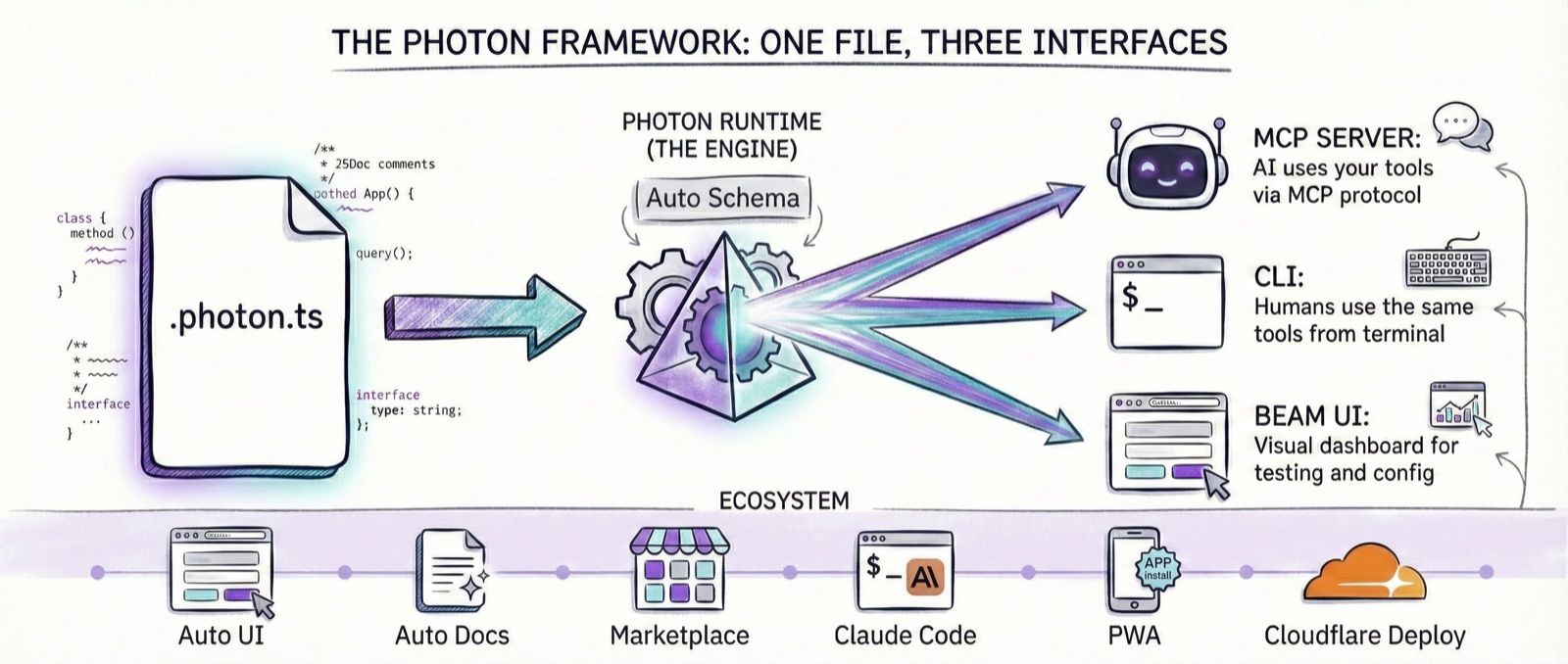
Write business logic. Get an MCP server, CLI, and web UI — automatically.






Quick Start · Features · Beam UI · Marketplace · Docs
Quick Start
npm install -g @portel/photon
photon init my-tool
photon                        # Open Beam UI in your browser
Create analytics.photon.ts — no boilerplate, no config files:
/**
 * Analytics - Query company analytics
 * @dependencies pg@^8.11.0
 */
import { Client } from 'pg';

export default class Analytics {
  private db: Client;

  constructor(private host: string, private database: string, private password: string) {}

  async onInitialize() {
    this.db = new Client({ host: this.host, database: this.database, password: this.password });
    await this.db.connect();
  }

  /** Get revenue by date range */
  async revenue(params: { startDate: string; endDate: string }) {
    return (await this.db.query(
      'SELECT date, SUM(amount) FROM orders WHERE date BETWEEN $1 AND $2 GROUP BY date',
      [params.startDate, params.endDate]
    )).rows;
  }
}
Same file, three interfaces:
photon mcp analytics              # MCP server for Claude, Cursor, Zed
photon cli analytics revenue      # CLI for humans
photon                            # Beam web UI
Beam
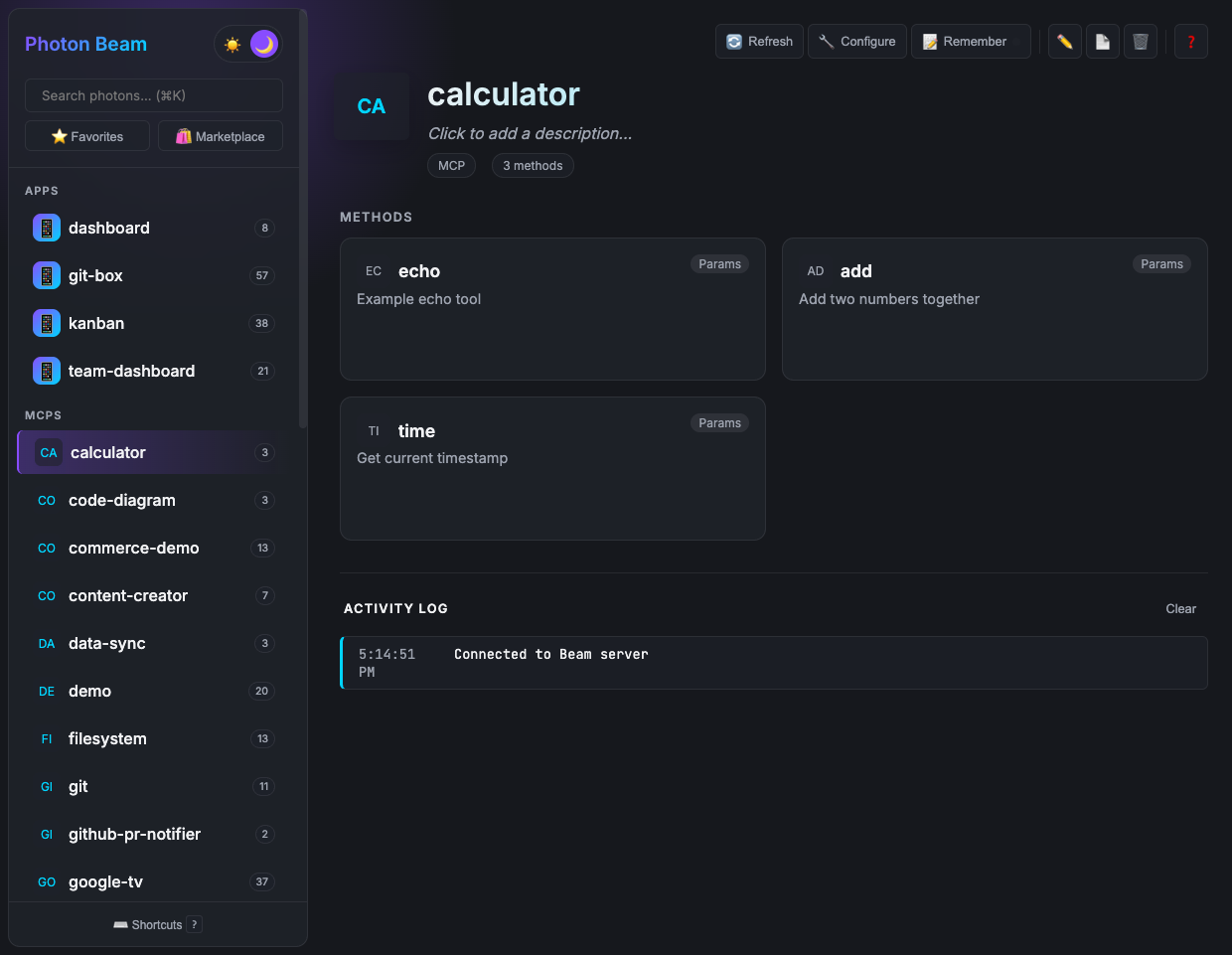
Beam is the human interface to MCP — browse, configure, test, and execute tools visually.
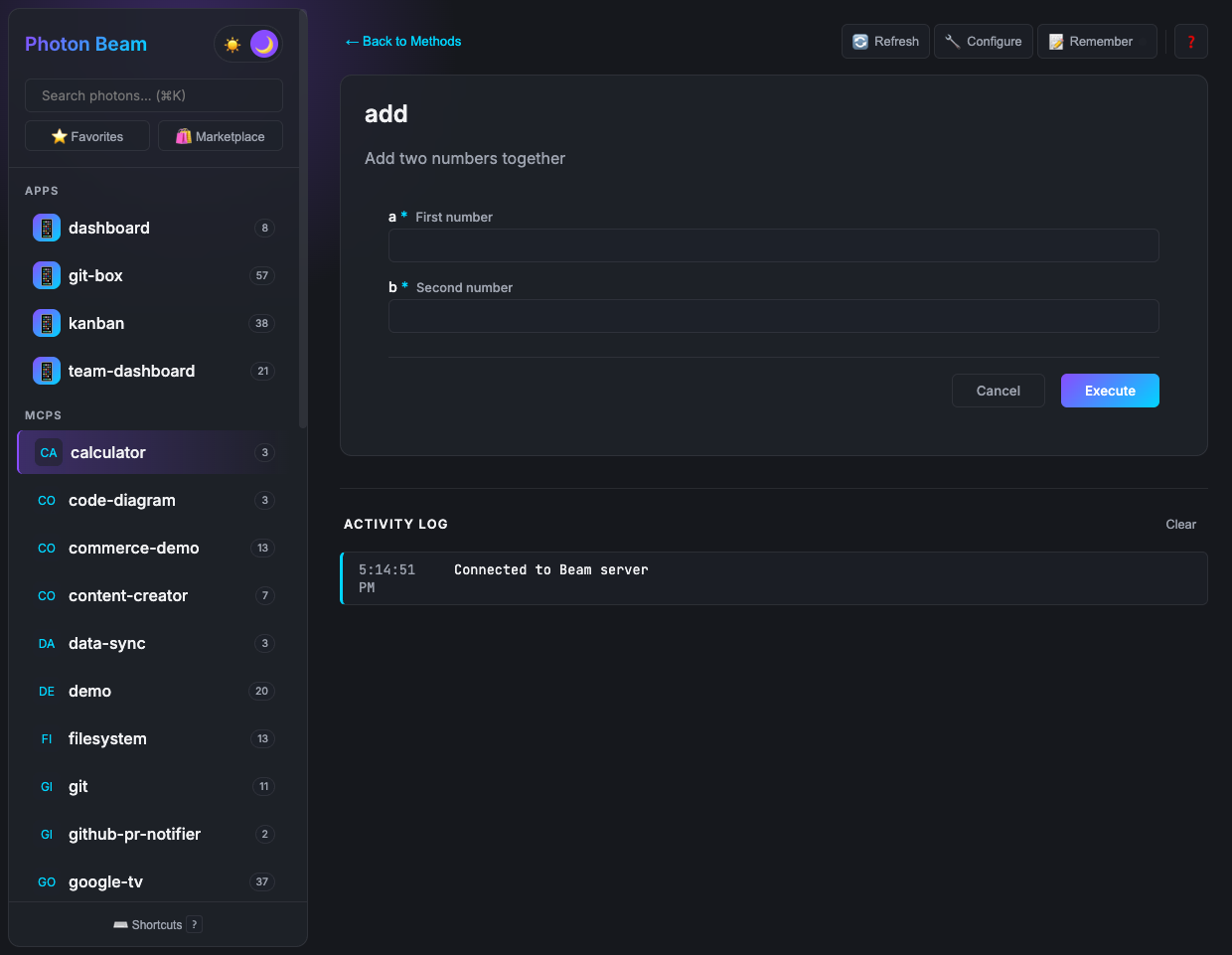
Auto-generated forms — Built from your TypeScript types. Required fields marked, types validated. |
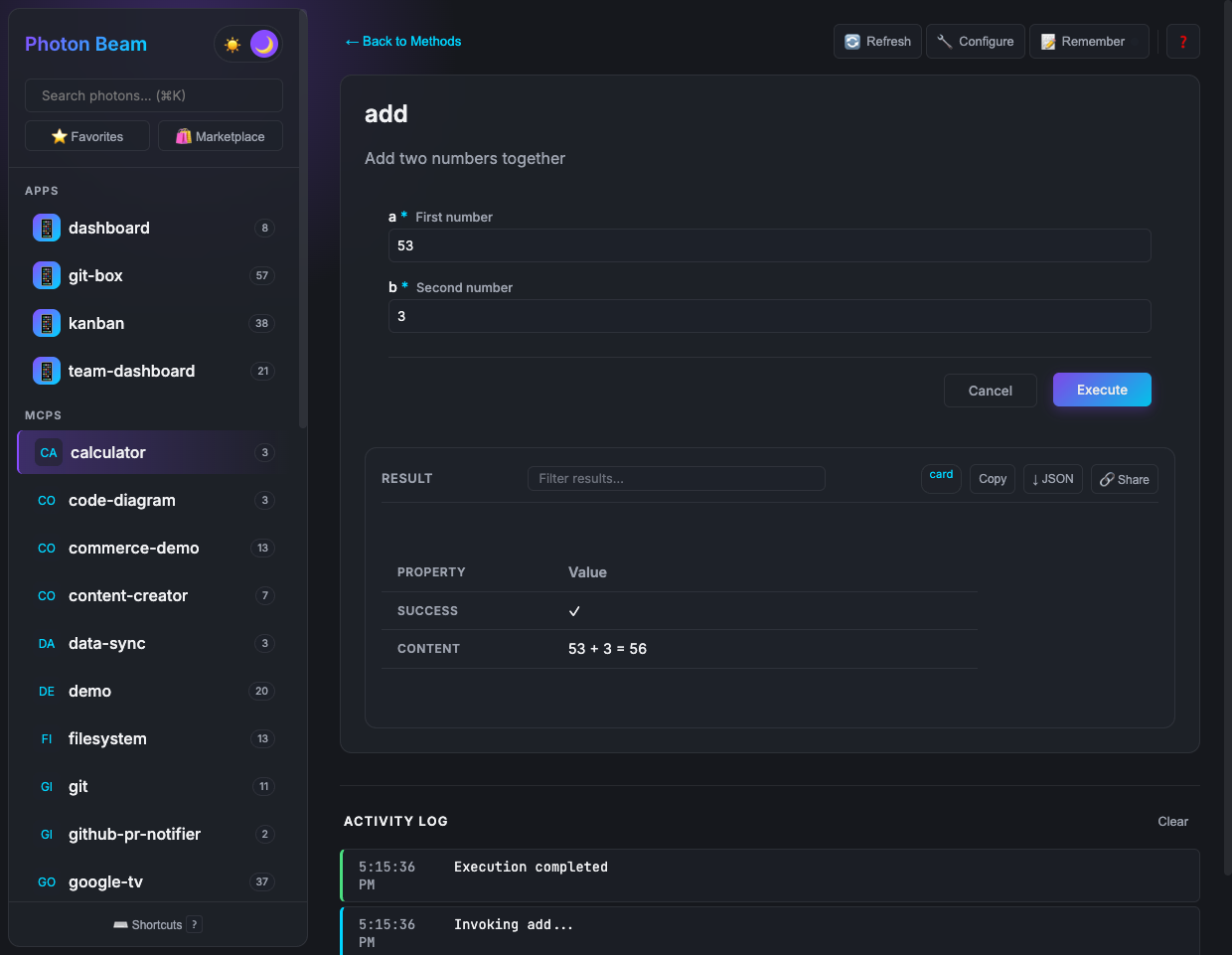
Execute and verify — Test every tool before deploying to AI. See exactly what AI will see. |
Constructor parameters become form fields, environment variables, and CLI flags automatically:
constructor(
  private host: string,      // → ANALYTICS_HOST env var → text field
  private database: string,  // → ANALYTICS_DATABASE    → text field
  private password: string   // → ANALYTICS_PASSWORD    → password field
) {}
Features
Convention Over Configuration
| What You Write | What Photon Does |
|---|---|
analytics.photon.ts | MCP server name: analytics |
async revenue() | MCP tool: revenue |
| TypeScript types | JSON Schema (auto-generated) |
| JSDoc comments | Tool descriptions |
| Constructor params | Env vars + config UI |
@dependencies pg@^8.11.0 | Auto-install on first run |
Full Platform
- Hot Reload —
--devflag watches for changes and reloads instantly - Daemon Protocol — Pub/sub channels, distributed locks, scheduled jobs, webhooks
- Custom UIs — Build rich interfaces with
window.photonAPI - OAuth — Built-in OAuth 2.1 with Google, GitHub, Microsoft providers
- MCP Composition — Call other MCP servers with
@mcptag - Deployment — Docker, Cloudflare Workers, AWS Lambda, Systemd
Why Single File?
Traditional MCPs scatter logic across 4-6 files. Photon keeps everything in one:
| Traditional MCP | Photon | |
|---|---|---|
| Files | 4-6 (server, transport, schemas, types, config) | 1 |
| Boilerplate | 150+ lines before business logic | 0 |
| Security audit | Hours across multiple files | Minutes, one file |
| Fork and customize | Build config, dependency management | Copy, edit, run |
| AI context | Scattered, multi-file coordination | Complete in one read |
Marketplace
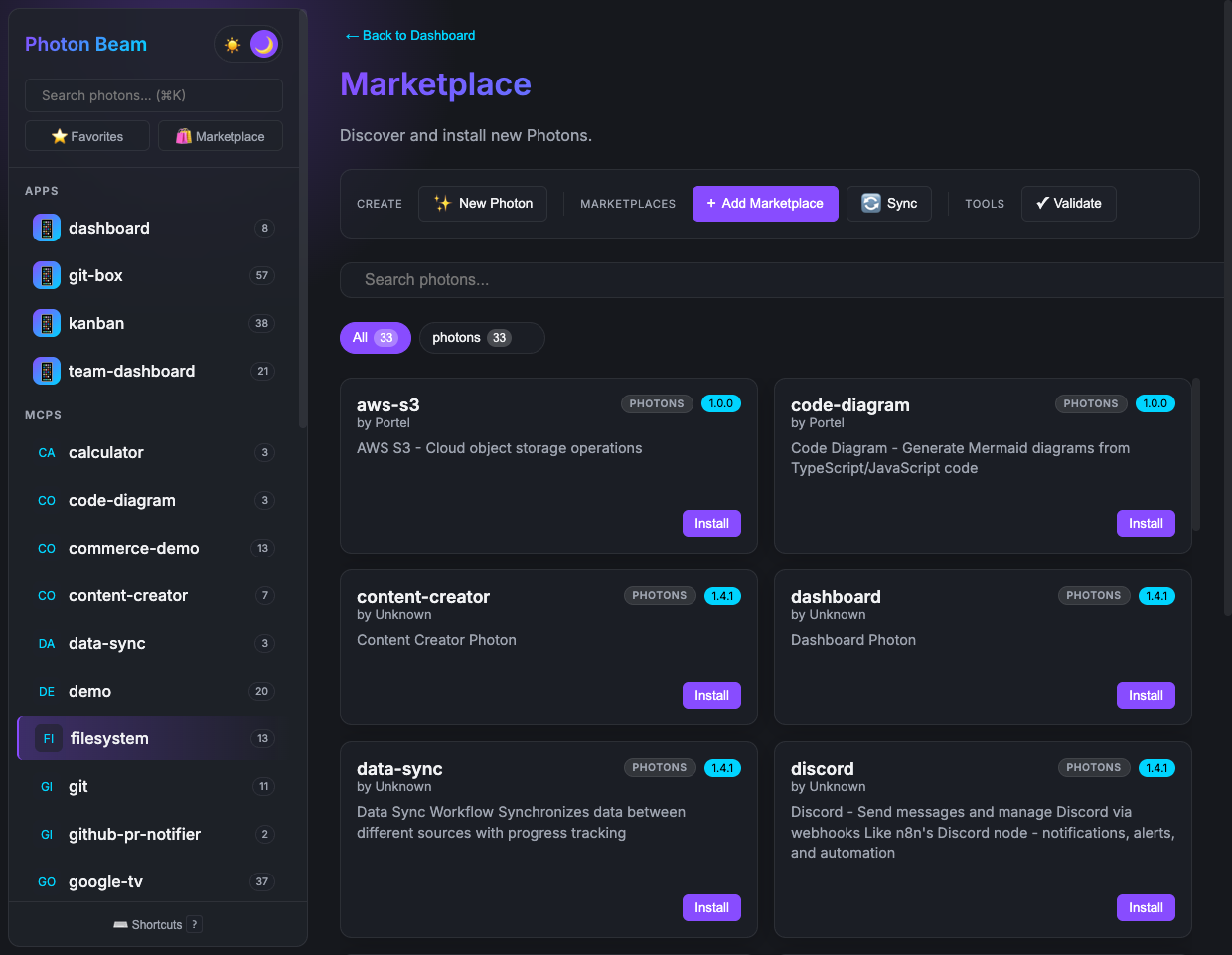
Install production-ready photons or create team marketplaces:
photon search postgres            # Find photons
photon add postgres               # Install
photon upgrade                    # Keep current
Available: PostgreSQL, MongoDB, Redis, SQLite, AWS S3, Docker, Filesystem, Git, GitHub, Email, Slack, Google Calendar, Jira, and more.
# Create a team marketplace
photon sync marketplace --claude-code
git push origin main
# Team members: photon marketplace add company/photons
Commands
# Run
photon                            # Open Beam UI
photon mcp <name>                 # MCP server
photon mcp <name> --dev           # MCP server with hot reload
photon cli <name> [method]        # CLI interface

# Manage
photon init <name>                # Create new photon
photon info                       # List all photons
photon info <name> --mcp          # Get MCP client config
photon validate <name>            # Check for errors

# Marketplace
photon add <name>                 # Install photon
photon search <query>             # Search
photon upgrade                    # Upgrade all

# Ops
photon doctor                     # Diagnose environment
photon audit                      # Security audit
photon test                       # Run tests
photon deploy                     # Deploy to production
Documentation
Start here:
| Guide | |
|---|---|
| Getting Started | Create your first photon, step by step |
| Advanced | Lifecycle hooks, performance, testing |
| Docblock Tags | Complete JSDoc tag reference |
| Troubleshooting | Common issues and solutions |
Deep dives:
| Topic | |
|---|---|
| Custom UI | Build rich interactive interfaces |
| Auth | OAuth 2.1 with built-in providers |
| Daemon Pub/Sub | Real-time cross-process messaging |
| Webhooks | HTTP endpoints for external services |
| Deployment | Docker, Lambda, Workers, Systemd |
| Security | Best practices and audit checklist |
| Marketplace Publishing | Create and share marketplaces |
Reference: Architecture · Best Practices · Naming Conventions · Comparison · Changelog
Contributing
See CONTRIBUTING.md and ARCHITECTURE.md.
License
Singular focus. Precise target.
Made by Portel
photon
Singular focus. Precise target.
Photons are single-file TypeScript MCP servers that supercharge AI assistants with focused capabilities. Each photon delivers ONE thing exceptionally well - from filesystem operations to cloud integrations.
Built on the Model Context Protocol (MCP), photons are:
- 📦 One-command install via Photon CLI
- 🎯 Laser-focused on singular capabilities
- ⚡ Zero-config with auto-dependency management
- 🔌 Universal - works with Claude Desktop, Claude Code, and any MCP client
📦 Available Photons
| Photon | Focus | Tools | Details |
|---|---|---|---|
| Code Diagram | Generate Mermaid diagrams from TypeScript/JavaScript code | 3 | View → |
| Truth Serum | Forces unfiltered honesty, no hedging or diplomacy @description Powerful prompt serums that force specific cognitive behaviors @icon 💉 / | ||
| export default class Serum { | |||
| / | 10 | View → | |
| Test Ui | Test Custom UI | 1 | View → |
Total: 3 photons ready to use
🚀 Quick Start
1. Install Photon
npm install -g @portel/photon
2. Add Any Photon
photon add filesystem
photon add git
photon add aws-s3
3. Use It
# Run as MCP server
photon mcp filesystem

# Get config for your MCP client
photon get filesystem --mcp
Output (paste directly into your MCP client config):
{
  "mcpServers": {
    "filesystem": {
      "command": "photon",
      "args": ["mcp", "filesystem"]
    }
  }
}
Add the output to your MCP client's configuration. Consult your client's documentation for setup instructions.
That's it! Your AI assistant now has 3 focused tools at its fingertips.
🎨 Claude Code Integration
This marketplace is also available as a Claude Code plugin, enabling seamless installation of individual photons directly from Claude Code's plugin manager.
Install as Claude Code Plugin
# In Claude Code, run:
/plugin marketplace add portel-dev/photons
Once added, you can install individual photons:
# Install specific photons you need
/plugin install filesystem@photons-marketplace
/plugin install git@photons-marketplace
/plugin install knowledge-graph@photons-marketplace
Benefits of Claude Code Plugin
- 🎯 Granular Installation: Install only the photons you need
- 🔄 Auto-Updates: Plugin stays synced with marketplace
- ⚡ Zero Config: Photon CLI auto-installs on first use
- 🛡️ Secure: No credentials shared with AI (interactive setup available)
- 📦 Individual MCPs: Each photon is a separate installable plugin
How This Plugin Is Built
This marketplace doubles as a Claude Code plugin through automatic generation:
# Generate marketplace AND Claude Code plugin files
photon maker sync --claude-code
This single command:
- Scans all
.photon.tsfiles - Generates
.marketplace/photons.jsonmanifest - Creates
.claude-plugin/marketplace.jsonfor Claude Code - Generates documentation for each photon
- Creates auto-install hooks for seamless setup
Result: One source of truth, two distribution channels (Photon CLI + Claude Code).
⚛️ What Are Photons?
Photons are laser-focused modules - each does ONE thing exceptionally well:
- 📁 Filesystem - File operations
- 🐙 Git - Repository management
- ☁️ AWS S3 - Cloud storage
- 📅 Google Calendar - Calendar integration
- 🕐 Time - Timezone operations
- ... and more
Each photon delivers singular focus to a precise target.
Key Features:
- 🎯 Each photon does one thing perfectly
- 📦 3 production-ready photons available
- ⚡ Auto-installs dependencies
- 🔧 Works out of the box
- 📄 Single-file design (easy to fork and customize)
🎯 The Value Proposition
Before Photon
For each MCP server:
- Find and clone the repository
- Install dependencies manually
- Configure environment variables
- Write MCP client config JSON by hand
- Repeat for every server
With Photon
# Install from marketplace
photon add filesystem

# Get MCP config
photon get filesystem --mcp
Output (paste directly into your MCP client config):
{
  "mcpServers": {
    "filesystem": {
      "command": "photon",
      "args": ["mcp", "filesystem"]
    }
  }
}
That's it. No dependencies, no environment setup, no configuration files.
Difference:
- ✅ One CLI, one command
- ✅ Zero configuration
- ✅ Instant installation
- ✅ Auto-dependencies
- ✅ Consistent experience
💡 Use Cases
For Claude Users:
photon add filesystem git github-issues
photon get --mcp  # Get config for all three
Add to Claude Desktop → Now Claude can read files, manage repos, create issues
For Teams:
photon add postgres mongodb redis
photon get --mcp
Give Claude access to your data infrastructure
For Developers:
photon add docker git slack
photon get --mcp
Automate your workflow through AI
🔍 Browse & Search
# List all photons
photon get

# Search by keyword
photon search calendar

# View details
photon get google-calendar

# Upgrade all
photon upgrade
🏢 For Enterprises
Create your own marketplace:
# 1. Organize photons
mkdir company-photons && cd company-photons

# 2. Generate marketplace
photon maker sync

# 3. Share with team
git push origin main

# Team members use:
photon marketplace add company/photons
photon add your-internal-tool
Built with singular focus. Deployed with precise targeting.
Made with ⚛️ by Portel