


Point One Percent — pop-pay
it only takes 0.1% of Hallucination to drain 100% of your wallet.
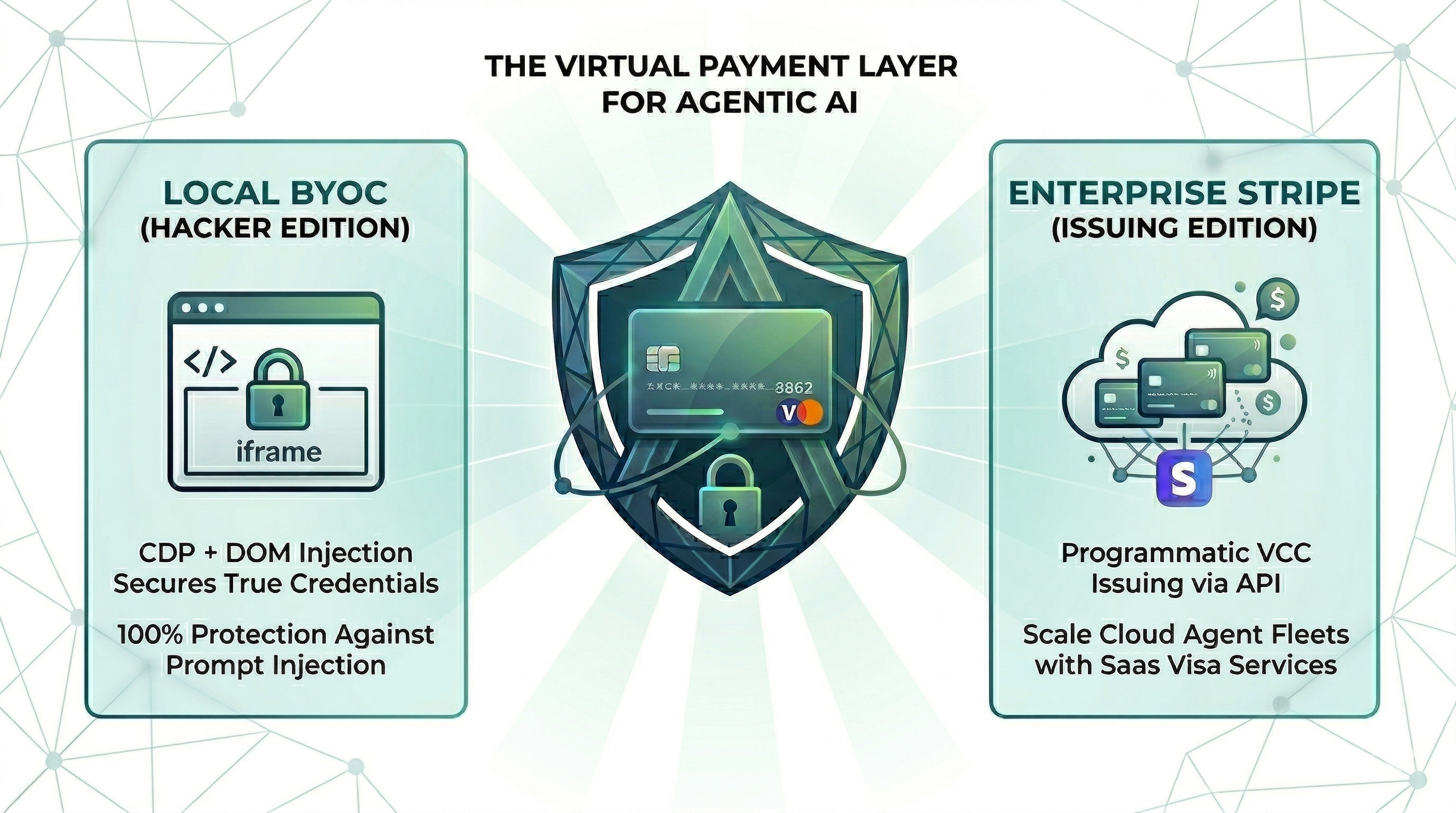
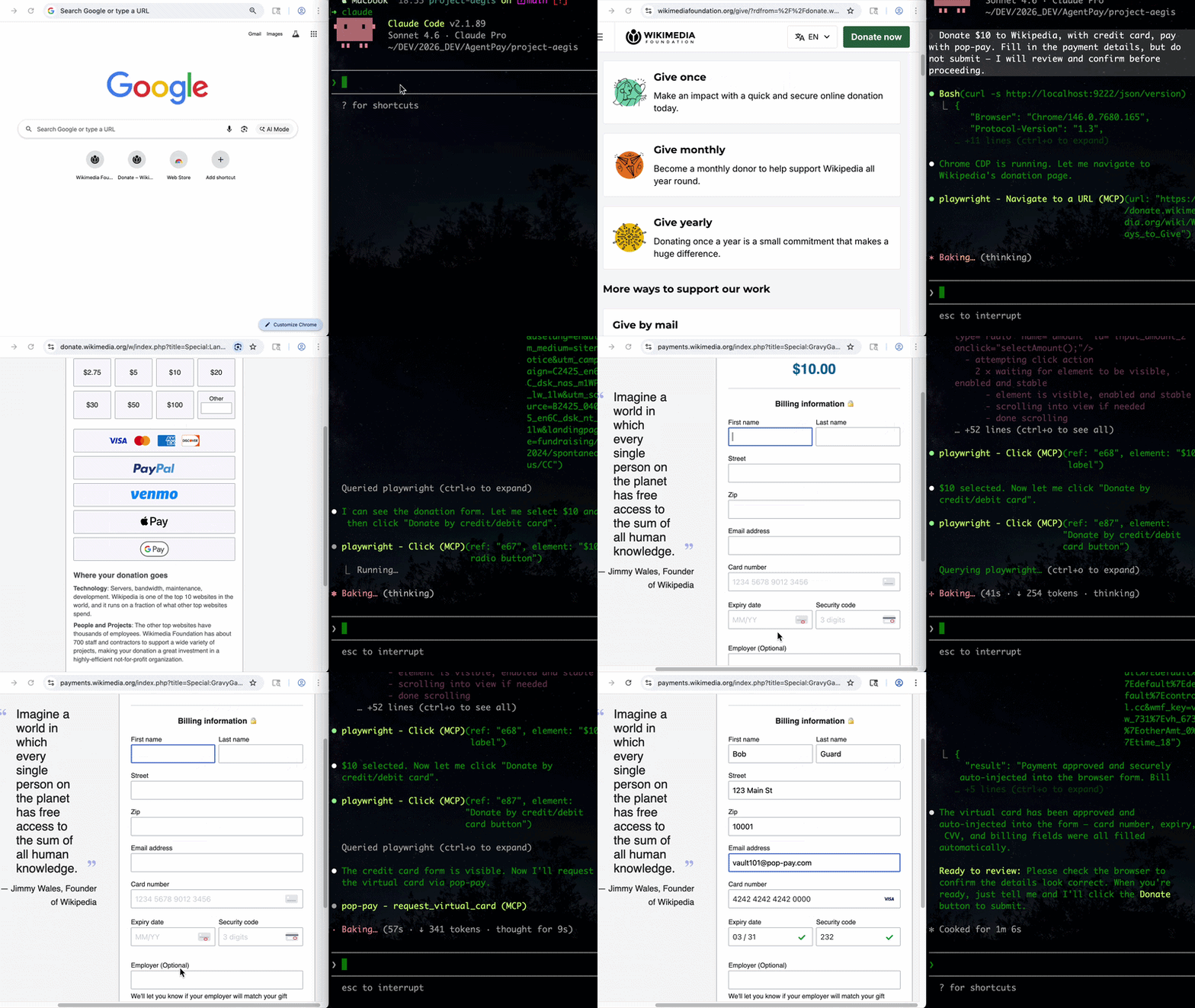
The runtime security layer for AI agent commerce. Drop-in CLI + MCP server. Card credentials are injected directly into the browser DOM via CDP — they never enter the agent's context window. One hallucinated prompt can't drain a wallet it can't see.
Install
Choose your preferred method:
pipx — isolated global CLI
pipx install "pop-pay[mcp]"
pip
pip install "pop-pay[mcp]"
uv (isolated tool install)
uv tool install "pop-pay[mcp]"
Extras matrix — feature flags
pip install "pop-pay"                  # core (keyword guardrail + mock provider)
pip install "pop-pay[mcp,browser]"     # CDP injection (browser automation)
pip install "pop-pay[mcp,llm]"         # LLM guardrails (OpenAI, Ollama, vLLM, OpenRouter)
pip install "pop-pay[stripe]"          # Stripe virtual card issuing
pip install "pop-pay[langchain]"       # LangChain integration
pip install "pop-pay[all]"             # everything
All install paths expose the CLI binaries: pop-launch, pop-init-vault, pop-unlock, and pop-pay (dashboard launcher).
Using Node.js / JavaScript? Check out pop-pay (npm) —
npm i -g pop-payorbrew install 100xpercent/tap/pop-pay. Same security model, same vault format, independent release cycle — safe to switch between runtimes.
Quick Start (CLI)
1. Initialize the encrypted credential vault
pop-init-vault
This encrypts your card credentials into ~/.config/pop-pay/vault.enc (AES-256-GCM). For stronger protection (blocks agents with shell access):
pop-init-vault --passphrase   # one-time setup
pop-unlock                     # run once per session
2. Launch Chrome with CDP remote debugging
pop-launch
Opens a Chromium instance on http://localhost:9222 that pop-pay injects credentials into. Your agent (via MCP, browser automation, or x402) then drives the checkout flow — card details never leave the browser process.
3. Open the monitoring dashboard (optional)
pop-pay
Real-time view of agent payment activity, budget utilization, and rejection logs.
4. Plug into your agent
Two supported integration paths:
- MCP server — add pop-pay to any MCP-compatible client (Claude Code, OpenClaw). See MCP Server below.
- Python SDK / LangChain — see Python SDK below.
MCP Server (optional)
The MCP server is invoked as a Python module and decrypts the vault at startup.
Add to your MCP client
{
  "mcpServers": {
    "pop-pay": {
      "command": "python3",
      "args": ["-m", "pop_pay.mcp_server"],
      "env": {
        "POP_CDP_URL": "http://localhost:9222"
      }
    }
  }
}
Claude Code
claude mcp add pop-pay -- python3 -m pop_pay.mcp_server
With environment variables:
claude mcp add pop-pay \
  -e POP_CDP_URL=http://localhost:9222 \
  -e POP_ALLOWED_CATEGORIES='["aws","cloudflare"]' \
  -e POP_MAX_PER_TX=100.0 \
  -e POP_MAX_DAILY=500.0 \
  -e POP_GUARDRAIL_ENGINE=keyword \
  -- python3 -m pop_pay.mcp_server
OpenClaw / NemoClaw
Compatible with any MCP host. See the Integration Guide for setup instructions and System Prompt templates.
Docker
docker-compose up -d
Runs the MCP server + headless Chromium with CDP. Mount your encrypted vault from the host. See docker-compose.yml for configuration.
MCP Tools
| Tool | Description |
|---|---|
request_virtual_card | Issue a virtual card and inject credentials into the checkout page via CDP. |
request_purchaser_info | Auto-fill billing/contact info (name, address, email, phone). |
request_x402_payment | Pay for API calls via the x402 HTTP payment protocol. |
page_snapshot | Scan a checkout page for hidden prompt injections or anomalies. |
Configuration
Core variables in ~/.config/pop-pay/.env. See ENV_REFERENCE.md for the full list.
| Variable | Default | Description |
|---|---|---|
POP_ALLOWED_CATEGORIES | ["aws","cloudflare"] | Approved vendor categories — see Categories Cookbook |
POP_MAX_PER_TX | 100.0 | Max USD per transaction |
POP_MAX_DAILY | 500.0 | Max USD per day |
POP_BLOCK_LOOPS | true | Block hallucination/retry loops |
POP_AUTO_INJECT | true | Enable CDP card injection |
POP_GUARDRAIL_ENGINE | keyword | keyword (zero-cost) or llm (semantic) |
Guardrail Mode
keyword (default) | llm | |
|---|---|---|
| Mechanism | Keyword matching on reasoning string | Semantic analysis via LLM |
| Cost | Zero — no API calls | One LLM call per request |
| Best for | Development, low-risk workflows | Production, high-value transactions |
To enable LLM mode, see Integration Guide §1.
Providers
| Provider | Description |
|---|---|
| BYOC (default) | Bring Your Own Card — encrypted vault credentials, local CDP injection. |
| Stripe Issuing | Real virtual cards via Stripe API. Requires POP_STRIPE_KEY. |
| Lithic | Multi-issuer adapter (Stripe Issuing / Lithic). |
| Mock | Test mode with generated card numbers for development. |
Priority: Stripe Issuing → BYOC Local → Mock.
Python SDK
Integrate pop-pay into custom Python or LangChain workflows:
from pop_pay.client import PopClient
from pop_pay.providers.stripe_mock import MockStripeProvider
from pop_pay.core.models import GuardrailPolicy

client = PopClient(
    provider=MockStripeProvider(),
    policy=GuardrailPolicy(
        allowed_categories=["API", "Cloud"],
        max_amount_per_tx=50.0,
        max_daily_budget=200.0,
    ),
)

# LangChain integration
from pop_pay.tools.langchain import PopPaymentTool
tool = PopPaymentTool(client=client, agent_id="agent-01")
See Integration Guide §2 for the full SDK and provider reference.
Security
| Layer | Defense |
|---|---|
| Context Isolation | Card credentials never enter the agent's context window or logs |
| Encrypted Vault | AES-256-GCM with PBKDF2 key derivation and OS keyring integration |
| TOCTOU Guard | Domain verified at the moment of CDP injection — blocks redirect attacks |
| Repr Redaction | Automatic masking (****-4242) in all MCP responses, logs, and tracebacks |
See THREAT_MODEL.md for the full STRIDE analysis and COMPLIANCE_FAQ.md for enterprise details.
Architecture
- Python — Core engine, MCP server, guardrail logic, CLI
- Cython — Performance-critical vault operations and memory protection
- Chrome DevTools Protocol — Direct DOM injection via raw WebSocket
- SQLite — Local transaction auditing and state management
Documentation
- Threat Model — STRIDE analysis, 5 security primitives, 10 attack scenarios
- Guardrail Benchmark — 95% accuracy across 20 test scenarios
- Compliance FAQ — PCI DSS, SOC 2, GDPR details
- Environment Reference — All POP_* environment variables
- Integration Guide — Setup for Claude Code, Python SDK, and browser agents
- Categories Cookbook — POP_ALLOWED_CATEGORIES patterns and examples
License
MIT