██████╗ ██████╗  ██████╗ ██╗     ███████╗████████╗ █████╗ ██████╗ ██╗ █████╗ ████████╗
██╔══██╗██╔══██╗██╔═══██╗██║     ██╔════╝╚══██╔══╝██╔══██╗██╔══██╗██║██╔══██╗╚══██╔══╝
██████╔╝██████╔╝██║   ██║██║     █████╗     ██║   ███████║██████╔╝██║███████║   ██║
██╔═══╝ ██╔══██╗██║   ██║██║     ██╔══╝     ██║   ██╔══██║██╔══██╗██║██╔══██║   ██║
██║     ██║  ██║╚██████╔╝███████╗███████╗   ██║   ██║  ██║██║  ██║██║██║  ██║   ██║
╚═╝     ╚═╝  ╚═╝ ╚═════╝ ╚══════╝╚══════╝   ╚═╝   ╚═╝  ╚═╝╚═╝  ╚═╝╚═╝╚═╝  ╚═╝   ╚═╝
Seize the means of production - Ship 100x.
Agent orchestration platform for AI labor. Spin up workers for all work, on demand.
Themed agents, including billionaires - Finally, they work for us.
⚠️ Beta Software — Under active development. Commands and APIs may change between versions, and bugs are actively being squashed.
Let's get you shipping Book a call - I'm happy to help you get prlt running or chat feedback, ideas, multi-agent workflows, and the future of work/labor (and economic labor theory..)
TLDR
prlt is an agent orchestration platform for AI labor. Spin up workers on demand, coordinate multi-agent development from one CLI. Isolated workspaces, secure containers, persistent state.
brew install chrismcdermut/proletariat/prlt    # macOS (Homebrew)
# or
npm install -g @proletariat/cli        # any platform (npm)

prlt init
prlt ticket create --title "Add OAuth" --category feature
prlt work spawn   # Interactive: select tickets, environment, action
Agent spawns in its own branch, writes code, opens PR. You review and merge.
Why prlt?
- Isolated - Each agent gets its own git branch. No conflicts.
- Secure - Docker containers, sandboxed from your host.
- Durable - Tmux sessions persist. Close window, agent keeps working.
- Trackable - One database, one CLI, all your agents.
- Ephemeral - Spawn agents on demand. They work, they PR, they're done.
- Structured - Tickets provide structured context, not freeform chat.
- Persistent - Tickets accumulate context over time. Hand off between agents.
- Agent-native -
--jsonmode lets AI agents drive the CLI programmatically.
Quick Start
npm install -g @proletariat/cli    # Install (npm)
# or
brew install chrismcdermut/proletariat/prlt  # Install (Homebrew, macOS)

prlt init                          # Create HQ, add repos, choose theme
prlt ticket create --title "Add OAuth" --category feature
prlt work spawn                    # Interactive: select tickets, environment, action
# Agent creates PR → You review → Merge → Done
Workflow Diagram (click to expand)
sequenceDiagram
    participant You
    participant prlt
    participant Agent
    participant GitHub

    You->>prlt: prlt ticket create
    You->>prlt: prlt work spawn
    prlt->>prlt: Create branch
    prlt->>prlt: Create workspace
    prlt->>Agent: Spawn agent
    Agent->>Agent: Read ticket
    Agent->>Agent: Write code
    Agent->>GitHub: Commit
    Agent->>GitHub: Open PR
    Agent->>prlt: Update status
    prlt->>You: PR ready
    You->>GitHub: Review & approve
Spawn agents to implement, groom, or review—not just write code.
Interactive Menus
prlt work guides you through project and ticket selection:
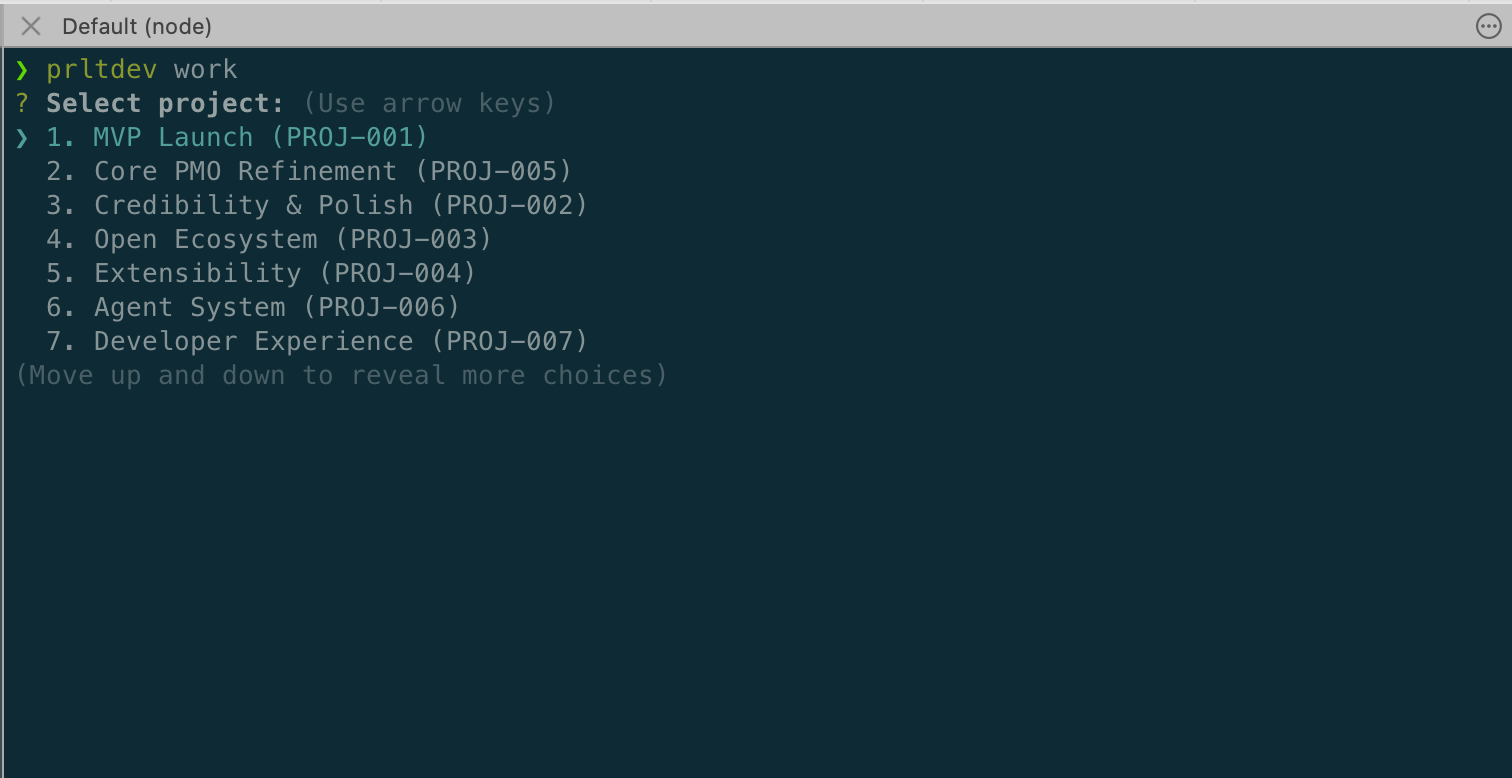
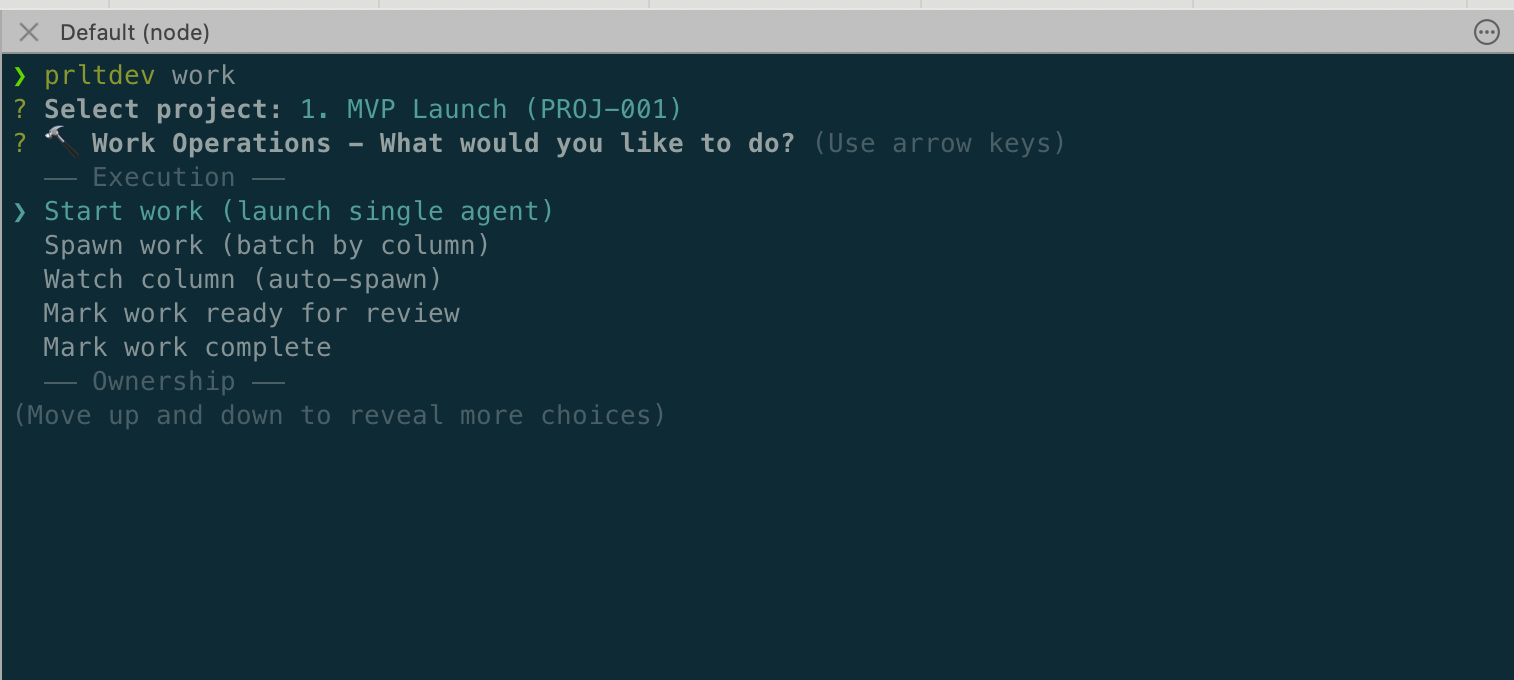
Choose your operation—start a single agent, batch spawn, or watch a column:
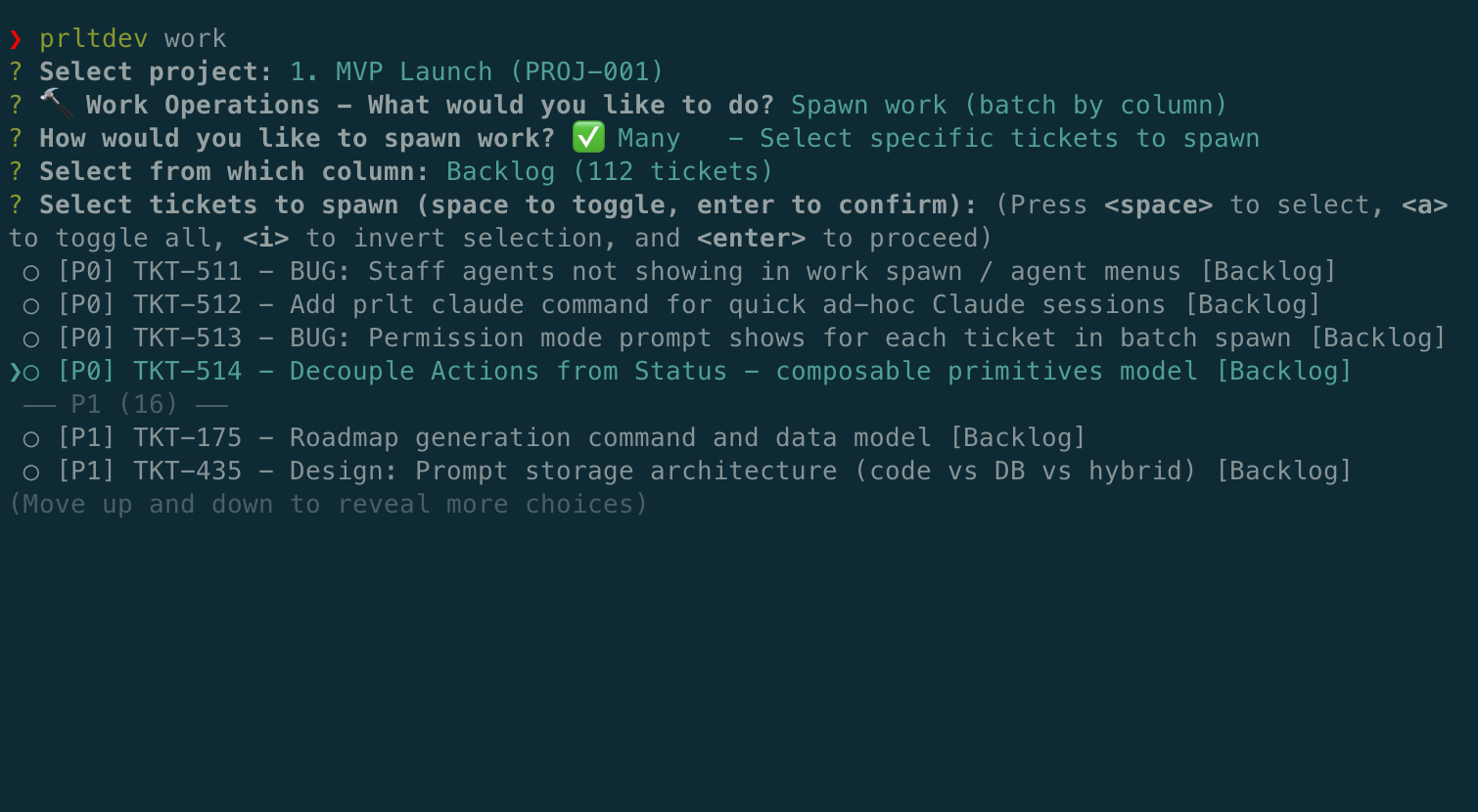
Select tickets to spawn, grouped by priority:
Deep Dive
| Problem | Solution |
|---|---|
| Agents conflict with each other's changes | Isolated - Each agent gets its own git branch and worktree |
| Agents run unsandboxed on your machine | Secure - Docker containers, sandboxed from your host (looking into host sandbox options) |
| You lose track of who's doing what | Trackable - All state in one SQLite database, one CLI |
| Sessions die when you close a window | Durable - Tmux sessions persist, detach/reattach anytime |
| Context scattered across chat windows | Structured - Tickets with requirements, acceptance criteria |
| Starting agents is heavyweight | Ephemeral - Spawn on demand, they work, they PR, they're done |
| Context lost between agent runs | Persistent - Tickets accumulate context, hand off between agents |
Installation
Homebrew (macOS)
brew install chrismcdermut/proletariat/prlt
Works on both Apple Silicon (arm64) and Intel (x86_64) Macs.
Upgrade:
brew update
brew upgrade prlt
Verify:
prlt --version
npm (all platforms)
npm install -g @proletariat/cli
Data Model
Workspace (HQ)
├── Projects
│   ├── Epics → Tickets
│   └── (references a Workflow)
├── Workflows → Phases → Statuses (can be shared across projects)
├── Specs (can span projects)
├── Actions (reusable templates)
├── Agents
│   ├── Staff (persistent, named)
│   └── Temp (ephemeral, per-ticket)
└── Executions (running sessions)
    ├── Docker
    │   ├── Tmux session
    │   ├── Terminal or Background display
    │   └── Safe or YOLO permissions
    └── Host
        ├── Tmux session
        ├── Terminal or Background display
        └── Safe or YOLO permissions
| Entity | Description |
|---|---|
| Project | Groups tickets and epics, references a workflow |
| Epic | Work container with lifecycle (draft → active → complete) |
| Ticket | Individual work item with requirements and acceptance criteria |
| Spec | Static documentation (can span projects, linked to epics) |
| Workflow | Status flow configuration (can be shared across projects) |
| Phase | Stage in a workflow |
| Status | Ticket state within a phase |
| Action | Reusable prompt/action templates |
| Agent (Staff) | Persistent named agent with dedicated workspace |
| Agent (Temp) | Ephemeral agent spawned for a single ticket |
| Execution | Running agent session on a ticket |
| Display | Terminal (new tab) or Background (detached) |
Example Workflow
A workflow defines how tickets move through your process. Projects reference a workflow, and multiple projects can share the same one.
Kanban Workflow
├── Backlog       # New tickets land here
├── In Progress   # Agent working (prlt work spawn)
├── Review        # PR ready (prlt work ready)
└── Done          # Merged (prlt work complete)
Scrum Workflow
├── Backlog
├── Sprint
│   ├── To Do
│   ├── In Progress
│   └── In Review
└── Done
Tickets flow through statuses as work progresses. Agents automatically move tickets when they start work, open PRs, or complete tasks.
Workspace Structure
Each agent gets a copy of all repos (repo scoping coming soon). Work happens on isolated branches.
my-project/
├── .proletariat/
│   └── workspace.db              # Tickets, executions, state
├── repos/
│   ├── frontend/                 # Your repos
│   ├── backend/
│   └── infra/
└── agents/
    ├── staff/
    │   └── alice/                # Named agent with persistent workspace
    │       ├── frontend/
    │       ├── backend/
    │       └── infra/
    └── temp/
        ├── agent-abc123/         # Ephemeral: Working on TKT-042 (OAuth)
        │   ├── frontend/         # All repos on branch: feat/TKT-042-oauth
        │   ├── backend/
        │   └── infra/
        └── agent-def456/         # Ephemeral: Working on TKT-043 (API)
            ├── frontend/         # All repos on branch: feat/TKT-043-api
            ├── backend/
            └── infra/
Agent Naming Themes
Themes control how agents are named. Staff agents use theme names directly (e.g., bezos, camry). Ephemeral agents add an adjective prefix (e.g., bold-bezos, keen-camry). Currently ephemeral names also include a number suffix (bold-bezos-1), but this will be removed soon.
Built-in Themes:
| Theme | Description | Example Names |
|---|---|---|
billionaires | Tech founders & executives (default) | musk, gates, bezos |
toyotas | Toyota vehicle models | camry, supra, tacoma |
companies | Major tech companies | stripe, vercel, linear |
billionaires — Finally, they work for us.
Theme Commands:
prlt agent themes list              # List available themes
prlt agent themes set billionaires  # Set active theme
prlt agent themes create mytheme    # Create custom theme
prlt agent themes add-names mytheme # Add names to custom theme
Themes are selected during prlt init.
Three Ways to Use Commands
1. Interactive (Humans)
Run without flags—get guided prompts:
$ prlt ticket create

? Title: Add password reset
? Description: Email-based password reset flow
? Priority: P1
? Category: feature

✓ Created TKT-043
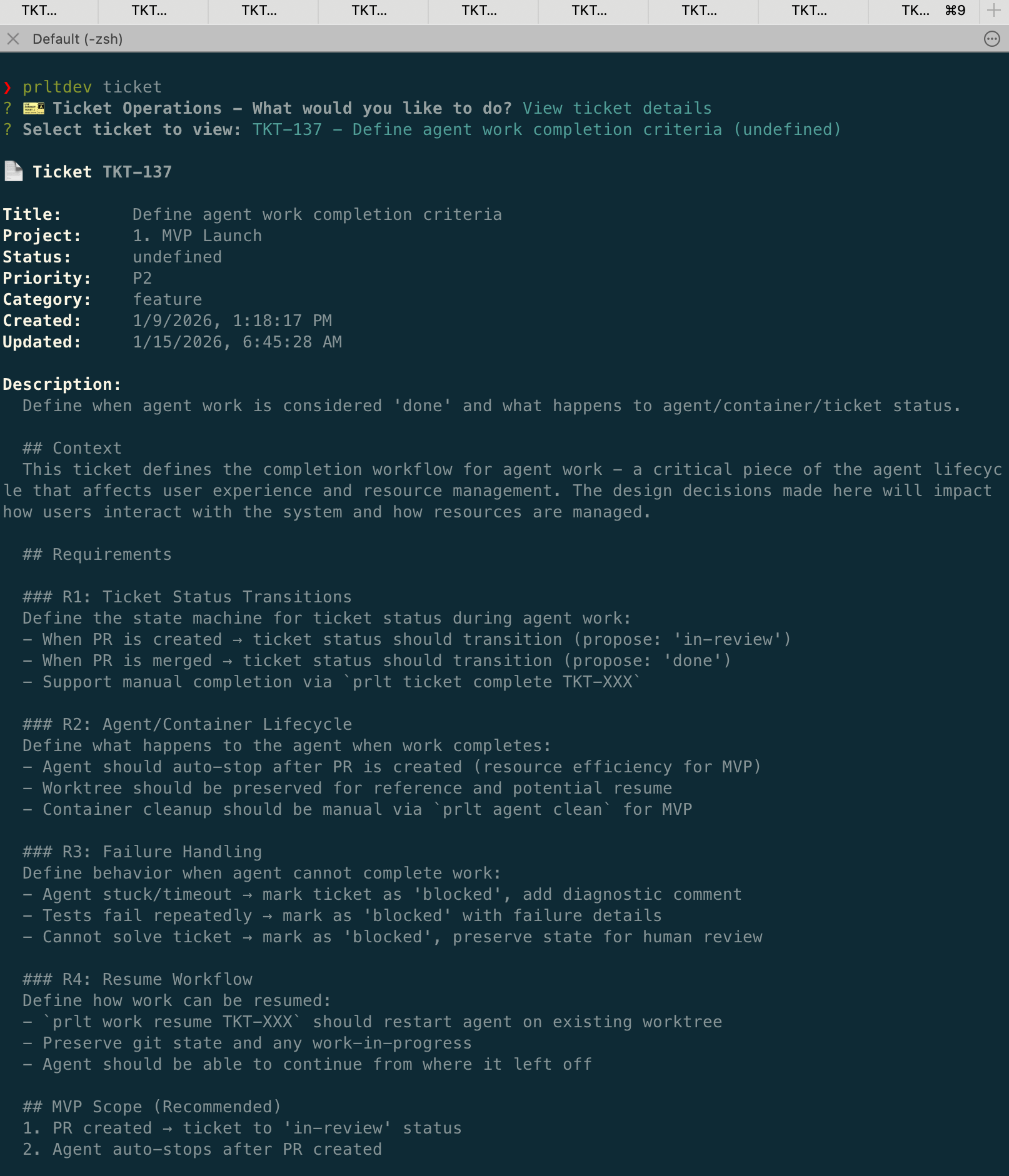
View ticket details with prlt ticket:
2. JSON Mode (AI Agents)
Add --json for machine-readable output:
$ prlt work start --json
{
  "prompt": {
    "type": "list",
    "message": "Select ticket to work on:",
    "choices": [
      {
        "name": "[P1] TKT-042 - Add user authentication",
        "value": "TKT-042",
        "command": "prlt work start TKT-042 --json"
      }
    ]
  }
}
AI agents parse this, make selections, call the next command.
3. Flags (Scripts/CI)
Pass everything directly:
prlt ticket create \
  --title "Add OAuth" \
  --description "Google and GitHub OAuth" \
  --priority P1 \
  --category feature
Execution Modes
Environment - where the agent runs:
| Environment | Flag | Best For |
|---|---|---|
| 🐳 Docker | (default if devcontainer exists) | Safety—fully isolated container |
| 🏃 Host | --run-on-host | Speed—no container overhead |
Display - how you see it:
| Display | Flag | Best For |
|---|---|---|
| 📺 Terminal | --display terminal | Watch in new terminal tab |
| 🔇 Background | --display background | Detached, reattach later |
Permissions - agent access level:
| Mode | Flag | Description |
|---|---|---|
| 🔒 Safe | (default) | Agent prompts for permissions |
| 🕺 YOLO | --skip-permissions | No prompts, full access. Use with Docker for safe autonomy. |
All sessions run in tmux under the hood—close the window, agent keeps working.
# Default: Docker + terminal (if devcontainer exists)
prlt work start TKT-042

# Docker + background
prlt work start TKT-042 --display background

# Host + background (fast, no container)
prlt work start TKT-042 --run-on-host --display background

# Docker + YOLO (full autonomy, safely sandboxed)
prlt work start TKT-042 --skip-permissions
Parallel Agents
Work on multiple tickets simultaneously.
Interactive (humans):
$ prlt work spawn

? Spawn mode: Select specific tickets
? Select tickets:
  ◉ [P1] TKT-042 - Add user authentication
  ◉ [P1] TKT-043 - Add API rate limiting
  ◯ [P2] TKT-044 - Add email notifications
? Action: implement
? Environment: docker

Spawning 2 tickets...
JSON mode (AI agents): (multi-select WIP)
$ prlt work spawn --json --many
{
  "prompt": {
    "type": "checkbox",
    "message": "Select tickets to spawn:",
    "choices": [
      {"name": "[P1] TKT-042 - Add user authentication", "value": "TKT-042"},
      {"name": "[P1] TKT-043 - Add API rate limiting", "value": "TKT-043"}
    ]
  }
}
Flags (scripts/CI):
prlt work spawn TKT-042 TKT-043 --action implement --mode docker
Each agent works in its own branch. No conflicts.
Scaling: The main limit is your machine. 50+ concurrent agents is achievable—depends on CPU, RAM, and whether you're running Docker or host mode.
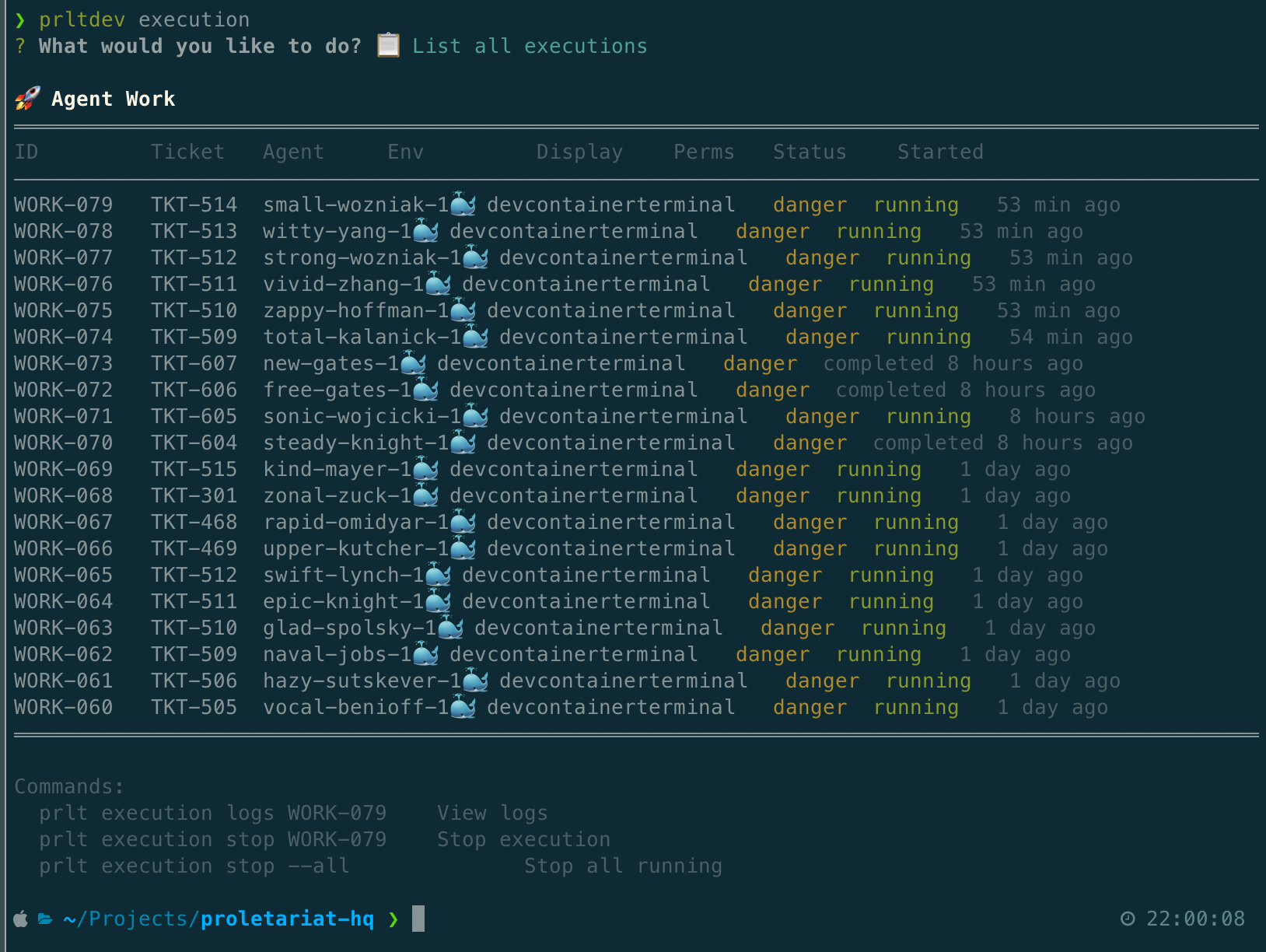
Monitor running agents with prlt execution:
flowchart LR
    subgraph You
        spawn[prlt work spawn]
    end

    subgraph Agents
        A1[Agent 1<br/>TKT-042 OAuth]
        A2[Agent 2<br/>TKT-043 Rate Limit]
        A3[Agent 3<br/>TKT-044 Notifications]
    end

    subgraph GitHub
        PR1[PR #101<br/>feat/TKT-042-oauth]
        PR2[PR #102<br/>feat/TKT-043-rate-limit]
        PR3[PR #103<br/>feat/TKT-044-notifications]
    end

    spawn --> A1
    spawn --> A2
    spawn --> A3

    A1 --> PR1
    A2 --> PR2
    A3 --> PR3
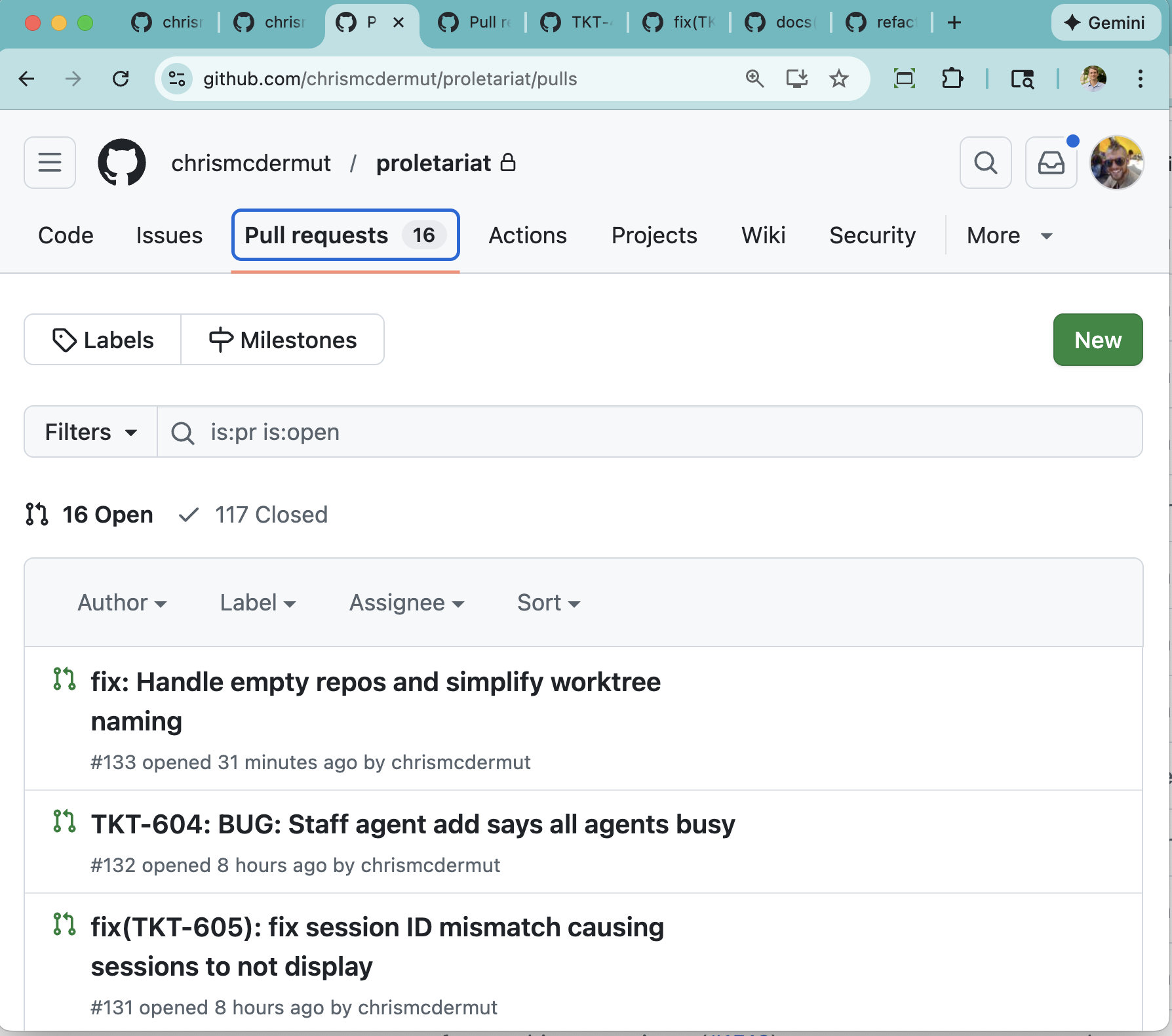
Agent-created PRs ready for review:
Command Reference
Full Command Reference (click to expand)
| Namespace | Command | Description |
|---|---|---|
| ticket | prlt ticket create | Create new ticket |
prlt ticket list | List all tickets | |
prlt ticket view | View ticket details | |
prlt ticket edit | Edit ticket | |
prlt ticket move | Change status | |
prlt ticket delete | Delete ticket | |
prlt ticket complete | Mark ticket complete | |
prlt ticket bulk | Bulk ticket operations | |
prlt ticket link block | Link blocking ticket | |
prlt ticket link relates | Link related ticket | |
prlt ticket template save | Save ticket as template | |
| work | prlt work start | Spawn agent on ticket |
prlt work spawn | Batch spawn tickets | |
prlt work spawn-all | Spawn all planned tickets | |
prlt work complete | Mark work done | |
prlt work ready | Mark ready for review | |
prlt work revise | Request revision | |
prlt work watch | Watch work progress | |
| execution | prlt execution list | List running agents |
prlt execution logs | View agent output | |
prlt execution stop | Stop an agent | |
| agent | prlt agent list | List all agents |
prlt agent status | Check agent status | |
prlt agent shell | Shell into agent workspace | |
prlt agent visit | Navigate to workspace | |
prlt agent login | Auth Claude in container | |
prlt agent rebuild | Rebuild agent workspace | |
prlt agent restart | Restart agent | |
prlt agent staff add | Add named agents | |
prlt agent staff list | List staff agents | |
prlt agent temp list | List ephemeral agents | |
prlt agent temp cleanup | Remove ephemeral agents | |
| agent themes | prlt agent themes list | List available themes |
prlt agent themes set | Set active theme | |
prlt agent themes create | Create custom theme | |
prlt agent themes add-names | Add names to theme | |
| board | prlt board | View kanban board |
prlt board watch | Real-time updates | |
| project | prlt project create | Create project |
prlt project list | List projects | |
prlt project view | View project details | |
prlt project archive | Archive project | |
prlt project unarchive | Unarchive project | |
prlt project delete | Delete project | |
| epic | prlt epic create | Create epic |
prlt epic list | List epics | |
prlt epic view | View epic details | |
prlt epic ticket | Add tickets to epic | |
prlt epic progress | View epic progress | |
prlt epic move | Move epic status | |
prlt epic archive | Archive epic | |
prlt epic activate | Activate epic | |
prlt epic reorder | Reorder epics | |
prlt epic link block | Link blocking epic | |
| spec | prlt spec create | Create specification |
prlt spec list | List specifications | |
prlt spec view | View specification | |
prlt spec plan | Generate plan from spec | |
prlt spec ticket | Create ticket from spec | |
prlt spec link relates | Link related spec | |
| action | prlt action create | Create action template |
prlt action list | List actions | |
prlt action show | Show action details | |
prlt action run | Run action | |
prlt action update | Update action | |
prlt action delete | Delete action | |
| branch | prlt branch create | Create branch |
prlt branch list | List branches | |
prlt branch validate | Validate branch name | |
| status | prlt status list | List workflow statuses |
prlt status create | Create custom status | |
prlt status update | Update status | |
prlt status move | Reorder status | |
prlt status delete | Delete status | |
| workflow | prlt workflow list | List workflows |
prlt workflow create | Create workflow | |
prlt workflow view | View workflow | |
prlt workflow switch | Switch active workflow | |
prlt workflow delete | Delete workflow | |
| phase | prlt phase list | List phases |
prlt phase create | Create phase | |
prlt phase update | Update phase | |
prlt phase move | Reorder phase | |
prlt phase delete | Delete phase | |
| template | prlt template list | List templates |
prlt template delete | Delete template | |
prlt template ticket list | List ticket templates | |
prlt template ticket apply | Apply ticket template | |
prlt template phase list | List phase templates | |
| pr | prlt pr create | Create pull request |
prlt pr status | Check PR status | |
prlt pr link | Link PR to ticket | |
| gh | prlt gh login | Login to GitHub |
prlt gh status | Check auth status | |
prlt gh token | Get GitHub token | |
| repo | prlt repo add | Add repository |
prlt repo list | List repositories | |
prlt repo view | View repository details | |
prlt repo remove | Remove repository | |
| docker | prlt docker list | List containers |
prlt docker status | Check Docker status | |
prlt docker start | Start container | |
prlt docker stop | Stop container | |
prlt docker restart | Restart container | |
prlt docker logs | View container logs | |
prlt docker shell | Shell into container | |
prlt docker sync | Sync container files | |
prlt docker clean | Remove stopped containers | |
prlt docker prune | Remove unused resources | |
| session | prlt session list | List active tmux sessions |
prlt session attach | Attach to tmux session | |
| workspace | prlt init | Initialize workspace |
prlt workspace list | List workspaces | |
prlt workspace add | Add workspace | |
prlt workspace use | Switch workspace | |
| utility | prlt whoami | Show current context |
prlt claude | Quick ad-hoc Claude session | |
prlt commit | Conventional commit | |
prlt autocomplete setup | Setup shell autocomplete |
Run prlt <command> --help for flags and options.
Use Cases
Parallel Feature Development
# Create tickets for each feature
prlt ticket create --title "Add OAuth" --category feature
prlt ticket create --title "Add API rate limiting" --category feature
prlt ticket create --title "Add email notifications" --category feature

# Spawn all three in parallel (Docker for isolation)
prlt work spawn TKT-001 TKT-002 TKT-003 --mode docker

# Watch the board as they work
prlt board watch
Three agents, three branches, three PRs. You review and merge.
Bug Bash
# Spawn all bugs at once
prlt work spawn --all --column Backlog --category bug

# Or pick specific ones
prlt work spawn TKT-010 TKT-011 TKT-012
Grooming Session
Have an agent refine ticket requirements:
prlt work start TKT-042 --action groom
Agent adds acceptance criteria, subtasks, estimates.
Environment Variables
| Variable | Purpose |
|---|---|
GITHUB_TOKEN | GitHub operations (PRs, etc.) |
Claude Code handles its own authentication via claude login.
Requirements
- Node.js 18+
- Git
- Claude Code (
claude loginto authenticate) - SQLite
- Tmux (session persistence)
- Docker (optional—for isolated execution)
Support
- Discord: discord.gg/tmZyjNNSvw
- GitHub Issues: Report bugs or request features
- Setup Help: Book a call - I'll help you get things running
License
Apache 2.0



Star on GitHub | Install from NPM | Report Issues
Made with ⚒️ by the proletariat.