prompt‑to‑asset
One brief → a validated, ship-ready asset bundle.
App icons, favicons, OG images, logos, splash screens, SVG — routed to the right model, matted, vectorized, and fanned out to every platform.
Works with or without an API key.






-D97706?style=for-the-badge&logo=anthropic&logoColor=white)

30-second start
Pick one. Run it. You're done. The recommended path is first.
Runtime: Node ≥ 20.11 (24 recommended). macOS, Linux, Windows (WSL2 for --fix native deps).
🔵 AI assistant · recommendedClick an install button above. Then paste one of these into chat: Works in Cursor, Claude Code, VS Code, Windsurf, Codex, Gemini CLI. Zero terminal typing. |
🟢 Zero key, zero installOne Outputs: iOS AppIconSet, Android adaptive, PWA, favicon bundle, visionOS scaffold. |
🟣 CLI · with an API keyFor CI and no rate limits. Supports OpenAI, Ideogram, Recraft, BFL/Flux, Gemini, Stability, Leonardo, fal.ai. |
Free paths at a glance
You don't need a paid API key. Ranked best-first:
| Route | Gets you | Signup |
|---|---|---|
inline_svg via AI assistant | Logos, favicons, icon packs — instant | None |
| Pollinations (HTTP GET) | Flux-quality raster, RGB | None |
| Cloudflare Workers AI | Flux-1-Schnell + SDXL, 10k neurons/day | Free token + account ID |
| HF Inference | SDXL, SD3, Flux dev/schnell | Free read token |
| Stable Horde | SDXL, Flux on community GPUs | Anonymous queue |
| Google AI Studio (paste-only UI) | Nano Banana / Nano Banana Pro | Google account |
Details + quotas: Free paths beyond Pollinations. Run p2a doctor or ask your assistant for asset_doctor() to see what's live right now.
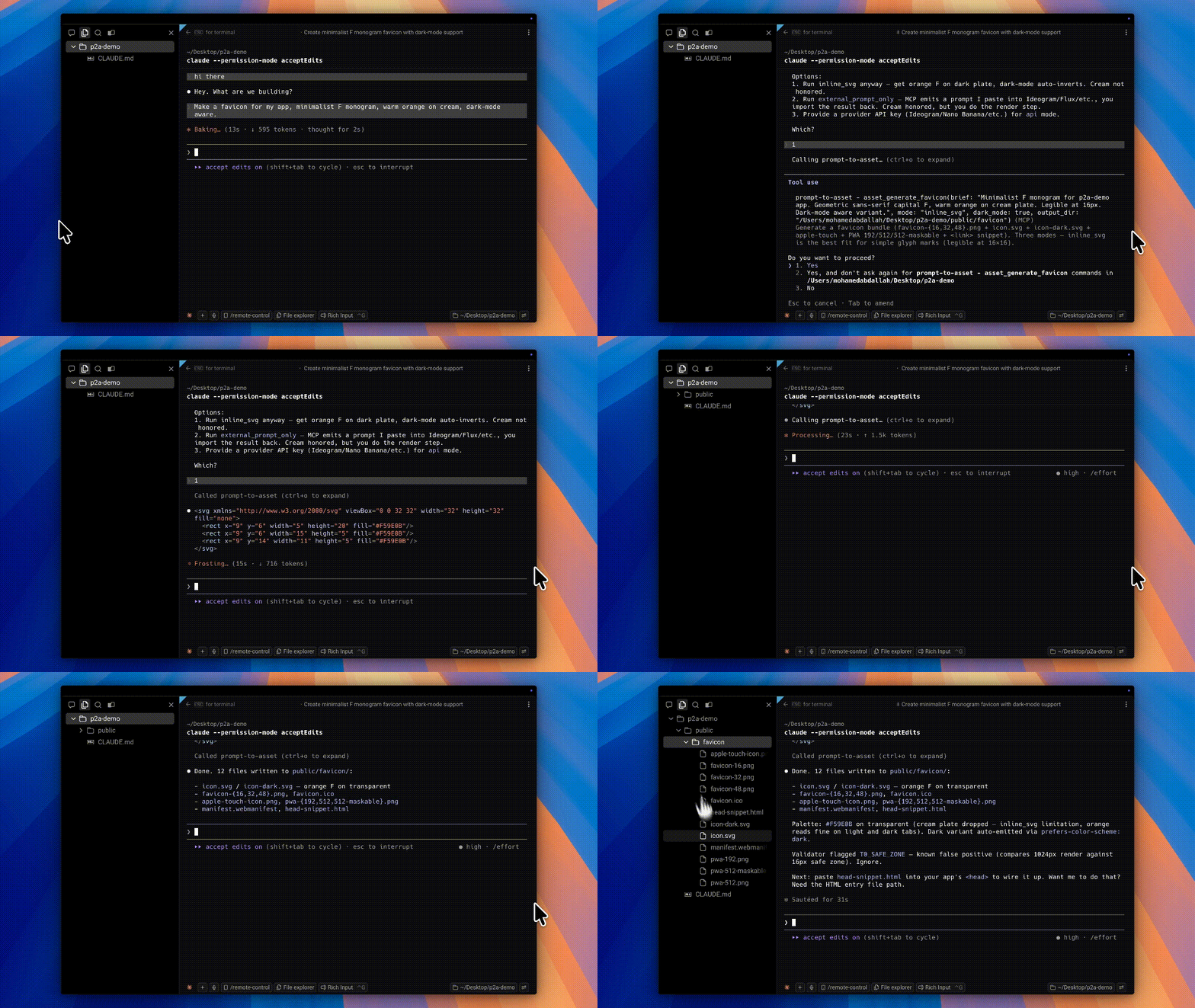
[!TIP] Stuck? Click Install in Cursor or Install in VS Code above, restart the editor, and say: "make a favicon for my app, dark-mode aware."
Highlights
- Three execution modes —
inline_svg(host LLM authors SVG),external_prompt_only(paste into any web UI),api(server calls the routed provider). Pick what fits. All three finish on $0. - 60+ models, one router — gpt-image-1.5, Ideogram 3 Turbo, Recraft V4, Flux.2, Nano Banana Pro, Imagen 4, SDXL/SD3, plus free-tier Pollinations / HF / Horde / Cloudflare. Each rule cites a research source.
- Refuses to do the wrong thing — the
Nevercolumn. No wordmarks past 3 words through a diffusion sampler. No transparent PNG through Imagen. Nonegative_prompton Flux. - Offline platform fan-out — one 1024² master → iOS AppIconSet, Android adaptive + monochrome, PWA 192/512/512-maskable, favicon bundle, visionOS parallax, Flutter launcher. Zero network.
- Validates before shipping — tier-0 checks on every output: dims, alpha presence, checkerboard FFT, safe-zone bbox, ΔE2000 palette drift, WCAG contrast, OCR Levenshtein on wordmarks.
- Sprite sheets + 9-slice — pack PNG frames into TexturePacker-compatible atlases (Phaser, PixiJS, Godot, Unity); emit 9-slice numbers + CSS
border-image+ Android.9.png.
Table of contents
Click to expand
- 30-second start
- Usage — what to say to your assistant
- The three modes — inline_svg · external_prompt_only · api
- The router — which model for which job, and what never
- Free paths beyond Pollinations
- Install
- Models covered — 60+
- MCP tools — 24 tools
- CLI surface
- Brand bundle (
brand.json) - Platform support
- Architecture
- Comparison
- Security
- Research-backed decisions
- Development
- Community · License
Usage
You just talk to your assistant. Example from a new chat:
Make me a transparent logo for a developer-tools company called Forge. Flat vector, two-tone warm orange on neutral.
Behind the scenes:
asset_doctor()— check what modes and providers are live.asset_init_brand({ app_name: "Forge", palette: ["#EA580C", "#F5F5F4"] })if nobrand.jsonexists.asset_enhance_prompt({ brief })returns anAssetSpec: classification, rewritten prompt,modes_available[], optionalsvg_brief, optionalpaste_targets, and arouting_tracepointing at the research file that backed the decision (plusnever_models— why Imagen or DALL·E got rejected).- Assistant offers you
inline_svg/external_prompt_only/api. - If
inline_svg: it writes<svg>inline and callsasset_save_inline_svg→ writesmaster.svg,favicon.ico, apple-touch, AppIconSet, PWA bundle to disk. - If
external_prompt_only: assistant shows the refined prompt and the best paste target (free first). You generate, save, then say "ingest this file" →asset_ingest_external. - If
api: assistant calls the routed provider. Server mattes, vectorizes, exports, validates. - Follow-up: "also fan this out for iOS and Android" →
asset_export_bundlewith the saved master.
Zero CLI typing. The CLI is still first-class for CI, shell scripts, and non-MCP environments — both surfaces hit the same core.
Why this exists
Two facts shape everything here.
Producing production-grade software assets is a routing and post-processing problem, not a prompt-engineering problem.
Imagen 3/4 and Gemini Flash Image can't produce real RGBA PNGs — their VAE is RGB-only, so asking for a transparent background renders the grey-and-white checkerboard as pixels. SDXL can't spell past ~8 characters. Only Recraft emits native SVG. Flux errors on negative_prompt. None of that is visible in the model UI. All of it silently breaks one-shot "prompt → asset" tools.
You may not have an image-model API key. The plugin works anyway.
Every one of the three modes can finish on $0.
The three modes
flowchart LR
    A["one-line brief"] --> B["asset_enhance_prompt"]
    B --> C{"mode"}
    C -->|inline_svg| D["Host LLM emits SVG inline<br/>→ asset_save_inline_svg"]
    C -->|external_prompt_only| E["Paste into web UI<br/>→ asset_ingest_external"]
    C -->|api| F["Server calls routed provider"]
    D --> G["matte · vectorize · validate"]
    E --> G
    F --> G
    G --> H["AssetBundle<br/>ios · android · pwa · favicon · visionos · flutter"]
| Mode | Key? | What happens | Best for |
|---|---|---|---|
inline_svg | No | Server returns an SVG-authoring brief (viewBox, palette, path budget ≤ 40). Host LLM emits <svg>…</svg> inline, then asset_save_inline_svg writes master + favicon.ico + apple-touch + AppIconSet + PWA bundle. Instant. Deterministic. | Logos, favicons, icon packs, stickers, simple app-icon masters |
external_prompt_only | No | Server returns the dialect-correct prompt plus a ranked list of paste targets, free paths first: Pollinations, HF Inference, Stable Horde, Google AI Studio, Ideogram, Recraft, Midjourney, fal.ai, BFL, ChatGPT, Firefly, Krea. Generate elsewhere, save locally, call asset_ingest_external. | Anything — best for illustrations, heroes, text-heavy logos |
api | Optional | Server calls the provider directly. Works zero-key via Pollinations / Horde / HF, or with paid keys. Route → generate → matte → vectorize → export → validate → content-addressed bundle. | Automation, CI, no rate-limit tolerance |
The host LLM picks the mode, or you do. The server surfaces modes_available so the assistant offers them to you. Free paths first — always.
The router
Router decisions live in data/routing-table.json. Capability matrix in data/model-registry.json. Every rule cites its research source.
| Need | Primary | Fallback | Never |
|---|---|---|---|
| Transparent PNG mark | gpt-image-1.5 with background:"transparent" | Ideogram 3 Turbo (/generate-transparent) → Recraft V4 | Imagen, Gemini Flash Image, SD 1.5 |
| Logo with 1–3 word text | Ideogram 3 Turbo → gpt-image-1.5 → Recraft V4 | Composite SVG type over mark | Imagen, SD 1.5, flux-schnell |
| Logo with >3 word text | Never a diffusion sampler. Mark + SVG typography composite. | — | — |
| Native SVG | Recraft V4 (V3 for brand-style pipelines) | inline_svg (host LLM authors SVG) | Everyone else |
| Photoreal hero | Flux Pro / Flux.2 → gpt-image-1.5 → Gemini 2.5 Flash Image | SDXL + brand LoRA | DALL·E 3, Imagen 4 (deprecated) |
| Iterate an existing mark | flux-kontext-pro (edit-only) | Pollinations Kontext (free) | — |
| Zero-key everything | Pollinations (Flux) → inline_svg | Stable Horde → HF Inference → paste-only | — |
The Never column matters. It's why prompt-to-asset refuses to render wordmarks past 3 words in any diffusion sampler, and why asking for a transparent PNG never goes to Imagen.
Free paths beyond Pollinations
| Option | How | Best at | Catch |
|---|---|---|---|
| Cloudflare Workers AI | Free API token + account ID | Flux-1-Schnell, SDXL, DreamShaper | 10k neurons/day cap (~900 Flux-Schnell or 5k SDXL-Lightning) |
| HF Inference | Free read token | SDXL, SD3, Flux dev + schnell | Rate-limited, cold-start latency |
| Pollinations.ai | curl → HTTP GET. No signup. | Flux-quality raster, instantly | ~1 req / 15s anonymous, RGB only |
| Stable Horde | Anonymous kudos queue | SDXL, Flux community GPUs | Minutes of queue on the free lane |
| Google AI Studio (UI) | Free interactive web UI at aistudio.google.com | Nano Banana / Nano Banana Pro | No free API — paste-only; download PNG, call asset_ingest_external |
| Local ComfyUI | Community comfyui-mcp adapter | Full fidelity, no caps | You bring the GPU |
inline_svg | Host LLM emits <svg> in chat | Logos, favicons, simple icons | ≤40 paths; simple geometry |
external_prompt_only | Paste into any web UI | Whatever that UI gives you | Manual save, then asset_ingest_external |
Google Gemini / Imagen — verified pricing (Apr 2026)
Verified against ai.google.dev/gemini-api/docs/pricing:
- No Gemini or Imagen image model has a public API free tier.
gemini-3.1-flash-image-preview(Nano Banana 2),gemini-3-pro-image-preview(Nano Banana Pro),gemini-2.5-flash-image(original Nano Banana), and allimagen-4.0-*variants showFree Tier: Not availableon Google's own pricing page. An unbilledGEMINI_API_KEYreturns HTTP 429 withlimit: 0on every image endpoint. - Free for text, multimodal understanding, and embeddings. The Gemini text-out models still have
Free of chargeinput + output on the free tier. - Free interactive image generation is only via the AI Studio web UI at aistudio.google.com. Community-observed limit 500–1,000 images/day, dynamic. Use
external_prompt_only+asset_ingest_external. - Free image generation via the Gemini consumer app at gemini.google.com: Basic 20/day, AI Plus 50/day, AI Pro 100/day, Ultra 1,000/day.
- Paid API pricing (per image, standard): Nano Banana (
gemini-2.5-flash-image) $0.039; Nano Banana 2 Flash (gemini-3.1-flash-image-preview) $0.045/0.5K, $0.067/1K, $0.101/2K, $0.151/4K; Nano Banana Pro (gemini-3-pro-image-preview) $0.134/1K-2K, $0.24/4K (+ $0.0011 per input image); Imagen 4 Fast $0.02, Standard $0.04, Ultra $0.06. Batch API is 50% off.
Run
p2a doctor(or ask your assistant forasset_doctor()) to see what's live in your environment right now.
Install
Every command works via npx — no install required.
# Zero install
npx prompt-to-asset doctor           # what's live in this shell right now
npx prompt-to-asset doctor --fix     # auto-install native deps (brew / cargo / scoop; never sudo)
npx prompt-to-asset pick             # interactive route picker
npx prompt-to-asset init --register  # scaffold brand.json + register in .cursor / .vscode / .windsurf

# Or global for daily use
npm i -g prompt-to-asset
p2a doctor

# Or per-project for CI
npm i -D prompt-to-asset
Register with your AI assistant
|
Claude Code Smithery (universal) |
Cursor · VS Code · Windsurf · Codex · Gemini CLI Use the install buttons at the top of this README, or see Claude Desktop Download the |
Once registered, your assistant has the full 24 asset_* tool surface.
Models covered
Paid direct APIs: gpt-image-1, gpt-image-1.5, dall-e-3 (deprecated 2026-05-12), imagen-3, imagen-4, gemini-3-flash-image (Nano Banana), gemini-3-pro-image, sd-1.5, sdxl, sd3-large, playground-v3, flux-schnell, flux-dev, flux-pro, flux-2, flux-kontext-pro, ideogram-3, ideogram-3-turbo, recraft-v3, leonardo-phoenix, leonardo-diffusion-xl, fal-flux-pro, fal-flux-2, fal-sdxl.
Free-tier / zero-key: pollinations-flux, pollinations-turbo, pollinations-kontext, pollinations-sd, horde-sdxl, horde-flux, hf-sdxl, hf-sd3, hf-flux-schnell, hf-flux-dev.
Paste-only surfaces: midjourney-v6, midjourney-v7, firefly-3, krea-image-1. Calling asset_generate_* with mode: "api" against a paste-only primary soft-falls-back to the first API-reachable model in the chain and surfaces a warning. If the whole chain is paste-only, you get an ExternalPromptPlan rather than an error.
🛠 MCP tool surface (24 tools)
| Tool | Purpose |
|---|---|
asset_capabilities | Inventory of modes + providers. Buckets paid / free-tier / paste-only; surfaces zero-key routes first. Read-only. |
asset_enhance_prompt | Classify, route, rewrite. Returns modes + svg_brief + paste_targets + routing_trace { research_sources, never_models, fallback_chain } + clarifying_questions[] when the brief is ambiguous. Read-only. |
asset_generate_logo | inline_svg / external_prompt_only / api. Returns InlineSvgPlan / ExternalPromptPlan / AssetBundle. |
asset_generate_app_icon | Same three modes. api produces full iOS / Android / PWA / visionOS / Flutter fan-out. Set ios_18_appearances: true for dark + tinted variants. |
asset_generate_favicon | favicon-{16,32,48}.png, icon.svg, icon-dark.svg, apple-touch, PWA 192/512/512-maskable, <link> snippet, manifest.webmanifest. |
asset_generate_og_image | 1200×630 via Satori + @resvg/resvg-js. Deterministic typography, no diffusion-rendered text garbage. |
asset_generate_illustration | external_prompt_only / api. Brand-locked via bundle refs, LoRA, or style_id. Routed primary: Flux.2 (up to 8 refs). |
asset_generate_splash_screen | iOS LaunchScreen-2732.png, Android mipmap-*/splash.png + theme XML, PWA splash + README. Pass existing_mark_svg to reuse an approved mark. |
asset_generate_hero | Marketing hero art (16:9 / 21:9 / 3:2 / 2:1). external_prompt_only / api. |
asset_save_inline_svg | Round-trip for inline_svg. Validates the SVG against the brief, writes the bundle. |
asset_ingest_external | Round-trip for external_prompt_only. Matte → vectorize → validate → bundle. |
asset_remove_background | BiRefNet / BRIA RMBG-2.0 / LayerDiffuse / difference matte / U²-Net. |
asset_vectorize | vtracer / potrace / Recraft / posterize fallback, then SVGO. |
asset_upscale_refine | DAT2 / Real-ESRGAN / SUPIR / img2img / Lanczos; asset-type-aware. |
asset_validate | Tier-0 (dims, alpha, checkerboard FFT, safe-zone bbox, ΔE2000 palette, WCAG contrast, OCR Levenshtein). Tier-2 VLM-as-judge via PROMPT_TO_BUNDLE_VLM_URL. |
asset_brand_bundle_parse | Parse brand.json / DTCG tokens / AdCP / Markdown into a canonical BrandBundle. |
asset_doctor | Structured env inventory: native deps, free-tier routes ranked best-first, paid keys, paste-only surfaces, pipeline URLs, mode flags, "what to try next." Read-only. |
asset_models_list | Browse the 60+ model registry with filters: free / paid / paste_only / rgba / svg. Read-only. |
asset_models_inspect | Full capability dump for one model id (or aka alias). Strengths, weaknesses, paste targets, routing rules, env status. Read-only. |
asset_export_bundle | Fan a 1024² master PNG into iOS AppIconSet + Android adaptive + PWA maskable + visionOS parallax + Flutter launcher + favicon. Offline. |
asset_sprite_sheet | Pack PNG/WEBP/JPG frames into a sprite sheet + TexturePacker-compatible JSON atlas (Phaser / PixiJS / Godot / Unity). Offline. |
asset_nine_slice | Emit a 9-slice config + CSS border-image + engine-ready numbers (Unity / Godot / Phaser / PixiJS) from an image plus four pixel guides. Optional Android .9.png. |
asset_init_brand | Scaffold brand.json and ensure the assets dir exists. Auto-detects Next.js, Expo, Flutter, Xcode, Astro, Vite, Remix, Nuxt, React Native, Electron, Node. |
asset_train_brand_lora | Wrap a user-owned LoRA training endpoint (PROMPT_TO_BUNDLE_MODAL_LORA_TRAIN_URL). Path-guarded; validates inputs. |
Tools are annotated readOnlyHint / idempotentHint so Cursor auto-approves without prompting.
⌨️ CLI surface
Used by the LLM over Bash when MCP isn't registered yet, and by CI. Every read-only command accepts --json.
p2a                          # default — MCP stdio server
p2a mcp                      # same, explicit
p2a export <master.png>      # offline platform fan-out
p2a export <master.png> --json
p2a init                     # interactive brand.json + IDE registration hints
p2a init --register          # + auto-write .cursor/mcp.json / .vscode/mcp.json / .windsurf/mcp.json
p2a pick                     # interactive model picker
p2a doctor                   # environment inventory
p2a doctor --json            # structured output
p2a doctor --data            # check data/model-registry.json ↔ data/routing-table.json consistency
p2a doctor --fix             # auto-install missing native deps (brew / cargo / scoop; never sudo)
p2a models list              # --free | --paid | --paste-only | --rgba | --svg
p2a models inspect <id>      # full capability dump
p2a sprite-sheet <dir>       # pack frames → PNG + atlas
p2a nine-slice <image>       # 9-slice JSON + CSS + engine numbers + .9.png
p2a --help
🎨 Brand bundle — brand.json
{
  "name": "Halcyon",
  "palette": ["#2563eb", "#ffffff"],
  "fonts": { "display": { "family": "Inter", "weights": [700, 800] } },
  "style_refs": ["https://…/sample1.png", "./refs/style2.png"],
  "do_not": ["drop shadows", "heavy gradients"],
  "lora": "halcyon-flux-v2",
  "sref_code": "--sref 1234567890",
  "style_id": "rc_halcyon_01"
}
p2a init writes this for you, detecting the framework and suggesting an assets directory. Once present, every generator reads from it automatically.
📱 Platform support
| Platform | What you get |
|---|---|
| iOS (Xcode) | AppIcon.appiconset with 1024 opaque, squircle-ready. iOS 18 dark + tinted variants via ios_18_appearances: true. |
| Android | Adaptive foreground + background, Android 13 monochrome, all mipmap densities, optional .9.png. |
| PWA / web | favicon.ico (16/32/48 multi-res), icon.svg with prefers-color-scheme dark support, apple-touch-icon.png 180×180 opaque, 192/512/512-maskable, manifest.webmanifest, <link> snippet for your <head>. |
| Flutter | Pre-populated flutter_launcher_icons.yaml wiring iOS, Android adaptive, web, macOS, Windows. |
| visionOS | Three-layer parallax scaffold with a README. Layer split stays a human decision. |
| Next.js / Astro / Vite / Remix / Nuxt / Expo / React Native / Electron | Framework detection via p2a init / asset_init_brand and a sensible output dir. |
| Games | sprite-sheet produces TexturePacker-compatible atlases (Phaser, PixiJS, Godot, Unity). nine-slice emits engine-ready numbers. |
🏗 Architecture
  brief (text)
    ↓  asset_capabilities         → modes available + free/paid/paste-only bucketing
    ↓  asset_enhance_prompt       → AssetSpec {
    ↓                                  routing_trace: { rule_id, reason, research_sources, never_models, fallback_chain },
    ↓                                  modes_available,
    ↓                                  svg_brief?,         (inline_svg)
    ↓                                  paste_targets?,     (external_prompt_only)
    ↓                                  rewritten_prompt, …
    ↓                                }
    ↓
    ├─ mode: inline_svg                → host LLM emits <svg>; asset_save_inline_svg writes bundle
    ├─ mode: external_prompt_only      → user pastes into web UI; asset_ingest_external runs matte → vectorize → validate
    └─ mode: api                       → provider(model, prompt, params) → matte → vectorize → upscale → export → validate
Content-addressed storage: assets/<hash[0:2]>/<hash>/<variant>.<ext>. The MCP server is synchronous and stateless. prompt_hash and params_hash in every AssetBundle are designed to drop straight into a BullMQ / SQS / Cloudflare Queues jobId for a hosted pipeline. Reference design: docs/research/18-asset-pipeline-tools/18e-production-pipeline-architecture.md.
Design thesis
You own the API keys. The LLM owns everything else.
The only thing that happens in a terminal is installing the package and putting keys in .env. Secrets shouldn't pass through chat. Every other verb — doctor checks, model inspection, platform fan-out, brand scaffolding, sprite sheets, 9-slice configs — is an MCP tool the assistant calls when you ask in natural language.
Comparison
| Tool | Prompt enhancement | Multi-model routing | Zero-key | Dev-asset bundle | Offline platform fan-out |
|---|---|---|---|---|---|
| Promptati / PromptHero | cinematic only | ✗ | ✗ | ✗ | ✗ |
| Looka / Brandmark / Designs.ai | ✗ | ✗ | ✗ | partial | ✗ |
| ChatGPT / Midjourney / Ideogram (direct) | ✗ | ✗ | ✗ | ✗ | ✗ |
| appicon.co | ✗ | ✗ | ✓ | partial | iOS only |
| flutter_launcher_icons | ✗ | ✗ | ✓ | partial | iOS + Android |
prompt-to-asset | ✓ | ✓ (60+ models) | ✓ (Pollinations / HF / Horde / SVG) | ✓ | ✓ (iOS + Android + PWA + visionOS + favicon + Flutter) |
Security
This tool handles API keys for up to 15 providers. Non-negotiables:
- Keys live in env vars only. Never written to disk, never logged, never echoed in MCP responses. Provider error bodies go through
redact()(packages/mcp-server/src/security/redact.ts) before reaching the host LLM. - Path access is allow-listed.
image_path/output_dir/existing_mark_svgresolve through symlinks and reject anything escaping project cwd + configured output dir + cache dir + OS tempdir. Widen withP2A_ALLOWED_PATHS=/path1:/path2. - SVG is XSS-sanitized before any write.
<script>,<foreignObject>,on*=handlers,javascript:URIs, external<image href>/<use href>, CSS@importover the network — all rejected. The check runs unconditionally; SVGO is not required. - Cost guardrail. Set
P2A_MAX_SPEND_USD_PER_RUN=5.00to cap any single tool call. Pre-flight estimate refuses to call if over. Free-tier routes are always $0. - Data integrity at boot.
assertDataIntegrityAtBoot()runs on start. If a routing rule points at a model id not in the registry, the server refuses to boot with a clear error. Check in CI withp2a doctor --data. - No telemetry. No remote calls unless the routed provider explicitly requires one.
Full policy: SECURITY.md.
Research-backed decisions
Every routing rule, dialect switch, safe-zone size, and text ceiling that's implemented is backed by a file under docs/research/. asset_enhance_prompt returns a routing_trace.research_sources array on every call. The angle → code pointer map, plus an honest ledger of what's wired and what's deferred, lives in docs/RESEARCH_MAP.md.
Development
git clone https://github.com/MohamedAbdallah-14/prompt-to-asset.git
cd prompt-to-asset
npm install
npm run build
npm run typecheck
npm run lint
npm test               # vitest watch
npm run test:run       # vitest run (CI)
npm run smoke          # list tools via MCP stdio + correctness assertions
npm run sync           # regenerate IDE mirrors from SSOTs
npm run verify         # byte-verify mirrors match SSOTs
SSOTs live in skills/*/SKILL.md, rules/*.md, .claude-plugin/, and data/*.json. Don't edit .cursor/, .claude/, .windsurf/ directly — they're regenerated by scripts/sync-mirrors.sh and CI byte-verifies them.
- Contribution flow: CONTRIBUTING.md
- User on-ramp: GETTING_STARTED.md
- Common snags: TROUBLESHOOTING.md
- Release notes: CHANGELOG.md
Community
- Issues + feature requests: GitHub Issues
- Security disclosures: SECURITY.md
- Code of Conduct: CODE_OF_CONDUCT.md
- Star history:
If this repo saved you from hand-crafting another AppIconSet, a star helps it reach other developers fighting the same fight.
License
MIT © prompt-to-asset contributors.