rigol-mcp
MCP server for controlling a Rigol DS1000Z series oscilloscope over LAN. Exposes the scope as a set of tools that Claude (or any MCP client) can call to take measurements, configure the instrument, and capture screenshots — entirely through natural language.
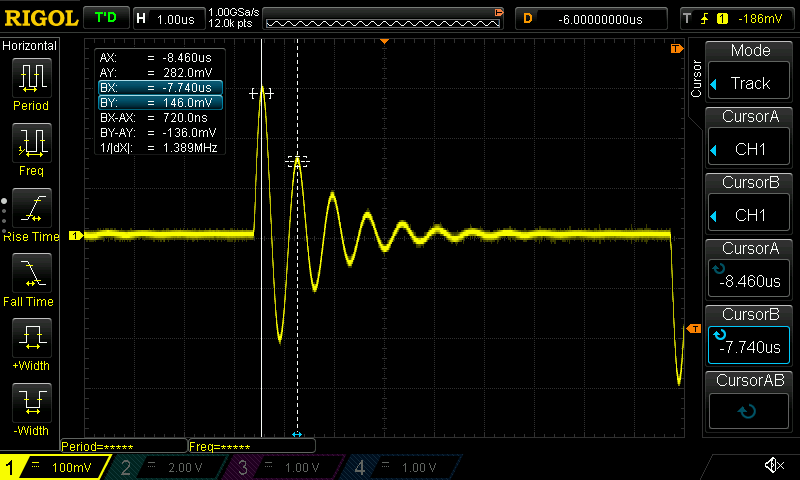
Supported Hardware
Rigol DS1000Z / MSO1000Z series:
| Model | Channels | Notes |
|---|---|---|
| DS1054Z | 4 analog | Most common, 50 MHz |
| DS1074Z | 4 analog | 70 MHz |
| DS1074Z-S | 4 analog + signal gen | |
| DS1104Z | 4 analog | 100 MHz |
| DS1104Z-S | 4 analog + signal gen | |
| MSO1054Z | 4 analog + 16 digital | MSO variant |
| MSO1074Z | 4 analog + 16 digital | |
| MSO1104Z | 4 analog + 16 digital |
The scope must be connected to your local network via Ethernet (rear panel RJ45). Wi-Fi is not supported by this hardware. USB-VISA is not currently supported — LAN only.
Requirements
- Python 3.11+
- uv (recommended) or pip
- Rigol DS1000Z on the same LAN as your computer
- SCPI over TCP/IP enabled on the scope (it is by default)
Installation
git clone https://github.com/erebusnz/rigol-mcp
cd rigol-mcp
uv sync
Scope Network Setup
On the scope, go to Utility → IO Setting → LAN and note the IP address (or assign a static one). The scope listens on port 5555 for raw SCPI commands — no additional configuration is needed.
Replace 192.168.1.123 with the IP address of your scope in all instructions below.
Verify in Browser: http://192.168.1.123/DS1000Z_WelcomePage.html
Verify connectivity before using as MCP:
python -c "import pyvisa; rm = pyvisa.ResourceManager(); s = rm.open_resource('TCPIP0::192.168.1.123::5555::SOCKET'); s.write_termination='\n'; s.read_termination='\n'; print(s.query('*IDN?'))"
You should see something like:
RIGOL TECHNOLOGIES,DS1054Z,DS1ZA123456789,00.04.04.SP4
Configuration
Set the scope IP for MCP via environment variable:
export RIGOL_IP=192.168.1.123
Or create a .env file (copy from .env.example):
RIGOL_IP=192.168.1.123
Optional:
| Variable | Default | Description |
|---|---|---|
RIGOL_IP | (required) | Scope IP address |
RIGOL_SCREENSHOT_DIR | screenshots/ | Directory for saved PNG screenshots |
Claude Desktop / Claude Code Setup
Add to your .mcp.json (or Claude Desktop MCP config):
{
  "mcpServers": {
    "rigol": {
      "command": "uv",
      "args": ["run", "rigol-mcp"],
      "cwd": "/path/to/rigol-mcp",
      "env": {
        "RIGOL_IP": "192.168.1.123"
      }
    }
  }
}
Tools
Identification & State
| Tool | Description |
|---|---|
idn | Identify the instrument — make, model, serial, firmware |
get_scope_state | Snapshot of all channel configs, timebase, and trigger settings |
Acquisition Control
| Tool | Description |
|---|---|
run | Start continuous acquisition |
stop | Stop and freeze display |
single | Arm for one trigger event, then stop |
autoscale | Auto-configure timebase, vertical scale, and trigger |
Configuration
| Tool | Description |
|---|---|
set_channel | Set scale (V/div), offset, coupling (AC/DC/GND), probe ratio, on/off |
set_timebase | Set time/div and trigger offset |
set_trigger | Configure edge trigger: source, slope (POS/NEG/RFAL), level |
Measurement
| Tool | Description |
|---|---|
measure | Query any single-channel measurement: VMAX, VMIN, VPP, VRMS, FREQUENCY, PERIOD, PWIDTH, NWIDTH, PDUTY, NDUTY, RTIME, FTIME, OVERSHOOT, PRESHOOT, and more |
measure_between | Query delay or phase between two channels: RDELAY, FDELAY (seconds), RPHASE, FPHASE (degrees) |
get_waveform | Download and analyse waveform data (~1200 points); returns text analysis by default, raw time/voltage arrays with raw_data=true |
Cursors
| Tool | Description |
|---|---|
set_cursors | Set cursor mode (MANUAL/TRACK/OFF) and time positions in seconds |
get_cursor_values | Read cursor positions (in seconds) and all delta/amplitude readouts |
Utility
| Tool | Description |
|---|---|
screenshot | Capture display as PNG — returns image inline and saves to disk |
send_raw | Send any SCPI command directly (escape hatch) |
check_error | Query the SCPI error queue |
Example Prompts
Basic measurement session:
"Connect to the scope, check what's configured, then measure the frequency and Vpp on channel 1."
Signal characterisation:
"Stop the scope, download the waveform from channel 2, and tell me the rise time, overshoot percentage, and estimated fundamental frequency."
Setup from scratch:
"Set channel 1 to 2V/div DC coupling with a 10x probe, set the timebase to 1ms/div, trigger on channel 1 rising edge at 1V, then run and take a screenshot."
Cursor measurement:
"Put manual cursors on the first rising edge of the signal on channel 1 — cursor A at the 10% level and cursor B at the 90% level — and read the rise time from the delta."
Transient / ringing characterisation:
"There's a damped oscillation on channel 1 after a step edge. Stop the scope, measure Vpp, Vmax, Vmin, and Vrms, then estimate the ring frequency and how many cycles it takes to decay."
Iterative debugging:
"I'm verifying the gain of an amplifier. Channel 1 is the input, channel 2 is the output. The expected gain is 20 dB. Figure out whether it's within spec."
Unknown signal characterisation:
"There's an unfamiliar signal on channel 1. I don't know its frequency, amplitude, or shape. Keep adjusting the timebase and vertical scale until you have a stable, well-framed view of at least two full cycles, then give me a complete characterisation of what you see."
Architecture
Claude / MCP client
        │  MCP protocol (stdio)
rigol_mcp.server      ← tool definitions, request routing
        │  Python function calls
rigol_mcp.scope       ← VISA connection, SCPI command helpers
        │  SCPI over TCP/IP (port 5555)
Rigol DS1000Z         ← 192.168.1.123
The VISA connection is cached across tool calls (one TCP connection per server session) and reconnects automatically on network errors.
SCPI Transport
The server connects using raw socket VISA (TCPIP0::<ip>::5555::SOCKET), not VXI-11. This avoids the NI-VISA dependency and works with the pure-Python pyvisa-py backend. It also eliminates the VXI-11 handshake overhead, making individual commands faster.
Limitations
- LAN only (no USB) - USB just adds more problems and OS-specific implementation challenges!
- No support for math channels, digital channels (MSO), or protocol decode in the current tools yet — use
send_rawfor those - Waveform download uses NORMAL mode (screen buffer, ~1200 points); full memory depth (RAW mode, up to 56M points) is not yet implemented