MCP Excalidraw Local


A fully local, self-hosted Excalidraw MCP server with SQLite persistence, multi-tenancy, and auto-sync — designed to run entirely on your machine without depending on excalidraw.com.
Run a live Excalidraw canvas and control it from any AI agent. This repo provides:
- MCP Server: 32 tools over stdio — works with any MCP-compatible client
- Agent Skill: Portable skill with workflow playbooks, cheatsheets, and helper scripts
- Live Canvas: Real-time Excalidraw UI synced via WebSocket
- SQLite Persistence: Elements survive restarts, with versioning and search
- Multi-Tenancy: Isolated canvases per workspace, auto-detected
Fork notice: This project is forked from yctimlin/mcp_excalidraw and extends it with persistence, multi-workspace support, and numerous UX improvements. Full credit to the original author for the excellent foundation. See What Changed From Upstream for details.
Keywords: Excalidraw MCP server, AI diagramming, local Excalidraw, self-hosted, SQLite persistence, multi-tenant, Mermaid to Excalidraw.
Screenshots
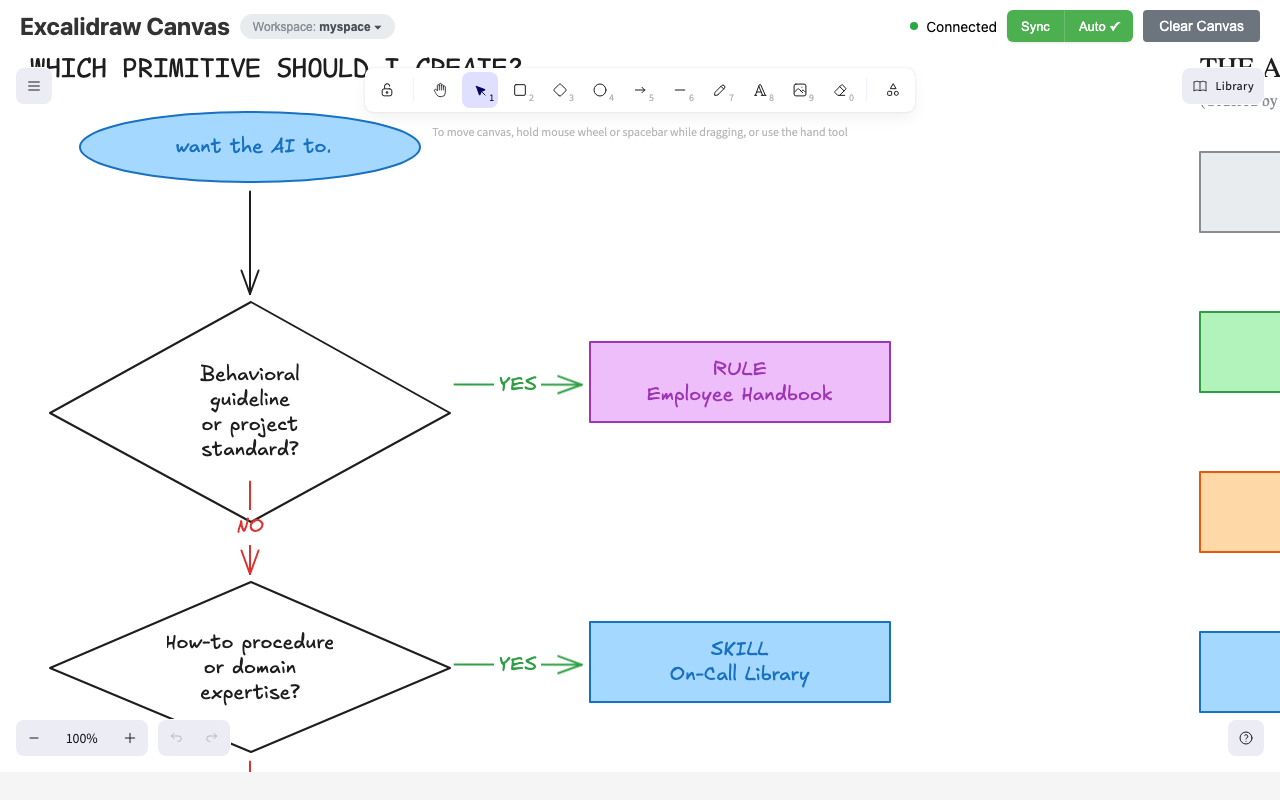
Canvas UI
The live Excalidraw canvas with toolbar, connection status, sync controls, and workspace badge:
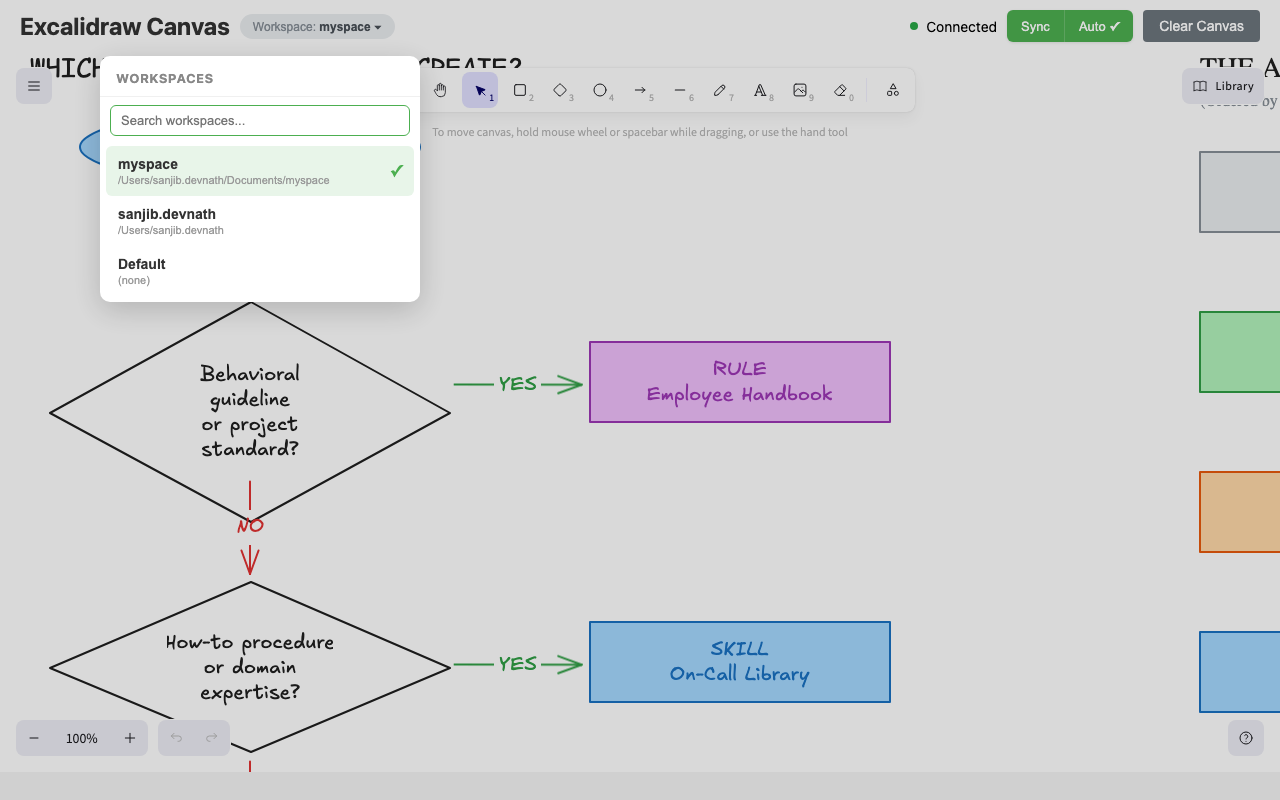
Workspace Switcher
Click the workspace badge to switch between isolated canvases — each workspace has its own set of diagrams:
For a demo of the upstream project (before persistence/multi-tenancy), see the original video by @yctimlin.
Table of Contents
- Screenshots
- What It Is
- How We Differ from the Official Excalidraw MCP
- What Changed From Upstream
- What's New
- Architecture
- Quick Start
- Quick Start (Docker)
- Configuration
- Environment Variables
- Multi-Tenancy (Workspaces)
- Agent Skill (Optional)
- MCP Tools (32 Total)
- Testing
- Troubleshooting
- Known Issues / TODO
- Development
- Credits
What It Is
This MCP server gives AI agents a full canvas toolkit to build, inspect, and iteratively refine Excalidraw diagrams — including the ability to see what they drew.
The repo contains a single Node.js process that runs:
- MCP server (stdio): 32 tools for element CRUD, layout, scene awareness, file I/O, snapshots, search, multi-tenancy, and more
- Canvas server (embedded): web UI + REST API + WebSocket updates at
http://localhost:<CANVAS_PORT> - SQLite database: persistent storage at
~/.excalidraw-mcp/excalidraw.db
How We Differ from the Official Excalidraw MCP
Excalidraw now has an official MCP — it's great for quick, prompt-to-diagram generation rendered inline in chat. We solve a different problem.
| Official Excalidraw MCP | This Project | |
|---|---|---|
| Approach | Prompt in, diagram out (one-shot) | Programmatic element-level control (32 tools) |
| State | Stateless — each call is independent | Persistent live canvas with real-time sync |
| Storage | None | SQLite with WAL mode, versioning, element history |
| Multi-tenancy | No | Workspace-based isolation, auto-detected |
| Element CRUD | No | Full create / read / update / delete per element |
| AI sees the canvas | No | describe_scene (structured text) + get_canvas_screenshot (image) |
| Iterative refinement | No — regenerate the whole diagram | Draw → look → adjust → look again, element by element |
| Layout tools | No | align_elements, distribute_elements, group / ungroup |
| File I/O | No | export_scene / import_scene (.excalidraw JSON) |
| Snapshot & rollback | No | snapshot_scene / restore_snapshot |
| Mermaid conversion | No | create_from_mermaid |
| Search | No | search_elements — full-text search across labels |
| Design guide | read_me cheat sheet | read_diagram_guide (colors, sizing, layout, anti-patterns) |
| Viewport control | Camera animations | set_viewport (zoom-to-fit, center on element, manual zoom) |
| Live canvas UI | Rendered inline in chat | Standalone Excalidraw app synced via WebSocket |
| Multi-agent | Single user | Multiple agents can draw on the same canvas concurrently |
| Works without MCP | No | Yes — REST API fallback via agent skill |
TL;DR — The official MCP generates diagrams. We give AI agents a full canvas toolkit to build, inspect, and iteratively refine diagrams — including the ability to see what they drew.
What Changed From Upstream
This fork extends yctimlin/mcp_excalidraw with the following enhancements:
| Area | Upstream | This Fork |
|---|---|---|
| Storage | In-memory (lost on restart) | SQLite with WAL mode, versioning, element history |
| Multi-tenancy | None | Workspace-based tenant isolation (auto-detected via server.listRoots()) |
| Canvas lifecycle | Separate process (2 terminals) | Embedded in MCP process (single node dist/index.js) |
| Auto-sync | Manual "Sync to Backend" button | Debounced auto-sync (3s idle) with manual override |
| Canvas port | Hardcoded 3000 | Configurable via CANVAS_PORT env var |
| MCP tools | 26 | 32 (added search, history, tenants, projects) |
| Workspace switcher | None | Dropdown with search in canvas UI |
| Sync normalization | Bound text breaks on reload | Elements normalized to MCP format before storage |
| Projects | None | Multiple projects per tenant |
| Element history | None | Full version history per element |
| Search | None | Full-text search across elements |
New MCP Tools (6 added)
| Tool | Description |
|---|---|
search_elements | Full-text search across element labels and text |
element_history | View version history for any element |
list_projects | List projects within the active tenant |
switch_project | Switch between projects |
list_tenants | List all workspace tenants |
switch_tenant | Switch the active workspace tenant |
What's New
v1.0 — This Fork (Persistence & Multi-Tenancy)
- SQLite persistence: Elements, projects, tenants, snapshots, and element versions stored in
~/.excalidraw-mcp/excalidraw.dbwith WAL mode andbusy_timeoutfor multi-process safety - Multi-tenancy: Each workspace gets an isolated canvas. Tenant auto-detected from workspace path via
server.listRoots(). UI dropdown with search for switching workspaces - Embedded canvas: Canvas server runs inside the MCP process — single
node dist/index.jsstarts everything, stops together - Auto-sync with debounce: Canvas changes are automatically persisted after 3s of inactivity. Manual sync button as fallback. Toggle auto-sync on/off
- Configurable port:
CANVAS_PORTenv var (default3000) - Sync normalization: Excalidraw's internal bound-text representation is normalized to MCP format before storage, preventing text overflow/detachment on reload
- 6 new MCP tools:
search_elements,element_history,list_projects,switch_project,list_tenants,switch_tenant - Updated agent skill: Comprehensive workflow playbook with iterative write-check-review cycle, sizing rules, anti-patterns, and quality checklist
- Workspace switcher UI: Click "Workspace: ..." badge to search and switch between workspaces
v2.0 — Canvas Toolkit (upstream)
- 13 new MCP tools (26 total):
get_element,clear_canvas,export_scene,import_scene,export_to_image,duplicate_elements,snapshot_scene,restore_snapshot,describe_scene,get_canvas_screenshot,read_diagram_guide,export_to_excalidraw_url,set_viewport - Closed feedback loop: AI can now inspect the canvas (
describe_scene) and see it (get_canvas_screenshotreturns an image) — enabling iterative refinement - Design guide:
read_diagram_guidereturns best-practice color palettes, sizing rules, layout patterns, and anti-patterns - Viewport control:
set_viewportwithscrollToContent,scrollToElementId, or manual zoom/offset - File I/O: export/import full
.excalidrawJSON files - Snapshots: save and restore named canvas states
- Skill fallback: Agent skill auto-detects MCP vs REST API mode
- Fixed all previously known issues:
align_elements/distribute_elementsfully implemented, points type normalization, removed invalidlabeltype,ungroup_elementsnow errors on failure
v1.x (upstream)
- Agent skill:
skills/excalidraw-skill/(portable instructions + helper scripts for export/import and repeatable CRUD) - Better testing loop: MCP Inspector CLI examples + browser screenshot checks
- Bugfixes: batch create now preserves element ids (fixes update/delete after batch); frontend entrypoint fixed
Architecture
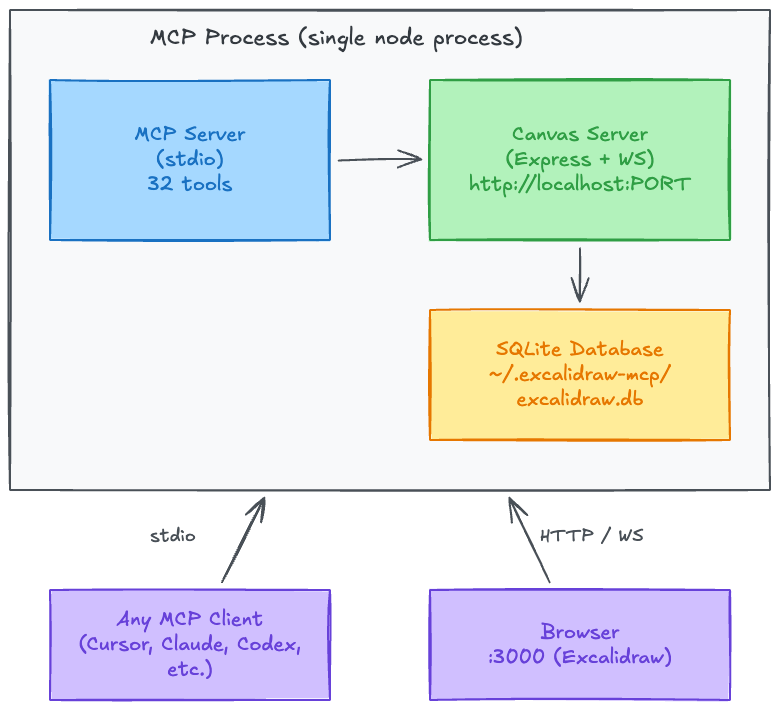
- Single process: The MCP server embeds the canvas server. Starting the MCP starts both; stopping it stops both.
- SQLite: Stored at
~/.excalidraw-mcp/excalidraw.dbby default. WAL mode +busy_timeoutfor multi-process safety. - Multi-tenancy: Each workspace gets an isolated tenant (SHA-256 hash of workspace path). The UI shows a workspace switcher dropdown with search.
Quick Start
Option A: NPM (recommended)
npx @sanjibdevnath/mcp-excalidraw-local
Or install globally:
npm install -g @sanjibdevnath/mcp-excalidraw-local
mcp-excalidraw-local
Option B: From source
Prerequisites: Node >= 18, npm or pnpm
git clone https://github.com/sanjibdevnathlabs/mcp-excalidraw-local.git
cd mcp-excalidraw-local

# Install dependencies (pnpm or npm)
pnpm install
pnpm rebuild better-sqlite3 esbuild

# Build frontend + server
pnpm run build
The MCP server is typically started by your MCP client — see Configuration. To run manually:
node dist/index.js
This starts the MCP server (stdio) and the canvas server. Open http://localhost:3000 in your browser.
Quick Start (Docker)
Canvas server:
docker run -d -p 3000:3000 --name mcp-excalidraw-canvas sanjibdevnath/mcp-excalidraw-local-canvas:latest
MCP server (stdio) is typically launched by your MCP client. If you want a local container, use sanjibdevnath/mcp-excalidraw-local:latest.
Configuration
This is a standard MCP server communicating over stdio. It works with any MCP-compatible client (Cursor, Claude Desktop, Claude Code, Codex CLI, OpenCode, Gemini, or any other agent that supports the Model Context Protocol).
JSON config (most clients)
Add this to your client's MCP configuration file:
{
  "mcpServers": {
    "excalidraw-canvas": {
      "command": "node",
      "args": ["/absolute/path/to/mcp-excalidraw-local/dist/index.js"],
      "env": {
        "CANVAS_PORT": "3000"
      }
    }
  }
}
Replace /absolute/path/to/mcp-excalidraw-local with the actual path where you cloned and built the repo.
CLI-based registration
# Example for Claude Code
claude mcp add excalidraw-canvas --scope user \
  -e CANVAS_PORT=3000 \
  -- node /absolute/path/to/mcp-excalidraw-local/dist/index.js
Docker
{
  "mcpServers": {
    "excalidraw-canvas": {
      "command": "docker",
      "args": [
        "run", "-i", "--rm",
        "-e", "CANVAS_PORT=3000",
        "sanjibdevnath/mcp-excalidraw-local:latest"
      ]
    }
  }
}
Note: For Docker on Linux, you may need
--add-host=host.docker.internal:host-gateway.
Key points
- Single process — The canvas server is embedded. No separate terminal or process needed.
- Browser required for screenshots —
export_to_imageandget_canvas_screenshotrely on the frontend. Openhttp://localhost:3000in a browser.
Environment Variables
| Variable | Description | Default |
|---|---|---|
CANVAS_PORT | Port for the embedded canvas server | 3000 |
EXCALIDRAW_DB_PATH | Path to the SQLite database file | ~/.excalidraw-mcp/excalidraw.db |
EXCALIDRAW_EXPORT_DIR | Allowed directory for file exports | process.cwd() |
EXPRESS_SERVER_URL | Canvas server URL (only if running canvas separately) | http://localhost:3000 |
ENABLE_CANVAS_SYNC | Enable real-time canvas sync | true |
Multi-Tenancy (Workspaces)
Each workspace (codebase) gets an isolated canvas. The tenant is identified by a SHA-256 hash of the workspace path.
How it works
- Auto-detection: When the MCP starts, it calls
server.listRoots()to get the actual workspace path from the MCP client. This is hashed to create a unique tenant ID. - Per-request scoping: Every HTTP request includes an
X-Tenant-Idheader. The canvas server uses this to scope all CRUD operations to the correct tenant. - UI switcher: The canvas UI shows a "Workspace: <name>" badge. Click it to open a dropdown with all known workspaces, complete with search.
- Multi-instance safe: SQLite WAL mode with
busy_timeout = 5000mshandles concurrent access from multiple client instances.
Projects within a tenant
Each tenant can have multiple projects (collections of elements). Use the list_projects and switch_project MCP tools, or manage via the REST API.
Agent Skill (Optional)
This repo includes a skill at skills/excalidraw-skill/ that provides:
- Workflow playbook (
SKILL.md): step-by-step guidance for drawing, refining, and exporting diagrams — including an iterative write-check-review cycle, sizing rules, color palettes, and anti-patterns - Cheatsheet (
references/cheatsheet.md): MCP tool and REST API reference for all 32 tools - Helper scripts (
scripts/*.cjs): export, import, clear, healthcheck, CRUD operations
The skill complements the MCP server by giving your AI agent structured workflows to follow.
Install the Skill
Copy the skill folder to your agent's skill directory:
# Claude Code
mkdir -p ~/.claude/skills
cp -R skills/excalidraw-skill ~/.claude/skills/excalidraw-skill

# Cursor
mkdir -p ~/.cursor/skills
cp -R skills/excalidraw-skill ~/.cursor/skills/excalidraw-skill

# Codex CLI
mkdir -p ~/.codex/skills
cp -R skills/excalidraw-skill ~/.codex/skills/excalidraw-skill

# Or any agent that supports a skills directory
cp -R skills/excalidraw-skill /path/to/your/agent/skills/
To update an existing installation, remove the old folder first then re-copy.
Use the Skill Scripts
All scripts respect EXPRESS_SERVER_URL (default http://localhost:3000) or accept --url.
EXPRESS_SERVER_URL=http://127.0.0.1:3000 node skills/excalidraw-skill/scripts/healthcheck.cjs
EXPRESS_SERVER_URL=http://127.0.0.1:3000 node skills/excalidraw-skill/scripts/export-elements.cjs --out diagram.elements.json
EXPRESS_SERVER_URL=http://127.0.0.1:3000 node skills/excalidraw-skill/scripts/import-elements.cjs --in diagram.elements.json --mode batch
When the Skill Is Useful
- Repository workflow: export elements as JSON, commit it, and re-import later
- Reliable refactors: clear + re-import in
syncmode to make canvas match a file - Automated smoke tests: create/update/delete a known element to validate a deployment
- Repeatable diagrams: keep a library of element JSON snippets and import them
See skills/excalidraw-skill/SKILL.md and skills/excalidraw-skill/references/cheatsheet.md.
MCP Tools (32 Total)
| Category | Tools |
|---|---|
| Element CRUD | create_element, get_element, update_element, delete_element, query_elements, batch_create_elements, duplicate_elements |
| Layout | align_elements, distribute_elements, group_elements, ungroup_elements, lock_elements, unlock_elements |
| Scene Awareness | describe_scene, get_canvas_screenshot |
| File I/O | export_scene, import_scene, export_to_image, export_to_excalidraw_url, create_from_mermaid |
| State Management | clear_canvas, snapshot_scene, restore_snapshot |
| Viewport | set_viewport |
| Design Guide | read_diagram_guide |
| Resources | get_resource |
| Search & History | search_elements, element_history |
| Multi-Tenancy | list_tenants, switch_tenant |
| Projects | list_projects, switch_project |
Full schemas are discoverable via tools/list or in skills/excalidraw-skill/references/cheatsheet.md.
Testing
Health check
curl http://localhost:3000/health
MCP Inspector
List tools:
npx @modelcontextprotocol/inspector --cli \
  -e CANVAS_PORT=3000 -- \
  node dist/index.js --method tools/list
Create a rectangle:
npx @modelcontextprotocol/inspector --cli \
  -e CANVAS_PORT=3000 -- \
  node dist/index.js --method tools/call --tool-name create_element \
  --tool-arg type=rectangle --tool-arg x=100 --tool-arg y=100 \
  --tool-arg width=300 --tool-arg height=200
Frontend Screenshots
If you use a browser automation tool for UI checks:
# Open the canvas and take a screenshot for verification
open http://127.0.0.1:3000
# Or use agent-browser, Playwright, Puppeteer, etc.
Troubleshooting
- Canvas not loading: Ensure
CANVAS_PORTisn't occupied by another process. Checklsof -i :3000. - Canvas not updating: Confirm the MCP process is running and the browser is connected (check the status dot in the header).
- Wrong workspace shown: The MCP uses
server.listRoots()to detect the workspace. Restart your MCP client if the workspace changed. - Elements missing after restart: Check
~/.excalidraw-mcp/excalidraw.dbexists. If you previously ran the upstream (in-memory) version, data wasn't persisted. - Port conflict with multiple instances: Set different
CANVAS_PORTvalues for each workspace, or rely on multi-tenancy (same port, different tenants). - Updates/deletes fail after batch creation: Ensure you are on a build that includes the batch id preservation fix.
Known Issues / TODO
All previously listed bugs from the upstream have been fixed. Remaining items:
- Image export requires a browser:
export_to_imageandget_canvas_screenshotrely on the frontend rendering. The canvas UI must be open in a browser. -
export_to_excalidraw_urlblocked: Organizations that blockexcalidraw.comcannot use shareable URL export. Useexport_scenefor local.excalidrawfiles instead.
Contributions welcome!
Development
# Type check
pnpm run type-check

# Full build (frontend + server)
pnpm run build

# Dev mode (watch)
pnpm run dev
Database
SQLite database: ~/.excalidraw-mcp/excalidraw.db
Override with EXCALIDRAW_DB_PATH environment variable.
REST API
The canvas server exposes a REST API alongside the WebSocket interface:
| Method | Endpoint | Description |
|---|---|---|
| GET | /health | Health check |
| GET | /api/elements | List all elements |
| POST | /api/elements | Create an element |
| PUT | /api/elements/:id | Update an element |
| DELETE | /api/elements/:id | Delete an element |
| POST | /api/elements/sync | Sync all elements (bulk upsert) |
| GET | /api/tenants | List all tenants |
| GET | /api/tenant/active | Get the active tenant |
| PUT | /api/tenant/active | Set the active tenant |
All endpoints accept an X-Tenant-Id header for per-request tenant scoping.
Credits
This project is forked from yctimlin/mcp_excalidraw — an excellent Excalidraw MCP server with a live canvas, 26 tools, real-time WebSocket sync, Mermaid conversion, and a comprehensive agent skill. Full credit to @yctimlin for the original design and implementation.
This fork adds SQLite persistence, multi-tenancy, auto-sync, embedded canvas lifecycle, and workspace management on top of that foundation.
Licensed under MIT.