schwab-mcp
An MCP server that connects to the Charles Schwab brokerage API, plus a Claude Code plugin with skills that save LLM roundtrips when calling the MCP tools.
What this does
MCP Server — Wraps the Schwab API via schwabdev and exposes 18 tools over Streamable HTTP:
| Category | Tools |
|---|---|
| Session | list_accounts, set_active_account, get_active_account |
| Market Data | get_quotes, get_option_chain, get_option_expirations, get_price_history, get_movers, get_market_hours |
| Accounts | get_account, get_transactions, get_transaction, get_preferences |
| Orders | list_orders, list_all_orders, get_order, place_order, cancel_order, replace_order, preview_order |
| Instruments | search_instruments, get_instrument |
Claude Code Plugin — Ships six skills (schwab:account, schwab:orders, schwab:quotes, schwab:market, schwab:instruments, schwab:chart-orders) that give Claude the tool-selection rules, parameter formats, and safety patterns upfront. This eliminates the back-and-forth the LLM would otherwise need to figure out which tool to call and how to call it.
Prerequisites
- Python 3.11+
- A Schwab Developer account with an approved app (you need the app key and secret)
Setup
# Clone and install
git clone <repo-url> && cd schwab-mcp
python -m venv .venv && source .venv/bin/activate
pip install -e ".[dev]"

# Add credentials
cp .env.example ~/.schwab-mcp/.env
# Edit ~/.schwab-mcp/.env with your Schwab app key and secret

# Authenticate (opens browser for OAuth)
schwab-mcp auth

# Start the server
schwab-mcp serve
The server listens on http://127.0.0.1:8099/mcp by default. Override with env vars SCHWAB_MCP_HOST and SCHWAB_MCP_PORT.
Using with Claude Code
Install the plugin directory so Claude Code picks up the MCP connection and skills:
claude plugin add ./plugin
This registers:
- The MCP server connection (via
plugin/.mcp.json) - Six skills that guide Claude on how to use each tool category
- A session-end hook that cleans up temp files
Once installed, ask Claude things like:
- "What are my account positions?"
- "Get me a quote for AAPL"
- "Place a limit order to buy 10 shares of MSFT at $400"
- "Show me today's top movers on the S&P 500"
- "Chart my filled orders for SPX today"
Example: Placing a Limit Order
You: Buy 100 shares of SPY with limit order at current median bid-ask spread.
     This order should be canceled if it weren't filled before 3/30 12PM ET.

Claude: I need to get SPY's current bid-ask spread first, then build the order.
        Let me fetch the quote.

        [calls get_quotes for SPY]

        Got the quote. Here's the current SPY pricing:
        - Bid: $632.70
        - Ask: $633.00
        - Midpoint: $632.85

        Regarding cancellation by 3/30 12PM ET — Schwab doesn't support
        "cancel at a specific time." I'll use DAY duration (valid through
        market close on 3/30). You'd need to manually cancel at noon if
        unfilled.

        [calls place_order with confirmed=False — dry run]

        | Field      | Value                      |
        |------------|----------------------------|
        | Action     | BUY                        |
        | Symbol     | SPY                        |
        | Quantity   | 100 shares                 |
        | Order Type | LIMIT                      |
        | Price      | $632.85 (bid-ask midpoint) |
        | Duration   | DAY                        |
        | Session    | NORMAL                     |

        Shall I submit this order?

You: yes

Claude: [calls place_order with confirmed=True]

        Order submitted successfully.
The skill guided Claude to:
- Fetch the quote to calculate the midpoint price
- Dry-run the order first (
confirmed=False) and show the summary - Only submit (
confirmed=True) after explicit user approval
Example: Charting Filled Orders
You: Plot my last week's credit spread trades

Claude: [fetches filled orders for Mar 22-28]

        39 credit spread orders on SPXW last week — 30 vertical spreads
        and 9 iron condors across 5 trading days.

        [fetches 15-minute SPX candles for the same range]
        [runs chart_orders.py with candles + orders data]

        Candles: 130, Orders: 62 (12 buy, 11 sell, 39 spread)
        Interactive chart saved to plugin/skills/chart-orders/chart.html
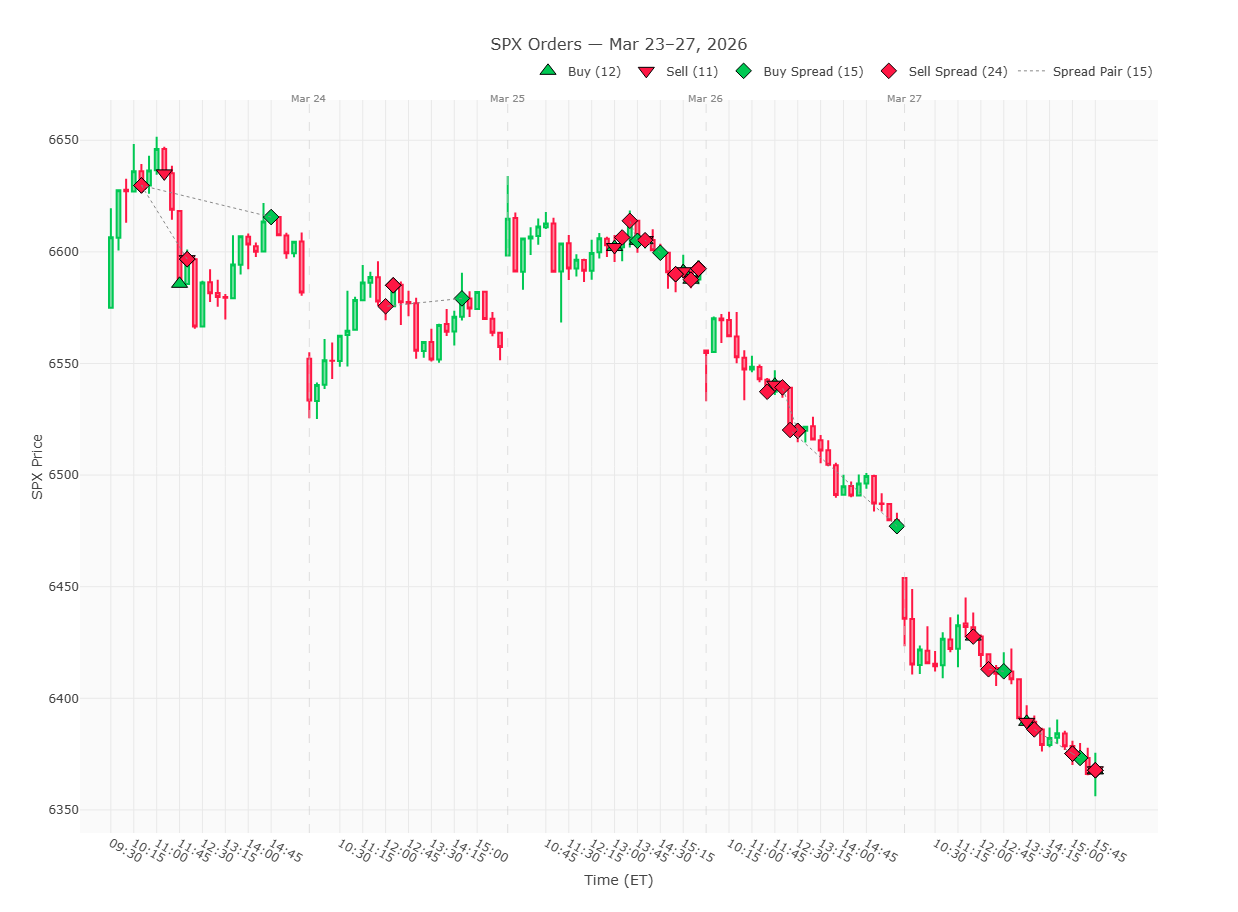
The skill guided Claude to:
- Fetch filled orders for the date range and identify the underlying (SPXW/SPX)
- Fetch 15-minute candles (appropriate for a multi-day range)
- Run the chart script to generate an interactive Plotly chart with order markers, day separators, and hover tooltips
Safety
Mutating operations (place_order, cancel_order, replace_order) use a two-step confirmation pattern. The first call is a dry run that shows what would happen; you must explicitly confirm to execute.
Project structure
src/schwab_mcp/
  server.py          # CLI entry point (serve / auth commands)
  client.py          # Schwab client init, OAuth tokens, state persistence
  _mcp.py            # FastMCP server instance
  logging_config.py  # Rotating log handler with credential redaction
  tools/             # MCP tool implementations
    session.py       # Account listing and selection
    market_data.py   # Quotes, options, price history, movers
    accounts.py      # Account details, transactions, preferences
    orders.py        # Order CRUD with dry-run safety
    instruments.py   # Symbol/CUSIP lookup

plugin/
  .mcp.json                  # MCP server connection config
  .claude-plugin/plugin.json # Plugin metadata
  hooks/hooks.json           # Session cleanup hook
  skills/                    # Claude Code skill definitions
State and logs
All runtime state lives in ~/.schwab-mcp/:
| File | Purpose |
|---|---|
.env | API credentials |
tokens.db | OAuth tokens (auto-refreshed by schwabdev) |
state.json | Active account selection |
schwab-mcp.log | Rotating log (5 MB, 3 backups, credentials redacted) |
Large tool responses (option chains, long transaction lists) are written to /tmp/schwab-mcp/ and cleaned up automatically when the Claude Code session ends.
Development
# Run tests
pytest

# Run with debug logging
LOG_LEVEL=DEBUG schwab-mcp serve