


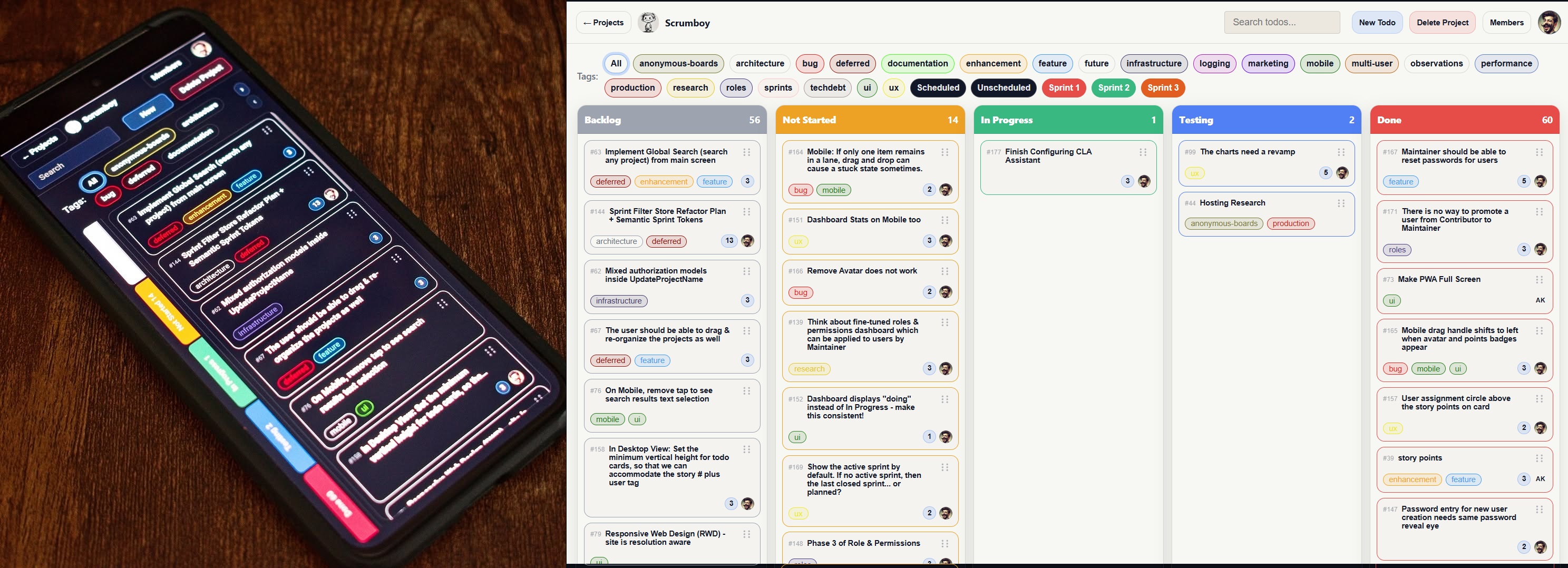
Self-hosted project management & issue-tracking solution + instant shareable & customizable boards + realtime collaboration, automation, API access and MCP-compatible client support
Quick Start
Runs in seconds. No setup required.
No .env file, TLS certificates, or encryption key are required to start the app.
Run with Docker
docker compose up --build
Open http://localhost:8080.
Run from source
go run ./cmd/scrumboy
Open http://localhost:8080.
Optional Configuration
Environment variables
Note: scrumboy.env is not a standard KEY=value file — it contains only the raw encryption key on a single line.
- The app does not automatically load
.envfiles. - On Linux/macOS, export variables manually (for example:
export SCRUMBOY_ENCRYPTION_KEY=...). - Windows helper scripts load
scrumboy.envautomatically.
Encryption key (optional)
SCRUMBOY_ENCRYPTION_KEYis not required for basic startup.- It is required for:
- 2FA
- Password reset flows
- If an existing database already has 2FA-enabled users, startup fails without this key.
Generate a key with: openssl rand -base64 32
OIDC / SSO login (optional)
Scrumboy supports OpenID Connect for single sign-on with any standards-compliant provider (Keycloak, Authentik, Auth0, Entra ID, etc.). OIDC is enabled by setting all four required environment variables:
| Variable | Description |
|---|---|
SCRUMBOY_OIDC_ISSUER | Issuer URL (e.g. https://auth.example.com/realms/main) |
SCRUMBOY_OIDC_CLIENT_ID | OAuth client ID |
SCRUMBOY_OIDC_CLIENT_SECRET | Confidential client secret |
SCRUMBOY_OIDC_REDIRECT_URL | Full callback URL registered at IdP (e.g. https://scrumboy.example.com/api/auth/oidc/callback) |
Optional:
| Variable | Description |
|---|---|
SCRUMBOY_OIDC_LOCAL_AUTH_DISABLED | Set to true to disable local password login when OIDC is configured (SSO-only mode) |
Local password authentication remains available by default alongside OIDC. After successful OIDC login, the user receives a standard Scrumboy session cookie. The IdP must return a verified email (email_verified: true). HTTPS is recommended when using OIDC to ensure session cookies are Secure.
See docs/oidc.md for full setup details, constraints, and troubleshooting.
TLS / HTTPS (optional)
- TLS is optional.
- HTTPS is enabled only when both
SCRUMBOY_TLS_CERTandSCRUMBOY_TLS_KEYfiles exist. - Otherwise, the server runs on HTTP by default.
Frontend build note
The Docker image and go run embed prebuilt assets under internal/httpapi/web/dist. If they are missing, build them:
cd internal/httpapi/web
npm install
npx tsc
Then run docker compose up --build or go run ./cmd/scrumboy again from the repository root.
Why Scrumboy?
Simplicity of a light Kanban, with the power of structured systems: Roles, sprints, audit trails & customizable workflows - without being locked into SaaS tools.
Who is this for?
- self-hosted & privacy-focused community
- small to medium-sized teams & solo builders
Modes
-
Full (
SCRUMBOY_MODE=full, default): Auth can be enabled. First user via bootstrap; then login/session. Backup/export, tags, multi-project. Projects can be user-owned (project_members) or anonymous (shareable by URL):/anon(or/temp) creates a throwaway board and redirects to/{slug}. -
Anonymous (
SCRUMBOY_MODE=anonymous): No auth. Landing at/; live deployment at: https://scrumboy.com/
Features
-
Custom Workflows: You can create any combination of workflow you want, per project, with user-defined "Done" lane.
-
Realtime SSE enabled boards for instant multi-user actions.
-
Customizable Tags: Users can inherit and customize tag colors.
-
Advanced filtering: Search todos based on text or tags.
-
Sprints: create, activate, close; sprint filter on board; default sprint weeks (1 or 2) per project.
-
Authentication & 2FA: TOTP supported when
SCRUMBOY_ENCRYPTION_KEYis set. -
Audit trail: append-only
audit_eventstable; todo/member/project/link actions logged (seedocs/AUDIT_TRAIL.md). -
Backup: export/import JSON; merge or replace; scope full or single project (see store backup logic).
-
PWA: Excellent UX for mobile users.
-
Anonymous shareable boards can be created in both Full & Anonymous deployments.
Integrations & API Access
Scrumboy supports API access tokens for automation, integrations, and programmatic MCP access (legacy HTTP and JSON-RPC — see below).
You can create a token from the API and use it to call MCP endpoints directly — no browser session or cookies required.
Create a token (requires login session):
curl -b cookies.txt -X POST http://localhost:8080/api/me/tokens \
  -H "Content-Type: application/json" \
  -H "X-Scrumboy: 1" \
  -d '{"name":"cli"}'
Response includes a one-time token (starts with sb_).
Use it with MCP:
curl -X POST http://localhost:8080/mcp \
  -H "Content-Type: application/json" \
  -H "Authorization: Bearer sb_your_token_here" \
  -d '{"tool":"projects.list","input":{}}'
MCP (JSON-RPC) for AI agents
Scrumboy exposes a Model Context Protocol (MCP) compatible JSON-RPC endpoint for AI agents (Claude, etc.) and MCP-compatible clients.
Endpoint: POST /mcp/rpc
This is separate from the /mcp HTTP endpoint above and follows JSON-RPC 2.0 (initialize, tools/list, tools/call, etc.). See API.md for full detail.
Example: initialize
curl -X POST http://localhost:8080/mcp/rpc \
  -H "Content-Type: application/json" \
  -d '{"jsonrpc":"2.0","id":1,"method":"initialize","params":{}}'
Example: list tools
curl -X POST http://localhost:8080/mcp/rpc \
  -H "Content-Type: application/json" \
  -d '{"jsonrpc":"2.0","id":2,"method":"tools/list","params":{}}'
Example: call a tool
curl -X POST http://localhost:8080/mcp/rpc \
  -H "Content-Type: application/json" \
  -H "Authorization: Bearer sb_your_token_here" \
  -d '{
    "jsonrpc":"2.0",
    "id":3,
    "method":"tools/call",
    "params":{
      "name":"todos.create",
      "arguments":{
        "projectSlug":"my-project",
        "title":"Created via MCP"
      }
    }
  }'
Notes
- Compatible with MCP clients that support HTTP JSON-RPC to this URL.
- Some MCP clients expect stdio-based servers — those are not supported here.
- Authentication works via session cookie or Bearer token (same rules as
/mcp).
This enables:
- CLI usage
- CI/CD automation
- AI agents and MCP clients (use
POST /mcp/rpcfor JSON-RPC;POST /mcpremains available for the legacy{ "tool", "input" }envelope) - Scripting/integrations without login flows
Config
Env vars and defaults are defined in internal/config/config.go. ResolveDataDir uses DATA_DIR and SQLITE_PATH as documented there.
None of these are required for basic startup.
| Variable | Default (from code) |
|---|---|
BIND_ADDR | :8080 |
DATA_DIR | ./data |
SQLITE_PATH | (empty; then $DATA_DIR/app.db) |
SQLITE_BUSY_TIMEOUT_MS | 30000 |
SQLITE_JOURNAL_MODE | WAL |
SQLITE_SYNCHRONOUS | FULL |
MAX_REQUEST_BODY_BYTES | 1048576 (1 MiB) |
SCRUMBOY_MODE | full (or anonymous) |
SCRUMBOY_ENCRYPTION_KEY | (empty) - Required for 2FA. Base64-encoded 32-byte key. Generate with openssl rand -base64 32. Without it, 2FA setup returns 503. |
SCRUMBOY_TLS_CERT | ./cert.pem - TLS cert for HTTPS |
SCRUMBOY_TLS_KEY | ./key.pem - TLS key for HTTPS |
SCRUMBOY_INTRANET_IP | 192.168.1.250 - LAN IP to log for intranet access |
docker-compose.yml overrides some of these (e.g. SQLITE_BUSY_TIMEOUT_MS=5000).
Roles
In full mode, access is governed by two separate role systems. System roles do not grant project access; project access comes only from project membership.
System roles (instance-wide)
| Role | Who has it | Allowed actions |
|---|---|---|
| Owner | Bootstrap (first) user; can be assigned by another owner | List all users; create users (admin-only API); update any user’s system role (owner/admin/user); delete users (except cannot delete the last owner). |
| Admin | Assigned by an owner | List all users; create users. Cannot change system roles or delete users. |
| User | Default for new users; assigned by owner | No system-level user management. Access to projects only via project membership. |
Project roles (per project)
A user must be a member of a project to access it; system role alone does not grant access.
| Role | View board & todos | Create/edit/move/delete todos | Edit body when assigned | Manage members | Delete project | Tag delete/color (project-scoped) |
|---|---|---|---|---|---|---|
| Maintainer | ✓ | ✓ | ✓ | ✓ | ✓ | ✓ (maintainer) |
| Contributor | ✓ | - | ✓ (body only) | - | - | - |
| Viewer | ✓ | - | - | - | - | - |
- View (board, backlog, burndown, charts, etc.): Any project role (Viewer or above).
- Create/edit/move/delete todos, assign, sprints: Maintainer only. Contributor cannot create, delete, move, or assign; cannot edit title, tags, sprint, or estimation.
- Edit body when assigned: Contributor can edit the body field only when the todo is assigned to them. Maintainer has full edit.
- Manage members (add/remove members, change role): Maintainer only.
- Delete project: Maintainer only.
- Delete/update tag (project-scoped tags): Maintainer only. User-owned tags: owner of the tag or maintainer in all projects where the tag is used.
- Create tags: Contributor or Maintainer.
Temporary/anonymous boards (shareable by URL, no auth) do not use project roles; anyone with the link can view and edit. New Todo and drag-and-drop are enabled for anonymous boards.
Export scope
- Full: All projects the user can access (full mode: projects where the user is a member, or temporary boards they created; anonymous mode: not applicable for full export).
- Single project: One board/project only (e.g. current board in anonymous mode).
Import modes
When importing a backup JSON, you choose how it is applied:
| Mode | Description |
|---|---|
| Replace | Replace all: delete every project in your current export scope, then create projects from the backup. Effect is “nuke and restore” so the instance matches the backup. Not available in anonymous mode. |
| Merge | Merge/update: for each project in the backup, match by slug. If a project with that slug exists (and you have access), update its todos, tags, and links to match the backup; otherwise create a new project. In anonymous mode, merge behaves like Create Copy (all projects are created as new). |
| Create copy | Create copy: create new projects for every project in the backup. Slugs are made unique (e.g. name-imported-2), so nothing is overwritten; you get duplicates. |
In anonymous mode, full-scope import is not allowed; you can only import into the current board (todos and tags are added to that board).
Code layout (reference)
cmd/scrumboy: main server entrypoint. Othercmd/*are utilities (tagcheck, tagrecover, dbquery, slugfix).internal/config: env-based config.internal/version: app and export format version.internal/db: SQLite open/options (PRAGMAs from config).internal/migrate: DB migrations.internal/store: data model and persistence (projects, todos, tags, auth, backup, ordering, memberships, audit, links, sprints, workflows, etc.).internal/httpapi: HTTP server, routing, auth cookies, SPA serve, embedded web FS.internal/httpapi/web: frontend (TS, CSS, HTML); built withnpx tscininternal/httpapi/web; output underweb/distand embedded by server.
Invariants (e.g. canonical URL /{slug}, no UI links to /p/{id}) are enforced in code and tests; see internal/httpapi and internal/store for the authoritative behavior.
Documentation
- Roles and permissions:
docs/ROLES_AND_PERMISSIONS.md- project roles, backend authorization, anonymous boards. - Audit trail:
docs/AUDIT_TRAIL.md- action vocabulary, event model, integration points.
License and Contributions
Scrumboy is licensed under the GNU Affero General Public License v3 (AGPL v3). See LICENSE for the full text.
Contributing: Contributors must sign the Contributor License Agreement (CLA) before contributions are accepted. See CONTRIBUTING.md for setup, build, and pull request guidelines.
Scrumboy is a passion project. We hope you will ❤️ it as much as we do!