Scythe MCP — REAPER Integration
AI-powered music composition and control for REAPER DAW via Model Context Protocol.
🎵 Features
- OSC Control: Transport, tempo, volume, pan, mute/solo
- MIDI Generation: Create tracks, items, and notes programmatically
- execute_lua: Full REAPER control via ReaScript
- Music Theory: Scales, chords, progressions, rhythm patterns
📸 Demo
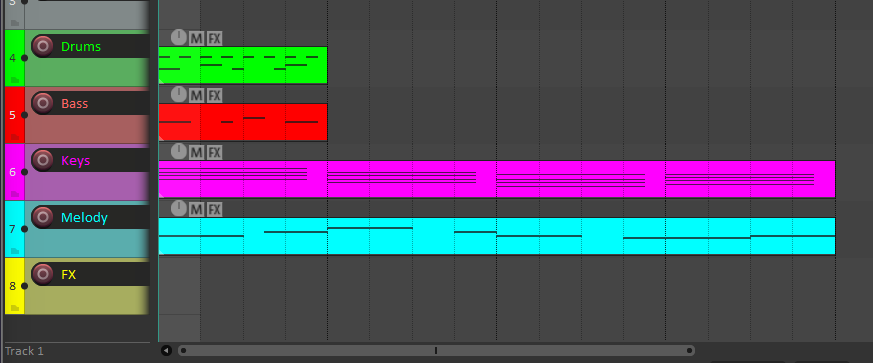
5 tracks created via MCP: Drums, Bass, Keys, Melody, FX — each with MIDI patterns and colors
🚀 Quick Start
1. Install Python dependencies
cd d:/tareas/experiment_cubase
uv sync
2. Configure REAPER OSC
- Preferences → Control/OSC/Web → Add
- Select OSC (Open Sound Control)
- Configure:
- Mode: Local port
- Port: 8000
- Local IP: 192.168.0.3 (your local IP)
3. Load the Lua script
- Copy
scythe_mcp/reascript/scythe_poller.luato REAPER Scripts - Actions → Load ReaScript → Run
4. Add to MCP config
{
  "mcpServers": {
    "scythe": {
      "command": "uv",
      "args": ["run", "scythe-mcp"],
      "cwd": "d:/tareas/experiment_cubase"
    }
  }
}
🛠️ Available Tools
| Tool | Description |
|---|---|
play, stop, record | Transport control |
set_tempo(bpm) | Change project tempo |
create_track(name) | Create new track |
set_track_volume(track, vol) | Set volume (0-1) |
mute_track, solo_track | Mute/solo toggle |
execute_lua(code) | Run any Lua in REAPER |
📁 Project Structure
scythe_mcp/
├── server/
│   ├── main.py           # MCP server with tools
│   └── reaper_bridge.py  # OSC + file-based commands
├── reascript/
│   ├── scythe_poller.lua # REAPER Lua client
│   └── install.md        # Setup guide
├── music_theory/
│   ├── scales.py         # 15+ scales and modes
│   ├── chords.py         # Chord construction
│   ├── progressions.py   # Genre-specific progressions
│   └── rhythm.py         # Time signatures, swing
└── generators/
    ├── drums.py          # Drum patterns
    ├── basslines.py      # Bass generators
    └── melodies.py       # Melody generators
🎹 Example: Create a Lo-fi Beat
Ask the AI:
"Create a lo-fi track at 85 BPM with jazzy chords and a dreamy melody"
What gets created:
- 5 tracks (Drums, Bass, Keys, Melody, FX) with colors
- Chord progression: Cmaj7 → Am7 → Fmaj7 → G7
- Melody notes on the Melody track
- ReaSynth loaded on each track
📜 License
MIT