🔍 Search Fusion MCP Server



🌏 中文文档
A High-Availability Multi-Engine Search Aggregation MCP Server providing intelligent failover, unified API, and LLM-optimized content processing. Search Fusion integrates multiple search engines with smart priority-based routing and automatic failover mechanisms.
🆕 What's New in v3.0.0: Major concurrency upgrade! Enhanced multi-threading support with thread-safe operations, intelligent connection pooling, and semaphore-based request limiting. Now supports 50+ concurrent searches without race conditions or data corruption!
✨ Features
🔄 Multi-Engine Integration
- Google Search - Premium performance with API key
- Serper Search - Google search alternative with advanced features
- Jina AI Search - AI-powered search with intelligent content processing
- DuckDuckGo - Free search, no API key required
- Exa Search - AI-powered semantic search
- Bing Search - Microsoft search API
- Baidu Search - Chinese search engine
🚀 Advanced Features
- Intelligent Failover - Automatic engine switching on failures or rate limits
- Priority-Based Routing - Smart engine selection based on availability and performance
- Unified Response Format - Consistent JSON structure across all engines
- Rate Limiting Protection - Built-in cooldown mechanisms
- 🔄 High Concurrency Support - Thread-safe operations with connection pooling
- ⚡ Performance Optimization - Async operations with semaphore-based concurrency control
- LLM-Optimized Content - Advanced web content fetching with pagination support
- Wikipedia Integration - Dedicated Wikipedia search tool
- Wayback Machine - Historical webpage archive search
- Environment Variable Configuration - Pure MCP configuration without config files
- 🌐 Enhanced Proxy Auto-Detection - Intelligent proxy detection with zero configuration
📊 Monitoring & Analytics
- Real-time engine status monitoring
- Success rate tracking
- Error handling and recovery
- Performance metrics
⚡ Concurrency & Performance
- Thread-Safe Operations - All engine statistics and state updates are protected by async locks
- Connection Pooling - Shared HTTP client with configurable connection limits (max 100 connections)
- Semaphore Control - Concurrent request limiting (max 30 simultaneous searches)
- Timeout Protection - 60-second search timeout prevents request accumulation
- Resource Management - Efficient memory usage with automatic connection cleanup
- Race Condition Prevention - Double-checked locking for SearchManager initialization
🏗️ Architecture
Search Fusion MCP Server
├── 🔧 Configuration Manager     # MCP environment variable handling
├── 🔍 Search Manager           # Multi-engine orchestration with concurrency control
├── ⚡ Concurrency Layer        # Thread-safe operations & performance optimization
│   ├── AsyncLock Protection    # Thread-safe state updates
│   ├── HTTP Connection Pool    # Shared client with connection limits
│   ├── Semaphore Control      # Concurrent request limiting (max 30)
│   └── Timeout Management     # 60s timeout protection
├── 🚀 Engine Implementations   # Individual search engines
│   ├── GoogleSearch            # Google Custom Search
│   ├── SerperSearch           # Serper API
│   ├── JinaSearch             # Jina AI Search
│   ├── DuckDuckGoSearch       # DuckDuckGo
│   ├── ExaSearch              # Exa AI
│   ├── BingSearch             # Bing API
│   └── BaiduSearch            # Baidu API
├── 🛠️ Advanced Fetcher         # Multi-method web scraping
└── 📡 MCP Server              # FastMCP integration
🚀 Quick Start
Installation
Option 1: Install from PyPI (Recommended)
pip install search-fusion-mcp
Option 2: Install from Source
git clone https://github.com/sailaoda/search-fusion-mcp.git
cd search-fusion-mcp
pip install -e .
🌐 Enhanced Proxy Auto-Detection (New in v2.0!)
Search Fusion now features intelligent proxy auto-detection inspired by concurrent-browser-mcp, providing seamless proxy support with zero configuration!
✨ Three-Layer Detection Strategy
- Environment Variables - Highest priority, checks
HTTP_PROXY,HTTPS_PROXY,ALL_PROXY - Port Scanning - Scans common proxy ports using socket connection testing
- System Proxy - Detects OS-level proxy settings (macOS supported)
🔍 Supported Proxy Ports (Priority Order)
- 7890 - Clash default port
- 1087 - V2Ray common port
- 8080 - Generic HTTP proxy port
- 3128 - Squid proxy default port
- 8888 - Other proxy software port
- 10809 - V2Ray SOCKS port
- 20171 - Additional proxy port
🚀 Zero Configuration Usage
Just run directly - proxy will be auto-detected:
search-fusion-mcp
Manual override (if needed):
env HTTP_PROXY="http://your-proxy:port" search-fusion-mcp
📊 Detection Process
🔍 Checking environment variables...
🔍 Scanning proxy ports: [7890, 1087, 8080, ...]
✅ Local proxy port detected: 7890
🌐 Auto-detected proxy: http://127.0.0.1:7890
🆚 Comparison with concurrent-browser-mcp
| Feature | Search-Fusion | concurrent-browser-mcp |
|---|---|---|
| Detection Method | ✅ Env vars → Port scan → System proxy | ✅ Same strategy |
| Port List | ✅ 7 common ports | ✅ 7 common ports |
| Connection Test | ✅ Socket testing | ✅ Socket testing |
| Timeout | ✅ 3 seconds | ✅ 3 seconds |
| macOS Support | ✅ networksetup | ✅ networksetup |
| Language | Python | TypeScript |
MCP Integration
Environment Variable Configuration
Search Fusion uses pure MCP environment variable configuration without requiring config files.
MCP Client Configuration (PyPI Installation):
{
  "mcp": {
    "mcpServers": {
      "search-fusion": {
        "command": "search-fusion-mcp",
        "env": {
          "GOOGLE_API_KEY": "your_google_api_key",
          "GOOGLE_CSE_ID": "your_google_cse_id",
          "SERPER_API_KEY": "your_serper_api_key",
          "JINA_API_KEY": "your_jina_api_key",
          "EXA_API_KEY": "your_exa_api_key",
          "BING_API_KEY": "your_bing_api_key",
          "BAIDU_API_KEY": "your_baidu_api_key",
          "BAIDU_SECRET_KEY": "your_baidu_secret_key"
        }
      }
    }
  }
}
MCP Client Configuration (Source Installation):
{
  "mcp": {
    "mcpServers": {
      "search-fusion": {
        "command": "python",
        "args": ["-m", "src.main"],
        "cwd": "/path/to/your/search-fusion-mcp",
        "env": {
          "GOOGLE_API_KEY": "your_google_api_key",
          "GOOGLE_CSE_ID": "your_google_cse_id",
          "SERPER_API_KEY": "your_serper_api_key",
          "JINA_API_KEY": "your_jina_api_key",
          "EXA_API_KEY": "your_exa_api_key",
          "BING_API_KEY": "your_bing_api_key",
          "BAIDU_API_KEY": "your_baidu_api_key",
          "BAIDU_SECRET_KEY": "your_baidu_secret_key"
        }
      }
    }
  }
}
Supported Environment Variables
| Search Engine | Environment Variable | Required | Description | Get API Key |
|---|---|---|---|---|
GOOGLE_API_KEYGOOGLE_CSE_ID | Both needed | Google Custom Search API | Get API Key | |
| Serper | SERPER_API_KEY | API key | Serper Google Search API | Get API Key |
| Jina AI | JINA_API_KEY | API key | Jina AI Search API | Get API Key |
| Bing | BING_API_KEY | API key | Microsoft Bing Search API | Get API Key |
| Baidu | BAIDU_API_KEYBAIDU_SECRET_KEY | Both needed | Baidu Search API | Get API Key |
| Exa | EXA_API_KEY | API key | Exa AI Search API | Get API Key |
| DuckDuckGo | None required | - | Free search, no API key needed | - |
Alternative Variable Names:
# Google
GOOGLE_SEARCH_API_KEY    # Alternative to GOOGLE_API_KEY
GOOGLE_SEARCH_CSE_ID     # Alternative to GOOGLE_CSE_ID

# Serper
SERPER_SEARCH_API_KEY    # Alternative to SERPER_API_KEY

# Others follow similar pattern...
Engine Priority
Search engines are prioritized automatically:
- Google Search (Priority 1) - Premium performance with API key
- Serper Search (Priority 1) - Google alternative with advanced features
- Jina AI Search (Priority 1.5) - AI-powered search with optional API key for advanced features
- DuckDuckGo (Priority 2) - Free, no API key required
- Exa Search (Priority 2) - AI-powered search with API key
- Bing Search (Priority 3) - Microsoft search API
- Baidu Search (Priority 3) - Chinese search engine
🛠️ MCP Tools
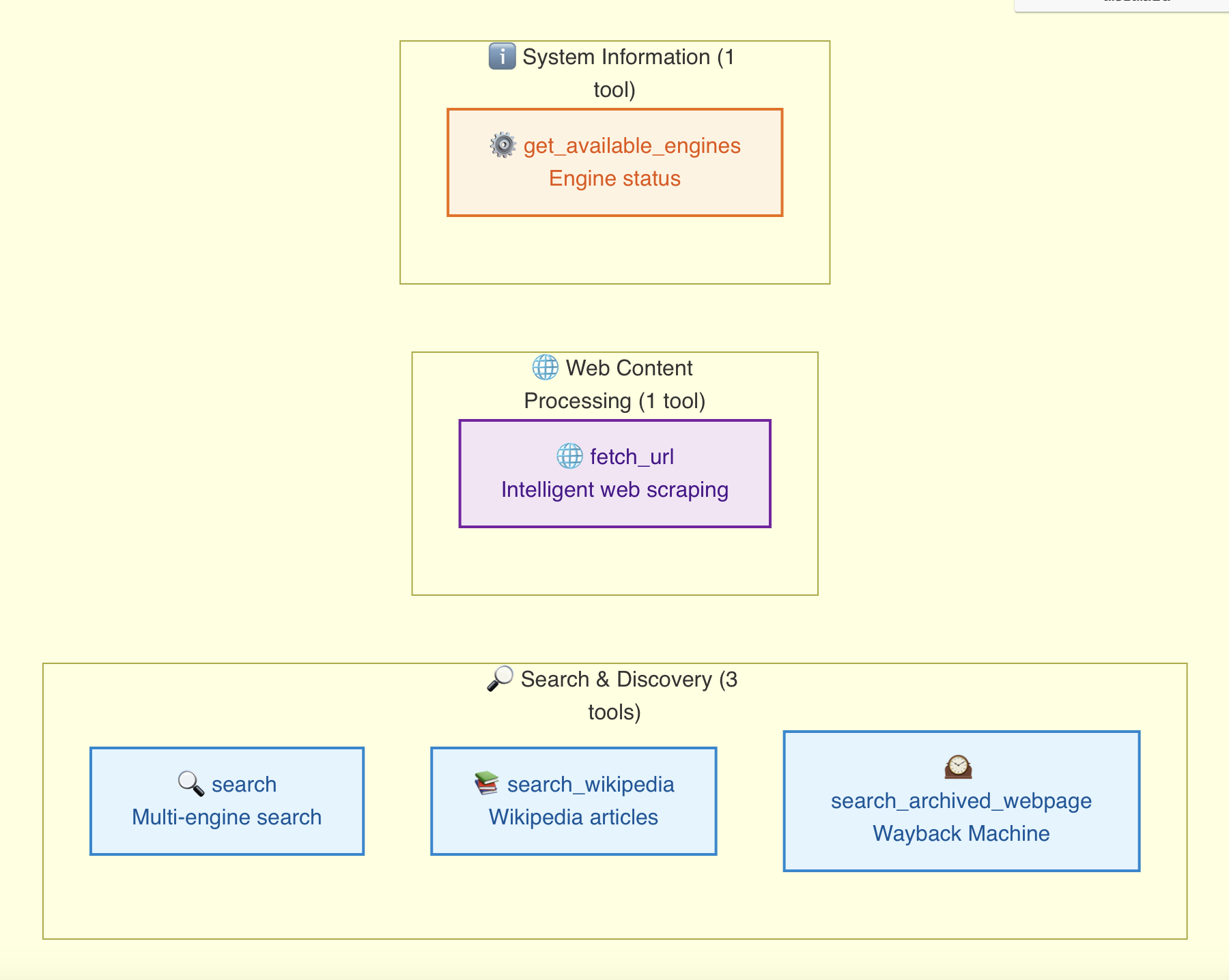
1. search
Perform web searches with intelligent engine selection and failover.
Parameters:
query(required): Search query termsnum_results(default: 10): Number of results to returnengine(default: "auto"): Engine preference"auto": Automatic engine selection (recommended)"google": Prefer Google Search"serper": Prefer Serper Search"jina": Prefer Jina AI Search"duckduckgo": Prefer DuckDuckGo"exa": Prefer Exa Search"bing": Prefer Bing Search"baidu": Prefer Baidu Search
2. fetch_url
Fetch and process web content with intelligent pagination and multi-method fallback.
Parameters:
url(required): Web URL to fetchuse_jina(default: true): Whether to prioritize Jina Reader for LLM-optimized contentwith_image_alt(default: false): Whether to generate alt text for imagesmax_length(default: 50000): Maximum content length per page (auto-paginate if exceeded)page_number(default: 1): Retrieve specific page from previously fetched content
Features:
- Intelligent Multi-Method Fallback: Tries Jina Reader → Serper Scrape → Direct HTTP
- Automatic Pagination: Splits large content into manageable pages
- Concurrent-Safe Caching: Unique page IDs prevent conflicts in high-concurrency scenarios
- LLM-Optimized Content: Clean markdown format optimized for AI processing
3. get_available_engines
Get current status and availability of all search engines.
4. search_wikipedia
Search Wikipedia articles for entities, people, places, concepts, etc.
Parameters:
entity(required): Entity to search forfirst_sentences(default: 10): Number of sentences to return (0 for full content)
5. search_archived_webpage
Search archived versions of websites using Wayback Machine.
Parameters:
url(required): Website URL to searchyear(optional): Target yearmonth(optional): Target monthday(optional): Target day
📖 API Examples
Basic Search
# Automatic engine selection
result = await search("artificial intelligence trends 2024")

# Prefer specific engine
result = await search("machine learning", engine="google")
Advanced Web Fetching
# Fetch with intelligent pagination
result = await fetch_url("https://example.com/long-article")

# If content is paginated, get additional pages
if result.get("is_paginated"):
    page_2 = await get_page(result["page_id"], 2)
Wikipedia Search
# Get Wikipedia summary
result = await search_wikipedia("Python programming language")

# Get full article
result = await search_wikipedia("Quantum computing", first_sentences=0)
🧪 Development
Development Setup
git clone https://github.com/sailaoda/search-fusion-mcp.git
cd search-fusion-mcp
pip install -r requirements.txt
pip install -e .
🔧 Configuration Guide
For detailed configuration instructions, see MCP_CONFIG_GUIDE.md.
📊 Performance
- Latency: Sub-second response times with caching
- Availability: 99.9% uptime with intelligent failover
- Throughput: Handles concurrent requests efficiently
- Scalability: Efficient resource utilization and concurrent processing
📈 Concurrency Benchmarks
Tested Performance (v3.0.0+):
- ✅ 50+ concurrent searches - No race conditions or data corruption
- ✅ Thread-safe statistics - Accurate request counting and error tracking
- ⚡ Connection pooling - Efficient HTTP resource management
- 🛡️ Timeout protection - 60s per request prevents system overload
- 📊 Real-time monitoring - Live engine status during high load
Recommended Limits:
- Concurrent searches: 10 (configurable via semaphore)
- Connection pool: 100 max connections, 20 keep-alive
- Request timeout: 60 seconds
- Memory usage: ~50MB baseline + ~2MB per concurrent request
🤝 Contributing
- Fork the repository
- Create a feature branch
- Make your changes
- Add tests for new functionality
- Submit a pull request
📄 License
This project is licensed under the MIT License - see the LICENSE file for details.
🚨 Rate Limiting & Best Practices
- Google Search: 100 queries/day (free tier)
- Serper API: Varies by plan
- Jina AI: Rate limits apply based on subscription
- DuckDuckGo: No official limits, but use responsibly
- Other engines: Check respective API documentation
Always implement appropriate delays and respect rate limits to ensure sustainable usage.
📞 Support
Made with ❤️ for the MCP community