Search-Scrape
100% Free web search and scraping MCP tools for AI assistants. No API keys, no costs, no limits.
✨ Features
- 🔍 Advanced Search: Full SearXNG parameter support (engines, categories, language, safesearch, time_range, pagination)
- 🕷️ Intelligent Scraping: Smart content extraction with automatic noise filtering (ads, nav, footers removed)
- 🔗 Smart Link Filtering: Extracts links from main content area only, avoiding navigation clutter
- 📝 Source Citations: Automatic reference-style
[1],[2]citations with clickable URLs in Sources section - 🧠 Agent-Friendly Extras: SearXNG instant answers, related suggestions, spelling corrections, and unresponsive-engine warnings help agents self-start follow-ups
- 🎯 Configurable Limits: Control
max_results,max_chars, andmax_linksvia request parameters or env vars to stay within token budgets - 🔧 Native MCP Tools: Direct integration with VS Code, Cursor, and other AI assistants
- 💰 100% Free: No API keys or subscriptions required - runs completely locally
- 🛡️ Privacy First: All processing happens on your machine
- ⚡ Performance: Built-in caching (10min search, 30min scrape), retry logic, and concurrency control
- 🎨 Content-Aware: Special handling for documentation sites (mdBook, GitBook, etc.)
- 🧠 Research History (v3.0): Semantic search memory with local embeddings - track all searches/scrapes, avoid duplicate work
- 🤖 Smart Query Rewriting (🆕 v3.5): Auto-enhances developer queries with site filters and optimizations
- 🔄 Duplicate Detection (🆕 v3.5): Warns about similar recent searches to avoid redundant work
🆕 New: Agent-Optimized Features (v2.0)
- 📊 JSON Output Mode: Structured data format for programmatic consumption (
output_format: "json") - 💻 Code Block Extraction: Preserves syntax, whitespace, and language hints from
<pre><code>tags - 🎯 Quality Scoring: 0.0-1.0 heuristic score based on content length, metadata, code blocks, and headings
- 🏷️ Search Classification: Automatic categorization (docs, repo, blog, video, qa, package, gaming)
- ⚠️ Machine-Readable Warnings: Truncation flags, error indicators, and quality assessments
- 🌐 Domain Extraction: Identifies content source domains for filtering and trust assessment
🚀 New: Developer Experience Enhancements (v3.5)
- 🔍 Intelligent Query Rewriting: Automatically detects developer queries and enhances them
- "rust docs" → "rust docs site:doc.rust-lang.org"
- "tokio error" → "tokio error site:stackoverflow.com"
- Supports 40+ programming languages and frameworks
- 🎯 Smart Site Suggestions: AI-powered recommendations for best sources
- ⚠️ Duplicate Warnings: Detects similar searches within 6 hours (0.9+ similarity)
- 📊 Optimized SearXNG: Weighted engines prioritize GitHub, Stack Overflow, and official docs
📸 Screenshot
Here are screenshots showing the MCP tools working in Vscode, Cursor, Trae:
Search Web Tool
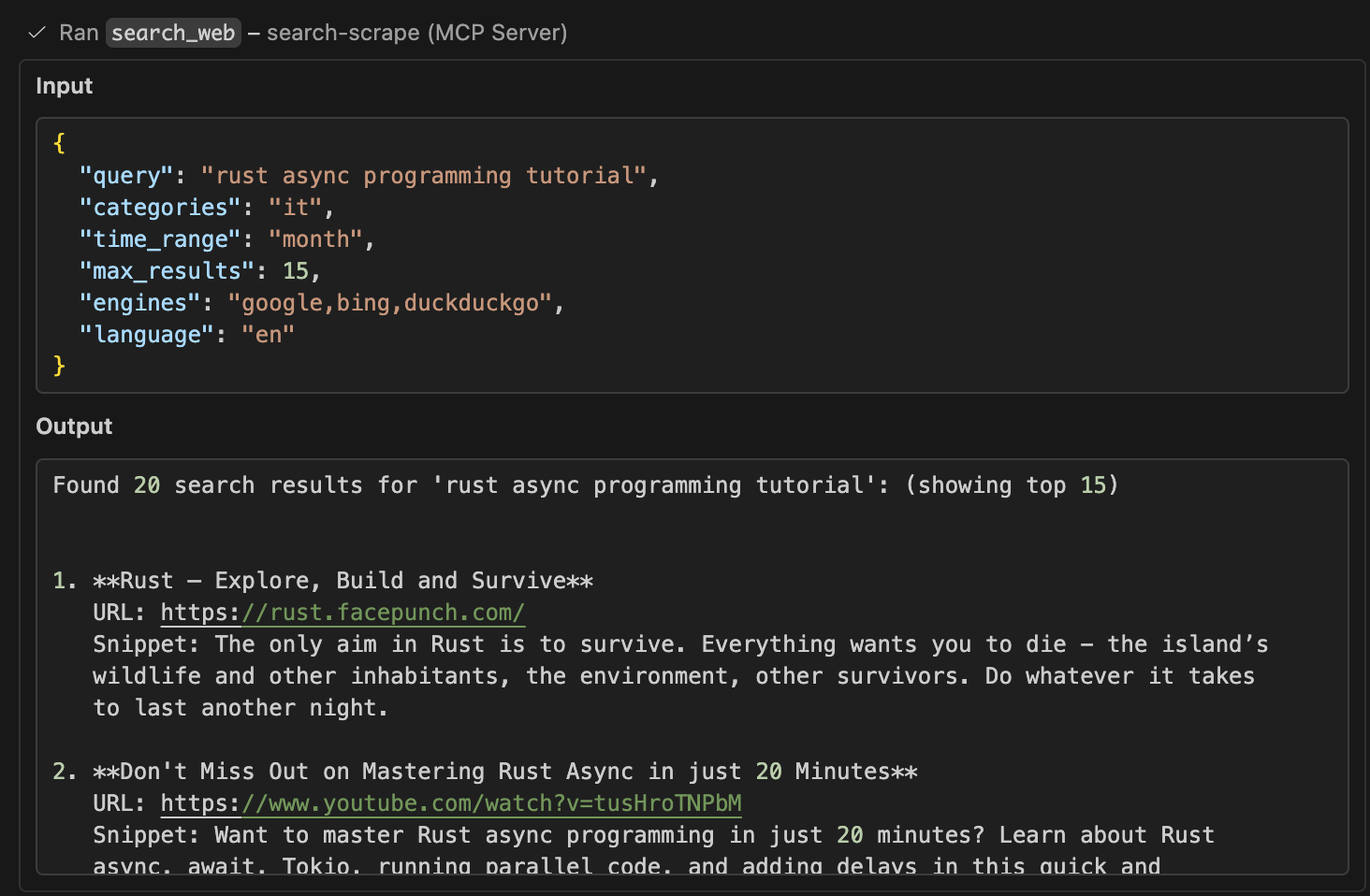 View the full sample output for this search interaction
Scrape URL Tool
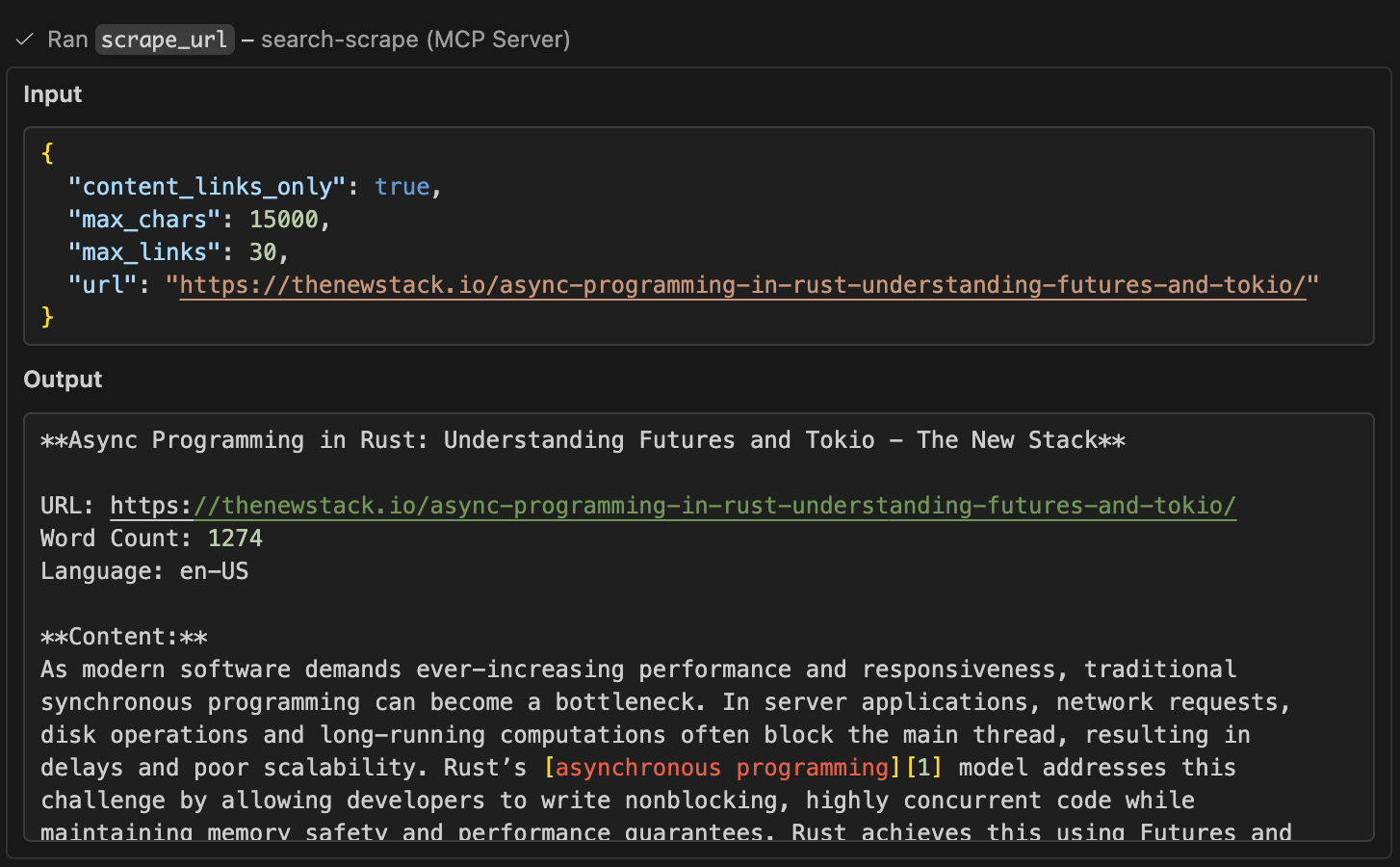 View the full sample output for this scrape interaction
Research History Tool
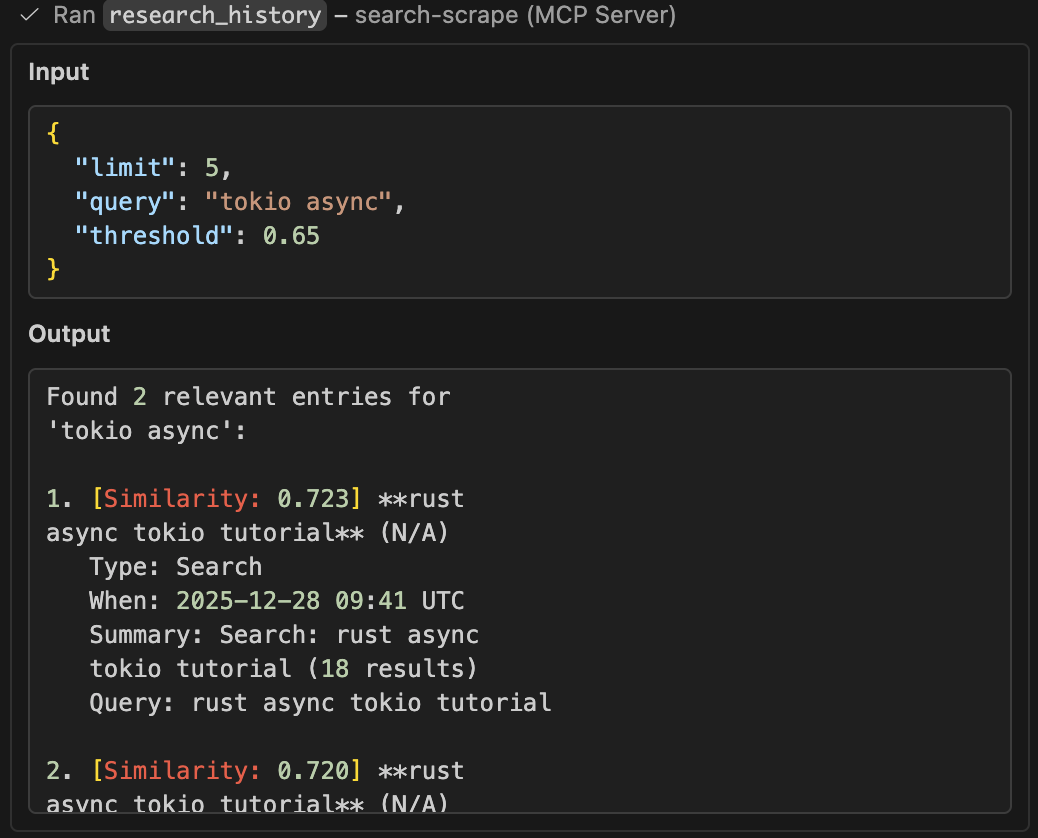 View the history sample output for this interaction
🚀 Quick Start
# 1. Start SearXNG search engine (required)
docker-compose up searxng -d

# 2. Optional: Start Qdrant for research history
docker-compose up qdrant -d

# 3. Build MCP server
cd mcp-server && cargo build --release

# 4. Add to your AI assistant's MCP config:
{
  "mcpServers": {
    "search-scrape": {
      "command": "/path/to/mcp-server/target/release/search-scrape-mcp",
      "env": {
        "SEARXNG_URL": "http://localhost:8888",
        "SEARXNG_ENGINES": "google,bing,duckduckgo",
        "QDRANT_URL": "http://localhost:6334",  // Optional: enables history (gRPC port)
        "MAX_LINKS": "100"
      }
    }
  }
}
Environment Variables
| Variable | Default | Description |
|---|---|---|
SEARXNG_URL | http://localhost:8888 | SearXNG instance URL |
QDRANT_URL | - | Optional: Qdrant gRPC URL (e.g., http://localhost:6334). Enables research history feature. Note: Use gRPC port 6334, NOT HTTP port 6333 |
SEARXNG_ENGINES | duckduckgo,google,bing | Default search engines (comma-separated) |
MAX_LINKS | 100 | Max links to return in Sources section |
MAX_CONTENT_CHARS | 10000 | Default max_chars limit for scraped content (100-50000) |
RUST_LOG | - | Log level: error, warn, info, debug, trace |
� MCP Tools
search_web - Advanced Web Search
Enhanced with full SearXNG parameter support:
- engines:
google,bing,duckduckgo, etc. - categories:
general,news,it,science, etc. - language:
en,es,fr,de, etc. - safesearch:
0(off),1(moderate),2(strict) - time_range:
day,week,month,year - pageno: Page number for pagination
{
  "query": "rust programming",
  "engines": "google,bing",
  "categories": "it,general",
  "language": "en",
  "safesearch": 1,
  "time_range": "month",
  "max_results": 20
}
Agent-friendly extras:
max_results: Limit how many ranked results you return to keep the response concise (1-100, default: 10)- The tool surfaces SearXNG
answers, spellingcorrections,suggestions, and a count ofunresponsive_enginesso agents know when to retry or refine the query
Enhanced Results (v2.0): Each search result now includes:
domain: Extracted domain name (e.g.,"tokio.rs")source_type: Automatic classification:docs- Official documentation (*.github.io, docs.rs, readthedocs.org)repo- Code repositories (github.com, gitlab.com, bitbucket.org)blog- Technical blogs (medium.com, dev.to, substack.com)video- Video platforms (youtube.com, vimeo.com)qa- Q&A sites (stackoverflow.com, reddit.com)package- Package registries (crates.io, npmjs.com, pypi.org)gaming- Gaming sites (steam, facepunch)other- General/unknown sites
Example: Agents can now filter results programmatically:
# Get only documentation links
docs = [r for r in results if r['source_type'] == 'docs']

# Filter by trusted domains
trusted = [r for r in results if r['domain'] in ['rust-lang.org', 'tokio.rs']]
scrape_url - Optimized Content Extraction
Intelligent scraping with advanced cleanup:
- ✅ Smart Link Filtering: Extracts links from main content (article/main tags) only
- ✅ Source Citations: Returns
[1],[2]markers with full URL mapping in Sources section - ✅ Noise Removal: Automatically removes ads, navigation, footers, and boilerplate
- ✅ Clean Text: Extracts article text with proper formatting preserved
- ✅ Rich Metadata: OpenGraph, author, publish date, reading time, canonical URL
- ✅ Structured Data: Headings (H1-H6), images with alt text, language detection
- ✅ Documentation Sites: Special handling for mdBook, GitBook, and similar formats
- ✅ Fallback Methods: Multiple extraction strategies for difficult sites
- ✅ Token-aware trimming:
max_charskeeps previews within a manageable length and shows a flag when the content is truncated - ✅ Configurable: Control link/image limits and filtering behavior
- ✅ Code Extraction: Preserves code blocks with syntax and language hints
- ✅ JSON Mode: Structured output for programmatic consumption
- ✅ Quality Scoring: Automatic content quality assessment (0.0-1.0)
Parameters:
{
  "url": "https://doc.rust-lang.org/book/ch01-00-getting-started.html",
  "content_links_only": true,  // Optional: smart filter (default: true)
  "max_links": 100,            // Optional: limit sources (default: 100, max: 500)
  "max_chars": 10000,          // Optional: cap preview length (default: 10000, max: 50000)
  "output_format": "text"      // Optional: "text" (default) or "json"
}
max_chars keeps scraped previews within token budgets; override the default for the entire server with the MAX_CONTENT_CHARS env var (100-50000).
Text Output (Default):
**Getting Started - The Rust Programming Language**

URL: https://doc.rust-lang.org/book/ch01-00-getting-started.html
Word Count: 842
Language: en

**Content:**
This chapter covers how to install Rust, write a Hello World program...
Learn more about [Cargo][1] and the [installation process][2].

**Sources:**
[1]: https://doc.rust-lang.org/cargo/ (Cargo documentation)
[2]: https://doc.rust-lang.org/book/ch01-01-installation.html (Installation)
[3]: https://doc.rust-lang.org/book/ch01-02-hello-world.html (Hello World)
...
JSON Output (New in v2.0):
Set output_format: "json" to get structured data:
{
  "url": "https://example.com/article",
  "title": "Article Title",
  "clean_content": "Extracted text...",
  "meta_description": "Article description",
  "word_count": 842,
  "language": "en",
  "author": "John Doe",
  "published_at": "2024-12-01T10:00:00Z",
  "reading_time_minutes": 4,
  "code_blocks": [
    {
      "language": "rust",
      "code": "fn main() { println!(\"Hello\"); }",
      "start_char": null,
      "end_char": null
    }
  ],
  "truncated": false,
  "actual_chars": 8420,
  "max_chars_limit": 10000,
  "extraction_score": 0.85,
  "warnings": [],
  "domain": "example.com",
  "headings": [
    {"level": "h1", "text": "Main Title"},
    {"level": "h2", "text": "Section"}
  ],
  "links": [
    {"url": "https://...", "text": "Link text"}
  ],
  "images": [
    {"src": "https://...", "alt": "Image alt", "title": ""}
  ]
}
Key JSON Fields:
code_blocks: Extracted code with language detection (e.g.,rust,python,javascript)extraction_score: Quality assessment (0.0-1.0) based on content richnesstruncated: Boolean flag indicating if content was cut offwarnings: Array of issues (e.g.,["content_truncated"])domain: Source domain for filtering/trust assessment
research_history - Semantic Search History (🆕 v3.0 | Enhanced v3.5)
100% Open Source Memory System: Track and search your research history using local embeddings and Qdrant vector database. Perfect for avoiding duplicate work and maintaining context across sessions.
Features:
- 🧠 Semantic Search: Find related searches/scrapes even with different wording
- 🔒 100% Local: No external API calls - uses fastembed for embeddings
- 📊 Auto-Logging: All searches and scrapes are automatically saved with full context
- 🎯 Type Filtering (🆕 v3.5): Separate search history from scrape history
- Filter by
entry_type: "search"for past web searches - Filter by
entry_type: "scrape"for scraped page history - Omit filter to search both types together
- Filter by
- 🔍 Rich Context: Each entry includes query, domain, summary, and full results
- ⚙️ Optional: Only enabled when
QDRANT_URLis set
Setup:
# 1. Start Qdrant vector database (gRPC port 6334)
docker-compose up qdrant -d

# 2. Run MCP server with history enabled
SEARXNG_URL=http://localhost:8888 \
QDRANT_URL=http://localhost:6334 \
./target/release/search-scrape-mcp
Parameters:
{
  "query": "rust async web scraping",  // Natural language query
  "limit": 10,                         // Max results (default: 10)
  "threshold": 0.7,                    // Similarity 0-1 (default: 0.7)
  "entry_type": "search"               // Optional: "search" or "scrape" or omit for both
}
Threshold Guide:
0.6-0.7: Broad topic search (e.g., "async programming" finds "tokio", "futures")0.75-0.85: Specific queries (e.g., "web scraping" finds "HTML parsing", "requests")0.9+: Near-exact matches
Example Output:
Found 5 relevant entries for 'rust async web scraping':

1. [Similarity: 0.89] Web Scraping in Rust (docs.rs)
   Type: Scrape
   When: 2024-12-01 14:30 UTC
   Summary: Introduction to Web Scraping - 2500 words, 8 code blocks
   Query: https://docs.rs/scraper/latest/scraper/

2. [Similarity: 0.82] async web frameworks (stackoverflow.com)
   Type: Search
   When: 2024-12-01 10:15 UTC
   Summary: Found 15 results. Top domains: stackoverflow.com, reddit.com
   Query: best async web frameworks rust

💡 Tip: Use threshold=0.70 for similar results, or higher (0.8-0.9) for more specific matches
Filtering by Type:
// Find only past searches
{"query": "rust tutorials", "entry_type": "search", "threshold": 0.75}

// Find only scraped pages
{"query": "tokio documentation", "entry_type": "scrape", "limit": 5}

// Search both types (default)
{"query": "async programming", "threshold": 0.7}
Technical Details:
- Search Algorithm: Hybrid Search (Vector + Keyword Boosting) for BEST agent results
- Vector embeddings find semantically similar content
- Keyword matching boosts exact term matches (+15% score)
- Combines semantic understanding with precise technical term matching
- Embedding Model: fastembed AllMiniLML6V2 (384 dimensions, ~23MB, downloaded on first use)
- Vector DB: Qdrant v1.11+ (local Docker container, gRPC port 6334)
- Storage: Persistent volume (
qdrant_storage) - survives restarts - Collection:
research_historywith cosine similarity search - Auto-created: Collection created automatically on first use
- Entry Types: Separate tracking for
SearchandScrapeoperations - Duplicate Detection: Built-in 6-hour window, 0.9+ similarity threshold
- Performance: Typically <100ms for hybrid search with 1000+ entries
🛠️ Development
HTTP API Testing
# Test search with parameters
curl -X POST "http://localhost:5000/search" \
  -H "Content-Type: application/json" \
  -d '{"query": "AI", "engines": "google", "language": "en"}'

# Test optimized scraping with smart filtering
curl -X POST "http://localhost:5000/scrape" \
  -H "Content-Type: application/json" \
  -d '{"url": "https://example.com", "content_links_only": true, "max_links": 50}'
Running the Server
# HTTP server (port 5000)
cd mcp-server
SEARXNG_URL=http://localhost:8888 cargo run --release --bin mcp-server

# MCP stdio server (for AI assistants)
SEARXNG_URL=http://localhost:8888 ./target/release/search-scrape-mcp

# With debug logging
RUST_LOG=debug SEARXNG_URL=http://localhost:8888 cargo run --release
Performance Tuning
Cache Settings (in src/main.rs and src/stdio_service.rs):
search_cache: 10_000 entries, 10 min TTL
scrape_cache: 10_000 entries, 30 min TTL
outbound_limit: 32 concurrent requests
Optimization Tips:
- Use
content_links_only: trueto reduce noise (enabled by default) - Set
max_linkslower (e.g., 20-50) for faster responses - Use
SEARXNG_ENGINESenv var to limit search engines - Enable
RUST_LOG=infofor production monitoring
📁 Project Structure
├── mcp-server/           # Native Rust MCP server
│   ├── src/
│   │   ├── main.rs       # HTTP server entry point
│   │   ├── stdio_service.rs  # MCP stdio server (for AI assistants)
│   │   ├── search.rs     # SearXNG integration with full parameter support
│   │   ├── scrape.rs     # Scraping orchestration with caching & retry
│   │   ├── rust_scraper.rs   # Advanced extraction, noise filtering, smart links
│   │   ├── mcp.rs        # MCP HTTP endpoints
│   │   ├── types.rs      # Data structures & API types
│   │   └── lib.rs        # Shared application state
│   └── target/release/   # Compiled binaries (mcp-server, search-scrape-mcp)
├── searxng/             # SearXNG configuration
│   ├── settings.yml     # Search engine settings
│   └── uwsgi.ini        # UWSGI server config
└── docker-compose.yml   # Container orchestration
💡 Best Practices
🤖 For AI Agents (Auto-Follow These Guidelines)
The tool descriptions already contain this guidance, but here's a quick reference:
research_history Smart Usage (🆕 v3.5)
- Always check history FIRST before doing new searches/scrapes:
- Saves API calls and bandwidth
- Maintains context across sessions
- Avoids duplicate work (search_web has built-in duplicate detection)
- Use type filtering for focused results:
entry_type: "search"→ Find what you've searched for beforeentry_type: "scrape"→ Find pages you've already read- Omit
entry_type→ Search both types together
- Adjust threshold based on your need:
0.6-0.7: Broad exploration ("rust" finds "tokio", "async")0.75-0.85: Specific queries ("web scraping" finds "HTML parsing")0.9+: Near-exact matches (avoid duplicate work)
- Check timestamps: Recent results (<24h) are more reliable
- Use limit wisely:
limit: 5-10for quick context checkslimit: 20+for comprehensive review
- Workflow recommendation:
research_historywithentry_type: "search"to check past searches- If not found, use
search_web(auto-logs to history) research_historywithentry_type: "scrape"to check if page already read- If not found, use
scrape_url(auto-logs to history)
search_web Smart Usage
- Always set
max_resultsbased on your task:- Quick fact-check? →
max_results: 5-10 - Balanced research? →
max_results: 15-25 - Comprehensive survey? →
max_results: 30-50
- Quick fact-check? →
- Use
time_rangefor time-sensitive queries:- Breaking news →
time_range: "day" - Current events →
time_range: "week" - Recent trends →
time_range: "month"
- Breaking news →
- Use
categoriesto filter results:- Technical/programming →
categories: "it" - News articles →
categories: "news" - Research papers →
categories: "science"
- Technical/programming →
- Check the response extras:
- Read
answersfield first (instant facts from SearXNG) - If you see
corrections, retry with the suggested spelling - If
unresponsive_engines > 3, consider retrying the query
- Read
scrape_url Smart Usage
- Always adjust
max_charsbased on your need:- Quick summary? →
max_chars: 3000-5000 - Standard article? →
max_chars: 10000(default) - Long-form content? →
max_chars: 20000-30000 - Full documentation? →
max_chars: 40000+
- Quick summary? →
- Keep
content_links_only: true(default) unless you specifically need nav/footer links - Check
word_countin response:- If < 50 words, the page may be JS-heavy or paywalled
- Consider trying a different URL or informing the user
- Use citation markers: Content has
[1],[2]markers - reference the Sources section for specific URLs - Lower
max_linksfor faster responses when you don't need all sources
For AI Assistants
- Use smart filtering: Keep
content_links_only: true(default) to avoid nav/footer links - Limit result counts: Dial back
max_resultsto 5-20 when agents only need the top snippets - Cap preview length: Use
max_chars(orMAX_CONTENT_CHARS) to prevent huge scrape responses from draining tokens - Limit sources: Set
max_links: 20-50for cleaner responses when you don't need all links - Follow citations: Use the
[1],[2]markers in content to find specific sources - Search first, scrape second: Use
search_webto find URLs, thenscrape_urlfor deep content
For Developers
- Cache effectively: Search results cached 10min, scrapes cached 30min
- Handle errors gracefully: Retry logic built-in (exponential backoff)
- Monitor performance: Use
RUST_LOG=infoto track cache hits and timing - Customize engines: Set
SEARXNG_ENGINESfor domain-specific search - Rate limiting: Built-in semaphore (32 concurrent) prevents overwhelming targets
For Content Extraction
- Documentation sites work great: mdBook, GitBook auto-detected
- JavaScript-heavy sites: May have limited content (no JS execution)
- Prefer canonical URLs: Tool extracts canonical link when available
- Reading time: Automatically calculated at ~200 words/minute
🔧 Troubleshooting
SearXNG not responding:
docker-compose restart searxng
# Check logs: docker-compose logs searxng
Empty scrape results:
- Site may be JavaScript-heavy (we don't execute JS)
- Try the URL in a browser to verify content is in HTML
- Check logs with
RUST_LOG=debugfor detailed extraction info
Too many/too few links:
- Adjust
max_linksparameter (default: 100, max: 500) - Use
content_links_only: falseto get all document links - Use
content_links_only: truefor main content only (default)
Slow responses:
- Check cache hit rates with
RUST_LOG=info - Verify SearXNG is running:
curl http://localhost:8888 - Reduce concurrent load (outbound_limit in source)
🤝 Contributing
Contributions welcome! Areas for improvement:
- Additional search engines in SearXNG config
- JavaScript execution support (headless browser)
- PDF/document extraction
- More smart content patterns
- Performance optimizations
📄 License
MIT License - Free to use, modify, and distribute.