
Shodh-Memory






Persistent memory for AI agents. Single binary. Local-first. Runs offline.
For AI Agents — Claude, Cursor, GPT, LangChain, AutoGPT, robotic systems, or your custom agents. Give them memory that persists across sessions, learns from experience, and runs entirely on your hardware.
We built this because AI agents forget everything between sessions. They make the same mistakes, ask the same questions, lose context constantly.
Shodh-Memory fixes that. It's a cognitive memory system—Hebbian learning, activation decay, semantic consolidation—packed into a single ~17MB binary that runs offline. Deploy on cloud, edge devices, or air-gapped systems.
Quick Start
Choose your platform:
| Platform | Install | Documentation |
|---|---|---|
| Claude / Cursor | claude mcp add shodh-memory -- npx -y @shodh/memory-mcp | MCP Setup |
| Python | pip install shodh-memory | Python Docs |
| Rust | cargo add shodh-memory | Rust Docs |
| npm (MCP) | npx -y @shodh/memory-mcp | npm Docs |
TUI Dashboard
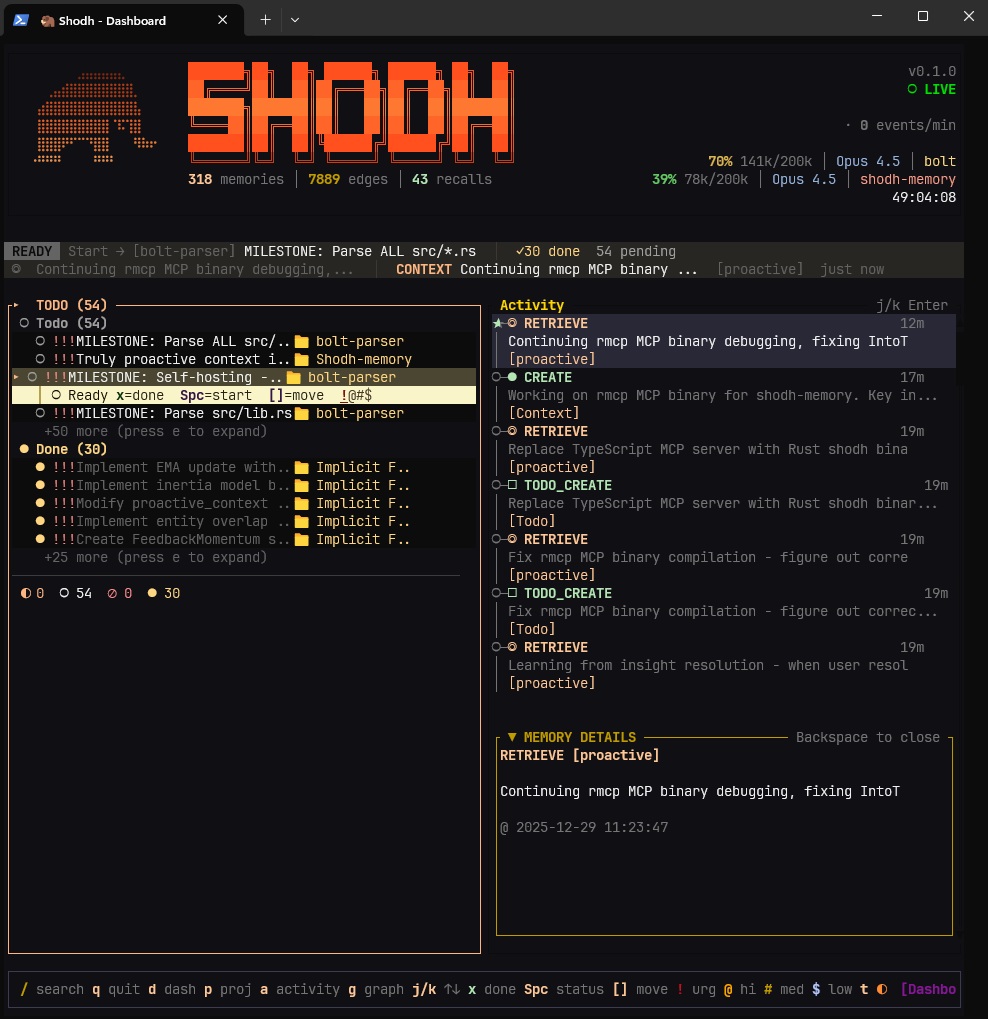
Real-time activity feed, memory tiers, and detailed inspection

Knowledge graph visualization — entity connections across memories
GTD Todo System

Projects and todos with GTD workflow — contexts, priorities, due dates
Built-in task management following GTD (Getting Things Done) methodology:
# Add todos with context, projects, and priorities
memory.add_todo("Fix authentication bug", project="Backend", priority="high", contexts=["@computer"])

# List by project or context
todos = memory.list_todos(project="Backend", status=["todo", "in_progress"])

# Complete tasks (auto-creates next occurrence for recurring)
memory.complete_todo("SHO-abc123")
MCP Tools for Claude/Cursor:
add_todo— Create tasks with projects, contexts, priorities, due dateslist_todos— Filter by status, project, context, due datecomplete_todo— Mark done, auto-advances recurring tasksadd_project/list_projects— Organize work into projects
How It Works
Experiences flow through three tiers based on Cowan's working memory model:
Working Memory ──overflow──▶ Session Memory ──importance──▶ Long-Term Memory
   (100 items)                  (500 MB)                      (RocksDB)
Cognitive Processing:
- Hebbian learning — Co-retrieved memories form stronger connections
- Activation decay — Unused memories fade: A(t) = A₀ · e^(-λt)
- Long-term potentiation — Frequently-used connections become permanent
- Entity extraction — TinyBERT NER identifies people, orgs, locations
- Spreading activation — Queries activate related memories through the graph
- Memory replay — Important memories replay during maintenance (like sleep)
Claude / Cursor (MCP)
Claude Code (CLI):
claude mcp add shodh-memory -- npx -y @shodh/memory-mcp
Claude Desktop / Cursor config:
{
  "mcpServers": {
    "shodh-memory": {
      "command": "npx",
      "args": ["-y", "@shodh/memory-mcp"],
      "env": {
        "SHODH_API_KEY": "your-api-key"
      }
    }
  }
}
Key MCP Tools:
remember— Store memories with types (Observation, Decision, Learning, etc.)recall— Semantic/associative/hybrid search across memoriesproactive_context— Auto-surface relevant memories for current contextadd_todo/list_todos— GTD task managementcontext_summary— Quick overview of recent learnings and decisions
Config file locations:
| Editor | Path |
|---|---|
| Claude Desktop (macOS) | ~/Library/Application Support/Claude/claude_desktop_config.json |
| Claude Desktop (Windows) | %APPDATA%\Claude\claude_desktop_config.json |
| Cursor | ~/.cursor/mcp.json |
Python
pip install shodh-memory
from shodh_memory import Memory

memory = Memory(storage_path="./my_data")
memory.remember("User prefers dark mode", memory_type="Decision")
results = memory.recall("user preferences", limit=5)
Rust
[dependencies]
shodh-memory = "0.1"
use shodh_memory::{MemorySystem, MemoryConfig};

let memory = MemorySystem::new(MemoryConfig::default())?;
memory.remember("user-1", "User prefers dark mode", MemoryType::Decision, vec![])?;
let results = memory.recall("user-1", "user preferences", 5)?;
Performance
| Operation | Latency |
|---|---|
| Store memory | 55-60ms |
| Semantic search | 34-58ms |
| Tag search | ~1ms |
| Entity lookup | 763ns |
| Graph traversal (3-hop) | 30µs |
Compared to Alternatives
| Shodh-Memory | Mem0 | Cognee | |
|---|---|---|---|
| Deployment | Single 17MB binary | Cloud API | Neo4j + Vector DB |
| Offline | 100% | No | Partial |
| Learning | Hebbian + decay + LTP | Vector similarity | Knowledge graphs |
| Latency | Sub-millisecond | Network-bound | Database-bound |
Platform Support
| Platform | Status |
|---|---|
| Linux x86_64 | Supported |
| macOS ARM64 (Apple Silicon) | Supported |
| macOS x86_64 (Intel) | Supported |
| Windows x86_64 | Supported |
| Linux ARM64 | Coming soon |
Community Implementations
| Project | Description | Author |
|---|---|---|
| SHODH on Cloudflare | Edge-native implementation on Cloudflare Workers with D1, Vectorize, and Workers AI | @doobidoo |
Have an implementation? Open a discussion to get it listed.
References
[1] Cowan, N. (2010). The Magical Mystery Four: How is Working Memory Capacity Limited, and Why? Current Directions in Psychological Science.
[2] Magee, J.C., & Grienberger, C. (2020). Synaptic Plasticity Forms and Functions. Annual Review of Neuroscience.
[3] Subramanya, S.J., et al. (2019). DiskANN: Fast Accurate Billion-point Nearest Neighbor Search. NeurIPS 2019.
License
Apache 2.0
MCP Registry · PyPI · npm · crates.io · Docs