
Skylos: Python SAST, Dead Code Detection & Security Auditor
The hybrid static analysis tool for Python. Finds dead code, security leaks, quality rot with agentic AI options and MCP integration.







⭐ If Skylos saves you time (or has helped you in any way), please star the repo — it helps a lot.
💬 Join the Discord (support + contributors): https://discord.gg/Ftn9t9tErf
What is Skylos?
Skylos is a privacy-first Python SAST tool that bridges the gap between traditional static analysis and AI agents. It detects dead code, security vulnerabilities (SQLi, SSRF, Secrets), and code quality issues with high precision.
Unlike standard linters (like Vulture or Bandit) that struggle with dynamic Python patterns, Skylos uses a hybrid engine (AST + optional Local/Cloud LLM). This allows it to:
- Eliminate False Positives: Distinguishes between truly dead code and framework magic (e.g.,
pytest.fixture,FastAPIroutes). - Verify via Runtime: Optional
--tracemode validates findings against actual runtime execution. - Find Logic Bugs: Goes beyond linting to find deep logic errors that regex-based tools miss.
Table of Contents
- Quick Start
- Features
- Installation
- Skylos vs Vulture
- How It Works
- Agent Analysis
- CI/CD
- MCP Server
- Baseline Tracking
- Gating
- VS Code Extension
- Integration and Ecosystem
- Auditing and Precision
- Coverage Integration
- Filtering
- CLI Options
- FAQ
- Limitations and Troubleshooting
- Contributing
- Roadmap
- License
- Contact
Quick Start
| Objective | Command | Outcome |
|---|---|---|
| Hunt Dead Code | skylos . | Prune unreachable functions and unused imports |
| Precise Hunt | skylos . --trace | Cross-reference with runtime data |
| Audit Risk & Quality | skylos . --secrets --danger --quality | Security leaks, taint tracking, code rot |
| Detect Unused Pytest Fixtures | skylos . --pytest-fixtures | Find unused @pytest.fixture across tests + conftest |
| AI-Powered Analysis | skylos agent analyze . --model gpt-4.1 | Hybrid static + LLM analysis with project context |
| AI Audit | skylos agent security-audit . | Deep LLM review with interactive file selection |
| Automated Repair | skylos agent analyze . --fix | Let the LLM fix what it found |
| Auto-Remediate | skylos agent remediate . --auto-pr | Scan, fix, test, and open a PR — end to end |
| PR Review | skylos agent review | Analyze only git-changed files |
| Local LLM | skylos agent analyze . --base-url http://localhost:11434/v1 --model codellama | Use Ollama/LM Studio (no API key needed) |
| Secure the Gate | skylos --gate | Block risky code from merging |
| Whitelist | skylos whitelist 'handle_*' | Suppress known dynamic patterns |
Demo
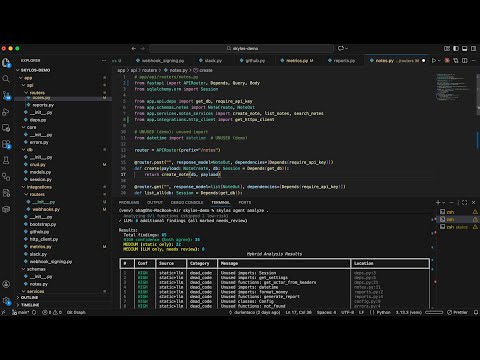
Backup (GitHub): https://github.com/duriantaco/skylos/discussions/82
Key Capabilities
Python Security Scanner (SAST)
- Taint Analysis: Traces untrusted input from API endpoints to databases to prevent SQL Injection and XSS.
- Secrets Detection: Hunts down hardcoded API keys (AWS, Stripe, OpenAI) and private credentials before commit.
- Vulnerability Checks: Flags dangerous patterns like
eval(), unsafepickle, and weak cryptography.
Dead Code Detection & Cleanup
- Find Unused Code: Identifies unreachable functions, orphan classes, and unused imports with confidence scoring.
- Smart Tracing: Distinguishes between truly dead code and dynamic frameworks (Flask/Django routes, Pytest fixtures).
- Safe Pruning: Uses LibCST to safely remove dead code without breaking syntax.
Agentic AI & Hybrid Analysis
- Context-Aware Audits: Combines static analysis speed with LLM reasoning to validate findings and filter noise.
- Automated Fixes:
skylos agent fixautonomously patches security flaws and removes dead code. - End-to-End Remediation:
skylos agent remediatescans, fixes, tests, and opens PRs — fully autonomous DevOps agent. - 100% Local Privacy: Supports Ollama and Local LLMs so your code never leaves your machine.
Codebase Optimization
- CST-safe removals: Uses LibCST to remove selected imports or functions (handles multiline imports, aliases, decorators, async etc..)
- Logic Awareness: Deep integration for Python frameworks (Django, Flask, FastAPI) and TypeScript (Tree-sitter) to identify active routes and dependencies.
- Granular Filtering: Skip lines tagged with
# pragma: no skylos,# pragma: no cover, or# noqa
Operational Governance & Runtime
- Coverage Integration: Auto-detects
.skylos-tracefiles to verify dead code with runtime data - Quality Gates: Enforces hard thresholds for complexity, nesting, and security risk via
pyproject.tomlto block non-compliant PRs - Interactive CLI: Manually verify and remove/comment-out findings through an
inquirer-based terminal interface - Security-Audit Mode: Leverages an independent reasoning loop to identify security vulnerabilities
Pytest Hygiene
- Unused Fixture Detection: Finds unused
@pytest.fixturedefinitions intest_*.pyandconftest.py - Cross-file Resolution: Tracks fixtures used across modules, not just within the same file
Multi-Language Support
| Language | Parser | Dead Code | Security | Quality |
|---|---|---|---|---|
| Python | AST | ✅ | ✅ | ✅ |
| TypeScript | Tree-sitter | ✅ | ✅ | ✅ |
No Node.js required — TypeScript parser is built-in via Tree-sitter.
TypeScript Rules
| Rule | ID | What It Catches |
|---|---|---|
| Security | ||
| eval() | SKY-D501 | eval() usage |
| innerHTML | SKY-D502 | Unsafe innerHTML assignment |
| document.write | SKY-D503 | XSS via document.write() |
| new Function() | SKY-D504 | Equivalent to eval() |
| setTimeout string | SKY-D505 | setTimeout/setInterval with string argument |
| child_process.exec | SKY-D506 | Command injection via child_process.exec() |
| outerHTML | SKY-D507 | Unsafe outerHTML assignment |
| Quality | ||
| Complexity | SKY-Q601 | Cyclomatic complexity exceeds threshold |
| Nesting depth | SKY-Q602 | Too many nested levels |
| Function length | SKY-Q603 | Function exceeds line limit |
| Too many params | SKY-Q604 | Function has too many parameters |
Installation
Basic Installation
## from pypi
pip install skylos

## or from source
git clone https://github.com/duriantaco/skylos.git
cd skylos

pip install .
Skylos vs. Vulture Benchmark
We benchmarked Skylos against Vulture (the standard for dead code detection) on a realistic FastAPI application containing dynamic patterns, framework wiring, and hidden dependencies.
The Results (Confidence Level 20 / Aggressive Mode):
| Feature | Skylos | Vulture | Impact |
|---|---|---|---|
| Recall | 100% | 82.8% | Skylos found all dead code; Vulture missed ~17%. |
| Precision | 76.3% | 55.8% | Vulture flagged 2x more false positives (noise). |
| True Positives | 29 | 24 | Skylos detected 5 more actual dead functions. |
| False Negatives | 0 | 5 | Skylos missed nothing. |
Key Takeaway: Skylos provides significantly higher coverage (Recall) with far less noise (Precision) than traditional tools.
See the full methodology and breakdown in BENCHMARK.md.
How it works
Skylos builds a reference graph of your entire codebase - who defines what, who calls what, across all files.
Parse all files -> Build definition map -> Track references -> Find orphans (zero refs = dead)
High Precision & Confidence Scoring
Static analysis often struggles with Python's dynamic nature (e.g., getattr, pytest.fixture). Skylos minimizes false positives through:
- Confidence Scoring: Grades findings (High/Medium/Low) so you only see what matters.
- Hybrid Verification: Uses LLM reasoning to double-check static findings before reporting.
- Runtime Tracing: Optional
--tracemode validates "dead" code against actual runtime execution.
| Confidence | Meaning | Action |
|---|---|---|
| 100 | Definitely unused | Safe to delete |
| 60 | Probably unused (default threshold) | Review first |
| 40 | Maybe unused (framework helpers) | Likely false positive |
| 20 | Possibly unused (decorated/routes) | Almost certainly used |
| 0 | Show everything | Debug mode |
skylos . -c 60  # Default: high-confidence findings only
skylos . -c 30  # Include framework helpers
skylos . -c 0  # Everything
Framework Detection
When Skylos sees Flask, Django, or FastAPI imports, it adjusts scoring automatically:
| Pattern | Handling |
|---|---|
@app.route, @router.get | Entry point → marked as used |
@pytest.fixture | Treated as a pytest entrypoint, but can be reported as unused if never referenced |
@celery.task | Entry point → marked as used |
getattr(mod, "func") | Tracks dynamic reference |
getattr(mod, f"handle_{x}") | Tracks pattern handle_* |
Test File Exclusion
Tests call code in weird ways that look like dead code. By default, Skylos excludes:
| Detected By | Examples |
|---|---|
| Path | /tests/, /test/, *_test.py |
| Imports | pytest, unittest, mock |
| Decorators | @pytest.fixture, @patch |
# These are auto-excluded (confidence set to 0)
/project/tests/test_user.py
/project/test/helper.py

# These are analyzed normally
/project/user.py
/project/test_data.py  # Doesn't end with _test.py
Want test files included? Use --include-folder tests.
Philosophy
When ambiguous, we'd rather miss dead code than flag live code as dead.
Framework endpoints are called externally (HTTP, signals). Name resolution handles aliases. When things get unclear, we err on the side of caution.
Unused Pytest Fixtures
Skylos can detect pytest fixtures that are defined but never used.
skylos . --pytest-fixtures
This includes fixtures inside conftest.py, since conftest.py is the standard place to store shared test fixtures.
Agent Analysis
Skylos uses a hybrid architecture that combines static analysis with LLM reasoning:
Why Hybrid?
| Approach | Recall | Precision | Logic Bugs |
|---|---|---|---|
| Static only | Low | High | ❌ |
| LLM only | High | Medium | ✅ |
| Hybrid | Highest | High | ✅ |
Research shows LLMs find vulnerabilities that static analysis misses, while static analysis validates LLM suggestions. However, LLM is extremely prone to false positives in dead code because it doesn't actually do real symbol resolution.
Note: Take dead code output from LLM solely with caution
Agent Commands
| Command | Description |
|---|---|
skylos agent analyze PATH | Hybrid analysis with full project context |
skylos agent security-audit PATH | Security audit with interactive file selection |
skylos agent fix PATH | Generate fix for specific issue |
skylos agent review | Analyze only git-changed files |
skylos agent remediate PATH | End-to-end: scan, fix, test, and create PR |
Provider Configuration
Skylos supports cloud and local LLM providers:
# Cloud - OpenAI (auto-detected from model name)
skylos agent analyze . --model gpt-4.1

# Cloud - Anthropic (auto-detected from model name)
skylos agent analyze . --model claude-sonnet-4-20250514

# Local - Ollama
skylos agent analyze . \
  --provider openai \
  --base-url http://localhost:11434/v1 \
  --model qwen2.5-coder:7b
Note: You can use the --model flag to specify the model that you want. We support Gemini, Groq, Anthropic, ChatGPT and Mistral.
Keys and configuration
Skylos can use API keys from (1) skylos key, or (2) environment variables.
Recommended (interactive)
skylos key
# opens a menu:
# - list keys
# - add key (openai / anthropic / google / groq / mistral / ...)
# - remove key
Environment Variables
Set defaults to avoid repeating flags:
# API Keys
export OPENAI_API_KEY="sk-..."
export ANTHROPIC_API_KEY="sk-ant-..."

# Default to local Ollama
export SKYLOS_LLM_PROVIDER=openai
export SKYLOS_LLM_BASE_URL=http://localhost:11434/v1
What LLM Analysis Detects
| Category | Examples |
|---|---|
| Hallucinations | Calls to functions that don't exist |
| Logic bugs | Off-by-one, incorrect conditions, missing edge cases |
| Business logic | Auth bypasses, broken access control |
| Context issues | Problems requiring understanding of intent |
Local LLM Setup (Ollama)
# Install Ollama
curl -fsSL https://ollama.com/install.sh | sh

# Pull a code model
ollama pull qwen2.5-coder:7b

# Use with Skylos
skylos agent analyze ./src \
  --provider openai \
  --base-url http://localhost:11434/v1 \
  --model qwen2.5-coder:7b
Remediation Agent
The remediation agent automates the full fix lifecycle. It scans your project, prioritizes findings, generates fixes via the LLM, validates each fix by running your test suite, and optionally opens a PR.
# Preview what would be fixed (safe, no changes)
skylos agent remediate . --dry-run

# Fix up to 5 critical/high issues, validate with tests
skylos agent remediate . --max-fixes 5 --severity high

# Full auto: fix, test, create PR
skylos agent remediate . --auto-pr --model gpt-4.1

# Use a custom test command
skylos agent remediate . --test-cmd "pytest test/ -x"
Safety guardrails:
- Dry run by default — use
--dry-runto preview without touching files - Fixes that break tests are automatically reverted
- Low-confidence fixes are skipped
- After applying a fix, Skylos re-scans to confirm the finding is actually gone
--auto-pralways works on a new branch, never touches main--max-fixesprevents runaway changes (default 10)
Recommended Models
| Model | Provider | Use Case |
|---|---|---|
gpt-4.1 | OpenAI | Best accuracy |
claude-sonnet-4-20250514 | Anthropic | Best reasoning |
qwen2.5-coder:7b | Ollama | Fast local analysis |
codellama:13b | Ollama | Better local accuracy |
CI/CD
Run Skylos in your CI pipeline with quality gates, GitHub annotations, and PR review comments.
Quick Start
skylos cicd init
git add .github/workflows/skylos.yml && git push
That's it. Skylos will now run on every PR and push to main.
Commands
skylos cicd init
Generates a ready-to-use GitHub Actions workflow.
skylos cicd init
skylos cicd init --triggers pull_request schedule
skylos cicd init --analysis security quality
skylos cicd init --python-version 3.11
skylos cicd init --llm --model gpt-4.1
skylos cicd init --no-baseline
skylos cicd init -o .github/workflows/security.yml
skylos cicd gate
Checks findings against your quality gate. Exits 0 (pass) or 1 (fail). Uses the same check_gate() as skylos . --gate.
skylos . --danger --quality --secrets --json > results.json 2>/dev/null
skylos cicd gate --input results.json
skylos cicd gate --input results.json --strict
skylos cicd gate --input results.json --summary
You can also use the main CLI directly:
skylos . --gate --summary
Configure thresholds in pyproject.toml:
[tool.skylos.gate]
fail_on_critical = true
max_critical = 0
max_high = 5
max_security = 10
max_quality = 10
skylos cicd annotate
Emits GitHub Actions annotations (::error, ::warning, ::notice). Uses the same _emit_github_annotations() as skylos . --github, with sorting and a 50-annotation cap.
skylos cicd annotate --input results.json
skylos cicd annotate --input results.json --severity high
skylos cicd annotate --input results.json --max 30

skylos . --github
skylos cicd review
Posts inline PR review comments and a summary via gh CLI. Only comments on lines changed in the PR.
skylos cicd review --input results.json
skylos cicd review --input results.json --pr 20
skylos cicd review --input results.json --summary-only
skylos cicd review --input results.json --max-comments 10
skylos cicd review --input results.json --diff-base origin/develop
In GitHub Actions, PR number and repo are auto-detected. Requires GH_TOKEN.
How It Fits Together
The gate and annotation logic lives in the core Skylos modules (gatekeeper.py and cli.py). The cicd commands are convenience wrappers that read from a JSON file and call the same functions:
skylos cicd command | Calls |
|---|---|
gate | gatekeeper.run_gate_interaction(summary=True) |
annotate | cli._emit_github_annotations(max_annotations=50) |
review | New — cicd/review.py (PR comments via gh api) |
init | New — cicd/workflow.py (YAML generation) |
Tips
- Run analysis once, consume many times — use
--json > results.json 2>/dev/nullthen pass--input results.jsonto each subcommand. - Baseline — run
skylos baseline .to snapshot existing findings, then--baselinein CI to only flag new issues. - Local testing — all commands work locally.
gateandannotateprint to stdout.reviewrequiresghCLI.
MCP Server
Skylos exposes its analysis capabilities as an MCP (Model Context Protocol) server, allowing AI assistants like Claude Desktop to scan your codebase directly.
Setup
pip install skylos
Add to your Claude Desktop config (~/.config/claude/claude_desktop_config.json on Linux, ~/Library/Application Support/Claude/claude_desktop_config.json on macOS):
{
  "mcpServers": {
    "skylos": {
      "command": "python",
      "args": ["-m", "skylos_mcp.server"]
    }
  }
}
Available Tools
| Tool | Description |
|---|---|
analyze | Dead code detection (unused functions, imports, classes, variables) |
security_scan | Security vulnerability scan (--danger equivalent) |
quality_check | Code quality and complexity analysis (--quality equivalent) |
secrets_scan | Hardcoded secrets detection (--secrets equivalent) |
remediate | End-to-end: scan, generate LLM fixes, validate with tests |
Available Resources
| Resource | URI | Description |
|---|---|---|
| Latest result | skylos://results/latest | Most recent analysis run |
| Result by ID | skylos://results/{run_id} | Specific analysis run |
| List results | skylos://results | All stored analysis runs |
Usage in Claude Desktop
Once configured, you can ask Claude:
- "Scan my project for security issues" → calls
security_scan - "Check code quality in src/" → calls
quality_check - "Find hardcoded secrets" → calls
secrets_scan - "Fix security issues in my project" → calls
remediate
Baseline Tracking
Baseline tracking lets you snapshot existing findings so CI only flags new issues introduced by a PR.
# Create baseline from current state
skylos baseline .

# Run analysis, only show findings NOT in the baseline
skylos . --danger --secrets --quality --baseline

# In CI: compare against baseline
skylos . --danger --baseline --gate
The baseline is stored in .skylos/baseline.json. Commit this file to your repo so CI can use it.
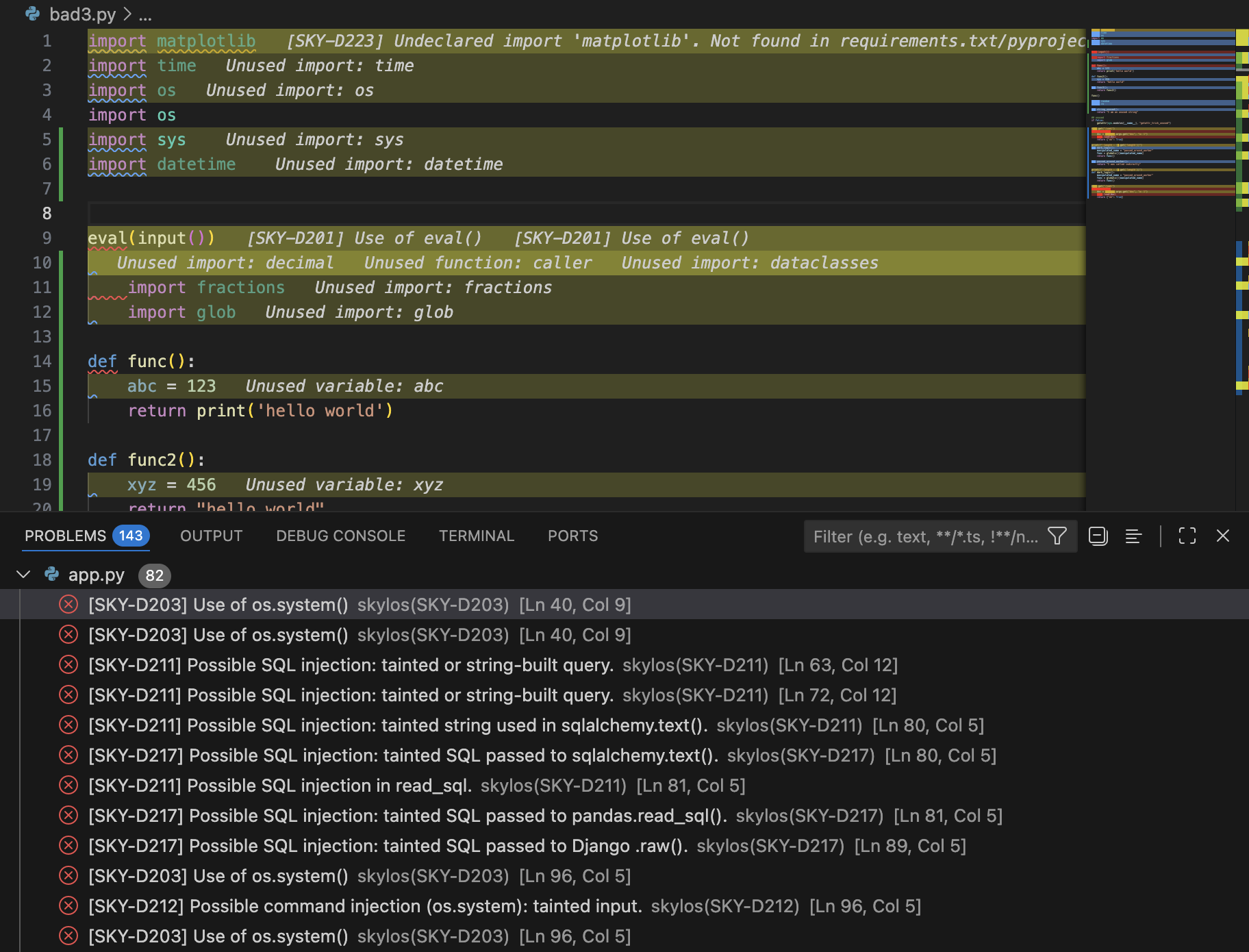
VS Code Extension
Real-time AI-powered code analysis directly in your editor.
Installation
- Search "Skylos" in VS Code marketplace or run:
ext install oha.skylos-vscode-extension
- Make sure the CLI is installed:
pip install skylos
- (Optional) Add your API key for AI features in VS Code Settings →
skylos.openaiApiKeyorskylos.anthropicApiKey
How It Works
| Layer | Trigger | What It Does |
|---|---|---|
| Static Analysis | On save | Runs Skylos CLI for dead code, secrets, dangerous patterns |
| AI Watcher | On idle (2s) | Sends changed functions to GPT-4/Claude for bug detection |
Features
- Real-time Analysis: Detects bugs as you type — no save required
- CodeLens Buttons: "Fix with AI" and "Dismiss" appear inline on error lines
- Streaming Fixes: See fix progress in real-time
- Smart Caching: Only re-analyzes functions that actually changed
- Multi-Provider: Choose between OpenAI and Anthropic
New Features
- MCP Server Support: Connect Skylos directly to Claude Desktop or any MCP client to chat with your codebase.
- CI/CD Agents: Autonomous bots that scan, fix, test, and open PRs automatically in your pipeline.
- Hybrid Verification: Eliminates false positives by verifying static findings with LLM reasoning.
Extension Settings
| Setting | Default | Description |
|---|---|---|
skylos.aiProvider | "openai" | "openai" or "anthropic" |
skylos.openaiApiKey | "" | Your OpenAI API key |
skylos.anthropicApiKey | "" | Your Anthropic API key |
skylos.idleMs | 2000 | Wait time before AI analysis (ms) |
skylos.runOnSave | true | Run Skylos CLI on save |
skylos.enableSecrets | true | Scan for hardcoded secrets |
skylos.enableDanger | true | Flag dangerous patterns |
Usage
| Action | Result |
|---|---|
| Save a Python file | Skylos CLI scans the workspace |
| Type and pause | AI analyzes changed functions |
| Click "Fix with AI" | Generates fix with diff preview |
Cmd+Shift+P -> "Skylos: Scan Workspace" | Full project scan |
Privacy
- Static analysis runs 100% locally
- AI features send only changed function code to your configured provider
- We DO NOT collect any telemetry or data
Install from VS Code Marketplace
Gating
Block bad code before it merges. Configure thresholds, run locally, then automate in CI.
Initialize Configuration
skylos init
Creates [tool.skylos] in your pyproject.toml:
[tool.skylos]
# Quality thresholds
complexity = 10
nesting = 3
max_args = 5
max_lines = 50
ignore = []
model = "gpt-4.1"

# Language overrides (optional)
[tool.skylos.languages.typescript]
complexity = 15
nesting = 4

# Gate policy
[tool.skylos.gate]
fail_on_critical = true
max_security = 0      # Zero tolerance
max_quality = 10      # Allow up to 10 warnings
strict = false
Free Tier
Run scans locally with exit codes:
skylos . --danger --gate
- Exit code
0= passed - Exit code
1= failed
Use in any CI system:
name: Skylos Quality Gate

on:
  pull_request:
    branches: [main, master]

jobs:
  skylos:
    runs-on: ubuntu-latest
    steps:
      - uses: actions/checkout@v4
      - uses: actions/setup-python@v5
        with:
          python-version: '3.11'
      - run: pip install skylos
      - run: skylos . --danger --gate
Limitation: Anyone with repo access can delete or modify this workflow.
Pro Tier
Server-controlled GitHub checks that cannot be bypassed by developers.
Quick Setup
pip install skylos
skylos sync setup
How It Works
- Developer opens PR → GitHub App creates required check ("Queued")
- Scan runs → Results upload to Skylos server
- Server updates check → Pass ✅ or Fail ❌
- Developer cannot merge until check passes
Free vs Pro
| Feature | Free | Pro |
|---|---|---|
| Local scans | ✅ | ✅ |
--gate exit codes | ✅ | ✅ |
| GitHub Actions | ✅ (DIY) | ✅ (auto) |
| Developer can bypass? | Yes | No |
| Server-controlled check | ❌ | ✅ |
| Slack/Discord alerts | ❌ | ✅ |
GitHub App Setup
- Dashboard -> Settings -> Install GitHub App
- Select your repository
- In GitHub repo settings:
- Settings -> Branches -> Add rule ->
main - Require status checks
- Select "Skylos Quality Gate"
- Settings -> Branches -> Add rule ->
Add Token to GitHub
Repo Settings → Secrets → Actions → New secret
- Name:
SKYLOS_TOKEN - Value: (from Dashboard → Settings)
Integration and Ecosystem
Skylos is designed to live everywhere your code does—from your IDE to your deployment pipeline.
1. Integration Environments
| Environment | Tool | Use Case |
|---|---|---|
| VS Code | Skylos Extension | Real-time guarding. Highlights code rot and risks on-save. |
| Web UI | skylos run | Launch a local dashboard at localhost:5090 for visual auditing. |
| CI/CD | GitHub Actions / Pre-commit | Automated gates that audit every PR before it merges. |
| Quality Gate | skylos --gate | Block deployment if security or complexity thresholds are exceeded. |
2. Output Formats
Control how you consume the watchdog's findings.
| Flag | Format | Primary Use |
|---|---|---|
--table | Rich Table | Default human-readable CLI summary. |
--tree | Logic Tree | Visualizes code hierarchy and structural dependencies. |
--json | Machine Raw | Piping results to jq, custom scripts, or log aggregators. |
--sarif | SARIF | GitHub Code Scanning, IDE integration |
-o, --output | File Export | Save the audit report directly to a file instead of stdout. |
Auditing and Precision
By default, Skylos finds dead code. Enable additional scans with flags.
Security (--danger)
Tracks tainted data from user input to dangerous sinks.
skylos . --danger
| Rule | ID | What It Catches |
|---|---|---|
| Injection | ||
| SQL injection | SKY-D211 | cur.execute(f"SELECT * FROM users WHERE name='{name}'") |
| SQL raw query | SKY-D217 | sqlalchemy.text(), pandas.read_sql(), Django .raw() with tainted input |
| Command injection | SKY-D212 | os.system(), subprocess(shell=True) with tainted input |
| SSRF | SKY-D216 | requests.get(request.args["url"]) |
| Path traversal | SKY-D215 | open(request.args.get("p")) |
| XSS (mark_safe) | SKY-D226 | Untrusted content passed to mark_safe() / Markup() |
| XSS (template) | SKY-D227 | Inline template with autoescape disabled |
| XSS (HTML build) | SKY-D228 | HTML built from unescaped user input |
| Open redirect | SKY-D230 | User-controlled URL passed to redirect() |
| Dangerous Calls | ||
| eval() | SKY-D201 | Dynamic code execution via eval() |
| exec() | SKY-D202 | Dynamic code execution via exec() |
| os.system() | SKY-D203 | OS command execution |
| pickle.load | SKY-D204 | Unsafe deserialization |
| yaml.load | SKY-D206 | yaml.load() without SafeLoader |
| Weak hash (MD5) | SKY-D207 | hashlib.md5() |
| Weak hash (SHA1) | SKY-D208 | hashlib.sha1() |
| shell=True | SKY-D209 | subprocess with shell=True |
| TLS disabled | SKY-D210 | requests with verify=False |
| Unsafe deserialization | SKY-D233 | marshal.loads, shelve.open, jsonpickle.decode, dill |
| Web Security | ||
| CORS misconfiguration | SKY-D231 | Wildcard origins, credential leaks, overly permissive headers |
| JWT vulnerabilities | SKY-D232 | algorithms=['none'], missing verification, weak secrets |
| Mass assignment | SKY-D234 | Django Meta.fields = '__all__' exposes all model fields |
| Supply Chain | ||
| Hallucinated dependency | SKY-D222 | Imported package doesn't exist on PyPI (CRITICAL) |
| Undeclared dependency | SKY-D223 | Import not declared in requirements.txt / pyproject.toml |
| MCP Security | ||
| Tool description poisoning | SKY-D240 | Prompt injection in MCP tool metadata |
| Unauthenticated transport | SKY-D241 | SSE/HTTP MCP server without auth middleware |
| Permissive resource URI | SKY-D242 | Path traversal via MCP resource URI template |
| Network-exposed MCP | SKY-D243 | MCP server bound to 0.0.0.0 without auth |
| Hardcoded secrets in MCP | SKY-D244 | Secrets in MCP tool parameter defaults |
Full list in DANGEROUS_CODE.md.
Secrets (--secrets)
Detects hardcoded credentials.
skylos . --secrets
Providers: GitHub, GitLab, AWS, Stripe, Slack, Google, SendGrid, Twilio, private keys.
Quality (--quality)
Flags functions that are hard to maintain.
skylos . --quality
| Rule | ID | What It Catches |
|---|---|---|
| Complexity | ||
| Cyclomatic complexity | SKY-Q301 | Too many branches/loops (default: >10) |
| Deep nesting | SKY-Q302 | Too many nested levels (default: >3) |
| Async Blocking | SKY-Q401 | Detects blocking calls inside async functions that kill server throughput |
| God class | SKY-Q501 | Class has too many methods/attributes |
| Structure | ||
| Too many arguments | SKY-C303 | Functions with >5 args |
| Function too long | SKY-C304 | Functions >50 lines |
| Logic | ||
| Mutable default | SKY-L001 | def foo(x=[]) - causes state leaks |
| Bare except | SKY-L002 | except: swallows SystemExit |
| Dangerous comparison | SKY-L003 | x == None instead of x is None |
| Anti-pattern try block | SKY-L004 | Nested try, or try wrapping too much logic |
| Unused exception var | SKY-L005 | except Error as e: where e is never referenced |
| Inconsistent return | SKY-L006 | Function returns both values and None |
| Performance | ||
| Memory load | SKY-P401 | .read() / .readlines() loads entire file |
| Pandas no chunk | SKY-P402 | read_csv() without chunksize |
| Nested loop | SKY-P403 | O(N²) complexity |
| Unreachable | ||
| Unreachable Code | SKY-UC001 | if False: or else after always-true |
| Empty | ||
| Empty File | SKY-E002 | Empty File |
To ignore a specific rule:
# pyproject.toml
[tool.skylos]
ignore = ["SKY-P403"]  # Allow nested loops
Tune thresholds and disable rules in pyproject.toml:
[tool.skylos]
# Adjust thresholds
complexity = 15        # Default: 10
nesting = 4            # Default: 3
max_args = 7           # Default: 5
max_lines = 80
Legacy AI Flags (These will be deprecated in the next updated)
These flags work on the main skylos command for quick operations:
# LLM-powered audit (single file)
skylos . --audit

# Auto-fix with LLM
skylos . --fix

# Specify model
skylos . --audit --model claude-haiku-4-5-20251001
Note: For full project context and better results, use
skylos agent analyzeinstead.
Combine Everything
skylos . --danger --secrets --quality  # All static scans
skylos agent analyze . --fix           # Full AI-assisted cleanup
Smart Tracing
Static analysis can't see everything. Python's dynamic nature means patterns like getattr(), plugin registries, and string-based dispatch look like dead code—but they're not.
Smart tracing solves this. By running your tests with sys.settrace(), Skylos records every function that actually gets called.
Quick Start
# Run tests with call tracing, then analyze
skylos . --trace

# Trace data is saved to .skylos_trace
skylos .
How It Works
| Analysis Type | Accuracy | What It Catches |
|---|---|---|
| Static only | 70-85% | Direct calls, imports, decorators |
| + Framework rules | 85-95% | Django/Flask routes, pytest fixtures |
+ --trace | 95-99% | Dynamic dispatch, plugins, registries |
Example
# Static analysis will think this is dead because there's no direct call visible
def handle_login():
    return "Login handler"

# But it is actually called dynamically at runtime
action = request.args.get("action")
func = getattr(module, f"handle_{action}")
func()  # here
| Without Tracing | With --trace |
|---|---|
handle_login flagged as dead | handle_login marked as used |
When To Use
| Situation | Command |
|---|---|
| Have pytest/unittest tests | skylos . --trace |
| No tests | skylos . (static only) |
| CI with cached trace | skylos . (reuses .skylos_trace) |
What Tracing Catches
These patterns are invisible to static analysis but caught with --trace:
# 1. Dynamic dispatch
func = getattr(module, f"handle_{action}")
func()

# 2. Plugin or registry patterns
PLUGINS = []
def register(f):
  PLUGINS.append(f)
return f

@register
def my_plugin(): ...

# 3. Visitor patterns
class MyVisitor(ast.NodeVisitor):
    def visit_FunctionDef(self, node): ...  # Called via getattr

# 4. String-based access
globals()["my_" + "func"]()
locals()[func_name]()
Important Notes
- Tracing only adds information. Low test coverage won't create false positives. It just means some dynamic patterns may still be flagged.
- Commit
.skylos_traceto reuse trace data in CI without re-running tests. - Tests don't need to pass. Tracing records what executes, regardless of pass/fail status.
Filtering
Control what Skylos analyzes and what it ignores.
Inline Suppression
Silence specific findings with comments:
# Ignore dead code detection on this line
def internal_hook():  # pragma: no skylos
    pass

# this also works
def another():  # pragma: no cover
    pass

def yet_another():  # noqa
    pass
Folder Exclusion
By default, Skylos excludes: __pycache__, .git, .pytest_cache, .mypy_cache, .tox, htmlcov, .coverage, build, dist, *.egg-info, venv, .venv
# See what's excluded by default
skylos --list-default-excludes

# Add more exclusions
skylos . --exclude-folder vendor --exclude-folder generated

# Force include an excluded folder
skylos . --include-folder venv

# Scan everything (no exclusions)
skylos . --no-default-excludes
Rule Suppression
Disable rules globally in pyproject.toml:
[tool.skylos]
ignore = [
    "SKY-P403",   # Allow nested loops
    "SKY-L003",   # Allow == None
    "SKY-S101",   # Allow hardcoded secrets (not recommended)
]
Summary
| Want to... | Do this |
|---|---|
| Skip one line | # pragma: no skylos |
| Skip one secret | # skylos: ignore[SKY-S101] |
| Skip a folder | --exclude-folder NAME |
| Skip a rule globally | ignore = ["SKY-XXX"] in pyproject.toml |
| Include excluded folder | --include-folder NAME |
| Scan everything | --no-default-excludes |
Whitelist Configuration
Suppress false positives permanently without inline comments cluttering your code.
CLI Commands
# Add a pattern
skylos whitelist 'handle_*'

# Add with reason
skylos whitelist dark_logic --reason "Called via globals() in dispatcher"

# View current whitelist
skylos whitelist --show
Inline Ignores
# Single line
def dynamic_handler():  # skylos: ignore
    pass

# Also works
def another():  # noqa: skylos
    pass

# Block ignore
# skylos: ignore-start
def block_one():
    pass
def block_two():
    pass
# skylos: ignore-end
Config File (pyproject.toml)
[tool.skylos.whitelist]
# Glob patterns
names = [
    "handle_*",
    "visit_*",
    "*Plugin",
]

# With reasons (shows in --show output)
[tool.skylos.whitelist.documented]
"dark_logic" = "Called via globals() string manipulation"
"BasePlugin" = "Discovered via __subclasses__()"

# Temporary (warns when expired)
[tool.skylos.whitelist.temporary]
"legacy_handler" = { reason = "Migration - JIRA-123", expires = "2026-03-01" }

# Per-path overrides
[tool.skylos.overrides."src/plugins/*"]
whitelist = ["*Plugin", "*Handler"]
Summary
| Want to... | Do this |
|---|---|
| Whitelist one function | skylos whitelist func_name |
| Whitelist a pattern | skylos whitelist 'handle_*' |
| Document why | skylos whitelist x --reason "why" |
| Temporary whitelist | Add to [tool.skylos.whitelist.temporary] with expires |
| Per-folder rules | Add [tool.skylos.overrides."path/*"] |
| View whitelist | skylos whitelist --show |
| Inline ignore | # skylos: ignore or # noqa: skylos |
| Block ignore | # skylos: ignore-start ... # skylos: ignore-end |
CLI Options
Main Command Flags
Usage: skylos [OPTIONS] PATH

Arguments:
  PATH  Path to the Python project to analyze

Options:
  -h, --help                   Show this help message and exit
  --json                       Output raw JSON instead of formatted text
  --tree                       Output results in tree format
  --table                      Output results in table format via the CLI
  --sarif                      Output SARIF format for GitHub/IDE integration
  -c, --confidence LEVEL       Confidence threshold 0-100 (default: 60)
  --comment-out                Comment out code instead of deleting
  -o, --output FILE            Write output to file instead of stdout
  -v, --verbose                Enable verbose output
  --version                    Checks version
  -i, --interactive            Interactively select items to remove
  --dry-run                    Show what would be removed without modifying files
  --exclude-folder FOLDER      Exclude a folder from analysis (can be used multiple times)
  --include-folder FOLDER      Force include a folder that would otherwise be excluded
  --no-default-excludes        Don't exclude default folders (__pycache__, .git, venv, etc.)
  --list-default-excludes      List the default excluded folders
  --secrets                    Scan for api keys/secrets
  --danger                     Scan for dangerous code
  --quality                    Code complexity and maintainability
  --trace                      Run tests with coverage first
  --audit                      LLM-powered logic review (legacy-will be deprecated)
  --fix                        LLM auto-repair (legacy-will be deprecated)
  --model MODEL                LLM model (default: gpt-4.1)
  --gate                       Fail on threshold breach (for CI)
  --force                      Bypass quality gate (emergency override)
Agent Command Flags
Usage: skylos agent <command> [OPTIONS] PATH

Commands:
  analyze             Hybrid static + LLM analysis with project context
  security-audit      Deep LLM security audit
  fix                 Generate fix for specific issue
  review              Analyze only git-changed files

Options (all agent commands):
  --model MODEL                LLM model to use (default: gpt-4.1)
  --provider PROVIDER          Force provider: openai or anthropic
  --base-url URL               Custom endpoint for local LLMs
  --format FORMAT              Output: table, tree, json, sarif
  -o, --output FILE            Write output to file

Agent analyze options:
  --min-confidence LEVEL       Filter: high, medium, low
  --fix                        Generate fix proposals
  --apply                      Apply fixes to files
  --yes                        Auto-approve prompts

Agent fix options:
  --line, -l LINE              Line number of issue (required)
  --message, -m MSG            Description of issue (required)

Agent remediate options:
  --dry-run                    Show plan without applying fixes (safe preview)
  --max-fixes N                Max findings to fix per run (default: 10)
  --auto-pr                    Create branch, commit, push, and open PR
  --branch-prefix PREFIX       Git branch prefix (default: skylos/fix)
  --test-cmd CMD               Custom test command (default: auto-detect)
  --severity LEVEL             Min severity filter: critical, high, medium, low
Commands
Commands:
  skylos PATH                  Analyze a project (static analysis)
  skylos agent analyze PATH    Hybrid static + LLM analysis
  skylos agent security-audit PATH  Deep LLM audit with file selection
  skylos agent fix PATH        Fix specific issue
  skylos agent review          Review git-changed files only
  skylos agent remediate PATH  End-to-end scan, fix, test, and PR
  skylos baseline PATH         Snapshot current findings for CI baselining
  skylos cicd init             Generate GitHub Actions workflow
  skylos cicd gate             Check findings against quality gate
  skylos cicd annotate         Emit GitHub Actions annotations
  skylos cicd review           Post inline PR review comments
  skylos init                  Initialize pyproject.toml config
  skylos key                   Manage API keys (add/remove/list)
  skylos whitelist PATTERN     Add pattern to whitelist
  skylos whitelist --show      Display current whitelist
  skylos run                   Start web UI at localhost:5090

Whitelist Options:
  skylos whitelist PATTERN           Add glob pattern (e.g., 'handle_*')
  skylos whitelist NAME --reason X   Add with documentation
  skylos whitelist --show            Display all whitelist entries
CLI Output
Skylos displays confidence for each finding:
────────────────── Unused Functions ──────────────────
#   Name              Location        Conf
1   handle_secret     app.py:16       70%
2   totally_dead      app.py:50       90%
Higher confidence = more certain it's dead code.
Interactive Mode
The interactive mode lets you select specific functions and imports to remove:
- Select items: Use arrow keys and
spacebarto select/unselect - Confirm changes: Review selected items before applying
- Auto-cleanup: Files are automatically updated
FAQ
Q: Why doesn't Skylos find 100% of dead code? A: Python's dynamic features (getattr, globals, etc.) can't be perfectly analyzed statically. No tool can achieve 100% accuracy. If they say they can, they're lying.
Q: Are these benchmarks realistic? A: They test common scenarios but can't cover every edge case. Use them as a guide, not gospel.
Q: Why doesn't Skylos detect my unused Flask routes?
A: Web framework routes are given low confidence (20) because they might be called by external HTTP requests. Use --confidence 20 to see them. We acknowledge there are current limitations to this approach so use it sparingly.
Q: What confidence level should I use? A: Start with 60 (default) for safe cleanup. Use 30 for framework applications. Use 20 for more comprehensive auditing.
Q: What does --trace do?
A: It runs pytest (or unittest) with coverage tracking before analysis. Functions that actually executed are marked as used with 100% confidence, eliminating false positives from dynamic dispatch patterns.
Q: Do I need 100% test coverage for --trace to be useful?
A: No. However, we STRONGLY encourage you to have tests. Any coverage helps. If you have 30% test coverage, that's 30% of your code verified. The other 70% still uses static analysis. Coverage only removes false positives, it never adds them.
Q: Why are fixtures in conftest.py showing up as unused?
A: conftest.py is the standard place for shared fixtures. If a fixture is defined there but never referenced by any test, Skylos will report it as unused. This is normal and safe to review.
Q: My tests are failing. Can I still use --trace?
A: Yes. Coverage tracks execution, not pass/fail. Even failing tests provide coverage data.
Q: What's the difference between skylos . --audit and skylos agent audit?
A: skylos agent audit uses the new hybrid architecture with full project context (defs_map), enabling detection of hallucinations and cross-file issues. The --audit flag is legacy and lacks project context.
Q: Can I use local LLMs instead of OpenAI/Anthropic?
A: Yes! Use --base-url to point to Ollama, LM Studio, or any OpenAI-compatible endpoint. No API key needed for localhost.
Limitations and Troubleshooting
Limitations
- Dynamic code:
getattr(),globals(), runtime imports are hard to detect - Frameworks: Django models, Flask, FastAPI routes may appear unused but aren't
- Test data: Limited scenarios, your mileage may vary
- False positives: Always manually review before deleting code
- Secrets PoC: May emit both a provider hit and a generic high-entropy hit for the same token. Supported file types:
.py,.pyi,.pyw,.env,.yaml,.yml,.json,.toml,.ini,.cfg,.conf,.ts,.tsx,.js,.jsx,.go - Quality limitations: The current
--qualityflag does not allow you to configure the cyclomatic complexity. - Coverage requires execution: The
--traceflag only helps if you have tests or can run your application. Pure static analysis is still available without it. - LLM limitations: AI analysis requires API access (cloud) or local setup (Ollama). Results depend on model quality.
Troubleshooting
-
Permission Errors
Error: Permission denied when removing functionCheck file permissions before running in interactive mode.
-
Missing Dependencies
Interactive mode requires 'inquirer' packageInstall with:
pip install skylos[interactive] -
No API Key Found
# For cloud providers export OPENAI_API_KEY="sk-..." export ANTHROPIC_API_KEY="sk-ant-..." # For local LLMs (no key needed) skylos agent analyze . --base-url http://localhost:11434/v1 --model codellama -
Local LLM Connection Refused
# Verify Ollama is running
curl http://localhost:11434/v1/models

# Check LM Studio
curl http://localhost:1234/v1/models
Contributing
We welcome contributions! Please read our Contributing Guidelines before submitting pull requests.
Quick Contribution Guide
- Fork the repository
- Create a feature branch (
git checkout -b feature/amazing-feature) - Commit your changes (
git commit -m 'Add amazing feature') - Push to the branch (
git push origin feature/amazing-feature) - Open a Pull Request
Roadmap
- Expand our test cases
- Configuration file support
- Git hooks integration
- CI/CD integration examples
- Deployment Gatekeeper
- Further optimization
- Add new rules
- Expanding on the
dangerous.pylist - Porting to uv
- Small integration with typescript
- Expand and improve on capabilities of Skylos in various other languages
- Expand the providers for LLMs (OpenAI, Anthropic, Ollama, LM Studio, vLLM)
- Expand the LLM portion for detecting dead/dangerous code (hybrid architecture)
- Coverage integration for runtime verification
- Implicit reference detection (f-string patterns, framework decorators)
More stuff coming soon!
License
This project is licensed under the Apache 2.0 License - see the LICENSE file for details.
Contact
- Author: oha
- Email: aaronoh2015@gmail.com
- GitHub: @duriantaco
- Discord: https://discord.gg/Ftn9t9tErf