StackMemory


Lossless, project-scoped memory for AI coding tools. Website | MCP Tools | Getting Started
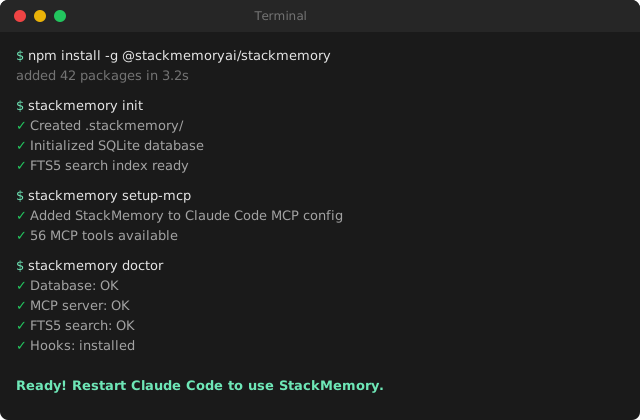
StackMemory is a production-ready memory runtime for AI coding tools that preserves full project context across sessions:
- Zero-config setup —
stackmemory initjust works - 32 MCP tools for Claude Code integration (context, tasks, Linear, traces, discovery, cord, team)
- FTS5 full-text search with BM25 scoring and hybrid retrieval
- Full Linear integration with bidirectional sync and OAuth/API key support
- Context persistence that survives
/clearoperations - Hierarchical frame organization (nested call stack model)
- Multi-wrapper support —
claude-sm,codex-sm,opencode-smwith auto context loading - Skills system with
/specand/linear-runfor Claude Code - Automatic hooks for task tracking, Linear sync, and spec progress
- Memory monitor daemon with automatic capture/clear on RAM pressure
- Auto-save service for periodic context persistence
- Comprehensive test coverage across all core modules
Instead of a linear chat log, StackMemory organizes memory as a call stack of scoped work (frames), with intelligent LLM-driven retrieval and team collaboration features.
Memory is storage. Context is a compiled view.
Who is this for?
| You are... | StackMemory helps you... |
|---|---|
| Solo dev using Claude Code | Keep decisions, constraints, and progress across sessions — no more re-explaining context after /clear |
| Team using AI coding tools | Share project context across agents and teammates with a single source of truth |
| AI-first startup | Ship faster with persistent memory, automatic Linear sync, and recursive task orchestration |
| Open-source maintainer | Onboard contributors and AI agents with durable project knowledge |
If you use an LLM coding assistant and lose context between sessions, StackMemory fixes that.
Why StackMemory exists
Tools forget decisions and constraints between sessions. StackMemory makes context durable and actionable.
- Records: events, tool calls, decisions, and anchors
- Retrieves: high-signal context tailored to the current task
- Organizes: nested frames with importance scoring and shared stacks
Features
- MCP tools for Claude Code: 36 tools across context, tasks, Linear, traces, discovery, cord, and team
- FTS5 search: full-text search with BM25 scoring, hybrid retrieval, and smart thresholds
- Skills:
/spec(iterative spec generation),/linear-run(task execution via RLM) - Hooks: automatic context save, task tracking, Linear sync, PROMPT_PLAN updates, cord tracing
- Prompt Forge: watches CLAUDE.md and AGENTS.md for prompt optimization (GEPA)
- Safe branches: worktree isolation with
--worktreeor-w - Persistent context: frames, anchors, decisions, retrieval
- Integrations: Linear (API key + OAuth), DiffMem, Browser MCP, log-mcp (log analysis)
Quick Start
Requirements: Node >= 20
# Install globally
npm install -g @stackmemoryai/stackmemory

# Initialize in your project (zero-config)
cd your-project
stackmemory init

# Configure Claude Code integration
stackmemory setup-mcp

# Verify everything works
stackmemory doctor
Restart Claude Code and StackMemory MCP tools will be available.
Wrapper Scripts
StackMemory ships wrapper scripts that launch your coding tool with StackMemory context pre-loaded:
claude-sm          # Claude Code with StackMemory context + Prompt Forge
claude-smd         # Claude Code with --dangerously-skip-permissions
codex-sm           # Codex with StackMemory context
codex-smd          # Codex with --dangerously-skip-permissions
opencode-sm        # OpenCode with StackMemory context
Core Concepts
| Concept | Meaning |
|---|---|
| Project | One GitHub repo (initial scope) |
| Frame | A scoped unit of work (like a function call) |
| Call Stack | Nested frames; only the active path is "hot" |
| Event | Append-only record (message, tool call, decision) |
| Digest | Structured return value when a frame closes |
| Anchor | Pinned fact (DECISION, CONSTRAINT, INTERFACE) |
Frames can span multiple chat turns, tool calls, and sessions.
How it integrates
Runs as an MCP server. Editors (e.g., Claude Code) call StackMemory on each interaction to fetch a compiled context bundle; editors don't store memory themselves.
Skills System
StackMemory ships Claude Code skills that integrate directly into your workflow. Skills are invoked via /skill-name in Claude Code or stackmemory skills <name> from the CLI.
Spec Generator (/spec)
Generates iterative spec documents following a 4-doc progressive chain. Each document reads previous ones from disk for context.
ONE_PAGER.md  ->  DEV_SPEC.md  ->  PROMPT_PLAN.md  ->  AGENTS.md
(standalone)     (reads 1)       (reads 1+2)        (reads 1+2+3)
# Generate specs in order
/spec one-pager "My App"          # Problem, audience, core flow, MVP
/spec dev-spec                    # Architecture, tech stack, APIs
/spec prompt-plan                 # TDD stages A-G with checkboxes
/spec agents                      # Agent guardrails and responsibilities

# Manage progress
/spec list                        # Show existing specs
/spec update prompt-plan "auth"   # Check off matching items
/spec validate prompt-plan        # Check completion status

# CLI equivalent
stackmemory skills spec one-pager "My App"
Output goes to docs/specs/. Use --force to regenerate an existing spec.
Linear Task Runner (/linear-run)
Pulls tasks from Linear, executes them via the RLM orchestrator (8 subagent types), and syncs results back.
/linear-run next                  # Execute next todo task
/linear-run next --priority high  # Filter by priority
/linear-run all                   # Execute all pending tasks
/linear-run all --dry-run         # Preview without executing
/linear-run task STA-123          # Run a specific task
/linear-run preview               # Show execution plan

# CLI equivalent
stackmemory ralph linear next
On task completion:
- Marks the Linear task as
done - Auto-checks matching PROMPT_PLAN items
- Syncs metrics (tokens, cost, tests) back to Linear
Options: --priority <level>, --tag <tag>, --dry-run, --maxConcurrent <n>
Hooks (Automatic)
StackMemory installs Claude Code hooks that run automatically during your session. Hooks are non-blocking and fail silently to never interrupt your workflow.
Installed Hooks
| Hook | Trigger | What it does |
|---|---|---|
on-task-complete | Task marked done | Saves context, syncs Linear (STA-* tasks), auto-checks PROMPT_PLAN items |
on-startup | Session start | Loads StackMemory context, initializes frame |
on-clear | /clear command | Persists context before clearing |
skill-eval | User prompt | Scores prompt against 28 skill patterns, recommends relevant skills |
tool-use-trace | Tool invocation | Logs tool usage for context tracking |
Hook Installation
Hooks install automatically during npm install (with user consent). To install or reinstall manually:
# Automatic (prompted during npm install)
npm install -g @stackmemoryai/stackmemory

# Manual install
stackmemory hooks install

# Skip hooks (CI/non-interactive)
STACKMEMORY_AUTO_HOOKS=true npm install -g @stackmemoryai/stackmemory
Hooks are stored in ~/.claude/hooks/ and configured via ~/.claude/hooks.json.
PROMPT_PLAN Auto-Progress
When a task completes (via hook or /linear-run), StackMemory fuzzy-matches the task title against unchecked - [ ] items in docs/specs/PROMPT_PLAN.md and checks them off automatically. One item per task completion, best-effort.
Memory Monitor Daemon
Automatically monitors system RAM and Node.js heap usage, triggering capture/clear cycles when memory pressure exceeds thresholds. Prevents long-running sessions from degrading performance.
How it works
- Daemon checks RAM and heap usage every 30 seconds
- If either exceeds 90%, it captures context (
stackmemory capture --no-commit --basic) - Clears context (
stackmemory clear --save) - Writes a signal file (
.stackmemory/.memory-clear-signal) - On next prompt, a Claude Code hook reads the signal and alerts you to run
/clear
Configuration
Configured via stackmemory daemon with these defaults:
| Option | Default | Description |
|---|---|---|
ramThreshold | 0.9 (90%) | System RAM usage trigger |
heapThreshold | 0.9 (90%) | Node.js heap usage trigger |
cooldownMinutes | 10 | Minimum time between triggers |
interval | 0.5 (30s) | Check frequency in minutes |
CLI
stackmemory daemon start      # Start daemon (includes memory monitor)
stackmemory daemon status      # Show memory stats, trigger count, thresholds
stackmemory daemon stop        # Stop daemon
Prompt Forge (GEPA)
When launching via claude-sm, StackMemory watches CLAUDE.md, AGENT.md, and AGENTS.md for changes. On file modification, the GEPA optimizer analyzes content and suggests improvements for prompt clarity and structure. Runs as a detached background process.
# Launch with Prompt Forge active
claude-sm

# Status shown in terminal:
# Prompt Forge: watching CLAUDE.md, AGENTS.md for optimization
RLM (Recursive Language Model) Orchestration
StackMemory includes an RLM system that handles complex tasks through recursive decomposition and parallel execution using Claude Code's Task tool.
Key Features
- Recursive Task Decomposition: Breaks complex tasks into manageable subtasks
- Parallel Subagent Execution: Run multiple specialized agents concurrently
- 8 Specialized Agent Types: Planning, Code, Testing, Linting, Review, Improve, Context, Publish
- Multi-Stage Review: Iterative improvement cycles with quality scoring (0-1 scale)
- Automatic Test Generation: Unit, integration, and E2E test creation
Usage
# Basic usage
stackmemory skills rlm "Your complex task description"

# With options
stackmemory skills rlm "Refactor authentication system" \
  --max-parallel 8 \
  --review-stages 5 \
  --quality-threshold 0.9 \
  --test-mode all
Configuration Options
| Option | Description | Default |
|---|---|---|
--max-parallel | Maximum concurrent subagents | 5 |
--max-recursion | Maximum recursion depth | 4 |
--review-stages | Number of review iterations | 3 |
--quality-threshold | Target quality score (0-1) | 0.85 |
--test-mode | Test generation mode (unit/integration/e2e/all) | all |
--verbose | Show all recursive operations | false |
Note: RLM requires Claude Code Max plan for unlimited subagent execution.
Open-Source Local Mode
Step 1: Clone & Build
git clone https://github.com/stackmemoryai/stackmemory
cd stackmemory
npm install
npm run build
Step 2: Run local MCP server
npm run mcp:start
# or for development
npm run mcp:dev
Step 3: Point your editor to local MCP
{
  "mcpServers": {
    "stackmemory": {
      "command": "node",
      "args": ["dist/src/integrations/mcp/server.js"]
    }
  }
}
Guarantees & Non-goals
Guarantees: Lossless storage, project isolation, survives session/model switches, inspectable local mirror.
Non-goals: Chat UI, vector DB replacement, tool runtime, prompt framework.
CLI Commands
See docs/cli.md for the full command reference.
Documentation
- Getting Started — Quick start guide (5 minutes)
- MCP Tools Reference — All 32 MCP tools
- CLI Reference — Full command reference
- Setup Guide — Advanced setup options
- Development Guide — Contributing and development
- Architecture — System design
- API Reference — API documentation
- Vision — Product vision and principles
- Status — Current project status
- Roadmap — Future plans
License
Licensed under the Business Source License 1.1. You can use, modify, and self-host StackMemory freely. The one restriction: you may not offer it as a competing hosted service. The license converts to MIT after 4 years per release.