MCP Doctor
Diagnose, safely install, and audit MCP servers.
MCP Doctor helps developers debug, risk-preview, and safely configure MCP servers before installing them in Claude Desktop, Cursor, VS Code, Cline, Claude Code, Windsurf, and other AI tools.
Before you paste an MCP config into Claude Desktop or Cursor — run MCP Doctor.
It checks the real failure points:
- wrong config file location
- invalid JSON
- missing
node,npx,uv,uvx,python, ordocker - GUI apps not inheriting your shell PATH (
spawn npx ENOENT) - missing env vars and API tokens
- MCP servers showing no tools, prompts, or resources
- unsafe filesystem access (home directory, root, credentials folders)
- high-privilege tokens and secrets in config
- risky server permissions before you install them
v0.3.0 — Tool Call Audit / Firewall Preview
Before connecting an MCP server to Claude, Cursor, or VS Code, audit what it wants to do:
# Create a local firewall policy
mcp-doctor firewall init

# Run built-in demo — see severity levels in action
mcp-doctor firewall demo

# Audit a tool call payload from file
mcp-doctor firewall audit --file examples/tool-calls/mixed-batch.json

# Audit from stdin (pipe from any source)
cat my-tool-calls.json | mcp-doctor firewall audit --stdin

# Generate an audit report
mcp-doctor firewall report --file examples/tool-calls/mixed-batch.json
MCP Doctor Tool Call Audit:
- Classifies every tool call as LOW / MEDIUM / HIGH / CRITICAL
- Detects writes to
.env,.ssh, secrets directories, package files - Flags shell execution,
rm -rf, credential arguments, network calls with tokens - Recommends ALLOW / ASK / BLOCK per call based on your policy file
- Writes
MCP_TOOL_AUDIT_REPORT.md
v0.3.0 is an audit preview, not a live firewall. Tool calls are analysed statically — nothing is executed or blocked at runtime. v0.4.0 will add a live proxy with real-time allow/ask/block controls.
v0.2.0 — Safe Install Preview
Before trusting any MCP config in an AI tool, inspect it first:
# Preview risk levels for all servers in a config
mcp-doctor preview ./mcp-config.json

# Detailed per-server inspection with report
mcp-doctor inspect ./mcp-config.json --report

# Generate a safer config with redacted secrets and scoped paths
mcp-doctor safe-config ./mcp-config.json --client claude
MCP Doctor never:
- executes unknown MCP server packages or scripts
- modifies your real Claude Desktop, Cursor, or VS Code config
- prints secret or token values
- sends data to external services
All analysis is local and offline.
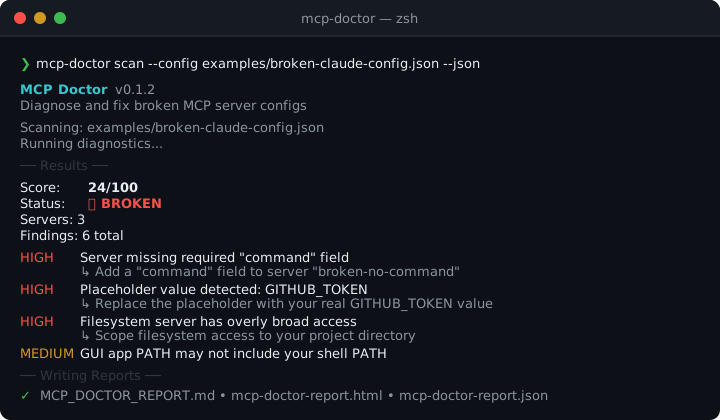
❯ mcp-doctor scan

  MCP Doctor v0.1.2
  Diagnose and fix broken MCP server configs

  Found 1 config:
    ✓  Claude Desktop: ~/Library/Application Support/Claude/claude_desktop_config.json

  Running diagnostics...

  ── Results ──

  Score:   24/100
  Status:  ❌ BROKEN
  Servers: 3
  Findings: 6 total

  HIGH    Server missing required "command" field  [broken-no-command]
          ↳ Add a "command" field to server "broken-no-command"
  HIGH    Placeholder value detected: GITHUB_TOKEN  [github]
          ↳ Replace the placeholder with your real GITHUB_TOKEN value
  HIGH    Filesystem server has overly broad access  [filesystem]
          ↳ Scope filesystem access to your project directory
  MEDIUM  GUI app PATH may not include your shell PATH  [filesystem]

  ── Writing Reports ──

  ✓  Markdown: MCP_DOCTOR_REPORT.md
  ✓  HTML:     mcp-doctor-report.html

  ❌  BROKEN — Fix HIGH severity issues to get your MCP servers working.
Why MCP Doctor Exists
MCP servers fail silently and often. The error messages are unhelpful. The config format is simple JSON — but the failure modes are not:
spawn npx ENOENT— GUI app can't find npx because it doesn't inherit your shell PATH- Tools don't appear — empty args, missing command, or token not set
- JSON parse error — one missing comma breaks the entire config
- Token set but wrong — placeholder like
YOUR_API_KEYleft in place - Filesystem server grants access to
/Usersor/— works but dangerous
MCP Doctor scans your config, detects these patterns, and tells you exactly what to fix.
Quick Start
Install from npm (package is scoped — the unscoped mcp-doctor name was already taken):
npm install -g @stephenywilson/mcp-doctor

mcp-doctor scan
Or build from source:
git clone https://github.com/stephenywilson/MCP-Doctor.git
cd MCP-Doctor
npm install
npm run build
npm link

mcp-doctor scan
Common commands:
# Scan auto-detected MCP configs
mcp-doctor scan

# Scan a specific config file
mcp-doctor scan --config ~/.cursor/mcp.json

# Scan with JSON output
mcp-doctor scan --json

# Choose output directory
mcp-doctor scan --out ~/Desktop/mcp-report

# List all auto-detected config locations
mcp-doctor list-configs
Development
npm install
npm run build        # compile TypeScript → dist/
npm run typecheck    # type-check without build
npm run smoke        # full smoke test suite
npm run clean        # remove dist/

# Try the broken examples
mcp-doctor scan --config examples/broken-claude-config.json --out /tmp/test --json
Safe Install Preview Example
mcp-doctor preview examples/safe-install-preview/unsafe-mcp-config.json

  MCP Doctor v0.2.0  Safe Install Preview

  Config:  examples/safe-install-preview/unsafe-mcp-config.json
  Servers: 3

  1. filesystem
     Risk: HIGH
       ─ Grants broad filesystem access: "/Users/stephen"
       ─ Filesystem server detected
       ─ No project-level boundary detected
     ⚠  Safer path: ~/projects/YOUR_PROJECT

  2. github
     Risk: HIGH
       ─ Requires high-privilege credential env var: GITHUB_TOKEN
     Env vars: GITHUB_TOKEN (values not shown)

  3. local-helper
     Risk: HIGH
       ─ Runs local script with relative path: "./scripts/helper.sh"
       ─ Requires high-privilege credential env var: API_SECRET

  Overall: HIGH

  Recommendations:
    • Do not grant access to your home directory.
    • Prefer a project-specific folder: ~/projects/YOUR_PROJECT
    • Use least-privilege tokens.
    • Run: mcp-doctor safe-config <config-path> --client claude
What It Checks
| Category | Examples |
|---|---|
| Config file | Invalid JSON, missing mcpServers, file not found |
| Commands | Shell operators in command, relative paths, missing command field |
| Executables | npx, uv, uvx, node, python, docker not found on PATH |
| GUI PATH | macOS apps don't inherit shell PATH — spawn npx ENOENT |
| Env/tokens | Empty values, placeholder tokens, secrets in config |
| Args | Empty args for npx/uvx, non-string values, no package specified |
| Filesystem | Access to root /, home ~, or entire /Users |
| Network | GitHub, Slack, Notion, Postgres, browser automation |
Full check list → docs/what-mcp-doctor-checks.md
Reports Generated
mcp-doctor scan writes two files by default:
| File | Description |
|---|---|
MCP_DOCTOR_REPORT.md | Human-readable Markdown report with all findings and fixes |
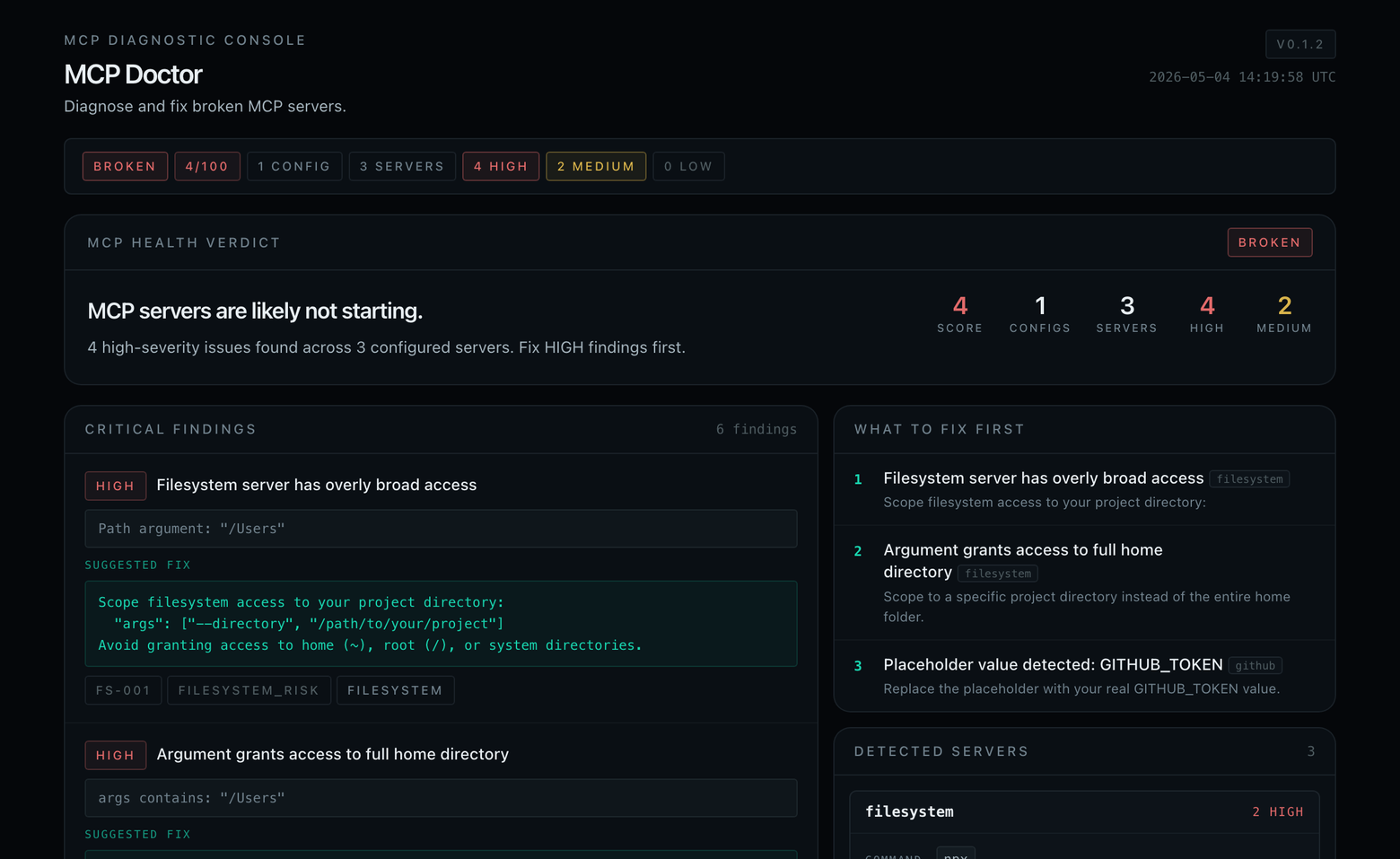
mcp-doctor-report.html | Visual HTML report — dark theme, score card, server cards, grouped findings |
Add --json to also generate mcp-doctor-report.json (machine-readable).
Reports are written to the current directory. Use --out <dir> to change the output directory.
Secrets in env vars are always masked (
sk-****,ghp_****). No data is sent to any network.
Supported Clients
Auto-detected config locations:
| Client | Config Path |
|---|---|
| Claude Desktop (macOS) | ~/Library/Application Support/Claude/claude_desktop_config.json |
| Claude Desktop (Windows) | %APPDATA%\Claude\claude_desktop_config.json |
| Cursor (project) | .cursor/mcp.json |
| Cursor (global) | ~/.cursor/mcp.json |
| MCP (project root) | .mcp.json |
Scan any config: mcp-doctor scan --config /path/to/config.json
Client auto-detection is still expanding. More clients in future versions. See docs/supported-clients.md.
Safe Config Suggestions
MCP Doctor generates suggested fixes inline. Common patterns it suggests:
Use absolute paths to avoid GUI PATH issues:
{
  "command": "/opt/homebrew/bin/npx"
}
Scope filesystem access to your project:
{
  "args": ["-y", "@modelcontextprotocol/server-filesystem", "--directory", "/your/project"]
}
Set real token values:
{
  "env": {
    "GITHUB_TOKEN": "ghp_yourActualToken"
  }
}
MCP Doctor never modifies your config files. Suggestions are in the report only.
Examples
The examples/ folder contains intentionally broken configs for testing:
| File | What's broken |
|---|---|
broken-claude-config.json | Missing command, placeholder token, broad filesystem access |
broken-cursor-config.json | Empty args, shell operators, relative path |
filesystem-too-broad.json | Root / and home dir access |
missing-env-token.json | Empty and placeholder env values |
invalid-json-example.json | Syntax error in JSON |
See examples/README.md for expected findings.
Roadmap
v0.3.0 (current)
- Auto-detect common MCP config locations
- Parse and validate JSON configs
- Diagnose 20+ failure patterns
- Executable availability checks
- GUI PATH warnings (macOS)
- Env/token analysis with secret masking
- Filesystem and network risk checks
- Markdown report
- HTML report (dark theme, score card, server cards)
- JSON report (--json flag)
- GitHub Actions CI
v0.4.0 ideas
- VS Code / Cline config detection
- Windsurf config detection
- Detect common MCP package names and verify they exist on npm/PyPI
- Suggested config snippets with absolute paths pre-filled
-
mcp-doctor fix --dry-runpreview mode
v0.2.0 ideas
- Interactive fix wizard
- Watch mode for config changes
- Docker-based MCP server checks
Security Notes
- MCP Doctor reads config files and checks local executables only
- No data is sent to any network or external service
- No telemetry, no analytics, no account required
- Secrets in env vars are always masked in reports
- Config files are never modified
- Works fully offline
See SECURITY.md for vulnerability reporting.
Contributing
Contributions welcome! See CONTRIBUTING.md.
Found a false positive? Have a new failure pattern to add? Open an issue or PR.
GitHub Topics
Suggest adding these topics to the repo:
mcp mcp-server mcp-doctor mcp-debug mcp-tools model-context-protocol claude claude-desktop cursor vscode cline ai-agents developer-tools typescript