Stock Tool MCP Server
English | 中文文档
一个强大且全面的模型上下文协议 (MCP) 服务器,专注于金融市场数据、技术分析和基本面研究。
🇨🇳 中文文档
📖 项目简介
本项目旨在为 AI Agent(如 Claude, Cursor, 通义千问等)赋予专业级的股市分析能力,打通大语言模型与实时金融数据之间的桥梁。
通过 MCP (Model Context Protocol) 协议,AI 可以直接调用本服务器提供的金融工具,实现:
- 📊 实时行情查询
- 📈 技术指标计算
- 💰 基本面分析
- 📰 新闻资讯获取
- 🔍 深度研究报告
🚀 核心功能
1. 多源市场数据融合
无需纠结使用哪个 API。本服务器内置智能 Adapter Manager(适配器管理器),可自动路由请求并在多个数据源之间进行故障转移:
- 美股: Yahoo Finance, Finnhub
- A股: Akshare, Tushare, Baostock
- 加密货币: CCXT (Binance, OKX 等)
- 外汇与指数: Yahoo Finance
2. 专业技术分析
内置量化分析引擎,提供的不仅仅是原始数字:
- 技术指标: SMA/EMA, RSI, MACD, 布林带 (Bollinger Bands), KDJ, ATR 等
- 形态识别: 自动检测 K 线形态(如十字星 Doji, 锤头线 Hammer, 吞没形态 Engulfing)
- 支撑与压力: 动态计算关键价格位
- 筹码分布 (Volume Profile): 分析成交量分布以识别价值区域
3. 深度基本面研究
自动化的金融分析师能力:
- 财务报表: 资产负债表、利润表、现金流量表
- 健康度打分: 基于盈利能力、偿债能力、成长性和估值的 0-100 分独家健康度评分
- 关键比率: PE, PB, ROE, ROA, 负债权益比等
4. 智能聚合工具
专为 LLM 上下文窗口优化:
perform_deep_research: 一键获取指定标的的 价格 + 历史走势 + 基本面 + 近期新闻get_market_report: 获取当前市场状态的综合快照
🛠️ 安装指南
前置要求
- Python 3.10+
- Redis (可选,用于缓存)
安装步骤
-
克隆仓库
git clone https://github.com/yourusername/stock-tool-mcp.git cd stock-tool-mcp -
创建并激活 Conda 环境
# 创建 Python 3.11.14 环境 conda create -n stock-mcp python=3.11.14 # 激活环境 conda activate stock-mcp -
安装依赖
pip install -r requirements.txt -
配置环境变量
复制示例环境变量文件:
cp .env.example .env编辑
.env添加你的 API 密钥(可选,但推荐以获得更高限额):TUSHARE_ENABLED- 是否启用 Tushare 数据源(默认 False)TUSHARE_TOKEN- 用于 A 股数据(获取 Token)FINNHUB_ENABLED- 是否启用 Finnhub 数据源(默认 False)FINNHUB_API_KEY- 用于美股机构数据(获取 API Key)DASHSCOPE_API_KEY- 用于阿里百炼 AI(可选,用于测试)
💡 提示: 本项目采用可插拔设计。如果没有配置 API Key,系统会自动禁用相应的数据源,并使用免费的替代方案(如 Akshare, Baostock, Yahoo Finance)作为后备。
🏃♂️ 使用方法
方式一:作为 HTTP 服务器运行(推荐用于测试和开发)
使用 uvicorn 启动 MCP 服务器(Streamable HTTP 模式):
# 设置环境变量指定传输方式为 streamable-http
export MCP_TRANSPORT=streamable-http

# 标准启动(监听 9898 端口)
python -m uvicorn src.server.app:app --host 0.0.0.0 --port 9898

# 开发模式(支持热重载)
MCP_TRANSPORT=streamable-http python -m uvicorn src.server.app:app --reload --port 9898
启动成功后,你会看到:
✅ MCP server ready!
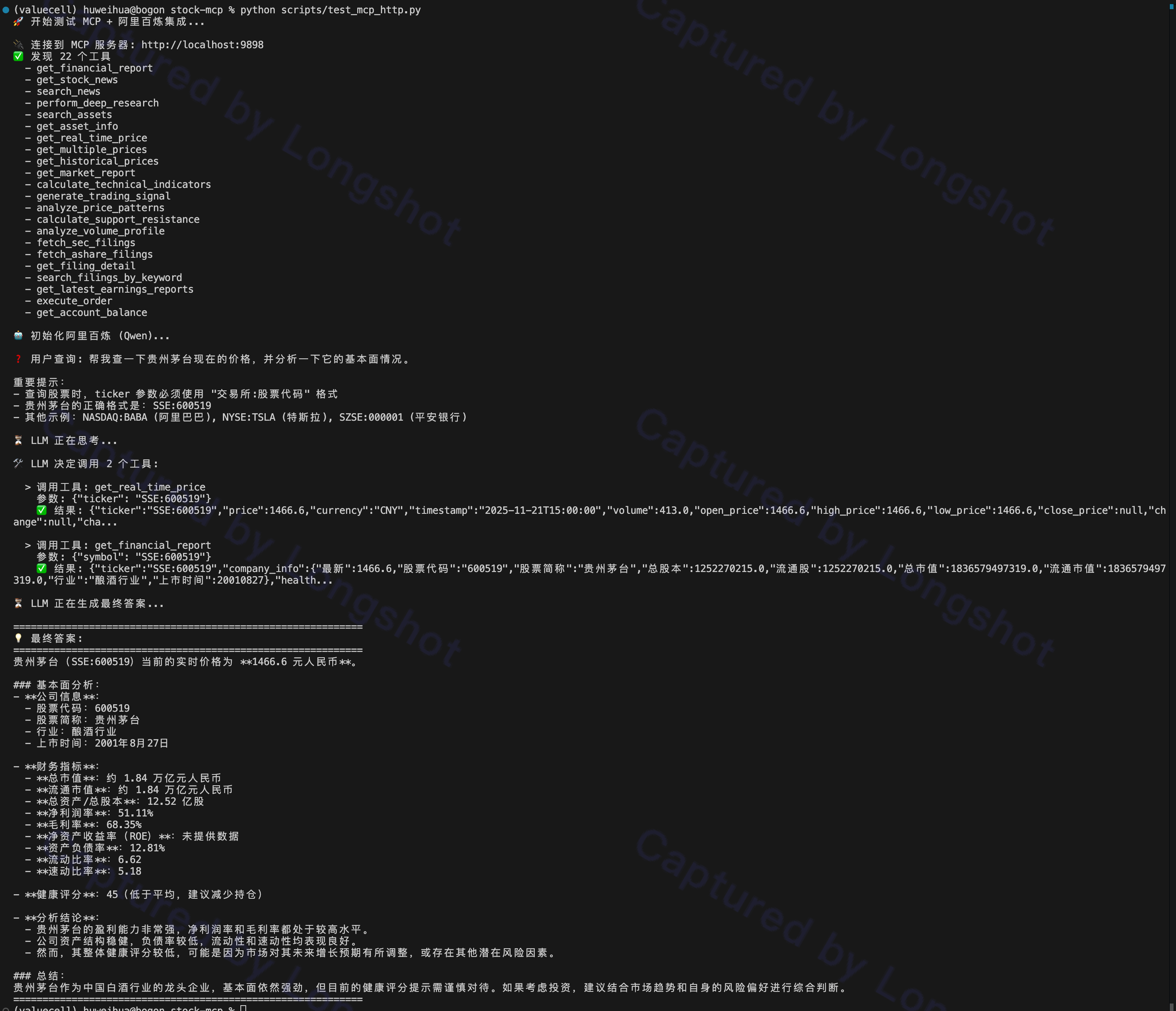
使用示例(Streamable HTTP):
方式二:使用 stdio 模式(推荐用于 AI Agent 集成)
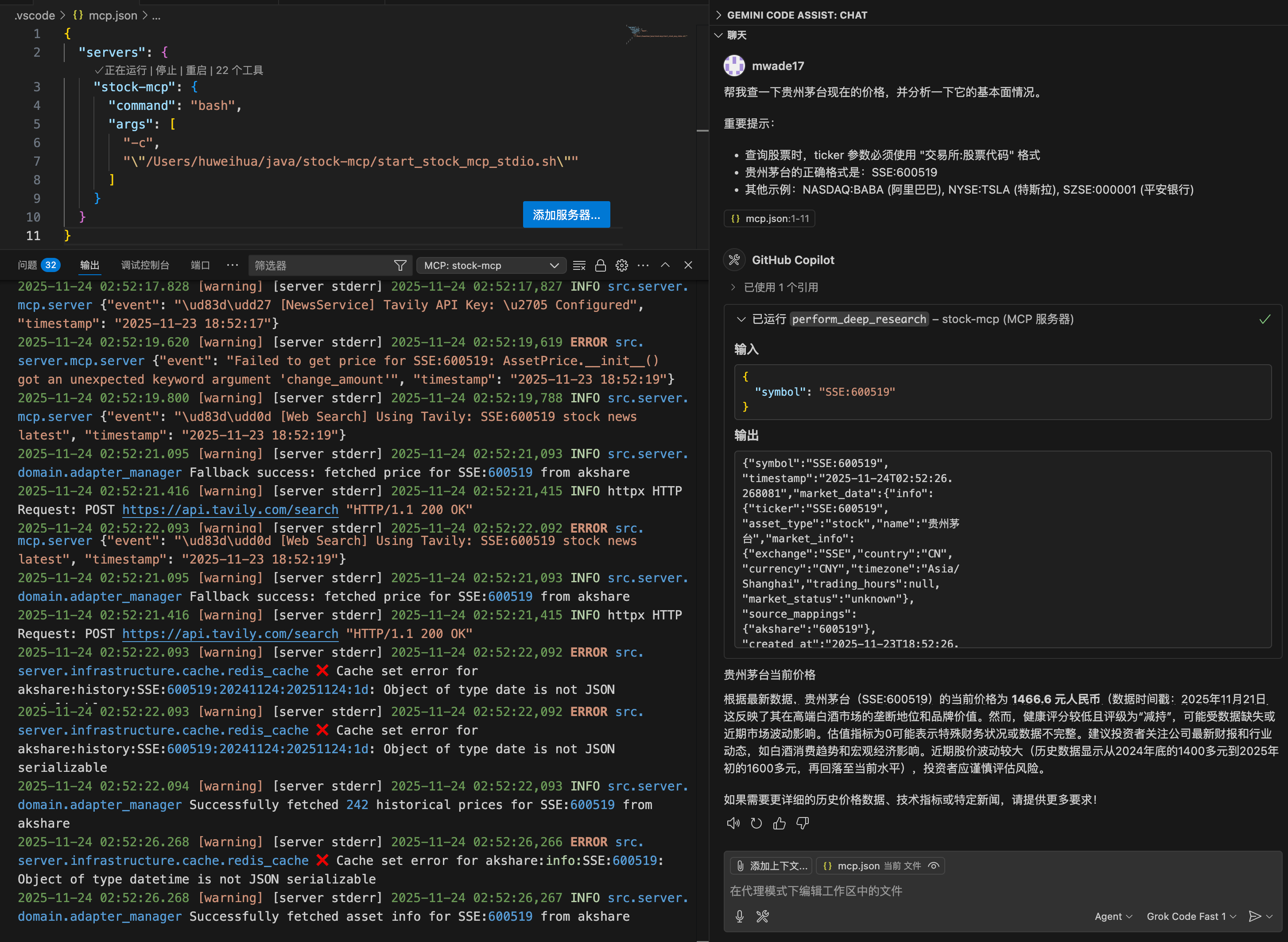
stdio 模式通过标准输入输出与 AI Agent 通信,适合 Claude Desktop、Cursor 等本地集成。
快速启动:
# 使用启动脚本(已配置好 conda 环境)
bash start_stock_mcp_stdio.sh
手动启动:
# 激活 conda 环境
conda activate stock-mcp

# 启动 stdio 模式(默认传输方式)
python -c "import src.server.mcp.server as m; m.create_mcp_server().run(transport='stdio')"
集成到 Claude Desktop (~/Library/Application Support/Claude/claude_desktop_config.json):
{
  "mcpServers": {
    "stock-tools": {
      "command": "bash",
      "args": ["start_stock_mcp_stdio.sh"],
      "cwd": "/path/to/stock-tool-mcp"
    }
  }
}
集成到 Cursor (.cursor/mcp_config.json):
{
  "mcpServers": {
    "stock-tools": {
      "command": "bash",
      "args": ["start_stock_mcp_stdio.sh"],
      "cwd": "/path/to/stock-tool-mcp"
    }
  }
}
使用示例(stdio 模式):
方式三:通过 HTTP API 调用
服务器启动后,可以通过 HTTP 接口调用(Streamable HTTP 协议):
# 列出所有可用工具
curl -X POST http://localhost:9898 \
  -H "Content-Type: application/json" \
  -d '{
    "jsonrpc": "2.0",
    "method": "tools/list",
    "params": {},
    "id": "1"
  }'

# 调用工具示例:查询贵州茅台价格
curl -X POST "http://localhost:9898/?_tool=get_real_time_price" \
  -H "Content-Type: application/json" \
  -d '{
    "jsonrpc": "2.0",
    "method": "tools/call",
    "params": {
      "name": "get_real_time_price",
      "arguments": {
        "ticker": "SSE:600519"
      }
    },
    "id": "2"
  }'
🧰 可用工具一览
| 工具名称 | 描述 | 示例参数 |
|---|---|---|
search_assets | 通过名称或代码搜索股票、加密货币或 ETF | {"query": "茅台"} |
get_asset_info | 获取资产的详细信息(公司简介、行业等) | {"ticker": "SSE:600519"} |
get_real_time_price | 获取任何资产的当前实时价格 | {"ticker": "SSE:600519"} |
get_historical_prices | 获取指定日期范围的 OHLCV 数据 | {"ticker": "SSE:600519", "start_date": "2024-01-01", "end_date": "2024-12-31"} |
calculate_technical_indicators | 计算技术指标 (RSI, MACD 等) | {"ticker": "SSE:600519", "indicators": ["rsi", "macd"]} |
generate_trading_signal | 基于技术指标生成交易信号 | {"ticker": "SSE:600519"} |
get_financials | 检索详细的财务报表和比率 | {"ticker": "SSE:600519"} |
perform_deep_research | (Agent 首选) 一次调用聚合所有数据 | {"ticker": "SSE:600519"} |
get_latest_news | 获取指定标的的相关市场新闻 | {"ticker": "SSE:600519"} |
💡 重要提示:
- A股股票代码格式:
SSE:600519(上交所)、SZSE:000001(深交所)- 美股股票代码格式:
NASDAQ:AAPL、NYSE:TSLA- 加密货币格式:
CRYPTO:BTC、CRYPTO:ETH
📸 实际使用示例
本项目支持两种传输协议,分别适用于不同场景:
1. Streamable HTTP 模式
适合通过 HTTP 接口调用,方便测试和集成到 Web 应用:
2. stdio 模式
适合直接集成到 AI Agent(如 Claude Desktop、Cursor),通过标准输入输出通信:
💡 两种模式的区别:
- Streamable HTTP: 需要启动 Web 服务器,支持远程调用,适合生产环境
- stdio: 直接进程通信,无需网络端口,适合本地 AI Agent 集成,延迟更低
🧪 测试脚本
项目提供了完整的测试脚本,帮助你快速验证功能:
1. HTTP 接口测试
使用 scripts/test_mcp_http.py 测试 MCP 服务器的 HTTP 接口:
# 1. 启动 MCP 服务器(在一个终端)
python -m uvicorn src.server.app:app --host 0.0.0.0 --port 9898

# 2. 在另一个终端运行测试脚本
python scripts/test_mcp_http.py
该脚本会:
- ✅ 连接到 MCP 服务器(http://localhost:9898)
- ✅ 列出所有可用工具
- ✅ 使用阿里百炼(通义千问)调用工具
- ✅ 查询贵州茅台的价格和基本面
2. OpenAPI 文档生成
使用 scripts/mcp2openapi.py 生成 OpenAPI 规范文档:
python scripts/mcp2openapi.py
生成的 OpenAPI 文档可以导入到 Apifox、Postman 等工具中进行测试。
🗺️ 路线图与未来计划
虽然当前的数据检索和分析能力已相当健壮,但以下功能计划在未来版本中支持:
- 实盘交易执行: 目前
execute_order工具处于 模拟模式 (Simulation Mode)。我们计划通过 CCXT(加密货币)和券商 API(股票)集成真实的交易下单能力 - 高级缓存策略: 实现更细粒度的 TTL (Time-To-Live) 设置,区分实时价格数据(短 TTL)和财务报表(长 TTL),以平衡性能与 API 配额消耗
- 用户账户管理: 安全地管理用户特定的交易所 API 密钥,实现个性化交易
- 更多数据适配器: 扩展支持更多专业数据源(如情绪分析提供商、另类数据等)
- WebSocket 实时推送: 支持实时行情推送,减少轮询开销
- 回测引擎: 内置策略回测功能,验证交易策略的有效性
🏗️ 项目架构
本项目采用 领域驱动设计 (DDD) 架构,清晰分离关注点:
src/server/
├── app.py                 # FastMCP 应用入口
├── config/                # 配置管理
├── core/                  # 核心业务逻辑
│   └── dependencies.py    # 依赖注入容器
├── domain/                # 领域层
│   ├── adapters/          # 数据适配器(Yahoo, Akshare, Tushare 等)
│   ├── models/            # 领域模型
│   └── services/          # 领域服务
├── infrastructure/        # 基础设施层
│   ├── cache/             # 缓存(Redis)
│   └── external/          # 外部 API 客户端
├── mcp/                   # MCP 协议层
│   └── tools/             # MCP 工具定义
└── utils/                 # 工具类
核心设计原则:
- 📦 适配器模式: 统一多数据源接口,自动故障转移
- 🔌 依赖注入: 使用
dependency-injector管理服务生命周期 - ⚡ 异步优先: 所有外部调用均为异步,提升并发性能
- 🎯 单一职责: 每个服务专注于特定领域功能
📄 许可证
MIT License
🇬🇧 English Documentation
📖 Introduction
A powerful, comprehensive Model Context Protocol (MCP) server for financial market data, technical analysis, and fundamental research.
Designed to empower AI agents (like Claude, Cursor, etc.) with professional-grade stock market capabilities, bridging the gap between LLMs and real-time financial data.
🚀 Features
1. Multi-Source Market Data
Stop worrying about which API to use. The server features a smart Adapter Manager that automatically routes requests and handles failover across multiple providers:
- US Stocks: Yahoo Finance, Finnhub
- China A-Shares: Akshare, Tushare, Baostock
- Crypto: CCXT (Binance, OKX, etc.)
- Forex & Indices: Yahoo Finance
2. Professional Technical Analysis
Built-in quantitative analysis engine providing more than just raw numbers:
- Indicators: SMA/EMA, RSI, MACD, Bollinger Bands, KDJ, ATR
- Pattern Recognition: Automatically detects candlestick patterns (Doji, Hammer, Engulfing)
- Support & Resistance: Dynamic calculation of key price levels
- Volume Profile: Analysis of volume distribution to identify value areas
3. Deep Fundamental Research
Automated financial analyst capabilities:
- Financial Statements: Balance Sheet, Income Statement, Cash Flow
- Health Scoring: 0-100 proprietary health score based on Profitability, Solvency, Growth, and Valuation
- Key Ratios: PE, PB, ROE, ROA, Debt-to-Equity, and more
4. Smart Aggregation Tools
Optimized for LLM context windows:
perform_deep_research: One-shot tool to fetch price, history, fundamentals, and recent news for a symbolget_market_report: A comprehensive snapshot of the current market status
🛠️ Installation
Prerequisites
- Python 3.10+
- Redis (optional, for caching)
Setup
-
Clone the repository
git clone https://github.com/yourusername/stock-tool-mcp.git cd stock-tool-mcp -
Create and activate Conda environment
# Create Python 3.11.14 environment conda create -n stock-mcp python=3.11.14 # Activate environment conda activate stock-mcp -
Install dependencies
pip install -r requirements.txt -
Configuration
Copy the example environment file:
cp .env.example .envEdit
.envto add your API keys (optional but recommended for higher limits):TUSHARE_ENABLED- Enable Tushare data source (default: False)TUSHARE_TOKEN- For China A-shares data (Get Token)FINNHUB_ENABLED- Enable Finnhub data source (default: False)FINNHUB_API_KEY- For US institutional data (Get API Key)DASHSCOPE_API_KEY- For Alibaba Cloud AI (optional, for testing)
💡 Note: This project features a pluggable design. If API keys are not configured, the system will automatically disable the corresponding data sources and use free alternatives (like Akshare, Baostock, Yahoo Finance) as fallbacks.
🏃♂️ Usage
Method 1: Run as HTTP Server (Recommended for Testing & Development)
Start the MCP server using uvicorn (Streamable HTTP mode):
# Set environment variable to specify transport mode
export MCP_TRANSPORT=streamable-http

# Standard run (listening on port 9898)
python -m uvicorn src.server.app:app --host 0.0.0.0 --port 9898

# Development mode (with hot reload)
MCP_TRANSPORT=streamable-http python -m uvicorn src.server.app:app --reload --port 9898
After successful startup, you'll see:
✅ MCP server ready!
Example (Streamable HTTP mode):
Method 2: Use stdio Mode (Recommended for AI Agent Integration)
stdio mode communicates with AI agents via standard input/output, suitable for local integration with Claude Desktop, Cursor, etc.
Quick Start:
# Use the startup script (conda environment pre-configured)
bash start_stock_mcp_stdio.sh
Manual Start:
# Activate conda environment
conda activate stock-mcp

# Start stdio mode (default transport)
python -c "import src.server.mcp.server as m; m.create_mcp_server().run(transport='stdio')"
Integrate with Claude Desktop (~/Library/Application Support/Claude/claude_desktop_config.json):
{
  "mcpServers": {
    "stock-tools": {
      "command": "bash",
      "args": ["start_stock_mcp_stdio.sh"],
      "cwd": "/path/to/stock-tool-mcp"
    }
  }
}
Integrate with Cursor (.cursor/mcp_config.json):
{
  "mcpServers": {
    "stock-tools": {
      "command": "bash",
      "args": ["start_stock_mcp_stdio.sh"],
      "cwd": "/path/to/stock-tool-mcp"
    }
  }
}
Example (stdio mode):
Method 3: HTTP API Calls
After starting the server, you can call it via HTTP interface (Streamable HTTP protocol):
# List all available tools
curl -X POST http://localhost:9898 \
  -H "Content-Type: application/json" \
  -d '{
    "jsonrpc": "2.0",
    "method": "tools/list",
    "params": {},
    "id": "1"
  }'

# Call tool example: Query Moutai stock price
curl -X POST "http://localhost:9898/?_tool=get_real_time_price" \
  -H "Content-Type: application/json" \
  -d '{
    "jsonrpc": "2.0",
    "method": "tools/call",
    "params": {
      "name": "get_real_time_price",
      "arguments": {
        "ticker": "SSE:600519"
      }
    },
    "id": "2"
  }'
🧰 Available Tools
| Tool Name | Description | Example Parameters |
|---|---|---|
search_assets | Search for stocks, crypto, or ETFs by name or ticker | {"query": "Moutai"} |
get_asset_info | Get detailed asset information (company profile, industry, etc.) | {"ticker": "SSE:600519"} |
get_real_time_price | Get the current live price for any asset | {"ticker": "SSE:600519"} |
get_historical_prices | Fetch OHLCV data for a specific date range | {"ticker": "SSE:600519", "start_date": "2024-01-01", "end_date": "2024-12-31"} |
calculate_technical_indicators | Compute technical indicators (RSI, MACD, etc.) | {"ticker": "SSE:600519", "indicators": ["rsi", "macd"]} |
generate_trading_signal | Generate trading signals based on technical indicators | {"ticker": "SSE:600519"} |
get_financials | Retrieve detailed financial statements and ratios | {"ticker": "SSE:600519"} |
perform_deep_research | (Agent Favorite) Aggregate all data in one call | {"ticker": "SSE:600519"} |
get_latest_news | Fetch relevant market news for a specific symbol | {"ticker": "SSE:600519"} |
💡 Important Note:
- A-share ticker format:
SSE:600519(Shanghai),SZSE:000001(Shenzhen)- US stock ticker format:
NASDAQ:AAPL,NYSE:TSLA- Crypto format:
CRYPTO:BTC,CRYPTO:ETH
📸 Real-World Examples
This project supports two transport protocols, each suitable for different scenarios:
1. Streamable HTTP Mode
Suitable for HTTP interface calls, convenient for testing and integration into web applications:
2. stdio Mode
Suitable for direct integration into AI Agents (like Claude Desktop, Cursor), communicating via standard input/output:
💡 Differences Between the Two Modes:
- Streamable HTTP: Requires a web server, supports remote calls, suitable for production environments
- stdio: Direct process communication, no network port required, suitable for local AI Agent integration with lower latency
🧪 Test Scripts
The project provides comprehensive test scripts to help you quickly verify functionality:
1. HTTP Interface Testing
Use scripts/test_mcp_http.py to test the MCP server's HTTP interface:
# 1. Start the MCP server (in one terminal)
python -m uvicorn src.server.app:app --host 0.0.0.0 --port 9898

# 2. Run the test script in another terminal
python scripts/test_mcp_http.py
This script will:
- ✅ Connect to the MCP server (http://localhost:9898)
- ✅ List all available tools
- ✅ Use Alibaba Cloud Qwen to call tools
- ✅ Query Moutai's price and fundamentals
2. OpenAPI Documentation Generation
Use scripts/mcp2openapi.py to generate OpenAPI specification:
python scripts/mcp2openapi.py
The generated OpenAPI documentation can be imported into tools like Apifox or Postman for testing.
🗺️ Roadmap & Future Plans
While the data retrieval and analysis capabilities are robust, the following features are planned for future releases:
- Real Trading Execution: Currently, the
execute_ordertool runs in simulation mode. We plan to integrate real trading capabilities via CCXT (for crypto) and broker APIs (for stocks) - Advanced Caching Strategy: Implement fine-grained TTL (Time-To-Live) settings to distinguish between real-time price data (short TTL) and financial reports (long TTL) for better performance and API quota management
- User Account Management: Secure handling of user-specific exchange API keys for personalized trading
- More Data Adapters: Expansion to include more specialized data sources (e.g., sentiment analysis providers, alternative data)
- WebSocket Real-time Push: Support real-time market data push to reduce polling overhead
- Backtesting Engine: Built-in strategy backtesting functionality to validate trading strategies
🏗️ Project Architecture
This project adopts Domain-Driven Design (DDD) architecture with clear separation of concerns:
src/server/
├── app.py                 # FastMCP application entry
├── config/                # Configuration management
├── core/                  # Core business logic
│   └── dependencies.py    # Dependency injection container
├── domain/                # Domain layer
│   ├── adapters/          # Data adapters (Yahoo, Akshare, Tushare, etc.)
│   ├── models/            # Domain models
│   └── services/          # Domain services
├── infrastructure/        # Infrastructure layer
│   ├── cache/             # Caching (Redis)
│   └── external/          # External API clients
├── mcp/                   # MCP protocol layer
│   └── tools/             # MCP tool definitions
└── utils/                 # Utilities
Core Design Principles:
- 📦 Adapter Pattern: Unified multi-source interface with automatic failover
- 🔌 Dependency Injection: Using
dependency-injectorfor service lifecycle management - ⚡ Async First: All external calls are asynchronous for improved concurrency
- 🎯 Single Responsibility: Each service focuses on specific domain functionality
📄 License
MIT License