
Open Source Excel AI Agent
This repo consists of two main parts: an Excel MCP server (excel_mcp) and an Excel AI Agent Runner (excel_agent).
Demos
Excel Assistant
See demo/ExcelAssistant for an AI Excel assistant in web application form.
https://github.com/user-attachments/assets/18b6b8b5-0943-4c5b-816b-587f1083311d
Slack Workflow
See demo/SlackExcelWorkflow to make a Slack bot that assists with your Excel work.
https://github.com/user-attachments/assets/40611a73-3d4b-4fd2-8626-eb0c6ee8d3c5
Model Performance
Using our agent, we benchmarked several of the leading models on a verified subset of 50 examples from SpreadsheetBench. The following are the results for Pass@1:
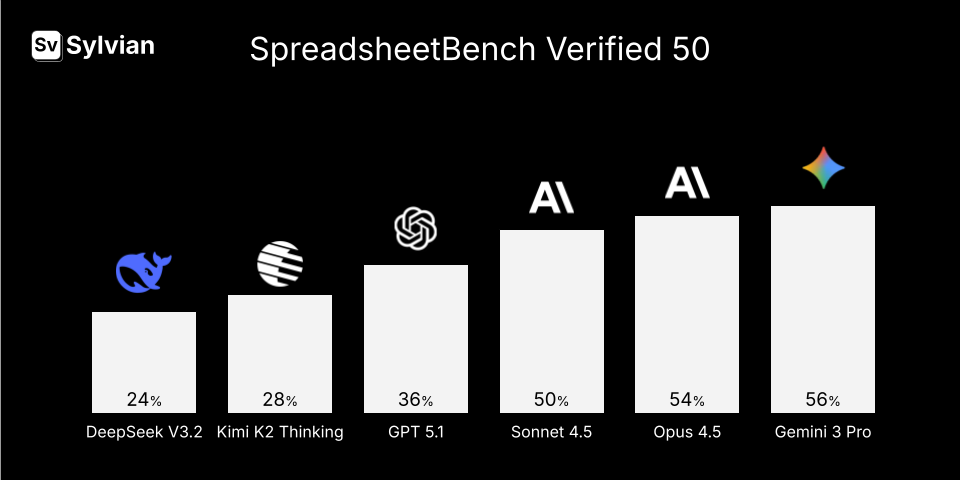
You can run this exact evaluation for yourself in the evals folder.
Environment Setup
conda create -n excel
conda activate excel
conda install python=3.11
pip install -r requirements.txt
pip install -e .
General Usage
Setting up an AI Agent consists of two portions. The Excel MCP server allows all agents to have access to a set of ~30 tools that allow editing of the Excel file directly.
Setting Up Excel MCP Server
import asyncio
from excel_mcp.excel_server import mcp

async def run_mcp_server():
    await mcp.run_sse_async(host="127.0.0.1", port=8765)

asyncio.run(run_mcp_server())
Setting Up Excel Agent Runner
from excel_agent.agent_runner import ExcelAgentRunner, TaskInput
from excel_agent.config import ExperimentConfig

message = #some prompt to edit the Excel file
input_file = #path to input Excel file
output_file = #path to output Excel file. typically a copy of the input file is created to edit.

runner = ExcelAgentRunner(
    config=ExperimentConfig(model='openrouter:openai/gpt-5.1'),
    mcp_server_url="http://127.0.0.1:8765/sse",
)

task_input = TaskInput(
    instruction=message,
    input_file=str(input_path),
    output_file=str(output_path),
)

agent_response = await runner.run_excel_agent(task_input)
Environment
The evaluation harness launches Microsoft Excel to calculate formulas and apply formatting during comparison. This ensures accurate evaluation of formula outputs and conditional formatting.
For headless environments, LibreOffice can be used as an alternative for spreadsheet conversion. However, LibreOffice conversion is less accurate—particularly for complex formulas and conditional formatting—and may result in evaluation discrepancies.