Chronicle


Stop wasting 80% of your AI's context window on code searches.
Chronicle is an MCP server that gives AI coding assistants instant access to your entire codebase through a persistent, pre-built index. Works with any MCP-compatible AI assistant: Claude Code, Claude Desktop, Cursor, Windsurf, Gemini CLI, VS Code Copilot, and more.
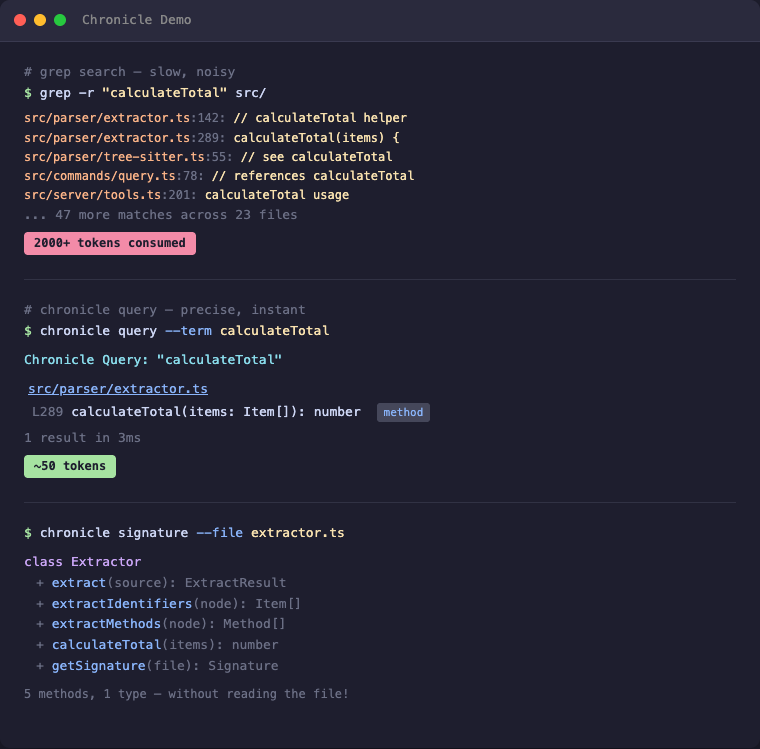
The Problem
Every time your AI assistant searches for code, it:
- Greps through thousands of files → hundreds of results flood the context
- Reads file after file to understand the structure → more context consumed
- Forgets everything when the session ends → repeat from scratch
A single "Where is X defined?" question can eat 2,000+ tokens. Do that 10 times and you've burned half your context on navigation alone.
The Solution
Index once, query forever:
# Before: grep flooding your context
AI: grep "PlayerHealth" → 200 hits in 40 files
AI: read File1.cs, File2.cs, File3.cs...
→ 2000+ tokens consumed, 5+ tool calls

# After: precise results, minimal context
AI: chronicle_query({ term: "PlayerHealth" })
→ Engine.cs:45, Player.cs:23, UI.cs:156
→ ~50 tokens, 1 tool call
Result: 50-80% less context used for code navigation.
Why Not Just Grep?
| Grep/Ripgrep | Chronicle | |
|---|---|---|
| Context usage | 2000+ tokens per search | ~50 tokens |
| Results | All text matches | Only identifiers |
| Precision | log matches catalog, logarithm | log finds only log |
| Persistence | Starts fresh every time | Index survives sessions |
| Structure | Flat text search | Knows methods, classes, types |
The real cost of grep: Every grep result includes surrounding context. Search for User in a large project and you'll get hundreds of hits — comments, strings, partial matches. Your AI reads through all of them, burning context tokens on noise.
Chronicle indexes identifiers: It uses Tree-sitter to actually parse your code. When you search for User, you get the class definition, the method parameters, the variable declarations — not every comment that mentions "user".
How It Works
-
Index your project once (~1 second per 1000 files)
chronicle_init({ path: "/path/to/project" }) -
AI searches the index instead of grepping
chronicle_query({ term: "Calculate", mode: "starts_with" }) → All functions starting with "Calculate" + exact line numbers chronicle_query({ term: "Player", modified_since: "2h" }) → Only matches changed in the last 2 hours -
Get file overviews without reading entire files
chronicle_signature({ file: "src/Engine.cs" })
→ All classes, methods, and their signatures
The index lives in .chronicle/index.db (SQLite) — fast, portable, no external dependencies.
Features
- Screenshots: Cross-platform screenshot capture (fullscreen, window, region) with auto-path for instant AI viewing
- Smart Extraction: Uses Tree-sitter to parse code properly — indexes identifiers, not keywords
- Method Signatures: Get function prototypes without reading implementations
- Project Summary: Auto-detected entry points, main classes, language breakdown
- Incremental Updates: Re-index single files after changes
- Cross-Project Links: Query across multiple related projects
- Time-based Filtering: Find what changed in the last hour, day, or week
- Project Structure: Query all files (code, config, docs, assets) without filesystem access
- Session Notes: Leave reminders for the next session — persists in the database
- Task Backlog: Built-in task management that lives with your code index — no external tools needed
- Auto-Cleanup: Excluded files (e.g., build outputs) are automatically removed from index
Supported Languages
| Language | Extensions |
|---|---|
| C# | .cs |
| TypeScript | .ts, .tsx |
| JavaScript | .js, .jsx, .mjs, .cjs |
| Rust | .rs |
| Python | .py, .pyw |
| C | .c, .h |
| C++ | .cpp, .cc, .cxx, .hpp, .hxx |
| Java | .java |
| Go | .go |
| PHP | .php |
| Ruby | .rb, .rake |
Quick Start
1. Install & Register
npm install -g @tensakulabs/chronicle
chronicle setup
chronicle setup automatically detects and registers Chronicle with your installed AI clients (Claude Code, Claude Desktop, Cursor, Windsurf, Gemini CLI, VS Code Copilot). To unregister: chronicle unsetup.
2. Or register manually with your AI assistant
For Claude Code (~/.claude/settings.json or ~/.claude.json):
{
  "mcpServers": {
    "chronicle": {
      "type": "stdio",
      "command": "chronicle",
      "env": {}
    }
  }
}
For Claude Desktop (%APPDATA%/Claude/claude_desktop_config.json on Windows):
{
  "mcpServers": {
    "chronicle": {
      "command": "chronicle"
    }
  }
}
Note: The server name in your config determines the MCP tool prefix. Use
"chronicle"as shown above — this gives you tool names likechronicle_query,chronicle_signature, etc.
For Gemini CLI (~/.gemini/settings.json):
{
  "mcpServers": {
    "chronicle": {
      "command": "chronicle"
    }
  }
}
For VS Code Copilot (run MCP: Open User Configuration in Command Palette):
{
  "servers": {
    "chronicle": {
      "type": "stdio",
      "command": "chronicle"
    }
  }
}
3. Make your AI actually use it
Add to your AI's instructions (e.g., ~/.claude/CLAUDE.md for Claude Code):
## Chronicle — Use for ALL code searches!

**Before using Grep/Glob, check if `.chronicle/` exists in the project.**

If yes, use Chronicle instead:
- `chronicle_query` — Find functions, classes, variables by name
- `chronicle_signature` — Get all methods in a file with line numbers
- `chronicle_signatures` — Get methods from multiple files (glob pattern)
- `chronicle_summary` — Project overview with entry points

If no `.chronicle/` exists, offer to run `chronicle_init` first.
4. Index your project
Ask your AI: "Index this project with Chronicle"
Or manually in the AI chat:
chronicle_init({ path: "/path/to/your/project" })
Available Tools
| Tool | Description |
|---|---|
chronicle_init | Index a project (creates .chronicle/) |
chronicle_query | Search by term (exact/contains/starts_with) |
chronicle_signature | Get one file's classes + methods |
chronicle_signatures | Get signatures for multiple files (glob) |
chronicle_update | Re-index a single changed file |
chronicle_remove | Remove a deleted file from index |
chronicle_summary | Project overview |
chronicle_tree | File tree with statistics |
chronicle_describe | Add documentation to summary |
chronicle_link | Link another indexed project |
chronicle_unlink | Remove linked project |
chronicle_links | List linked projects |
chronicle_status | Index statistics |
chronicle_scan | Find indexed projects in directory tree |
chronicle_files | List project files by type (code/config/doc/asset) |
chronicle_note | Read/write session notes (persists between sessions) |
chronicle_session | Start session, detect external changes, auto-reindex |
chronicle_viewer | Open interactive project tree in browser |
chronicle_task | Create, read, update, delete tasks with priority and tags |
chronicle_tasks | List and filter tasks by status, priority, or tag |
chronicle_screenshot | Take a screenshot (fullscreen, window, region) |
chronicle_windows | List open windows for screenshot targeting |
Time-based Filtering
Track what changed recently with modified_since and modified_before:
chronicle_query({ term: "render", modified_since: "2h" })   # Last 2 hours
chronicle_query({ term: "User", modified_since: "1d" })     # Last day
chronicle_query({ term: "API", modified_since: "1w" })      # Last week
Supported formats:
- Relative:
30m(minutes),2h(hours),1d(days),1w(weeks) - ISO date:
2026-01-27or2026-01-27T14:30:00
Project Structure Queries
Chronicle indexes ALL files in your project (not just code):
chronicle_files({ path: ".", type: "config" })  # All config files
chronicle_files({ path: ".", type: "test" })    # All test files
chronicle_files({ path: ".", pattern: "**/*.md" })  # All markdown files
chronicle_files({ path: ".", modified_since: "30m" })  # Changed this session
File types: code, config, doc, asset, test, other, dir
Session Notes
Leave reminders for the next session:
chronicle_note({ path: ".", note: "Test the glob fix after restart" })  # Write
chronicle_note({ path: ".", note: "Also check edge cases", append: true })  # Append
chronicle_note({ path: "." })                                              # Read
chronicle_note({ path: ".", clear: true })                                 # Clear
Notes are stored in .chronicle/index.db and persist indefinitely.
Task Backlog
Keep your project tasks right next to your code index:
chronicle_task({ path: ".", action: "create", title: "Fix parser bug", priority: 1, tags: "bug" })
chronicle_task({ path: ".", action: "update", id: 1, status: "done" })
chronicle_task({ path: ".", action: "log", id: 1, note: "Root cause: unbounded buffer" })
chronicle_tasks({ path: ".", status: "active" })
Priorities: 🔴 high, 🟡 medium, ⚪ low
Statuses: backlog → active → done | cancelled
Screenshots
chronicle_screenshot()                                              # Full screen
chronicle_screenshot({ mode: "active_window" })                     # Active window
chronicle_screenshot({ mode: "window", window_title: "VS Code" })   # Specific window
chronicle_windows({ filter: "chrome" })                             # Find window titles
Cross-platform: Windows (PowerShell), macOS (screencapture), Linux (maim/scrot).
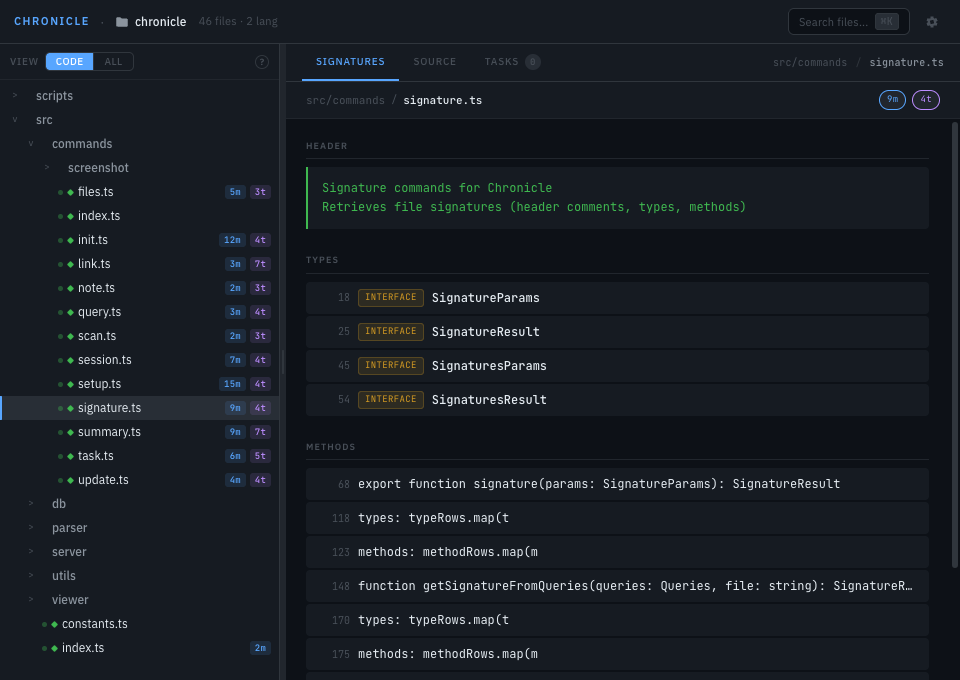
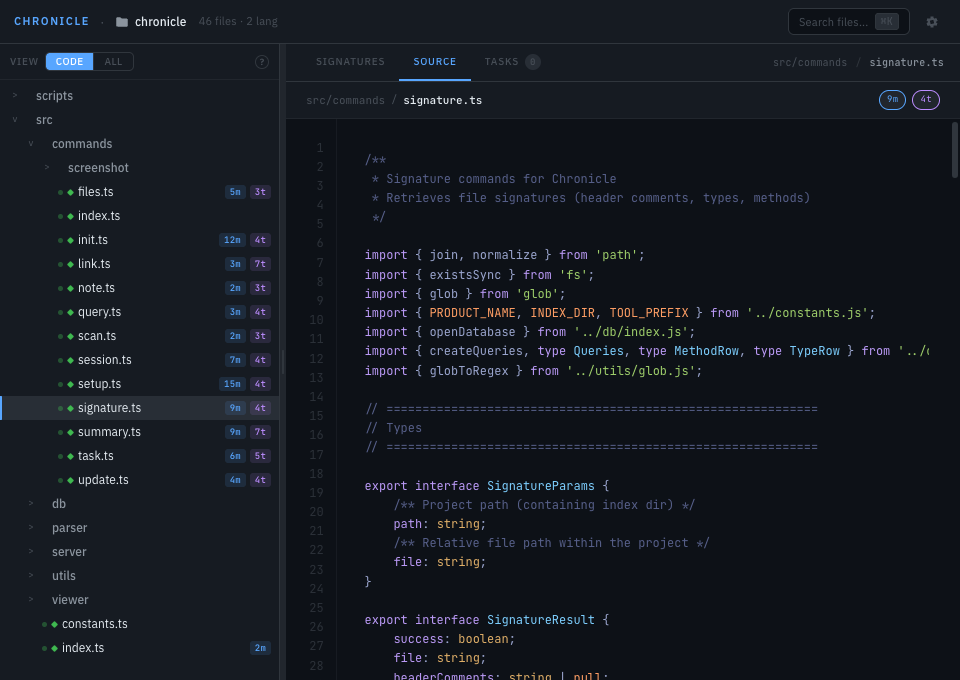
Interactive Viewer
chronicle_viewer({ path: "." })
Opens http://localhost:3333 with an interactive file tree, file signatures, live reload, and git status icons.
Close with chronicle_viewer({ path: ".", action: "close" })
CLI Usage
chronicle scan ~/projects       # Find all indexed projects
chronicle init ./myproject      # Index a project from command line
Performance
| Project Size | Files | Items | Index Time | Query Time |
|---|---|---|---|---|
| Small | ~20 | 1,200 | <1s | 1-5ms |
| Medium | ~50 | 1,900 | <1s | 1-5ms |
| Large | ~100 | 3,000 | <1s | 1-5ms |
| XL | ~500 | 4,100 | ~2s | 1-10ms |
Technology
- Parser: Tree-sitter — real parsing, not regex
- Database: SQLite with WAL mode — fast, single file, zero config
- Protocol: MCP — works with any compatible AI
Project Structure
.chronicle/              ← Created in YOUR project
├── index.db             ← SQLite database
└── summary.md           ← Optional documentation

chronicle/               ← This repository
├── src/
│   ├── commands/        ← Tool implementations
│   ├── db/              ← SQLite wrapper
│   ├── parser/          ← Tree-sitter integration
│   └── server/          ← MCP protocol handler
└── build/               ← Compiled output
Contributing
PRs welcome.
License
MIT © 2026 Tensaku Labs