Thunderbird MCP




Give your AI assistant full access to Thunderbird — search mail, compose messages, manage filters, and organize your inbox. All through the Model Context Protocol.
Inspired by bb1/thunderbird-mcp. Rewritten from scratch with a bundled HTTP server, proper MIME decoding, and UTF-8 handling throughout.
Why?
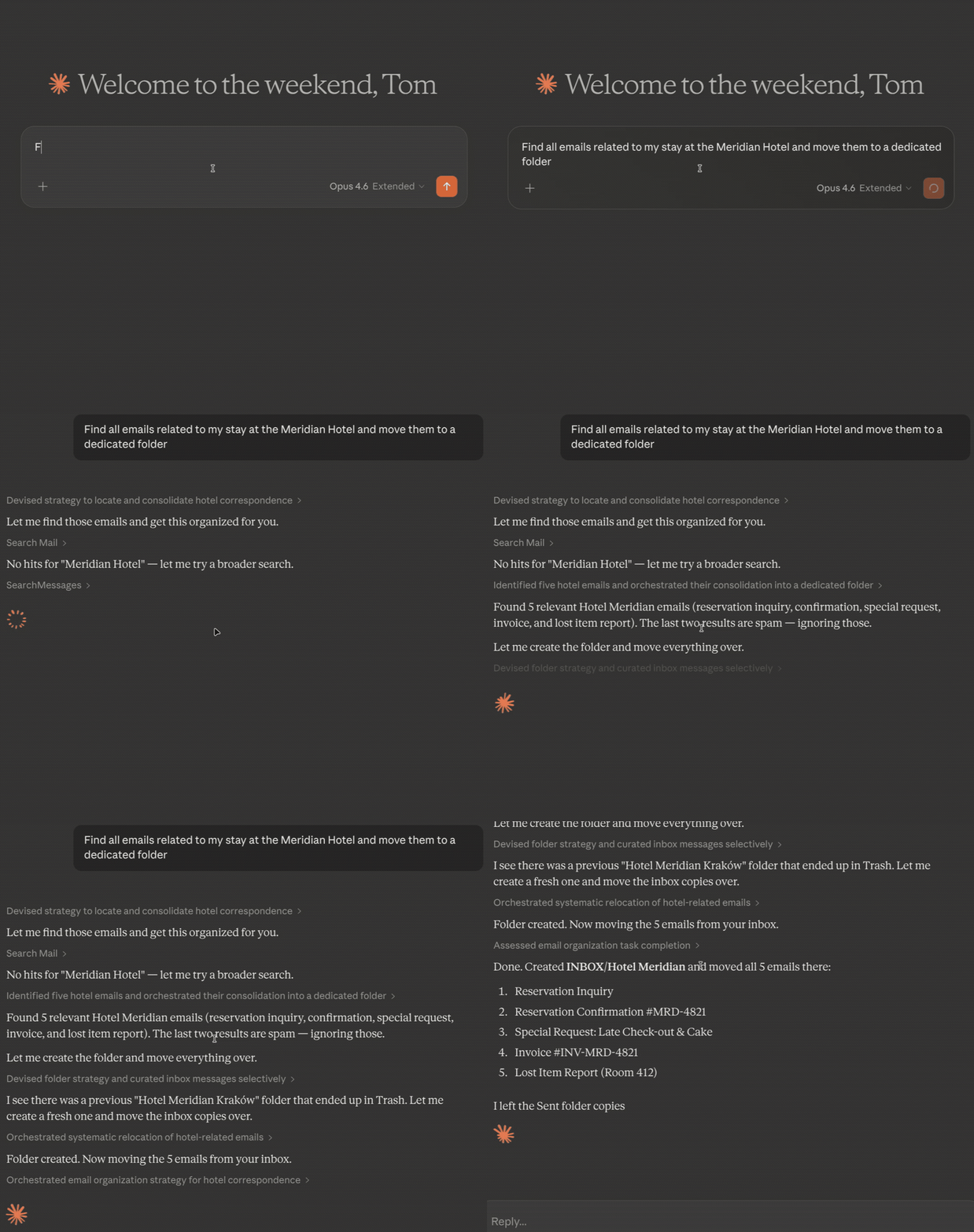
Thunderbird has no official API for AI tools. Your AI assistant can't read your email, can't help you draft replies, can't organize your inbox. This extension fixes that -- it exposes 24 tools over MCP so any compatible AI (Claude, GPT, local models) can work with your mail the way you'd expect.
Compose tools open a review window before sending. Nothing gets sent without your approval.
How it works
                    stdio              HTTP (localhost:8765)
  MCP Client  <----------->  Bridge  <--------------------->  Thunderbird
  (Claude, etc.)           mcp-bridge.cjs                    Extension + HTTP Server
The Thunderbird extension embeds a local HTTP server. The Node.js bridge translates between MCP's stdio protocol and HTTP. Your AI talks stdio, Thunderbird talks HTTP, the bridge connects them. The bridge handles MCP lifecycle methods (initialize, ping) locally, so clients can connect even before Thunderbird is fully loaded.
What you can do
| Tool | Description |
|---|---|
listAccounts | List all email accounts and their identities |
listFolders | Browse folder tree with message counts — filter by account or subtree |
searchMessages | Find emails by subject, sender, recipient, date range, read status, or within a specific folder |
getMessage | Read full email content with optional attachment saving -- includes inline CID images |
getRecentMessages | Get recent messages with date and unread filtering |
updateMessage | Mark read/unread, flag/unflag, move between folders, or trash -- supports bulk via messageIds |
deleteMessages | Delete messages — drafts are safely moved to Trash |
createFolder | Create new subfolders to organize your mail |
Compose
| Tool | Description |
|---|---|
sendMail | Open a compose window with pre-filled recipients, subject, and body |
replyToMessage | Reply with quoted original and proper threading |
forwardMessage | Forward with all original attachments preserved |
All compose tools open a window for you to review and edit before sending.
Filters
| Tool | Description |
|---|---|
listFilters | List all filter rules with human-readable conditions and actions |
createFilter | Create filters with structured conditions (from, subject, date...) and actions (move, tag, flag...) |
updateFilter | Modify a filter's name, enabled state, conditions, or actions |
deleteFilter | Remove a filter by index |
reorderFilters | Change filter execution priority |
applyFilters | Run filters on a folder on demand — let your AI organize your inbox |
Full control over Thunderbird's message filters. Changes persist immediately. Your AI can create sorting rules, adjust priorities, and run them on existing mail.
Contacts & Calendar
| Tool | Description |
|---|---|
searchContacts | Look up contacts from your address books |
listCalendars | List all calendars with read-only, event, and task support flags |
createEvent | Create a calendar event -- opens a review dialog, or set skipReview to add directly |
listEvents | Query events by date range with recurring event expansion |
updateEvent | Modify an event's title, dates, location, or description |
deleteEvent | Delete a calendar event by ID |
createTask | Open a pre-filled task dialog for review |
Setup
1. Install the extension
git clone https://github.com/TKasperczyk/thunderbird-mcp.git
Install dist/thunderbird-mcp.xpi in Thunderbird (Tools > Add-ons > Install from File), then restart. A pre-built XPI is included in the repo — no build step needed.
2. Configure your MCP client
Add to your MCP client config (e.g. ~/.claude.json for Claude Code):
{
  "mcpServers": {
    "thunderbird-mail": {
      "command": "node",
      "args": ["/absolute/path/to/thunderbird-mcp/mcp-bridge.cjs"]
    }
  }
}
That's it. Your AI can now access Thunderbird.
Security
The extension listens on localhost:8765 only. No remote access. However, any local process can reach it while Thunderbird is running — keep this in mind on shared machines.
Troubleshooting
| Problem | Fix |
|---|---|
| Extension not loading | Check Tools > Add-ons and Themes. Errors: Tools > Developer Tools > Error Console |
| Connection refused | Make sure Thunderbird is running and the extension is enabled |
| Missing recent emails | IMAP folders can be stale. Click the folder in Thunderbird to sync, or right-click > Properties > Repair Folder |
| Tool not found after update | Reconnect MCP (/mcp in Claude Code) to pick up new tools |
Development
# Build the extension
./scripts/build.sh

# Test the HTTP API directly
curl -X POST http://localhost:8765 \
  -H "Content-Type: application/json" \
  -d '{"jsonrpc":"2.0","id":1,"method":"tools/list"}'

# Test the bridge
echo '{"jsonrpc":"2.0","id":1,"method":"tools/list"}' | node mcp-bridge.cjs
After changing extension code: remove from Thunderbird, restart, reinstall the XPI, restart again. Thunderbird caches aggressively.
Project structure
thunderbird-mcp/
├── mcp-bridge.cjs              # stdio <-> HTTP bridge
├── extension/
│   ├── manifest.json
│   ├── background.js           # Extension entry point
│   ├── httpd.sys.mjs           # Embedded HTTP server (Mozilla)
│   └── mcp_server/
│       ├── api.js              # All 24 MCP tools
│       └── schema.json
└── scripts/
    ├── build.sh
    └── install.sh
Known issues
- IMAP folder databases can be stale until you click on them in Thunderbird
- Email bodies with control characters are sanitized to avoid breaking JSON
- HTML-only emails are converted to plain text (original formatting is lost)
- Recurring calendar event CRUD operates on the series, not individual occurrences
License
MIT. The bundled httpd.sys.mjs is from Mozilla and licensed under MPL-2.0.