UI Annotator MCP




See what every UI element is called — in any browser, zero extensions.
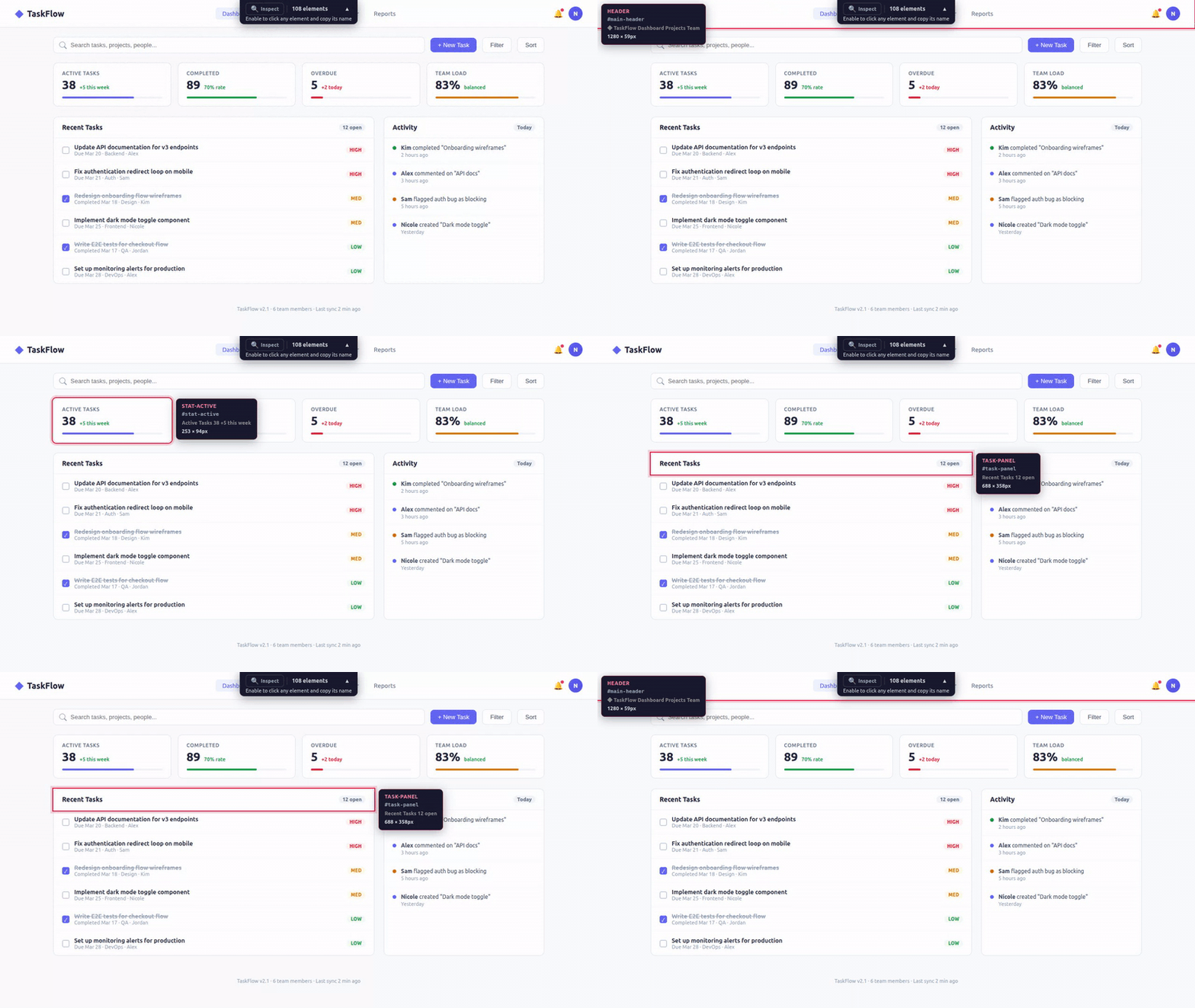
An MCP server that adds interactive hover annotations to any web page. Open a proxied URL, hover any element, see its name. Tell your AI assistant "make the sidebar wider" — it knows exactly what you mean.
The Problem
When reviewing a web UI with an AI coding assistant, the hardest part isn't the code change — it's describing which element you want changed.
"That thing on the left... the second row... no, the one with the icon..."
You don't know what it's called. The AI doesn't know what you're pointing at. You waste time on miscommunication instead of shipping.
The Solution
Open your page through the annotator proxy. Hover any element — instantly see its name, CSS selector, and dimensions. Now you both speak the same language.
# Start the MCP server
npx @mcpware/ui-annotator

# Open in ANY browser
http://localhost:7077/localhost:3847
That's it. No browser extensions. No code changes. No setup. Works in Chrome, Firefox, Safari, Edge — any browser.
How It Works
Your app (localhost:3847)
        │
        ▼
┌─────────────────────┐
│  UI Annotator Proxy  │ ← Reverse proxy on port 7077
│  (MCP Server)        │
└─────────────────────┘
        │
        ▼
Proxied page with hover annotations injected
        │
        ├──► User sees: hover overlay + tooltip with element names
        └──► AI sees: structured element data via MCP tools
The proxy fetches your page, injects a lightweight annotation script, and serves it back. The script scans the DOM, identifies named elements, and reports them to the MCP server. Your AI assistant queries the server to understand what's on the page.
Features
Hover Annotations
Hover any element to see:
- Element name (pink) — the human-readable identifier
- CSS selector (monospace) — the technical reference
- Content preview — what text the element contains
- Dimensions — width × height in pixels
Inspect Mode
Click the Inspect button in the toolbar (or let your AI toggle it). In inspect mode:
- Click any element → copies its name to clipboard
- All page interactions are paused (clicks don't trigger buttons/links)
- Click Inspect again to return to normal mode
Collapsible Toolbar
The toolbar sits at the top center of the page showing:
- Inspect toggle button
- Element count
- Helpful subtitle explaining what to do
- Collapse button (▲) to minimize when not needed
MCP Tools for AI
| Tool | What it does |
|---|---|
annotate(url) | Returns proxy URL for user to open in any browser |
get_elements() | Returns all detected UI elements with names, selectors, positions |
highlight_element(name) | Flash-highlights a specific element so user can confirm |
rescan_elements() | Force DOM rescan after page changes |
inspect_mode(enabled) | Toggle inspect mode remotely |
Why Not Just Use DevTools?
| Browser DevTools | UI Annotator | |
|---|---|---|
| Target user | Frontend developers who know the DOM | Anyone — QA, PM, designer, junior dev |
| Learning curve | Need to understand DOM tree, CSS selectors, box model | Hover and read — zero learning |
| Communication | "The div.flex.gap-4 inside the second child of..." | "The sidebar" |
| Language | CSS/HTML technical terms | Human-readable names |
| Setup | Teach people to open DevTools + navigate the DOM | Open a URL |
| AI integration | None — AI can't see what you're inspecting | MCP — AI sees the same element names you do |
DevTools is for debugging. UI Annotator is for communication — giving humans and AI a shared vocabulary for UI elements.
Why Not Use Existing Tools?
| Tool | Approach | Why we're different |
|---|---|---|
| MCP Pointer | Chrome extension + MCP server | Requires Chrome extension. Click-to-inspect, no hover overlay. |
| Agentation | npm package embedded in your app | Requires code changes. React 18+ dependency. Not zero-config. |
| Cursor Visual Editor | Built-in IDE browser | Only works inside Cursor IDE. |
| Windsurf Previews | Built-in IDE browser | Only works inside Windsurf IDE. |
| Chrome DevTools MCP | Programmatic DOM access for AI | AI can inspect, but humans don't see visual annotations. |
| VisBug | Chrome extension for visual editing | No MCP integration. No AI connection. Chrome only. |
| Marker.io / BugHerd | SaaS visual feedback widgets | Not MCP. Paid. For bug reporting, not AI-assisted development. |
Feature Comparison
| Feature | UI Annotator | MCP Pointer | Agentation | Cursor | Chrome DevTools MCP |
|---|---|---|---|---|---|
| Visual hover annotation | Yes | No | Partial | Yes (IDE only) | No |
| Shows element names | Yes | Yes | Yes | No (high-level) | Programmatic |
| Shows dimensions | Yes | Yes | Yes (Detailed) | Yes | Programmatic |
| MCP server | Yes | Yes | Yes | No | Yes |
| Zero browser extensions | Yes | No | Yes | N/A | No |
| Zero code changes | Yes | Yes | No | N/A | Yes |
| Any browser | Yes | Chrome only | Desktop only | Cursor only | Chrome only |
| Zero dependencies | Yes | Chrome ext | React 18+ | Cursor | Chrome |
| Click to copy element name | Yes | No | No | No | No |
Architecture
Zero external dependencies
- Reverse proxy: Node.js built-in
httpmodule - MCP server:
@modelcontextprotocol/sdk(stdio transport) - Communication: HTTP POST (browser → server) + GET polling (server → browser)
- No WebSocket, no Express, no browser extension
How the proxy works
- User requests
localhost:7077/localhost:3847 - Proxy fetches
http://localhost:3847 - For HTML responses:
- Injects
fetch()/XMLHttpRequestinterceptor (rewrites API paths through proxy) - Rewrites
href="/..."andsrc="/..."attributes to route through proxy - Injects annotation script before
</body>
- Injects
- For non-HTML (CSS, JS, images): passes through directly
- Strips
Content-Security-Policyheaders to allow injected script
How annotation works
- Script scans DOM for elements with
id,class, semantic roles, or interactive roles - On hover: positions overlay border (follows
border-radius) + positions tooltip (always within viewport) - Reports all detected elements to server via
POST /__annotator/elements - Polls
GET /__annotator/commandsevery second for server instructions (highlight, rescan, inspect toggle) MutationObserverauto-rescans when DOM changes
Quick Start
With Claude Code
# Add as MCP server
claude mcp add ui-annotator -- npx @mcpware/ui-annotator

# Then in conversation:
# "Annotate my app at localhost:3847"
# → AI returns proxy URL, you open it, hover elements, discuss changes by name
Manual
npx @mcpware/ui-annotator
# Proxy starts on http://localhost:7077
# Open http://localhost:7077/localhost:YOUR_PORT
Environment Variables
| Variable | Default | Description |
|---|---|---|
UI_ANNOTATOR_PORT | 7077 | Port for the proxy server |
License
MIT