U.S. Census Bureau Data API MCP





Bringing official Census Bureau statistics to AI assistants everywhere.
The U.S. Census Bureau Data API MCP is a Model Context Protocol (MCP) server that connects AI assistants with data from the Census Data API and other official Census Bureau sources. This project is built using the MCP Typescript SDK.
Contents
- Getting Started
- Using the MCP Server
- How the MCP Server Works
- Development
- MCP Server Architecture
- Available Methods
- Available Tools
- Available Prompts
- Helper Scripts
- Additional Information
Getting Started
To get started, you will need:
- A valid Census Bureau Data API key
- Docker (i.e. Docker Desktop)
- Node 18+
Using the MCP Server
To use the U.S. Census Bureau Data API MCP server:
- Clone or download the project locally.
- In a terminal window, navigate to the project’s root directory and run
docker compose --profile prod run --rm census-mcp-db-init sh -c "npm run migrate:up && npm run seed"to pull data from the Census Data API into the local database. This is only required on first-time setup. - Configure your AI Assistant to use the MCP Server (see below).
- Start your AI Assistant.
Here is an example configuration file that includes the appropriate scripts for launching the MCP Server:
{
  "mcpServers": {
    "mcp-census-api": {
      "command": "bash",
      "args": [
        "/Path/To/Server/us-census-bureau-data-api-mcp/scripts/mcp-connect.sh"
      ],
      "env": {
        "CENSUS_API_KEY": "YOUR_CENSUS_API_KEY"
      }
    }
  }
}
Note that the CENSUS_API_KEY variable is required. This defines the env variable in the MCP Client and passes it to the MCP server via the mcp-connect script.
Be sure to update the path to the us-census-bureau-data-api-mcp directory in args and provide a valid CENSUS_API_KEY.
Updating the MCP Server
When a new version of this project is released, you will need to rebuild the production environment for the latest features. From the mcp-db/ directory, run the following:
npm run prod:down
npm run prod:build
After that, you can relaunch your MCP Client and it should connect to the server again.
How the MCP Server Works
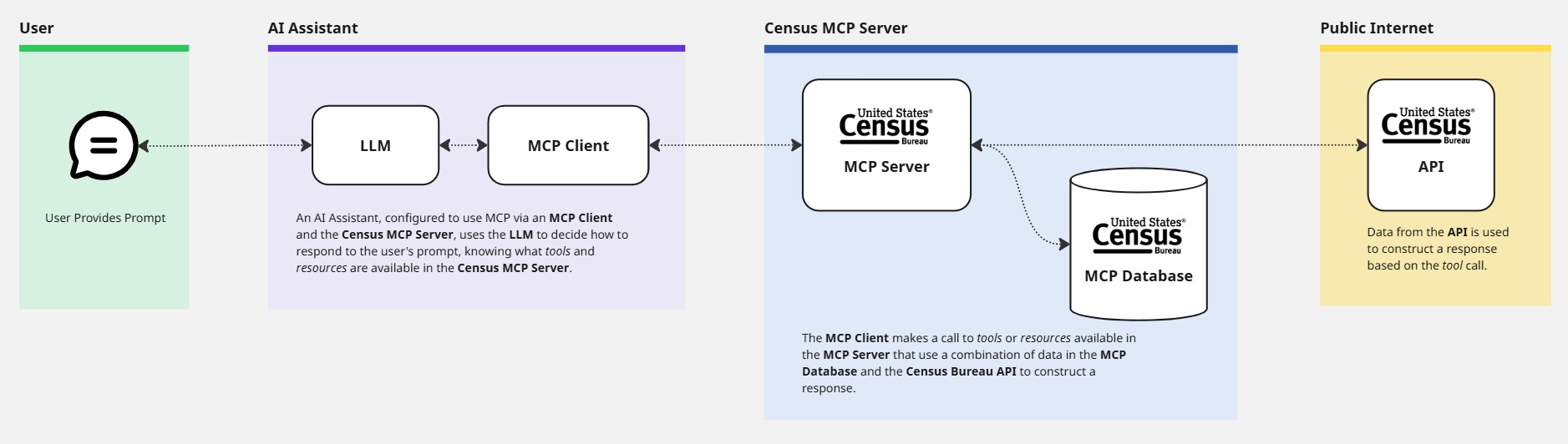
The U.S. Census Bureau Data API MCP server uses data from the Census Data API and other official sources to construct contextually rich data and statistics for use with AI Assistants. The Census Data API is the primary source of data but some of the API's data is pulled down to a local postgres container to enable more robust and performant search functionality. Below is an illustration of how user prompts are processed by AI Assistants and the MCP Server.
Development
Run docker compose --profile dev up from the root of the project to build the containers. This starts the MCP Database containers that runs migrations and seeds a local postgres database to supplement information from the Census Bureau API. It also starts the MCP Server itself.
By default, all logging functions are disabled in the mcp-server to prevent json validation errors when interacting with the MCP server through MCP clients. To enable logging for development purposes, set DEBUG_LOGS=true when interacting with the server directly using the examples below, e.g. echo '{CALL_ARGUMENTS}' docker exec -e DEBUG_LOGS=true -i -e CENSUS_API_KEY=YOUR_CENSUS_API_KEY mcp-server node dist/index.js.
Testing
This project uses Vitest to test the MCP Server and MCP Database.
MCP Server Testing
Prior to running the MCP Server tests, a valid Census Bureau API key is required. This key should be defined in the .env file of the mcp-server directory. The sample.env offers an example of how this .env file should look.
To run tests, navigate to the mcp-server/ directory and run npm run test. To run ESLint, run npm run lint from the same directory.
MCP Database Testing
A .env file needs to be created in the mcp-db/ directory with a valid DATABASE_URL variable defined. The sample.env in the same directory includes the default value.
To run tests, navigate to the mcp-db/ directory and run npm run test.
MCP Server Architecture
mcp-server/src/- Source code for the MCP Server.mcp-server/src/index.ts- Starts the MCP Server and registers tools.mcp-server/src/server.ts- Defines theMcpServerclass that handles calls to the server, e.g. howtools/listandtools/callsrespond to requestsmcp-server/src/tools/- Includes tool definitions and shared classes, e.g.BaseToolandToolRegistry, to reduce repetition and exposes the tools list to the servermcp-server/src/schema/- Houses each tool’s schema and is used to validate schemas in tests
Available Methods
The MCP server exposes several methods: tools/list, tools/call, prompts/list, and prompts/get.
Available Tools
This section covers tools that can be called.
List Datasets
The list-datasets tool is used for fetching a subset of metadata for all datasets that are available in the Census Bureau's API.
It requires no arguments.
Fetch Dataset Geography
The fetch-dataset-geography tool is used for fetching available geography levels for filtering a given dataset. It accepts the following arguments:
- Dataset (Required) - The identifier of the dataset, e.g.
'acs/acs1' - Year (Optional) - The vintage of the dataset, e.g.
1987
Fetch Aggregate Data
The fetch-aggregate-data tool is used for fetching aggregate data from the Census Bureau's API. It accepts the following arguments:
- Dataset (Required) - The identifier of the dataset, e.g.
'acs/acs1' - Year (Required) - The vintage of the dataset, e.g.
1987 - Get (Required) - An object that is required that accepts 2 optional arguments:
- Variables (optional) - An array of variables for filtering responses by attributes and rows, e.g.
'NAME','B01001_001E' - Group (Optional) - A string that returns a larger collection of variables, e.g.
S0101
- Variables (optional) - An array of variables for filtering responses by attributes and rows, e.g.
- For (Optional) - A string that restricts geography to various levels and is required in most datasets
- In (Optional) - A string that restricts geography to smaller areas than state level
- UCGID (Optional) - A string that restricts geography by Uniform Census Geography Identifier (UCGID), e.g.
0400000US41 - Predicates (Optional) - Filter options for the dataset, e.g.
'for': 'state*' - Descriptive (Optional) - Adds variable labels to API response (default:
false), e.g.true
Resolve Geography FIPS Tool
The resolve-geography-fips tool is used to search across all Census Bureau geographies to return a list of potential matches and the correct FIPS codes and parameters used to query data in them. This tool accepts the following arguments:
- Geography Name (Required) - The name of the geography to search, e.g.
Philadelphia - Summary Level (Optional) - The summary level to search. Accepts name or summary level code, e.g.
Place,160
Available Prompts
This section covers prompts that can be called. According to the Model Context Protocol docs, prompts are "pre-built instruction templates that tell the model to work with specific tools and resources". This means that prompts override the default model behavior. Prompts are not a menu of allowed questions. They are instructions, not constraints on server capability.
Population
This get_population_data prompt retrieves population statistics for US states, counties, cities, and other geographic areas. It resolves geographic names to their corresponding FIPS codes before fetching data. This prompt accepts the following argument:
geography_name(required): Name of the geographic area (state, county, city, etc.)
Helper Scripts
For easier command-line usage, this project includes bash helper scripts in the scripts/dev directory that wrap the complex Docker commands and handle the CENSUS_API_KEY parameter automatically.
Additional Information
For more information about the parameters above and all available predicates, review the Census Bureau's API documentation.