
UseCortex MCP Server
Give your AI coding agent a persistent memory — read and write knowledge from any tool.
Website · Quick Start · Tools · Pricing
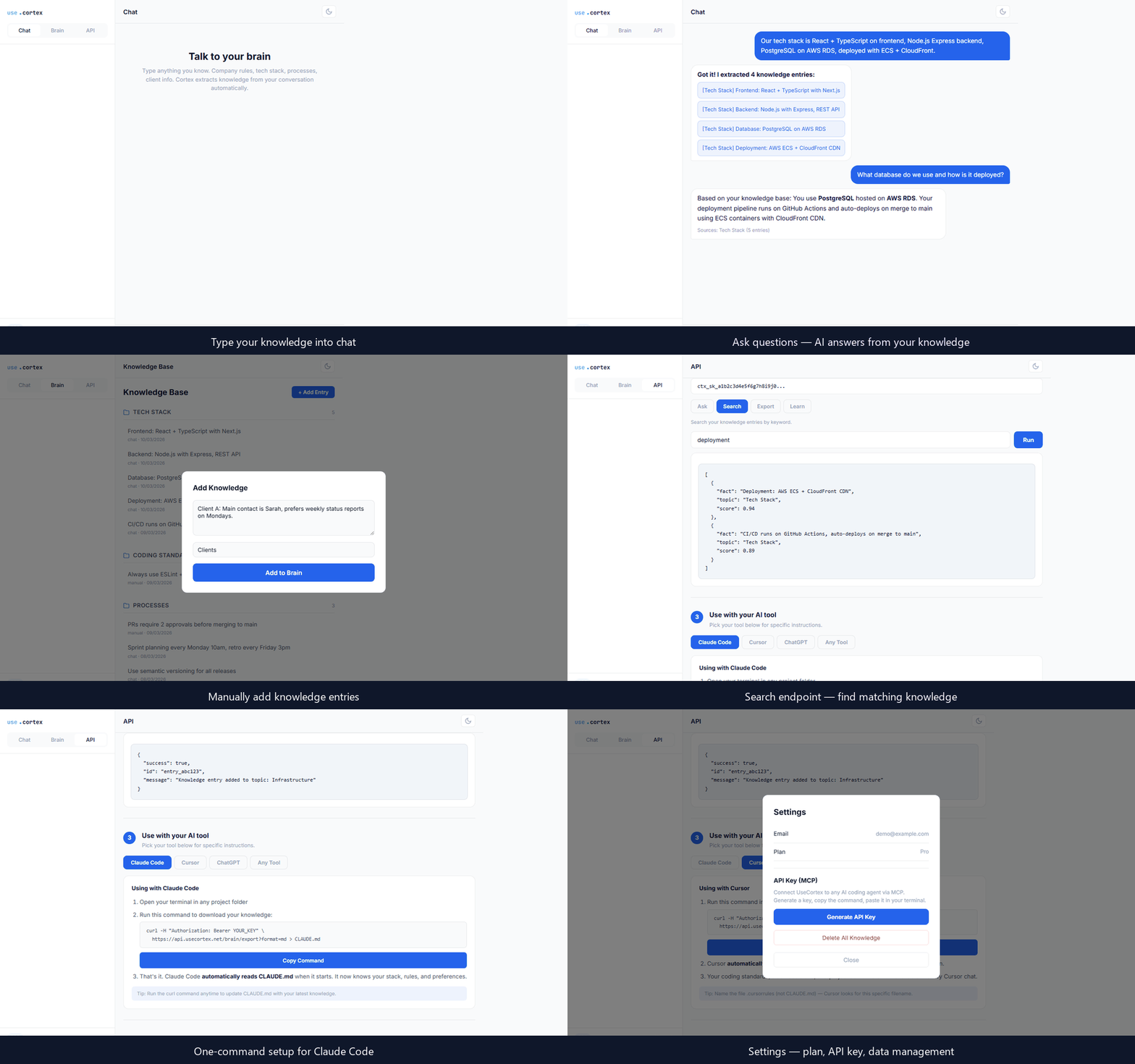
UseCortex MCP is a Model Context Protocol server that gives AI coding agents persistent memory. Your agent can read knowledge you've stored and write new discoveries back — all through a single encrypted endpoint.
No context window limits. No copy-pasting. No outdated docs. Your AI remembers everything.
How It Works
- You chat — describe your coding standards, architecture decisions, client requirements, anything
- UseCortex extracts — AI automatically organizes facts into structured topics
- Your agent recalls — any MCP-compatible tool can query your knowledge instantly
- Knowledge grows — your agent can push new discoveries back, so your knowledge base stays current
Features
- Two-way knowledge flow — read context into projects, write discoveries back
- Works with any MCP client — compatible with any AI coding agent that supports the Model Context Protocol
- Encrypted at rest — AES-256 encryption with per-user keys
- No vendor lock-in — your knowledge works across every AI tool
- Structured by topic — knowledge auto-organized, not dumped in one pile
Quick Start
Prerequisites
- A free UseCortex account
- An MCP-compatible AI coding agent
1. Generate an API key
Sign up at usecortex.net, then navigate to Settings → API Keys → Generate.
Note: Copy the key immediately after generation. It will not be shown again.
2. Install (one command)
Run this in your terminal — replace YOUR_API_KEY with the key from step 1:
claude mcp add usecortex --transport url https://api.usecortex.net/mcp --header "Authorization: Bearer YOUR_API_KEY"
That's it. Restart your AI coding agent and UseCortex tools are ready.
Manual setup (alternative)
If you prefer to configure manually, add this to your MCP client config file:
{
  "mcpServers": {
    "usecortex": {
      "type": "url",
      "url": "https://api.usecortex.net/mcp",
      "headers": {
        "Authorization": "Bearer YOUR_API_KEY"
      }
    }
  }
}
Replace YOUR_API_KEY with the key generated in step 1.
Available Tools
query_knowledge
Ask a natural language question and get an AI-powered answer based on your stored knowledge.
| Parameter | Type | Required | Description |
|---|---|---|---|
query | string | Yes | Natural language question |
topic | string | No | Filter by specific topic |
list_topics
List all knowledge topics. Takes no parameters.
add_knowledge
Write new knowledge to your base. Your agent can store discoveries, decisions, or patterns it finds.
| Parameter | Type | Required | Description |
|---|---|---|---|
content | string | Yes | The knowledge to store |
topic | string | No | Topic to file under (auto-detected if omitted) |
get_topic
Retrieve all knowledge entries for a specific topic.
| Parameter | Type | Required | Description |
|---|---|---|---|
topic | string | Yes | Topic name to retrieve |
search_knowledge
Search knowledge entries by keyword (text match).
| Parameter | Type | Required | Description |
|---|---|---|---|
query | string | Yes | Search term |
capture_session (Memory plan)
Capture an AI session summary into persistent memory. Store what you learned, decided, or built.
| Parameter | Type | Required | Description |
|---|---|---|---|
summary | string | Yes | Compressed summary of the session |
tool | string | No | AI tool used (claude-code, cursor, chatgpt) |
project | string | No | Project name or path |
tags | string[] | No | Tags for categorization |
observations | string | No | Detailed observations as JSON string |
recall_memory (Memory plan)
Search across all captured session memories using AI. Ask what you worked on or what decisions were made.
| Parameter | Type | Required | Description |
|---|---|---|---|
query | string | Yes | Natural language question about past sessions |
tool | string | No | Filter by AI tool |
project | string | No | Filter by project |
limit | number | No | Max results (default 20) |
list_sessions (Memory plan)
List recent captured session memories.
| Parameter | Type | Required | Description |
|---|---|---|---|
tool | string | No | Filter by AI tool |
project | string | No | Filter by project |
limit | number | No | Max results (default 10) |
Use Cases
| Who | What |
|---|---|
| Developers | Your coding standards, architecture decisions, and project context — automatically available to your AI agent |
| Support teams | Feed real policies and procedures to any support bot — it answers with facts, not guesses |
| Sales teams | Store client history, pricing, and objections — pull everything before meetings |
| Individuals | Your personal brain backup — everything you know, encrypted and accessible from any AI tool |
| HR & Onboarding | Your company playbook — processes, tools, culture — available to new hires instantly |
Pricing
| Free | Pro ($9/mo) | Memory ($19/mo) | Team ($39/mo) | |
|---|---|---|---|---|
| Knowledge entries | 100 | Unlimited | Unlimited | Unlimited |
| Topics | 3 | Unlimited | Unlimited | Unlimited |
| API calls/month | 500 | 10,000 | 50,000 | 200,000 |
| Two-way API | Read only | Yes | Yes | Yes |
| AI session capture | — | — | Yes | Yes |
| Memory recall | — | — | Yes | Yes |
| Markdown sync | — | — | Yes | Yes |
| Session history | — | — | 90 days | Unlimited |
| API keys | 1 | 5 | 10 | 50 |
| Team members | — | — | — | 25 |
| Audit logs | — | — | — | Yes |
Manage your plan at usecortex.net.
Security
- All communication encrypted over HTTPS
- Knowledge encrypted at rest with AES-256
- Per-user encryption keys — even we can't read your data
- API keys scoped per user with instant revocation
Contributing
Found a bug or have a feature request? Open an issue.
Links
- UseCortex — Create your account and manage knowledge
- cortex-cli — CLI for markdown sync & terminal usage
- Model Context Protocol — Learn about MCP