




🔍 What is VidLens?
Stop watching 10 videos to answer one question. VidLens searches YouTube, reads the transcripts, and synthesizes what creators actually said — across multiple videos, with timestamps, benchmark charts, and sources.
VidLens is a Model Context Protocol server that gives AI agents deep, reliable access to YouTube. Not just transcripts — full intelligence: search, analysis, visual search, and auto-generated comparison charts.
No API key required to start. Every tool has a three-tier fallback chain (YouTube API → yt-dlp → page extraction) so nothing breaks when quota runs out or keys aren't configured.
Try it — paste any of these into Claude:
"I'm thinking about buying the M5 Max MacBook Pro. Search YouTube for top tech reviewers and tell me what they're saying. Is it worth the upgrade from M3/M4?"
VidLens finds 10+ reviews, reads the transcripts, extracts benchmark scores, and presents comparison charts — all from one prompt.
"I want to understand how AI agents work. Search YouTube for the best videos for a beginner and summarize what I need to know."
Discovers videos across creators, ranks by learning value, and prepares transcripts for follow-up questions.
"Search YouTube for reviews comparing the iPhone 17 Pro vs Samsung S26 Ultra. What do reviewers agree on? Where do they disagree?"
Searches, reads transcripts from multiple reviewers, and synthesizes consensus vs disagreements with sources.
🎯 Core Capabilities
🔍 Explore — One Prompt, Full Pipeline
Ask a question about YouTube and VidLens does the rest: searches, ranks by creator match and freshness, reads transcripts, extracts benchmark data, and presents comparison charts automatically. Works for product research, learning, competitive analysis — anything on YouTube.
🔎 Semantic Search Across Playlists
Import entire playlists or video sets, index every transcript with Gemini embeddings, and search across hundreds of hours of content by meaning — not just keywords.
👁️ Visual Search — See What's In Videos
Extract keyframes, describe them with Gemini Vision, run OCR on slides and whiteboards, and search by what you see — not just what's said.
📊 Intelligence Layer — Not Just Data
Sentiment analysis, niche trend discovery, content gap detection, hook pattern analysis, upload timing recommendations. The LLM does the thinking — VidLens gives it the right data.
⚡ Zero Config, Always Works
No API key needed to start. Three-tier fallback chain on every tool. Nothing breaks when quota runs out. Keys are optional power-ups.
🎬 Full Media Pipeline
Download videos/audio/thumbnails. Extract keyframes. Index comments for semantic search. Build a local knowledge base from any YouTube content.
⚡ Why VidLens?
| VidLens | Other YouTube MCP servers | |
|---|---|---|
| 🔑 Setup | ✅ Works immediately - no keys needed | ❌ Most require YouTube API key upfront |
| 🛡️ Reliability | ✅ Three-tier fallback on every tool | ❌ Single point of failure - API down = broken |
| 🧠 Intelligence | ✅ Sentiment, trends, content gaps, hooks | ❌ Raw data dumps - you do the analysis |
| 📦 Token efficiency | ✅ 75-87% smaller responses | ❌ Verbose JSON with thumbnails, etags, junk |
| 🔬 Depth | ✅ 41 tools across 10 modules | ⚠️ 1-5 tools, mostly transcripts only |
| 🖼️ Visual evidence | ✅ Returns actual frame paths + timestamps, not just text hits | ⚠️ Usually transcript-only or raw frame dumps |
| ⚖️ Trademark | ✅ Compliant naming | ⚠️ Most violate YouTube trademark |
🚀 Quick Start
1. Install
npx vidlens-mcp setup
This auto-detects your MCP clients (Claude Desktop, Claude Code), downloads yt-dlp if needed, and configures everything. No manual setup required.
2. Or configure manually
Claude Desktop — add to ~/Library/Application Support/Claude/claude_desktop_config.json:
{
  "mcpServers": {
    "vidlens-mcp": {
      "command": "npx",
      "args": ["-y", "vidlens-mcp", "serve"]
    }
  }
}
Claude Code — add to ~/.claude/settings.json:
{
  "mcpServers": {
    "vidlens-mcp": {
      "command": "npx",
      "args": ["-y", "vidlens-mcp", "serve"]
    }
  }
}
3. Restart your MCP client
Fully quit and reopen Claude Desktop (⌘Q). Claude Code picks up changes automatically.
4. Try it
Start with "Search YouTube" to activate VidLens:
"Search YouTube for the top M5 Max MacBook Pro reviews and tell me if it's worth upgrading from M4."
"Search YouTube for the best videos about agentic AI for a beginner."
"Import this playlist and search across all videos for mentions of machine learning."
"Search this video's frames for the benchmark comparison chart."
"What's trending in the AI coding niche right now?"
🧰 Tools - 41 across 10 modules
🔍 Explore - YouTube Discovery & Research
The front door — one prompt, full pipeline
| Tool | What it does |
|---|---|
exploreYouTube | Intent-aware search with multi-query ranking, parallel enrichment, transcript summaries, structured benchmark data, and background indexing. One call replaces 5-8 individual tool calls. |
📺 Core - Video & Channel Intelligence
Always available, no API key needed
| Tool | What it does |
|---|---|
findVideos | Search YouTube by query with metadata |
inspectVideo | Deep metadata - tags, engagement, language, category |
inspectChannel | Channel stats, description, recent uploads |
listChannelCatalog | Browse a channel's full video library |
readTranscript | Full transcript with timestamps and chapters |
readComments | Top comments with likes and engagement |
expandPlaylist | List all videos in any playlist |
🔎 Knowledge Base - Semantic Search
Index transcripts and search across them with natural language
| Tool | What it does |
|---|---|
importPlaylist | Index an entire playlist's transcripts |
importVideos | Index specific videos by URL/ID |
searchTranscripts | Natural language search across indexed content |
listCollections | Browse your indexed collections |
setActiveCollection | Scope searches to one collection |
clearActiveCollection | Search across all collections |
removeCollection | Delete a collection and its index |
💬 Sentiment & Analysis
Understand what audiences think and feel
| Tool | What it does |
|---|---|
measureAudienceSentiment | Comment sentiment with themes and risk signals |
analyzeVideoSet | Compare performance across multiple videos |
analyzePlaylist | Playlist-level engagement analytics |
buildVideoDossier | Complete single-video deep analysis |
🎯 Creator Intelligence
Insights for content strategy
| Tool | What it does |
|---|---|
scoreHookPatterns | Analyze what makes video openings work |
researchTagsAndTitles | Tag and title optimization insights |
compareShortsVsLong | Short-form vs long-form performance |
recommendUploadWindows | Best times to publish for engagement |
📈 Discovery & Trends
Find what's working in any niche
| Tool | What it does |
|---|---|
discoverNicheTrends | Momentum, saturation, content gaps in any topic |
exploreNicheCompetitors | Channel landscape and top performers |
🎬 Media Assets
Download and manage video files locally
| Tool | What it does |
|---|---|
downloadAsset | Download video, audio, or thumbnails |
listMediaAssets | Browse stored media files |
removeMediaAsset | Clean up downloaded assets |
extractKeyframes | Extract key frames from videos |
mediaStoreHealth | Storage usage and diagnostics |
🖼️ Visual Search
Three-layer visual intelligence. Not transcript reuse.
| Tool | What it does |
|---|---|
indexVisualContent | Extract frames, run Apple Vision OCR + feature prints, Gemini frame descriptions, and Gemini semantic embeddings |
searchVisualContent | Search visual frames using semantic embeddings + lexical matching. Returns actual image paths + timestamps as evidence |
findSimilarFrames | Image-to-image frame similarity using Apple Vision feature prints |
Three layers, all real:
- Apple Vision feature prints — image-to-image similarity (find frames that look alike)
- Gemini 2.5 Flash frame descriptions — natural language scene understanding per frame
- Gemini semantic embeddings — 768-dim embedding retrieval over OCR + description text for true text→visual search
What you always get back: frame path on disk, timestamp, source video URL/title, match explanation, OCR text, visual description.
What is NOT happening: no transcript embeddings are reused for visual search. This is a separate visual index.
💭 Comment Knowledge Base
Index and semantically search YouTube comments
| Tool | What it does |
|---|---|
importComments | Index a video's comments for search |
searchComments | Natural language search over comment corpus |
listCommentCollections | Browse comment collections |
setActiveCommentCollection | Scope comment searches |
clearActiveCommentCollection | Search all comment collections |
removeCommentCollection | Delete a comment collection |
🏥 Diagnostics
Health checks and pre-flight validation
| Tool | What it does |
|---|---|
checkSystemHealth | Full system diagnostic report |
checkImportReadiness | Validate before importing content |
🔑 API Keys (Optional)
VidLens works without any API keys. Add them to unlock more capabilities:
| Key | What it unlocks | Free? | How to get it |
|---|---|---|---|
YOUTUBE_API_KEY | Better metadata, comment API, search via YouTube API | ✅ Free tier (10,000 units/day) | Google Cloud Console → APIs → Enable YouTube Data API v3 → Credentials → Create API Key |
GEMINI_API_KEY | Higher-quality embeddings for semantic search (768d vs 384d) | ✅ Free tier | Google AI Studio → Get API Key |
⚠️ These are separate keys from separate Google services. A Gemini key will NOT work for YouTube API calls and vice versa. Create them independently.
# Configure via setup wizard
npx vidlens-mcp setup --youtube-api-key YOUR_YOUTUBE_KEY --gemini-api-key YOUR_GEMINI_KEY

# Or via environment variables
export YOUTUBE_API_KEY=your_youtube_key
export GEMINI_API_KEY=your_gemini_key
💻 CLI
npx vidlens-mcp               # Start MCP server (stdio)
npx vidlens-mcp serve         # Start MCP server (explicit)
npx vidlens-mcp setup         # Auto-configure Claude Desktop + Claude Code
npx vidlens-mcp doctor        # Run diagnostics
npx vidlens-mcp version       # Print version
npx vidlens-mcp help          # Usage guide
Doctor - diagnose issues
npx vidlens-mcp doctor --no-live
Checks: Node.js version, yt-dlp availability, API key validation, data directory health, MCP client registration (Claude Desktop, Claude Code).
📱 Works Everywhere — Desktop, Cowork, Phone
VidLens works across the full Claude ecosystem. Set it up once, use it everywhere.
Claude Desktop — Chat
The classic experience. Ask a question, get charts and analysis inline. Best for interactive research sessions.
Claude Desktop — Cowork Projects (March 2026)
Create a persistent research project with VidLens connected. Claude remembers context across sessions — last week's competitive research informs this week's analysis. Set up scheduled tasks that run automatically:
"Every Monday, search YouTube for new AI agent framework videos and compare to last week's findings."
Claude Dispatch — From Your Phone (March 2026)
Trigger any VidLens research from the Claude mobile app. Ask from your phone, Claude Desktop runs the tools locally, results come back to your pocket:
"Run my competitive research project — what new M5 Max content dropped this weekend?"
Claude Code — Remote Control
Start a Claude Code session with claude --remote-control, then continue from any browser or your phone at claude.ai/code. Full tool access, full context.
Note: Your Mac must be awake with Claude Desktop open for Cowork, Dispatch, and scheduled tasks to execute.
🏗️ Architecture
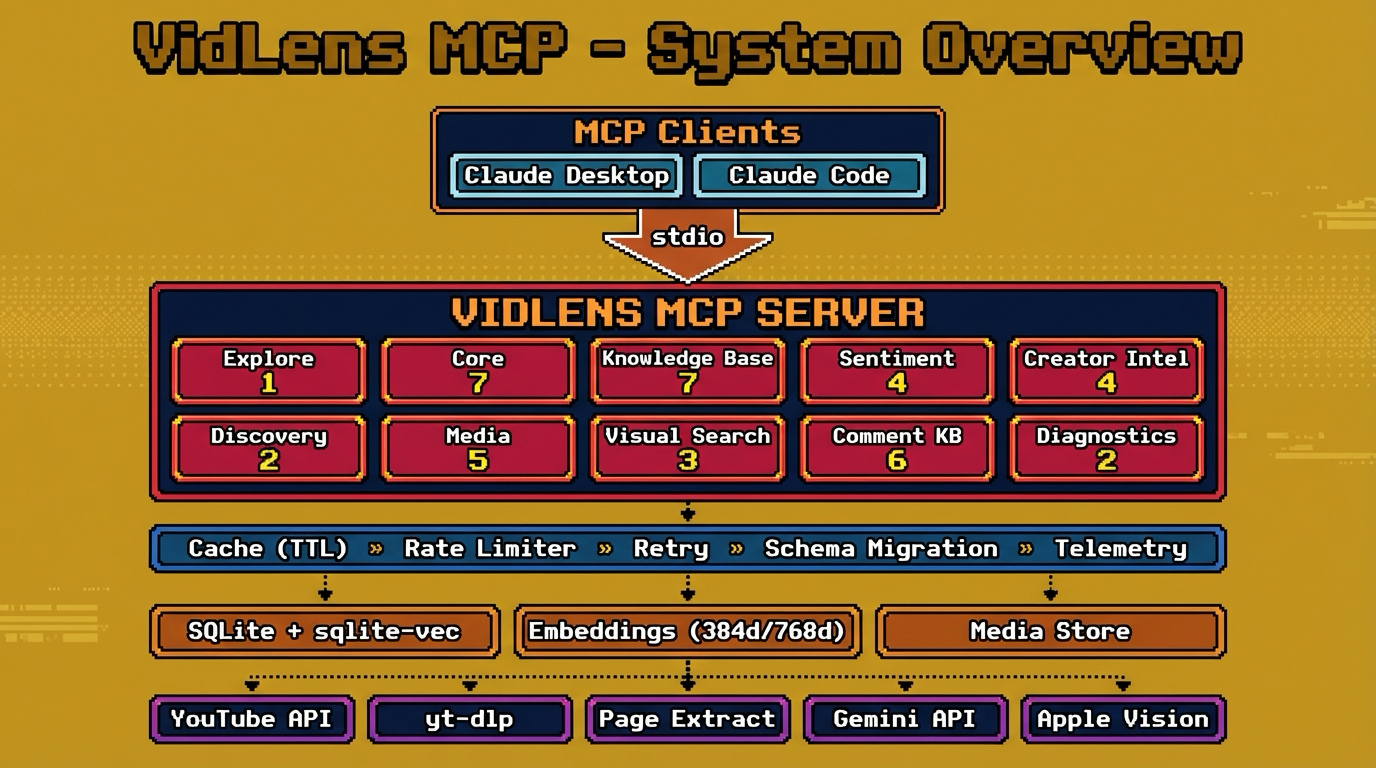
System Overview
How the Fallback Chain Works
Every tool that touches YouTube data uses the same resilience pattern:
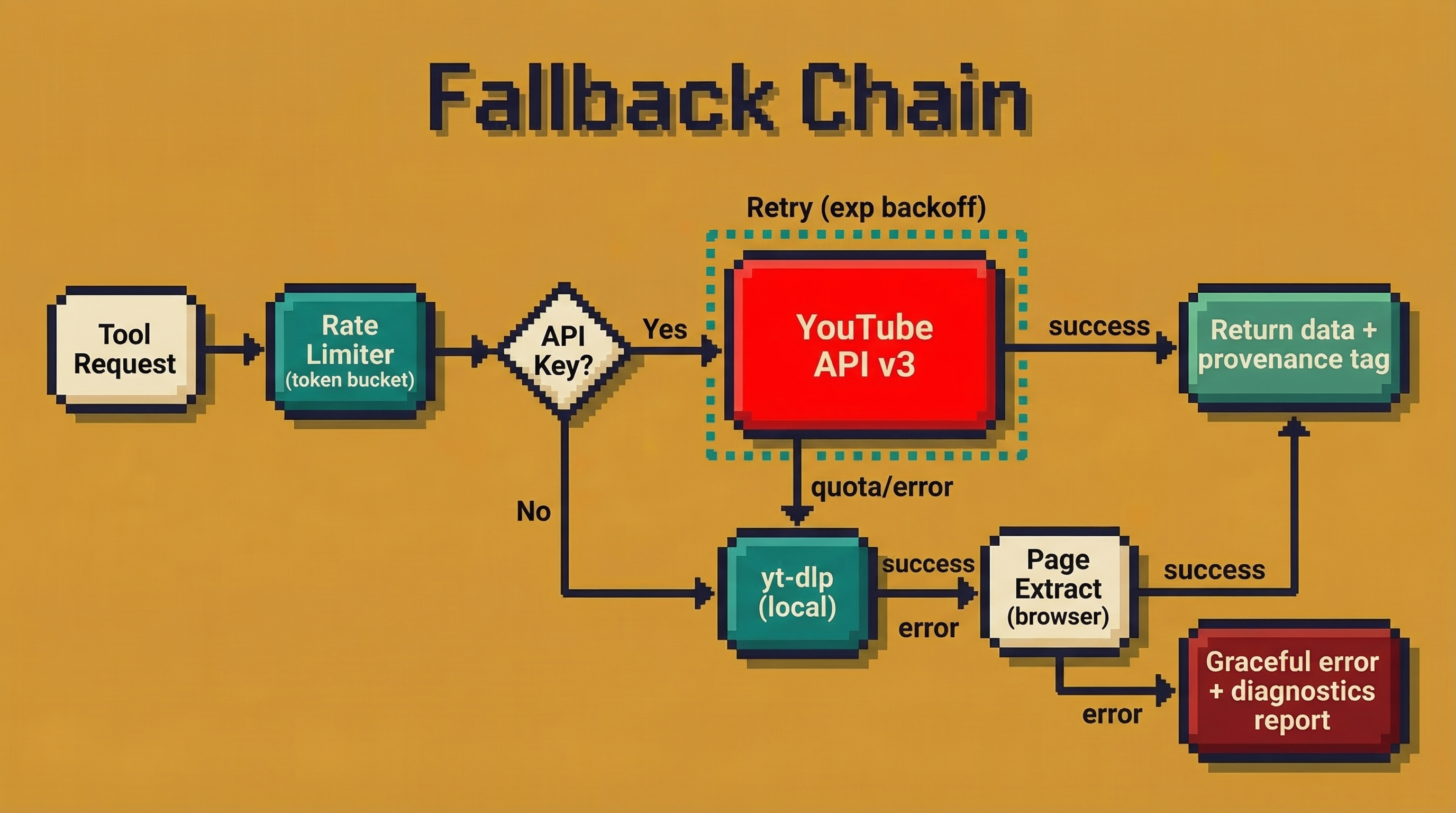
Every response includes a provenance field telling you exactly which tier served the data and whether anything was partial. No silent degradation — you always know what happened.
Visual Search Pipeline
Visual search is not transcript reuse. It's a dedicated three-layer index:
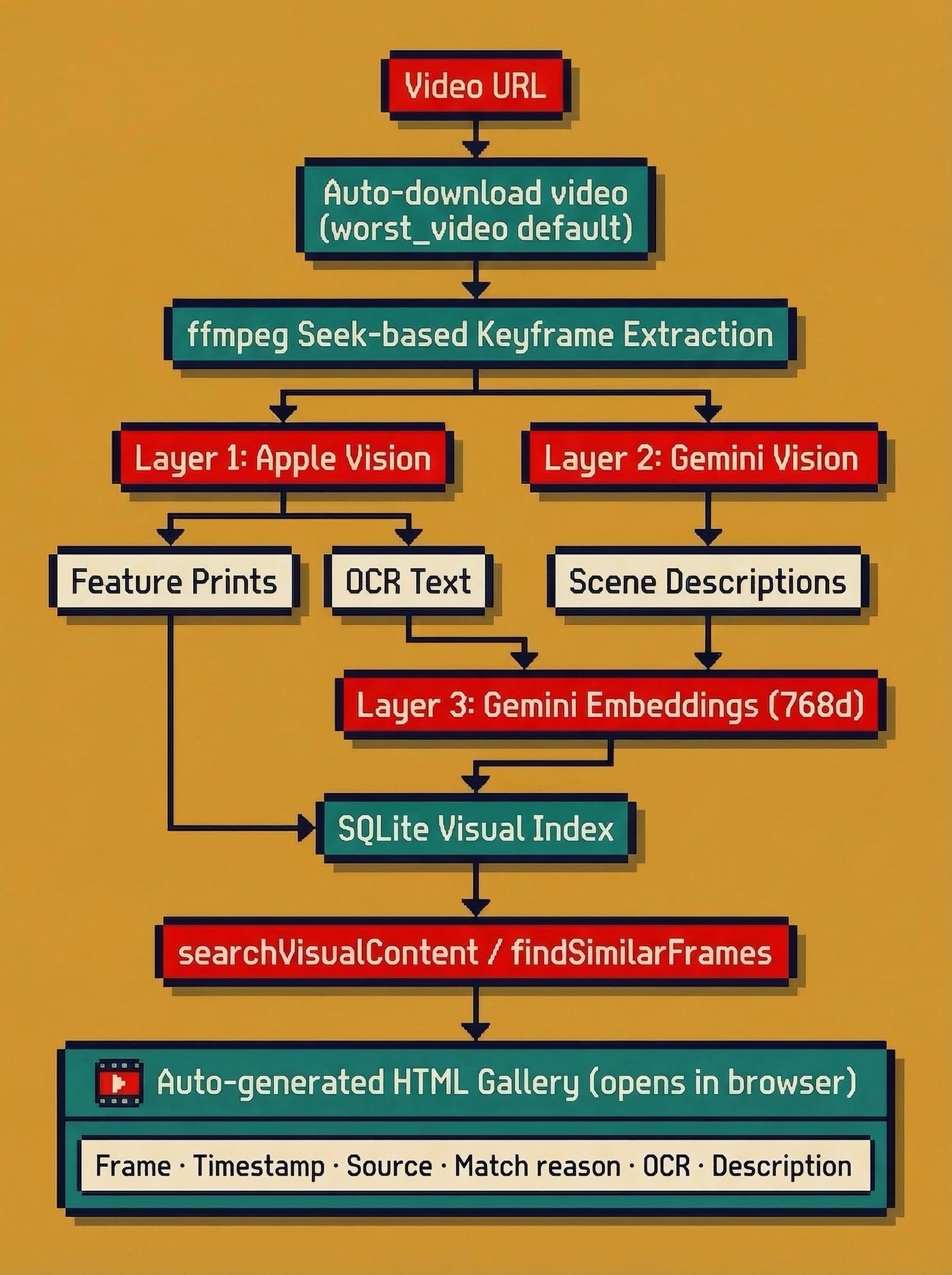
Three layers, all real:
- Apple Vision feature prints — image-to-image similarity (find frames that look alike)
- Gemini Vision frame descriptions — natural language scene understanding per frame
- Gemini semantic embeddings — 768-dim retrieval over OCR + description text
Data Storage
Everything lives in a single directory. No external databases, no Docker, no infrastructure.
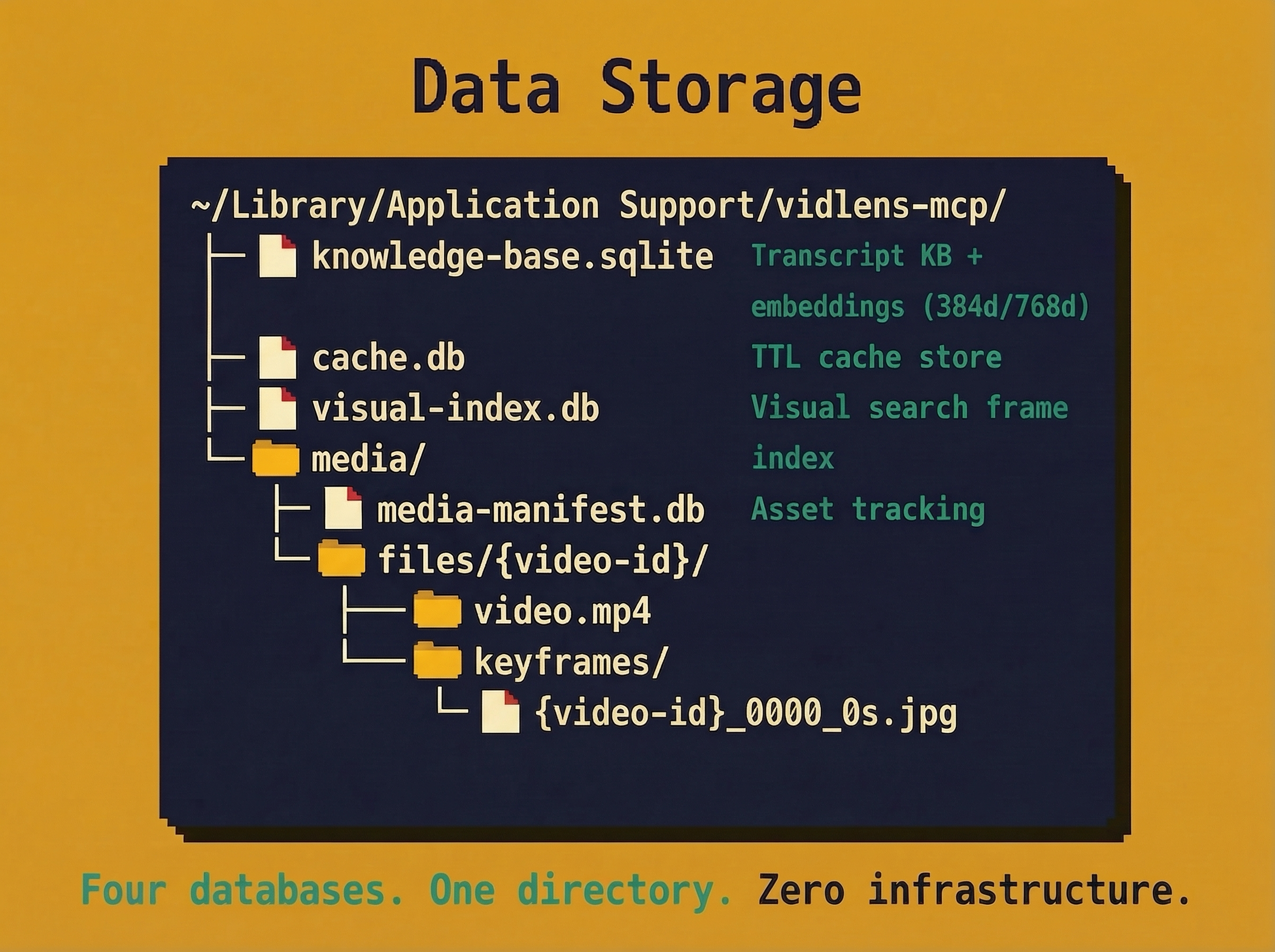
One directory. Portable. Back it up by copying. Delete it to start fresh.
📋 Requirements
| Requirement | Status | Notes |
|---|---|---|
| Node.js ≥ 22 | Required | Uses node:sqlite — node --version to check |
| yt-dlp | Auto-installed | Downloaded automatically during npx vidlens-mcp setup |
| ffmpeg | Optional | Needed for frame extraction and visual indexing |
| YouTube API key | Optional | Unlocks comments, better metadata |
| Gemini API key | Optional | Upgrades transcript embeddings and frame descriptions for visual search |
| macOS Apple Vision | Automatic on macOS | Powers native OCR and image similarity for visual search |
🔧 Troubleshooting
"Tool not found" in Claude Desktop
Fully quit Claude Desktop (⌘Q, not just close window) and reopen. MCP servers only load on startup.
"YOUTUBE_API_KEY not configured" warning
This is informational, not an error. VidLens works without it. Add a key only if you need comments/sentiment features.
"API_KEY_SERVICE_BLOCKED" error
Your API key has restrictions. Create a new unrestricted key in Google Cloud Console, or remove the API restriction from the existing key.
Gemini key doesn't work for YouTube API
These are separate services. You need a YouTube API key from Google Cloud Console AND a Gemini key from Google AI Studio. They are not interchangeable.
Build errors
npx vidlens-mcp doctor     # Run diagnostics
npx vidlens-mcp doctor --no-live  # Skip network checks
📄 License
MIT