viznoir
English | 한국어 | 中文 | 日本語 | Deutsch | Français | Español | Português
VTK is all you need.
Cinema-quality science visualization for AI agents.
Quickstart · Docs · GitHub




What is viznoir?
An MCP server that gives AI agents full access to VTK's rendering pipeline — no ParaView GUI, no Jupyter notebooks, no display server. Your agent reads simulation data, applies physics filters, renders cinema-quality images, and exports animations. All headless.
How it works
01Point to your datainspect_data("cavity.foam")
|
02Ask in natural language"Render pressure with cinematic lighting" |
03Get cinema-quality outputPNG · MP4 · glTF · LaTeX |
Works with
| Claude Code | Cursor | Windsurf | Gemini CLI | Codex | Any MCP Client |
If it speaks MCP, it renders.
Right for you if
- ✅ You run CFD/FEA simulations and want automated post-processing
- ✅ You want cinema-quality renders without learning ParaView
- ✅ You need headless visualization in CI/CD pipelines
- ✅ You want one prompt to go from raw data to publication figures
- ✅ You process 50+ file formats (OpenFOAM, CGNS, Exodus, STL, ...)
Features
🎬 Cinema Render3-point lighting, SSAO, FXAA, PBR materials. Publication-ready in one call. |
🔬 Physics AnalysisVortex detection, stagnation points, gradient stats, Reynolds number. |
📊 Data ExtractionLine plots, surface integrals, time-series probes, statistical summaries. |
🎞️ Animation7 physics presets, 17 easing functions, scene transitions, video export. |
🧩 50+ FormatsOpenFOAM, VTK, CGNS, Exodus, STL, glTF, NetCDF, PLOT3D, and more. |
🤖 Agent Harnessauto_postprocess meta-tool with MCP sampling for full autonomy.
|
📐 Adaptive Resolutionanalyze 480p, preview 720p, publish 1080p. Context-aware quality scaling. |
🔄 Pipeline DSLCompose multi-step filter chains into a single executable pipeline. |
🖥️ Headless GPUEGL/OSMesa rendering, Docker support, no display server needed. |
Without viznoir vs. With viznoir
| Without viznoir | With viznoir |
|---|---|
| ❌ Open ParaView GUI, click through menus, export manually | ✅ One prompt, headless, cinema-quality, automated |
| ❌ Write 200-line VTK Python scripts for each visualization | ✅ Natural language — the agent writes the pipeline |
| ❌ No rendering in CI/CD — need a display server | ✅ EGL/OSMesa headless — runs anywhere, including Docker |
| ❌ Manual camera placement, lighting, colormap tuning | ✅ PCA auto-camera, 3-point lighting, adaptive resolution |
What viznoir is NOT
| Not a simulation solver | It visualizes results, it does not run CFD/FEA solvers |
| Not ParaView | No GUI — pure headless API designed for AI agents |
| Not a Jupyter widget | MCP server, not an interactive notebook extension |
| Not a mesh generator | It reads meshes, it does not create them |
Quick Start
pip install mcp-server-viznoir
Add to your MCP client config:
{
  "mcpServers": {
    "viznoir": {
      "command": "mcp-server-viznoir"
    }
  }
}
Then ask your AI agent:
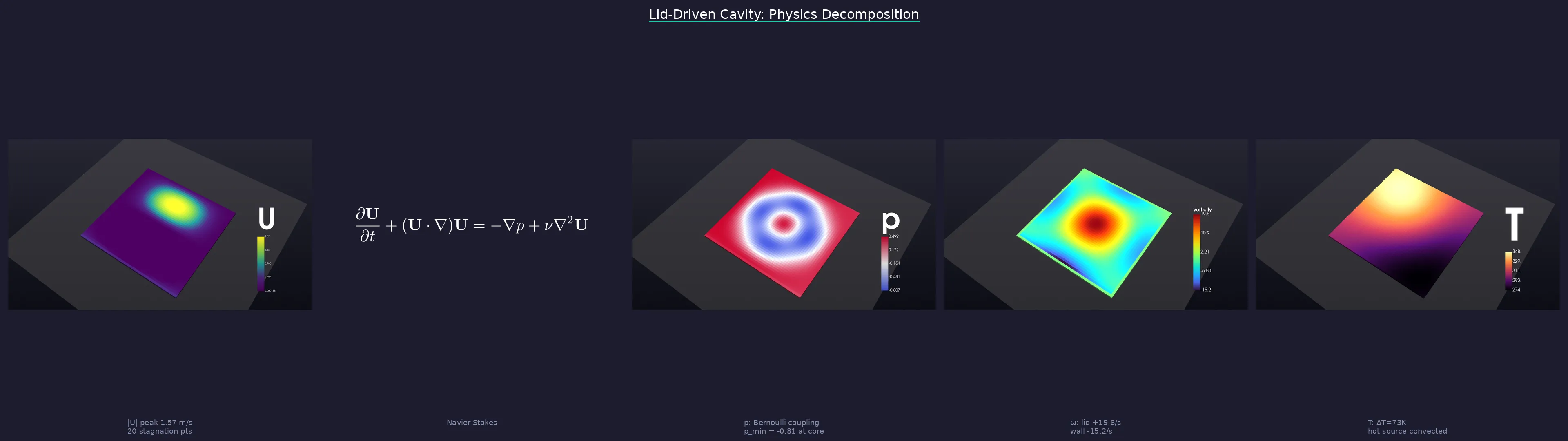
"Open cavity.foam, render the pressure field with cinematic lighting, then create a physics decomposition story."
Numbers
22 MCP tools · 12 resources · 4 prompts · 1505+ tests 97% coverage · 50+ file formats · 7 animation presets · 17 easing functions
Documentation
Homepage — kimimgo.github.io/viznoir
Developer docs — kimimgo.github.io/viznoir/docs — full tool reference, domain gallery, architecture guide
Contributing
Contributions are welcome. Please open an issue first to discuss what you would like to change.
pip install -e ".[dev]"
pytest --cov=viznoir -q
ruff check src/ tests/
License
Star History
Open source under MIT. Built for engineers who'd rather prompt than click.