whoop-ai-mcp




An MCP (Model Context Protocol) server that connects AI assistants like Claude to your WHOOP health and fitness data. Ask questions about your recovery, sleep, workouts, and more — all through natural conversation.
📦 Published on the MCP Registry as
io.github.shashankswe2020-ux/whoop— discoverable by any MCP-compatible client.
Features
- 🏋️ 6 health data tools — recovery, sleep, workouts, cycles, body measurements, and profile
- 🔐 Secure OAuth2 — browser-based authentication with automatic token refresh
- 🔄 Resilient — automatic retry on rate limits, token refresh on expiry, clear error messages
- 💾 Secure token storage — tokens stored at
~/.whoop-mcp/tokens.jsonwith0600permissions - ⚡ Zero config — just add your WHOOP app credentials and go
- 📦 Lightweight — only two runtime dependencies (
@modelcontextprotocol/sdk+zod)
Quick Comparison (WHOOP MCP packages on npm)
Based on npm search results for whoop mcp on 2026-04-17.
| Package | Latest version | Last publish (UTC) | MCP Registry metadata (mcpName) | Runtime deps | npm |
|---|---|---|---|---|---|
| whoop-ai-mcp (this repo) | 0.2.1 | 2026-04-16 | ✅ io.github.shashankswe2020-ux/whoop | 2 | https://www.npmjs.com/package/whoop-ai-mcp |
| whoop-mcp-server | 0.0.5 | 2026-03-13 | — | 2 | https://www.npmjs.com/package/whoop-mcp-server |
| whoop-mcp | 0.1.2 | 2026-03-11 | — | 2 | https://www.npmjs.com/package/whoop-mcp |
| @alacore/whoop-mcp-server | 1.0.1 | 2025-10-09 | — | 2 | https://www.npmjs.com/package/@alacore/whoop-mcp-server |
| @iflow-mcp/nissand-whoop-mcp-server | 1.0.3 | 2026-03-24 | — | 3 | https://www.npmjs.com/package/@iflow-mcp/nissand-whoop-mcp-server |
| @roebot0/whoop-mcp | 1.0.0 | 2026-04-06 | — | 3 | https://www.npmjs.com/package/@roebot0/whoop-mcp |
Why this package stands out
- Published to npm and the official MCP Registry (via
mcpNamemetadata) - Most recently published among listed WHOOP MCP packages (as of 2026-04-17)
- Minimal runtime footprint (2 dependencies)
Security, feature-update, and gap comparison
Evidence basis: npm package metadata + npm-hosted README text as of 2026-04-17.
| Package | Security posture (README/metadata) | Feature-update signal | Gap vs whoop-ai-mcp |
|---|---|---|---|
| whoop-ai-mcp (this repo) | OAuth2 documented + explicit 0600 token file permissions + retry/backoff + token refresh | Most recent publish date in this set (2026-04-16), includes changelog/release workflow docs | Baseline |
| whoop-mcp-server | OAuth/token refresh documented; no explicit 0600 mention in npm README | Last publish 2026-03-13 | No MCP Registry mcpName metadata; no MCP Inspector section in npm README |
| whoop-mcp | No explicit OAuth/retry/refresh/0600 documentation in npm README | Last publish 2026-03-11 | No MCP Registry mcpName metadata; security/reliability behavior not explicitly documented in npm README |
| @alacore/whoop-mcp-server | OAuth/token refresh documented; no explicit 0600 mention in npm README | Last publish 2025-10-09 | No MCP Registry mcpName metadata; retry/backoff behavior not explicitly documented in npm README |
| @iflow-mcp/nissand-whoop-mcp-server | OAuth documented; no explicit 0600 or token-refresh mention in npm README | Last publish 2026-03-24 | No MCP Registry mcpName metadata; no explicit token-refresh/Inspector documentation in npm README |
| @roebot0/whoop-mcp | OAuth/token refresh documented; no explicit 0600 mention in npm README | Last publish 2026-04-06 | No MCP Registry mcpName metadata; retry/backoff and Inspector coverage not explicitly documented in npm README |
🎥 Video Walkthrough
Watch a detailed walkthrough of setting up and using whoop-ai-mcp with Claude Desktop:
Covers: creating a WHOOP Developer App, configuring Claude Desktop, OAuth authentication, and querying your health data through natural conversation.
Prerequisites
- A WHOOP account with an active membership
- A WHOOP Developer App — create one at developer.whoop.com
- Set the redirect URI to
http://localhost:3000/callback
- Set the redirect URI to
- Node.js >= 20
Get a WHOOP
Don't have a WHOOP yet? Here's how to get started:
- 🛒 Buy a WHOOP on Amazon — WHOOP peak on Amazon
- 🔗 Join WHOOP directly — whoop.com/membership
Quickstart (MCP Registry)
This server is published on the official MCP Registry. MCP clients that support the registry can discover and install it automatically:
Server name: io.github.shashankswe2020-ux/whoop
You can also browse it via the registry API:
curl "https://registry.modelcontextprotocol.io/v0.1/servers?search=io.github.shashankswe2020-ux/whoop"
Quickstart (Claude Desktop)
Add this to your Claude Desktop configuration file:
macOS: ~/Library/Application Support/Claude/claude_desktop_config.json
Windows: %APPDATA%\Claude\claude_desktop_config.json
{
  "mcpServers": {
    "whoop": {
      "command": "npx",
      "args": ["whoop-ai-mcp"],
      "env": {
        "WHOOP_CLIENT_ID": "your_client_id",
        "WHOOP_CLIENT_SECRET": "your_client_secret"
      }
    }
  }
}
Replace your_client_id and your_client_secret with the credentials from your WHOOP Developer App.
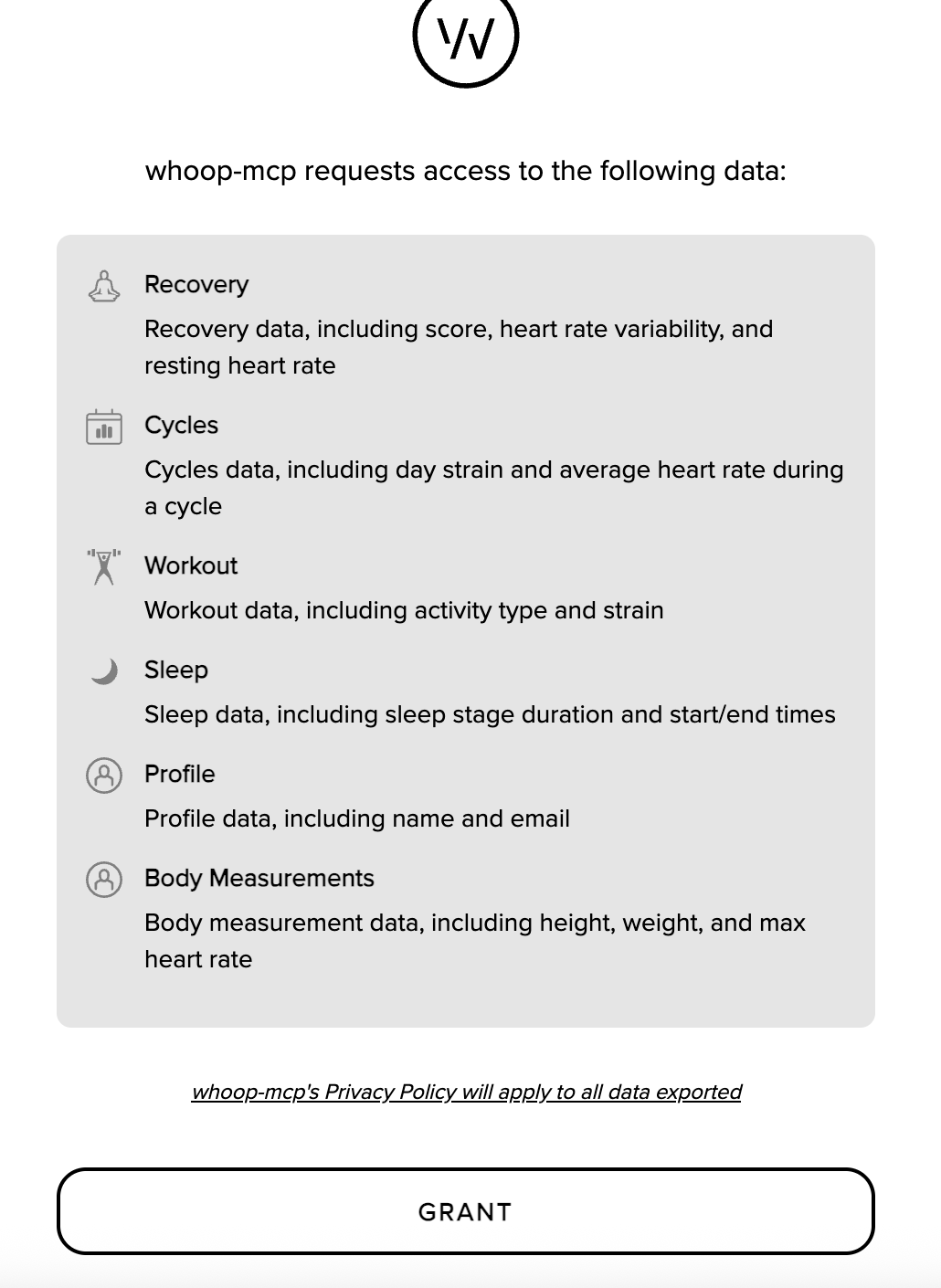
On first launch, a browser window will open for you to authorize access to your WHOOP data. After authorizing, tokens are cached locally and refresh automatically.
Then ask Claude something like:
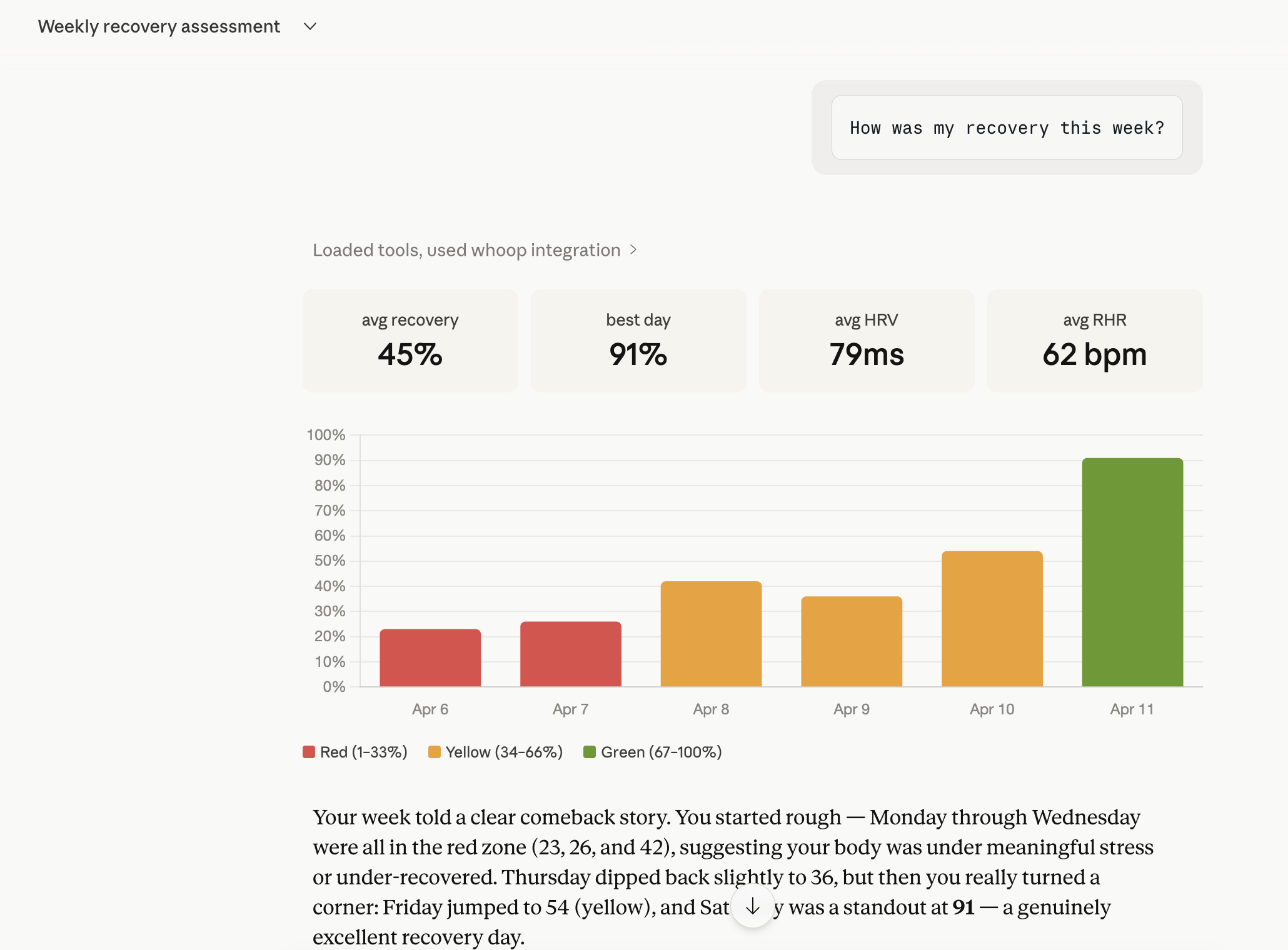
"How was my recovery this week?"
"Show me my sleep data from the last 3 days"
"What workouts did I do this month?"
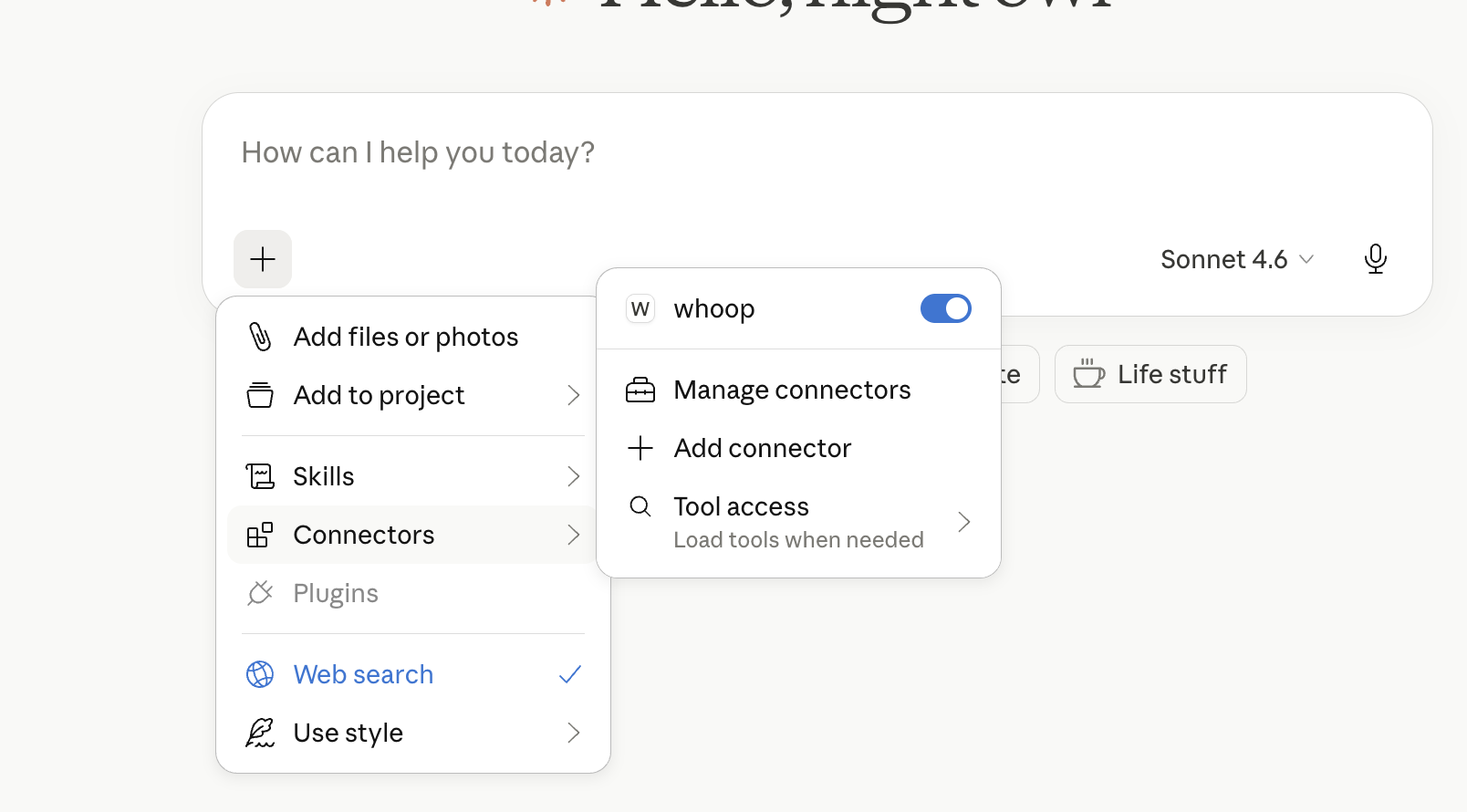
whoop-mcp connected in Claude Desktop:
Chatting with WHOOP data through Claude:
Installation
Via npx (recommended)
No installation needed — Claude Desktop runs it automatically with the config above.
Global install
npm install -g whoop-ai-mcp
From source
git clone https://github.com/shashankswe2020-ux/whoop-mcp.git
cd whoop-mcp
npm install
npm run build
Configuration
Environment Variables
| Variable | Required | Description |
|---|---|---|
WHOOP_CLIENT_ID | Yes | Your WHOOP Developer App client ID |
WHOOP_CLIENT_SECRET | Yes | Your WHOOP Developer App client secret |
Set these in your Claude Desktop config (see Quickstart) or as shell environment variables:
export WHOOP_CLIENT_ID=your_client_id
export WHOOP_CLIENT_SECRET=your_client_secret
Creating a WHOOP Developer App
- Go to developer.whoop.com
- Create a new application
- Set the Redirect URI to
http://localhost:3000/callback - Set the Privacy Policy URL (required by WHOOP) — you can use
https://github.com/shashankswe2020-ux/whoop-mcpor your own URL - Enable the following scopes:
read:profileread:recoveryread:sleepread:workoutread:cyclesread:body_measurement
- Copy the Client ID and Client Secret
Tools
get_profile
Get the authenticated user's basic profile — name and email.
Parameters: None
get_body_measurement
Get the user's body measurements — height, weight, and max heart rate.
Parameters: None
get_recovery_collection
Get recovery scores for a date range. Returns HRV, resting heart rate, SpO2, and skin temp for each day.
Parameters:
| Parameter | Type | Required | Description |
|---|---|---|---|
start | string | No | Return records after this time (inclusive). ISO 8601 format. |
end | string | No | Return records before this time (exclusive). Defaults to now. |
limit | number | No | Max records to return (1–25). Defaults to 10. |
nextToken | string | No | Pagination token from a previous response. |
get_sleep_collection
Get sleep records for a date range. Returns sleep stages, duration, respiratory rate, and performance scores.
Parameters:
| Parameter | Type | Required | Description |
|---|---|---|---|
start | string | No | Return records after this time (inclusive). ISO 8601 format. |
end | string | No | Return records before this time (exclusive). Defaults to now. |
limit | number | No | Max records to return (1–25). Defaults to 10. |
nextToken | string | No | Pagination token from a previous response. |
get_workout_collection
Get workout records for a date range. Returns strain, heart rate zones, calories, and sport type.
Parameters:
| Parameter | Type | Required | Description |
|---|---|---|---|
start | string | No | Return records after this time (inclusive). ISO 8601 format. |
end | string | No | Return records before this time (exclusive). Defaults to now. |
limit | number | No | Max records to return (1–25). Defaults to 10. |
nextToken | string | No | Pagination token from a previous response. |
get_cycle_collection
Get physiological cycles for a date range. Returns strain, calories, and heart rate data per cycle.
Parameters:
| Parameter | Type | Required | Description |
|---|---|---|---|
start | string | No | Return records after this time (inclusive). ISO 8601 format. |
end | string | No | Return records before this time (exclusive). Defaults to now. |
limit | number | No | Max records to return (1–25). Defaults to 10. |
nextToken | string | No | Pagination token from a previous response. |
Authentication
whoop-ai-mcp uses OAuth2 Authorization Code flow with PKCE:
- First run: A browser window opens for you to authorize with WHOOP
- Token caching: Access and refresh tokens are saved to
~/.whoop-mcp/tokens.json - Auto-refresh: When the access token expires, it's automatically refreshed using the stored refresh token
- Re-authentication: If the refresh token expires, you'll be prompted to authorize again
Token files are stored with 0600 permissions (user-only read/write).
Troubleshooting
"Missing required environment variable: WHOOP_CLIENT_ID"
Your WHOOP credentials aren't set. Add them to your Claude Desktop config or set them as environment variables. See Configuration.
"Network error: Unable to reach the WHOOP API"
Check your internet connection. The WHOOP API must be reachable at https://api.prod.whoop.com.
"WHOOP API returned 429"
You've hit the rate limit. The server retries automatically with exponential backoff (up to 3 attempts). If this persists, reduce the frequency of your requests.
"WHOOP API returned 401"
Your access token has expired. The server attempts an automatic refresh. If that fails, delete ~/.whoop-mcp/tokens.json and restart to re-authenticate:
rm ~/.whoop-mcp/tokens.json
Browser doesn't open during authentication
If the browser doesn't open automatically, check the terminal output for the authorization URL and open it manually.
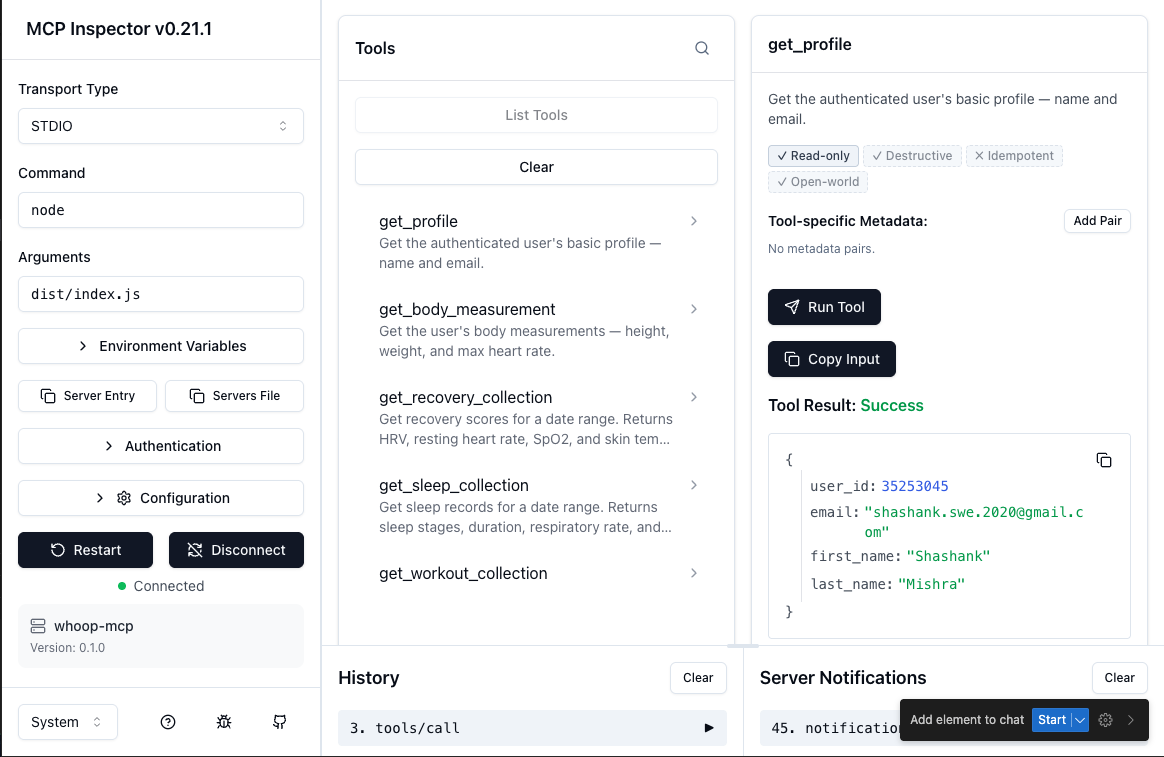
Testing with MCP Inspector
You can interactively test the server using the MCP Inspector — a browser-based tool for exploring and invoking MCP tools.
WHOOP_CLIENT_ID=your_client_id \
WHOOP_CLIENT_SECRET=your_client_secret \
WHOOP_REDIRECT_URI=http://localhost:3000/callback \
npx @modelcontextprotocol/inspector node dist/index.js
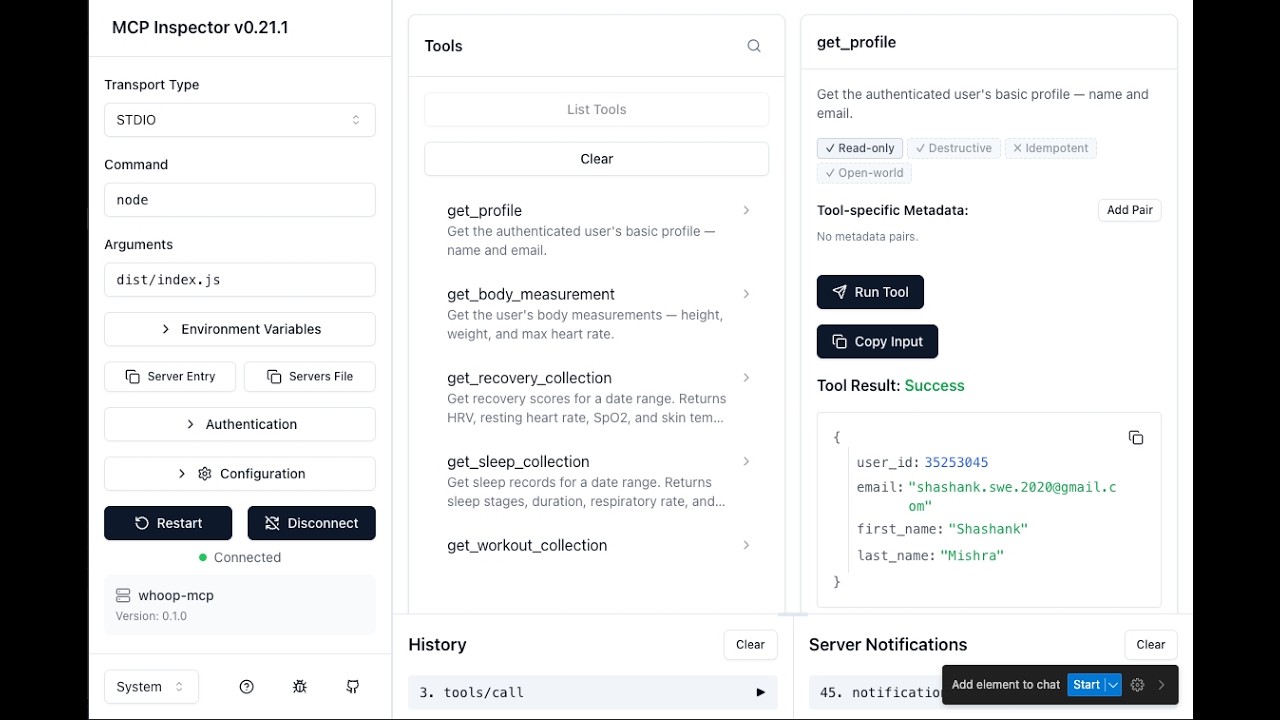
Then open http://localhost:6274 in your browser. The Inspector connects to the server, lists all available tools, and lets you invoke them with custom parameters.
OAuth grant access screen (first-run authorization):
Testing get_profile tool in MCP Inspector:
Development
Setup
git clone https://github.com/shashankswe2020-ux/whoop-mcp.git
cd whoop-mcp
npm install
Commands
| Command | Description |
|---|---|
npm run build | Build TypeScript |
npm test | Run tests (Vitest) |
npm run typecheck | Type check (tsc --noEmit) |
npm run lint | Lint (ESLint) |
npm run lint:fix | Lint + auto-fix |
npm run format | Format (Prettier) |
npm run dev | Run in dev mode (tsx) |
Project Structure
src/
├── index.ts              # Entry point — auth, client, server, stdio
├── server.ts             # MCP server + tool registration
├── auth/
│   ├── oauth.ts          # OAuth2 Authorization Code flow
│   ├── token-store.ts    # Secure token persistence
│   └── callback-server.ts # Local OAuth callback server
├── api/
│   ├── client.ts         # HTTP client with retry + refresh
│   ├── types.ts          # WHOOP API response types
│   └── endpoints.ts      # API URL constants
└── tools/
    ├── get-profile.ts
    ├── get-recovery.ts
    ├── get-sleep.ts
    ├── get-workout.ts
    ├── get-cycle.ts
    ├── get-body-measurement.ts
    └── collection-utils.ts
Releases & npm Package
This project is published on npm as whoop-ai-mcp.
npm install -g whoop-ai-mcp
Or run directly with npx:
npx whoop-ai-mcp
Release Process
- Update the version in
package.jsonand add a new entry inCHANGELOG.md - Commit the changes:
git commit -am "Release vX.Y.Z" - Tag the release:
git tag vX.Y.Z - Push the commit and tag:
git push origin main vX.Y.Z - The Release workflow automatically creates a GitHub Release with notes extracted from the changelog
- The npm publish workflow automatically publishes the new version to npm
Changelog
See CHANGELOG.md for a full list of changes in each release.
Contributing
See CONTRIBUTING.md for development workflow, coding conventions, and the project's Copilot agent/skill configuration.