Wick
Roslyn-enriched C# exception telemetry for Godot Engine, exposed over MCP.


What is Wick?
When a Godot C# game crashes, your AI assistant sees a raw stack trace and spends 8+ turns asking you to open files. Wick captures that exception, enriches it with Roslyn-powered source context (the actual method body, caller chain, recent logs, scene state), and hands the full picture to the AI in one call. One turn to diagnosis instead of ten.
What makes Wick different?
Other Godot MCP servers (like the excellent GoPeak) focus on scene manipulation and GDScript tooling. Wick focuses on the C#/.NET developer experience:
- Roslyn-enriched exception telemetry -- stderr-captured C# exceptions enriched with the calling method body, surrounding source lines, enclosing type, and caller chain. No other Godot MCP server does this.
- In-process exception capture -- optional Wick.Runtime NuGet companion catches TaskScheduler.UnobservedTaskException and async exceptions that stderr can't see.
- Build diagnostics with source context -- dotnet build errors enriched with Roslyn source context through the same pipeline as runtime exceptions.
- C# analysis tools -- find symbol, find references, member signatures via Roslyn workspace.
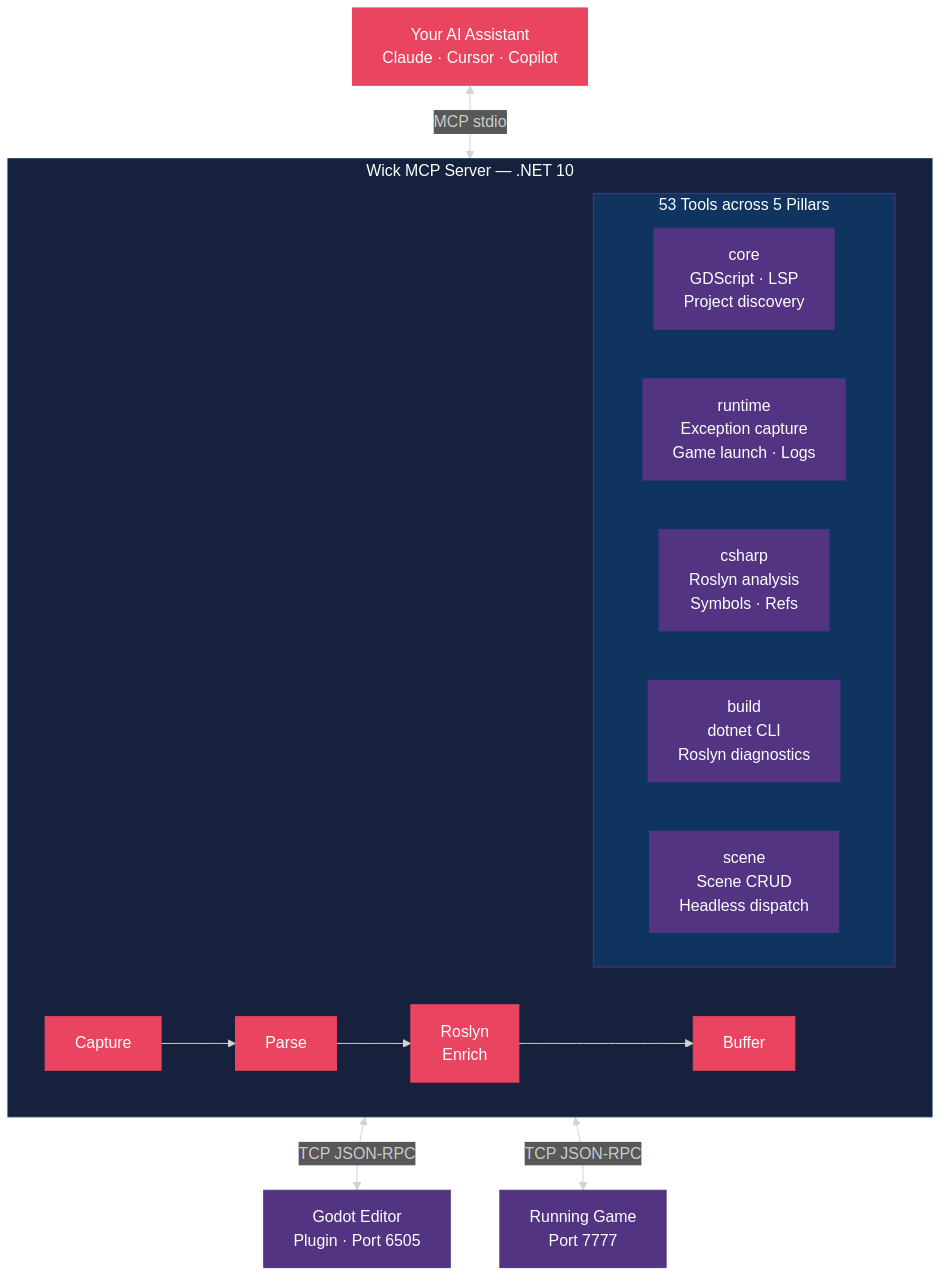
- 5-pillar tool group system -- activate only what you need: core, runtime, csharp, build, scene.
Getting Started
Prerequisites
- .NET 10 SDK (10.0.201 or later)
- Godot 4.6.1+ with .NET/Mono support
Installation
git clone https://github.com/buildepicshit/Wick.git
cd Wick
dotnet build Wick.slnx --configuration Release
MCP Configuration
Add Wick to your AI coding assistant's MCP configuration:
{
  "mcpServers": {
    "wick": {
      "command": "dotnet",
      "args": ["run", "--project", "path/to/Wick/src/Wick.Server"],
      "env": {
        "WICK_GROUPS": "core,runtime,csharp,build",
        "WICK_GODOT_BIN": "/path/to/godot",
        "WICK_PROJECT_PATH": "/path/to/your/godot-project"
      }
    }
  }
}
Tool Groups
Activate tool pillars via WICK_GROUPS env var or --groups CLI flag:
| Pillar | What it includes | Default |
|---|---|---|
| core | GDScript tools, scene parsing, GDScript LSP, introspection | Always on |
| runtime | Exception pipeline, game launch/stop, log tail, runtime_diagnose | Opt-in |
| csharp | Roslyn analysis, find symbol, find references, member signatures | Opt-in |
| build | dotnet build/test/clean, NuGet management, build_diagnose | Opt-in |
| scene | Scene create/modify via headless Godot dispatch | Opt-in |
Example: WICK_GROUPS=core,runtime,csharp,build or --groups=all.
Optional: Wick.Runtime Companion
For in-process exception capture (async exceptions, TaskScheduler failures), add the Wick.Runtime NuGet to your Godot project:
// In your Godot project's autoload or entry point:
WickRuntime.Install();
This captures exceptions that stderr can't see and reports them to the Wick server via a TCP bridge.
Architecture
Wick runs as an external process -- it does NOT run inside Godot. Communication:
- stdio -- MCP protocol to the AI client
- TCP 6505 -- editor bridge (Godot plugin to Wick server)
- TCP 7777 -- runtime bridge (running game to Wick server)
- TCP 7878 -- Wick.Runtime companion bridge (in-process to Wick server)
This architecture lets Wick target .NET 10 even though Godot 4.6.1's runtime is stuck on .NET 8.
Attribution
Wick is a clean-room reimplementation inspired by GoPeak (MIT License, (c) 2025 Solomon Elias / HaD0Yun). See ATTRIBUTION.md for detailed credits.
Contributing
We welcome contributions! Please read CONTRIBUTING.md before submitting a PR.
Demo
Clone the repo and open docs/demo/player.html in a browser to watch the demo, or play the cast file directly:
asciinema play docs/demo/wick-demo.cast
Before/after — 8 turns vs 1

Architecture