mcp-wp-abilities



MCP server for the WordPress 6.9+ Abilities API.
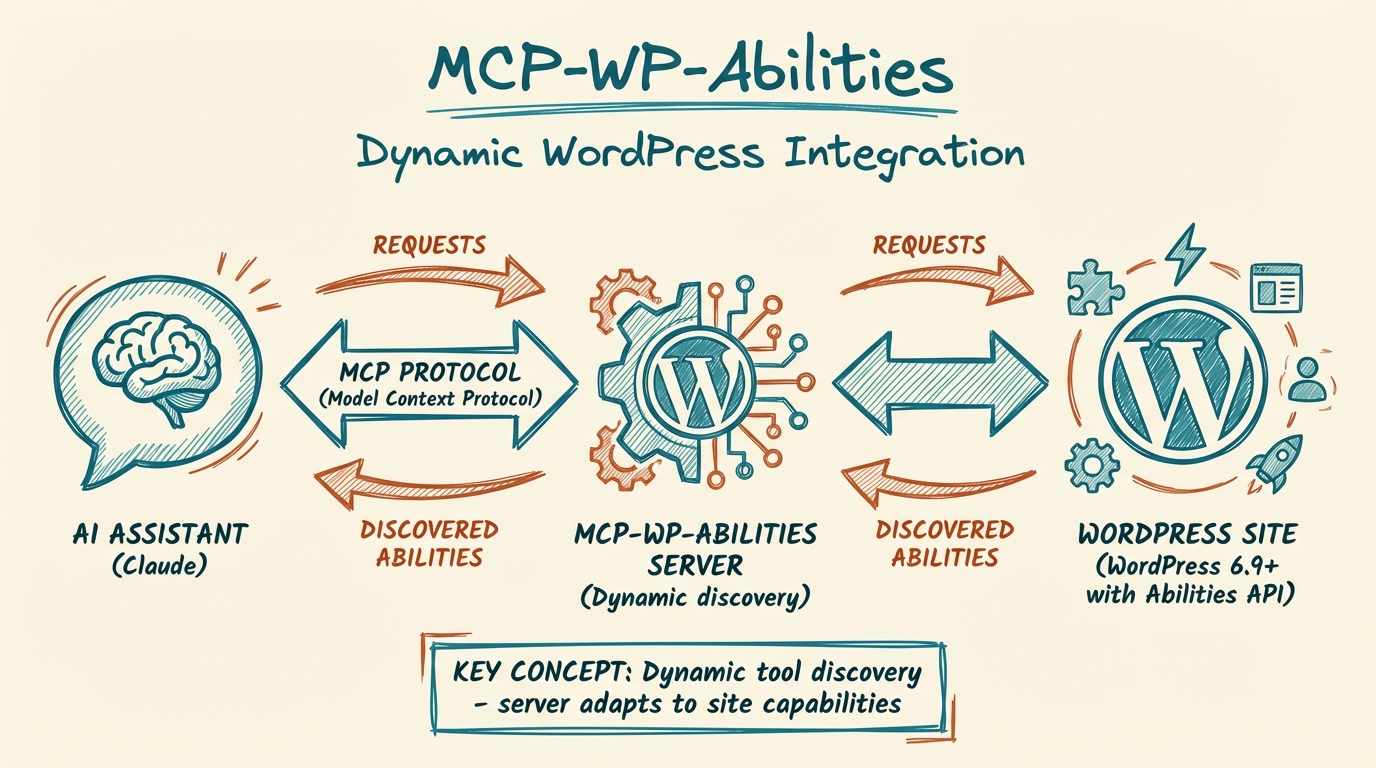 Dynamically discovers and exposes WordPress abilities as AI-accessible tools.
What is this?
WordPress 6.9 introduced the Abilities API, a standardized framework for exposing WordPress capabilities through REST endpoints in a machine-readable format. This MCP server connects to any WordPress 6.9+ site and automatically discovers and exposes all registered abilities as MCP tools.
Key features:
- Dynamic discovery - Tools are discovered at runtime from your WordPress site
- Zero configuration - No hardcoded tools; the server adapts to your site's capabilities
- Full schema support - Input/output validation via JSON Schema
- Smart method handling - Automatically uses GET for readonly abilities, POST for mutations
- Plugin extensibility - Any WordPress plugin that registers abilities becomes available
Requirements
- Node.js 18+
- WordPress 6.9+ with Abilities API enabled
- WordPress Application Password for authentication
Installation
npm install -g mcp-wp-abilities
Configuration
The server requires three environment variables:
| Variable | Description |
|---|---|
WORDPRESS_URL | Your WordPress site URL (e.g., https://example.com) |
WORDPRESS_USERNAME | WordPress username |
WORDPRESS_APP_PASSWORD | Application password (Settings → Security → Application Passwords) |
Claude Desktop
Add to ~/Library/Application Support/Claude/claude_desktop_config.json:
{
  "mcpServers": {
    "wp-abilities": {
      "command": "npx",
      "args": ["-y", "mcp-wp-abilities"],
      "env": {
        "WORDPRESS_URL": "https://your-site.com",
        "WORDPRESS_USERNAME": "your-username",
        "WORDPRESS_APP_PASSWORD": "your-app-password"
      }
    }
  }
}
Claude Code
claude mcp add wp-abilities \
  -e WORDPRESS_URL="https://your-site.com" \
  -e WORDPRESS_USERNAME="your-username" \
  -e WORDPRESS_APP_PASSWORD="your-app-password" \
  -- npx -y mcp-wp-abilities
Available Tools
Tools are dynamically discovered from your WordPress site. Core WordPress 6.9 includes:
| Tool | Description |
|---|---|
wp_core_get_site_info | Get site name, description, URL, version, language, etc. |
wp_core_get_environment_info | Get PHP version, database info, environment type |
Additional abilities registered by plugins will appear automatically.
How it Works
- On startup, the server connects to your WordPress Abilities API
- It fetches all registered abilities with their schemas
- Each ability is converted to an MCP tool with:
- Name:
wp_{category}_{ability_name}(e.g.,wp_core_get_site_info) - Description: From the ability's label and description
- Input schema: Converted from WordPress JSON Schema
- Annotations:
readOnlyHint,destructiveHint,idempotentHint
- Name:
- When a tool is called, the server executes the corresponding WordPress ability
Creating WordPress Application Password
- Log in to your WordPress admin
- Go to Users → Profile (or the specific user's profile)
- Scroll to Application Passwords
- Enter a name (e.g., "MCP Server") and click Add New Application Password
- Copy the generated password (shown only once)
Security Notes
- Application passwords grant full API access for that user
- Use a dedicated user with minimal required capabilities
- Store credentials securely using environment variables
- The server only reads abilities and executes them; it doesn't modify WordPress core
Extending with Custom Abilities
WordPress plugins can register custom abilities that will automatically appear as MCP tools:
add_action( 'wp_abilities_api_init', function() {
    wp_register_ability( 'myplugin/my-ability', [
        'label'        => 'My Custom Ability',
        'description'  => 'Does something useful',
        'category'     => 'myplugin',
        'input_schema' => [
            'type'       => 'object',
            'properties' => [
                'param' => [ 'type' => 'string' ],
            ],
        ],
        'output_schema' => [
            'type'       => 'object',
            'properties' => [
                'result' => [ 'type' => 'string' ],
            ],
        ],
        'execute_callback'    => 'my_ability_handler',
        'permission_callback' => fn() => current_user_can( 'manage_options' ),
        'meta' => [
            'show_in_rest' => true,
            'annotations'  => [
                'readonly'    => false,
                'destructive' => false,
                'idempotent'  => true,
            ],
        ],
    ] );
} );
Troubleshooting
"Missing required environment variables"
- Ensure all three environment variables are set
"Failed to discover abilities: 401"
- Check username and application password are correct
- Verify the user has API access
"Failed to discover abilities: 404"
- Confirm your WordPress version is 6.9+
- Check that Abilities API is enabled
No tools appearing
- Verify abilities are registered with
show_in_rest: true - Check user has permission to access the abilities
Contributing
Contributions are welcome! Please feel free to submit a Pull Request.
Changelog
See CHANGELOG.md for release history.
License
MIT