YourMemory
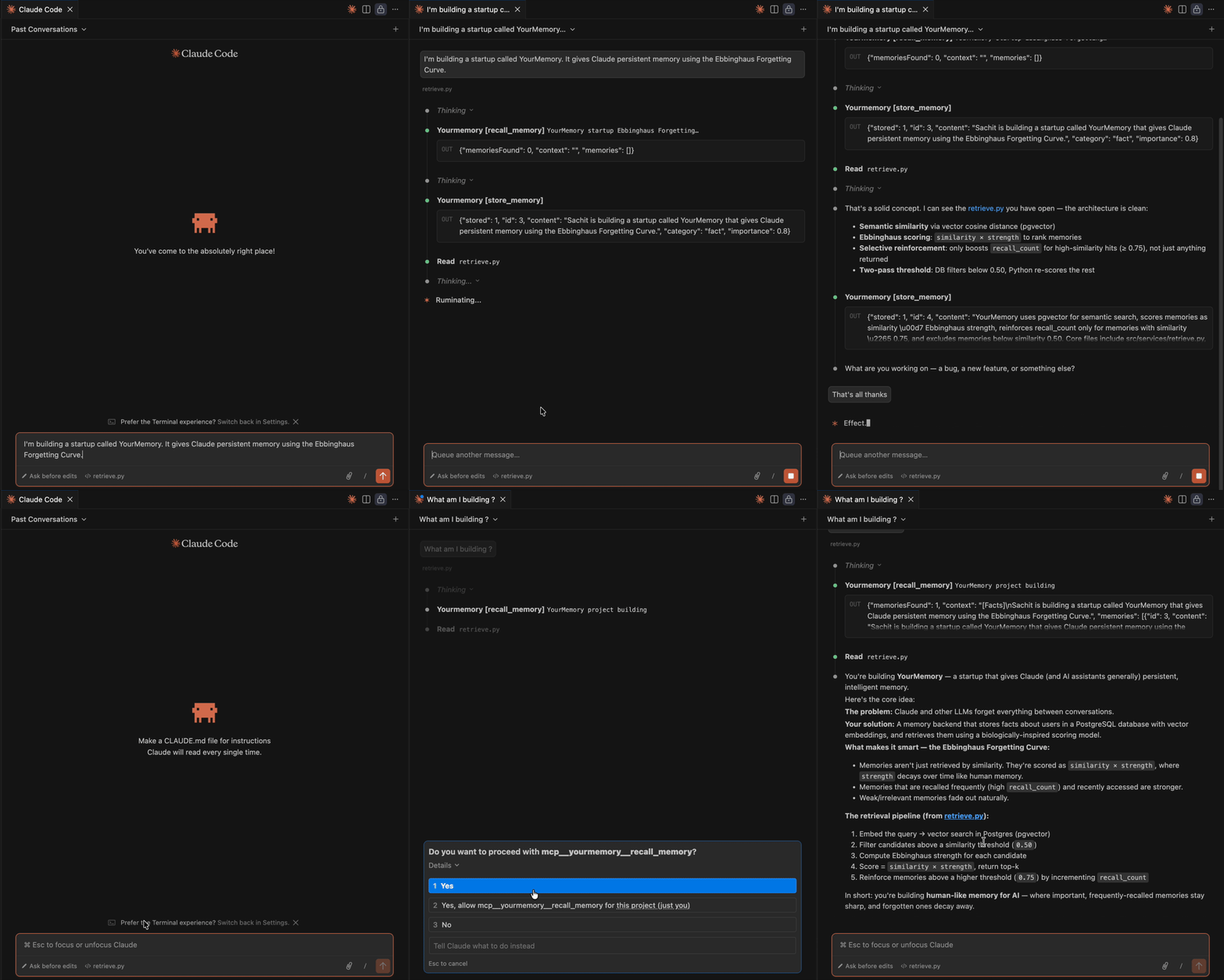
Persistent, decaying memory for AI agents — backed by PostgreSQL + pgvector.
Memories fade like real ones do. Frequently recalled memories stay strong. Forgotten ones are pruned automatically. Claude decides what to remember and how important it is.
How it works
Ebbinghaus Forgetting Curve
effective_λ = 0.16 × (1 - importance × 0.8)
strength    = importance × e^(-effective_λ × days) × (1 + recall_count × 0.2)
Importance controls both the starting value and how fast a memory decays:
| importance | effective λ | survives (never recalled) |
|---|---|---|
| 1.0 | 0.032 | ~94 days |
| 0.9 | 0.045 | ~64 days |
| 0.5 | 0.096 | ~24 days |
| 0.2 | 0.134 | ~10 days |
Memories recalled frequently gain recall_count boosts that counteract decay. A memory recalled 5 times decays at 2× the base rate but starts 2× stronger.
Retrieval scoring
score = cosine_similarity × Ebbinghaus_strength
Results rank by how relevant and how fresh a memory is — not just one or the other.
MCP Integration (Claude Code)
YourMemory ships as an MCP server. Claude gets three tools:
| Tool | When to call |
|---|---|
recall_memory | Start of every task — surface relevant context |
store_memory | After learning a new preference, fact, or instruction |
update_memory | When a recalled memory is outdated or needs merging |
Setup
-
Make sure Ollama is running:
ollama serveandollama pull llama3.2:3b -
Add to
~/.claude/settings.json:
{
  "mcpServers": {
    "yourmemory": {
      "command": "/path/to/yourmemory/venv311/bin/python3.11",
      "args": ["/path/to/yourmemory/memory_mcp.py"]
    }
  }
}
- Reload Claude Code. The tools appear automatically.
Example session
User: "I prefer tabs over spaces in all my Python projects"

Claude:
  → recall_memory("tabs spaces Python preferences")   # nothing found
  → [answers the question]
  → store_memory("Sachit prefers tabs over spaces in Python", importance=0.9)

Next session:
  → recall_memory("Python formatting")
  ← {"content": "Sachit prefers tabs over spaces in Python", "strength": 0.87}
  → Claude now knows without being told again
Quick Start
Step 1 — Install prerequisites
Ollama (local LLM + embeddings):
# Mac
brew install ollama
ollama serve   # start the server

# Pull required models
ollama pull nomic-embed-text   # embeddings
ollama pull llama3.2:3b        # classification
PostgreSQL with pgvector:
# Mac
brew install postgresql@16
brew install pgvector
brew services start postgresql@16

# Create the database
createdb yourmemory
Step 2 — Clone and run
git clone https://github.com/sachitrafa/yourmemory
cd yourmemory

python3.11 -m venv venv311
source venv311/bin/activate
pip install -r requirements.txt
python -m spacy download en_core_web_sm

cp .env.example .env          # DATABASE_URL is pre-filled for local Postgres

python -m src.db.migrate      # create tables (run once)
uvicorn src.app:app --reload  # start the API
Step 3 — Connect to Claude Code
First get the absolute path to your install:
cd yourmemory && pwd
# e.g. /Users/yourname/Desktop/yourmemory
Add to ~/.claude/settings.json (replace INSTALL_PATH with the output above):
{
  "mcpServers": {
    "yourmemory": {
      "command": "INSTALL_PATH/venv311/bin/python3.11",
      "args": ["INSTALL_PATH/memory_mcp.py"]
    }
  }
}
Reload Claude Code (Cmd+Shift+P → Developer: Reload Window). Done.
Option: Docker (skip Steps 1 & 2)
If you have Docker, this replaces Steps 1 and 2 entirely:
git clone https://github.com/sachitrafa/yourmemory
cd yourmemory
docker compose up
python -m src.db.migrate
Note: Ollama still needs to run on your host machine for embeddings.
REST API
POST /memories — store a memory
curl -X POST http://localhost:8000/memories \
  -H "Content-Type: application/json" \
  -d '{"userId":"u1","content":"Prefers dark mode","importance":0.8}'
{"stored": 1, "id": 42, "content": "Prefers dark mode", "category": "fact"}
POST /retrieve — semantic search
curl -X POST http://localhost:8000/retrieve \
  -H "Content-Type: application/json" \
  -d '{"userId":"u1","query":"UI preferences"}'
{
  "memoriesFound": 1,
  "context": "[Facts]\nPrefers dark mode",
  "memories": [
    {"id": 42, "content": "Prefers dark mode", "importance": 0.8,
     "strength": 0.74, "similarity": 0.91, "score": 0.67}
  ]
}
GET /memories — inspect all memories
curl "http://localhost:8000/memories?userId=u1&limit=20"
curl "http://localhost:8000/memories?userId=u1&category=fact"
Returns all memories with live-computed strength. Useful for building a memory management UI.
PUT /memories/{id} — update a memory
curl -X PUT http://localhost:8000/memories/42 \
  -H "Content-Type: application/json" \
  -d '{"content":"Prefers dark mode in all apps","importance":0.85}'
DELETE /memories/{id} — remove a memory
curl -X DELETE http://localhost:8000/memories/42
Decay Job
Run daily to prune memories that have decayed below the threshold (strength < 0.05):
python -m src.jobs.decay_job
Via cron (runs at 2am):
0 2 * * * /path/to/venv311/bin/python -m src.jobs.decay_job
Stack
- PostgreSQL + pgvector — vector similarity search + relational in one DB
- Ollama — local embeddings (
nomic-embed-text, 768 dims) + classification (llama3.2:3b) - spaCy — question detection, fact/assumption categorization
- FastAPI — REST server
- MCP — Claude Code integration via Model Context Protocol
Architecture
Claude Code
    │
    ├── recall_memory(query)
    │       └── embed(query) → cosine similarity → score = sim × strength → top-k
    │
    ├── store_memory(content, importance)
    │       └── is_question? → reject
    │           categorize() → fact | assumption
    │           embed() → INSERT memories
    │
    └── update_memory(id, new_content, importance)
            └── embed(new_content) → UPDATE memories SET content, embedding, importance

REST API (FastAPI)
    ├── POST   /memories         — store
    ├── PUT    /memories/{id}    — update
    ├── DELETE /memories/{id}    — delete
    ├── GET    /memories         — list all (with live strength)
    └── POST   /retrieve         — semantic search

PostgreSQL (pgvector)
    └── memories table
        ├── embedding vector(768)    — cosine similarity
        ├── importance float         — user/LLM-assigned base weight
        ├── recall_count int         — reinforcement counter
        └── last_accessed_at         — for Ebbinghaus decay